
As an Instagram user, you might wish to boost your account’s reach. You might have tried different ways, but did you try collabs? Do you know how to add a collaborator on your Instagram? In this article, I have covered Instagram’s Collaboration feature in detail. So, keep reading. Instagram is evolving its algorithm with every passing day. It is because Instagram is not the same as its older version anymore.
Growing on the platform has become a challenge for the creators as the number of quality content creators has increased. Brands can leverage Instagram for their benefits as there are billions of accounts on it. They can use the platform to market their products and promote their business. But for all the benefits, Brands will have to grow their audience, and one of the best features for the same can be Instagram’s Collaboration. It can help a creator, a brand, or an individual to grow their follower count and engagement and reach their target audience.
What Are Instagram Collabs?
Using the Instagram app’s collaboration tool, two accounts may easily work together to produce a post, video, or reel that will appear on their respective profiles. One account must make these Instagram collaboration posts; however, before posting, the other account should get an invite.
Once you post, you cannot add a collaborator. The second person must accept the invitation to let the post be seen on both pages. The collaboration request appears in each of the two collaborators’ chat windows and may also be accessed by clicking on the tag notice in the notification panel. The original poster is still the post’s principal author, and he has the right to delete any collaborator at any moment.
If the original author deletes the collaboration post, it vanishes from the other accounts. Notably, the post may only be edited, and persons can only be tagged by the primary author. Currently, Instagram only permits two users to collaborate on a single post. But you may tag a maximum of twenty individuals.

What Does Adding a Collaborator Do?
Collaboration means the two collaborated accounts will have the same content on their feed. Suppose you add a collaborator on your Instagram, then you and the collaborator will have the opportunity to work together and grow both accounts simultaneously.
Benefits of Collaborator Feature on Instagram
There are several benefits of using a Collab feature, but we need to focus on the most important ones.
1. Network Reach
The best benefit of collaboration is discoverability, and we know how important it is to reach massive users’ eyes. When brands reach out to influencers and collaborate with them, the brands get more audience as perks because influencers, generally, have a massive follower count. If you own a small business, you must approach influencers for collaboration. Even if you are just a creator, you can collaborate with the ones working in a similar niche. It will help both the accounts.
2. Nurturing Relationships
When two accounts collaborate or work together, they develop a sense of connection and friendship. After a successful collaboration, no one chooses to block their collaborator, for sure. Therefore, there is a high chance that after a successful collaboration, the accounts will approach each other again frequently in the future.
3. Shared Workload
Several times, you and another account have the same content, and you want to post the same. In such a case, you and the other account post the same content and tag each other, but it creates an issue of repetition. Things have changed, and Instagram enters the room with its creativity Collab feature.
The accounts that decide to collaborate generally put effort into the content from both sides and make it more appealing. It divides the workload, and the primary account posts the content, and it shows up in both creators’ feeds. Both the creators can keep an eye on the content’s stats and engage with the viewers in the comments.
4. Increased Visibility
As mentioned above, the published content shows up in the primary and the collaborator’s feeds, which means the audience from both accounts will engage with the content and visit profiles. This helps increase the visibility of the content and the profiles of the collaborators.

How to Add a Collaborator on Instagram Before Posting?
To add a collaborator on your Instagram, you need to follow just a few steps, but before jumping on to the guide, let’s talk more. After creating good content, you need to upload the same. For that, you need to add the content on Instagram, and the app will allow you to edit your content more.
There, you will find the option for collaborating or tagging other accounts. You have the liberty to either add or remove a person from collaborating with you. But, to add a person, you need to get his/her permission. The collaborator will get an invitation to collaborate. He can either decline or accept the invitation.
4 Easy Steps to Add a Collaborator on Instagram
Add a collaborator on your Instagram with the help of a few simple steps.
Step 1: Create a post in the Instagram App
Create an eye-catching post or reel. If you do not want to create a post on Instagram, then you can use a trusted third-party app to create one. You and your collaborator should agree with the elements inside the content.
You might be wondering how to create a catchy or trendy post because trends change every week on Instagram. For that, you can get help from Predis.ai. The platform helps you create trendy videos, select effective hashtags, and manage the whole process. You can even schedule your post with the help of Predis.ai.
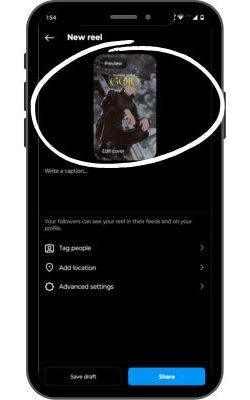
Step 2: Click Tag People
Once you have created content, add it to your Instagram. Just swipe left and add the content. After that, if you want to edit more, you might want to give it a final touch; you can do that on Instagram. Now, you will see three options – Tag People, Add Location, and Advanced Settings. You should click on Tag People.
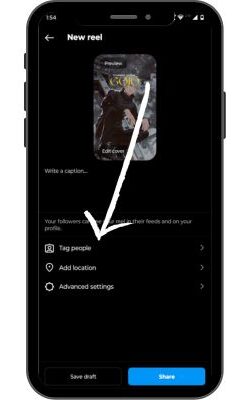
Step 3: Click Add Collaborator
Now, you will see two options that say Add tag and Invite collaborators. You should click on Invite Collaborators as you will be allowed to add search and add one.
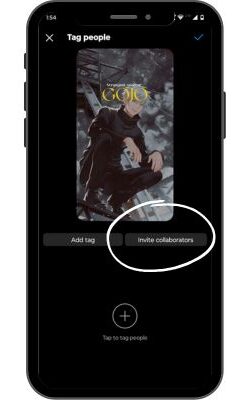
Step 4: Type in the collaborator’s account name
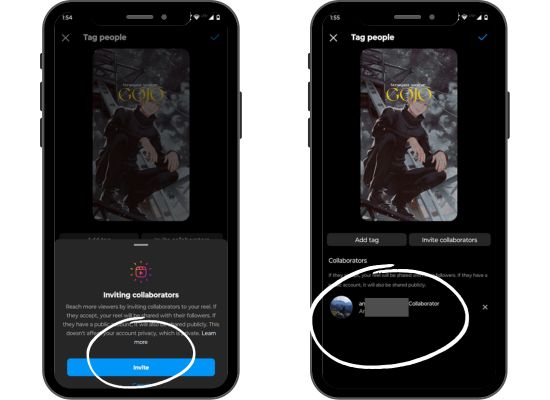
The final step is to invite the collaborator’s account. When you click on Invite Collaborators, you will be asked for a confirmation. Agree to it and search for the username in the search bar. Now, tap on the desired account name, and an invite will be sent to the collaborator.
After this, click on the Tick option in the upper right corner of the screen.
Note: The collaborator must accept the request.
3 Alternatives to Adding Collaborator on Instagram
Instagram Collab is undoubtedly a cool feature that allows you to show content on the collaborating pages. This content is visible to every follower on both accounts. Also, the non-follower reach stops on the content, which is helpful for both accounts. Currently, Instagram doesn’t let its users add a collaborator after posting the content.
Therefore, to add a collaborator, you must send an invite before sharing the content with the world. However, I am going to share a few ways that can get you similar engagement and reach that you would get from using the Instagram Collab feature. Even though adding a collaborator post-publishing isn’t possible, these workarounds can help you a lot.
1. Asking the collaborator to repost on their feed.
One of the easiest and most common ways to grab enough reach for your content after posting is to ask the person with whom you want to collaborate to post the same content and tag your ID. This way, you can get more reach for your content even after not adding the collaborator before posting it.
2. Tagging the collaborator in the post and caption.
Another method is to tag the partner in your post, whether it is a feed or reel post. In this manner, you may point a portion of the viewer to the page of your partner.
Tagging can help make your material accessible on Instagram, even though you cannot add a collaborator after sharing an image. It works best if the person you’re tagging has a decent number of followers and you have a good following.
3. Having the collaborator share the post on their story
To improve your reach and divert part of the audience’s attention to your material, you should also urge the collaborator to share the post in his tale in addition to the first two options. Sharing the post with their followers makes it visible to them, even if they might not be able to collaborate on Instagram after it is posted.

How to Accept a Collaborator Invite on Instagram?
When you get a collab invite from your friend or influencer, you must accept or decline the request. You might be wondering where will you get the invite or how to accept or decline it. Below are three easy steps, so follow the guide.
- You should open the Direct Messages screen and then tap on View Request.
- You will see a pop-up message with Accept and Decline options.
- You should tap on Accept if you want to collaborate.
Note: If you choose the option, decline, the post will get deleted. It will be posted on the primary account’s feed but not on yours.
Collabs vs. Tagging/Mentions
There are major differences between Collabs and Tagging.
- While collaborating, you and your partner work together to create and manage a post. On the other hand, tagging doesn’t include teamwork, as the primary account does all the work and tags people into it.
- Instagram’s Collab feature, after the update, allows 5 accounts to collaborate with you for a post; meanwhile, you can tag multiple accounts on a single post.
- When you collaborate, the post you share will appear on both accounts; however, tagging people won’t help show the content in every tagged account.
- Collabs need acceptance from all the accounts collaborating, but tagging doesn’t need permission.
Important Considerations
There are a few things that you should keep in your mind.
- When you add a post and an account for collaboration, the other person should accept the invitation sent by the platform. If the other account declines the request, the post will be published on the primary account’s feed.
- You can not add a collaborating account after publishing a post.
- Add a maximum of five accounts for collaboration. If you add more than five, all the accounts after the sixth account will be shifted to the tags section.
- The primary owner of the post has the leash of the content, as he can delete or modify hashtags. The account that collaborated can manage engagement and keep an eye on the insights but can not delete the post.
IG Collaborator FAQs
No, you can not. You should follow other methods to gain reach from another account or delete the post and publish it again, adding the collaborator.
You and your collaborator can use Creator Studio For Instagram to manage posts, insights, and engagement.
You can add 5 collaborators on one post. If you add more than that you will be displayed a message similar to the below image.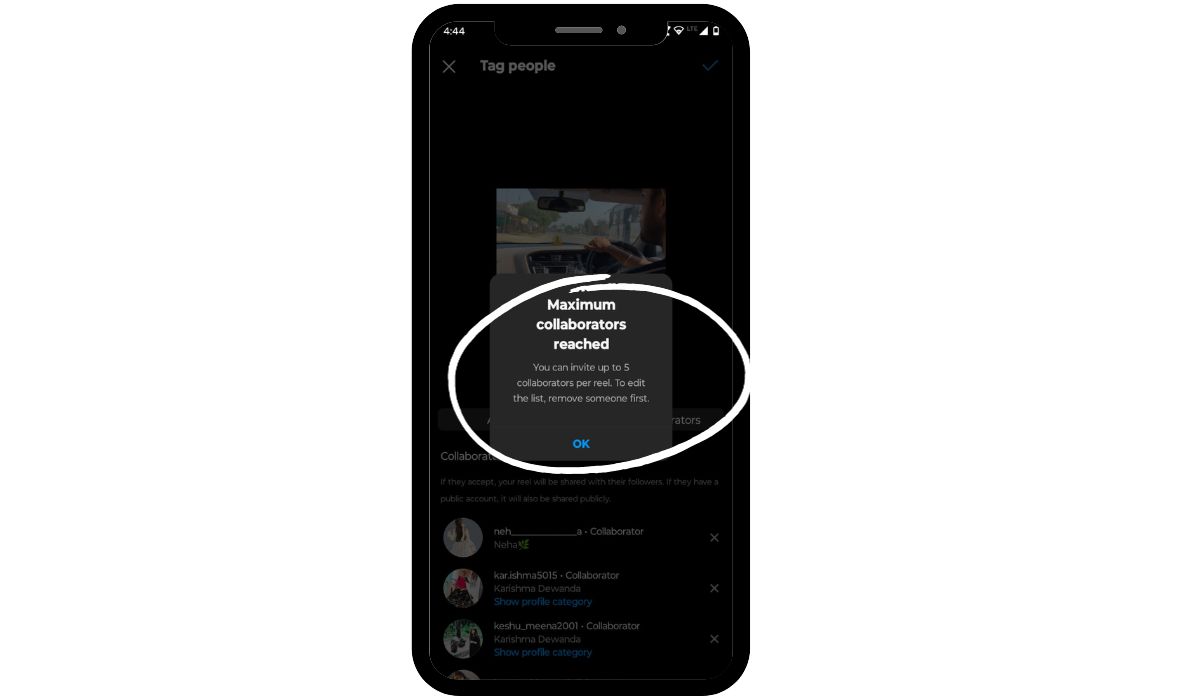
1. You can tag multiple accounts in a single post, but collaboration can be done with 5 accounts only.
2. While collaborating, single content shows up on the feeds of all the collaborated accounts. Meanwhile, if you’re tagged in a post, it will not appear in your feed.
For example, you can check out the image below. Vogue magazine and Vogue Weddings collaborated while influencers were tagging each other. 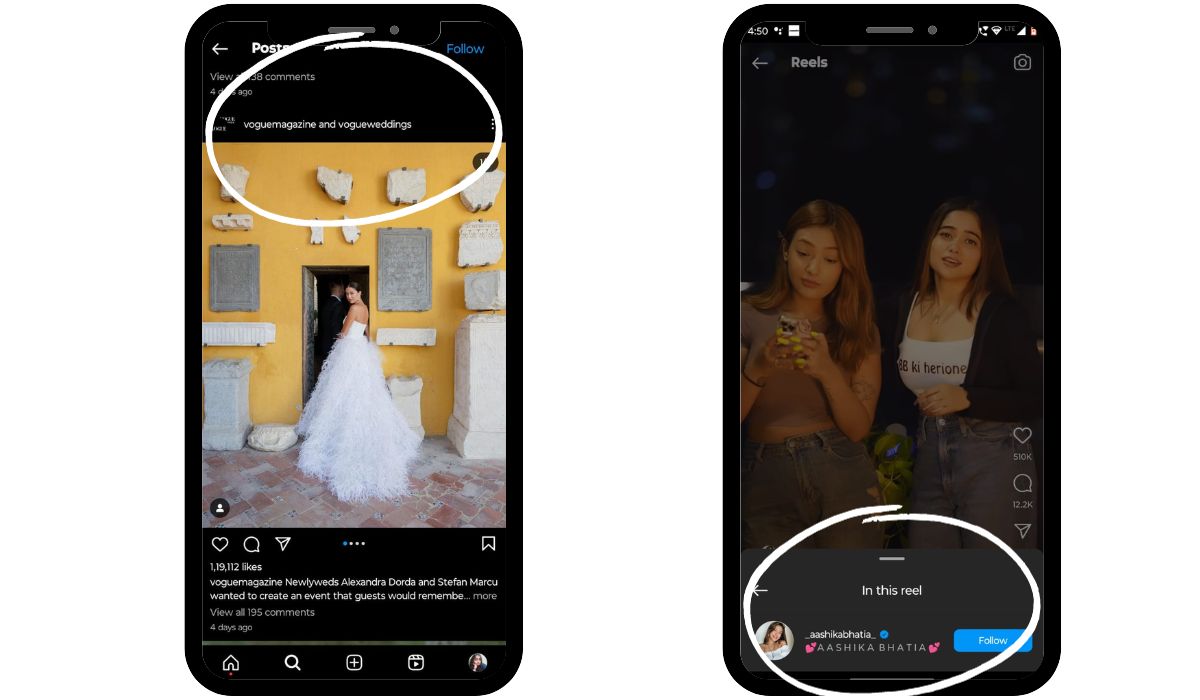
Conclusion
Now, you know how to add a collaborator on your Instagram, so start approaching the ones you trust. If you own a start-up, you can approach influencers and collaborate with them. They have a huge fan base, so they can help grow your brand. Being a content creator, you can collaborate and grow with others. It is certainly a cool feature for avoiding repetition, building relationships, engagement, and ensuring growth.
Finally, if you want to elevate your Instagram Game. Make use of free AI Instagram post generator to simplify your content creation and management. Boost your social presence now!