
In a world where social media is quickly taking over, TikTok has risen to the top with its short and entertaining videos. From awe-inspiring dance routines to easy-to-follow workout regimes, whether it’s about cooking a recipe for your best friend or recreating a funny prank, TikTok is now a part of our modern pop culture. There’s no denying that there’s something for everyone on this platform. Is it possible to save a TikTok without posting it, especially after you’ve painstakingly created the video? That’s exactly what we’ll explore in this article.
TikTok offers options to save your videos without sharing them on your profile. Not only that, but you can now watch your favorite TikToks any time, by simply downloading them! Without much foreplay, here’s how!
How TikTok’s Draft and Save Features Work?
- TikTok has an option where you can save your videos as drafts in the app. You can use these drafts later on and edit them before posting. In order to save them to your device, you need to manually do that.
- If you uninstall TikTok or switch devices, your drafts will be permanently lost because they are not backed up to the TikTok servers.
- You can find your drafts under the “Drafts” folder on your profile page. Drafts are private and are only visible to you.
- TikTok also allows users to save their posted videos on the device by using the “Save Video” option. This applies to public and private posts only.

How to Save a TikTok Without Posting It – Step-by-Step Guide
Before we start, let’s look into the kind of TikTok videos you’d want to save. The first would be when you create a TikTok of your own, but don’t want to post it yet. Maybe you’re waiting for the right posting times, or you want to get another TikTok up before this one. In that case, it’s best to save your TikTok as a draft that you can access and post at any time!
The second case is when you watch a TikTok and really like it. If you want it on your device for offline viewing, you can simply download the video! This blog will guide you through both of these scenarios.
1. Saving your TikTok as a Draft
- Go to the TikTok app
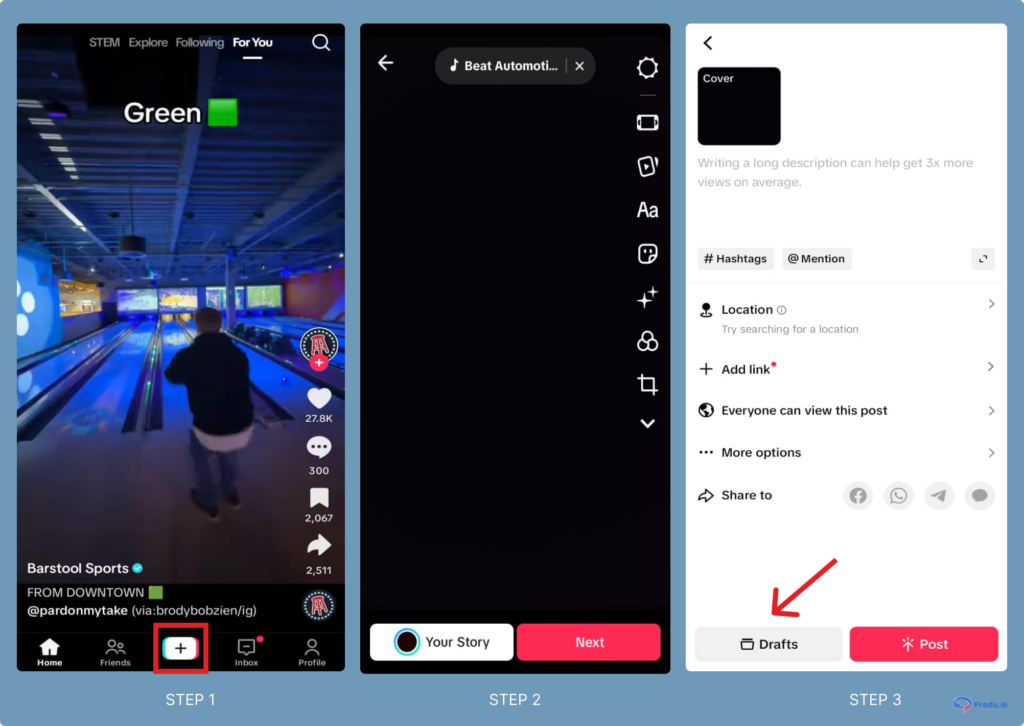
- When you open the app, go ahead and create a video. Tap on the “+” button at the bottom center of the screen to create a new video
- Record a trial video to understand these steps, or upload your chosen video.
- When you do so, you’ll get a wide array of features to edit the video, from music to stickers and filters.
- Once you’re done editing, instead of hitting ‘Post’, tap on ‘Drafts’ at the bottom of the screen.
- Your video will be saved in your drafts, which you can access anytime from your profile.
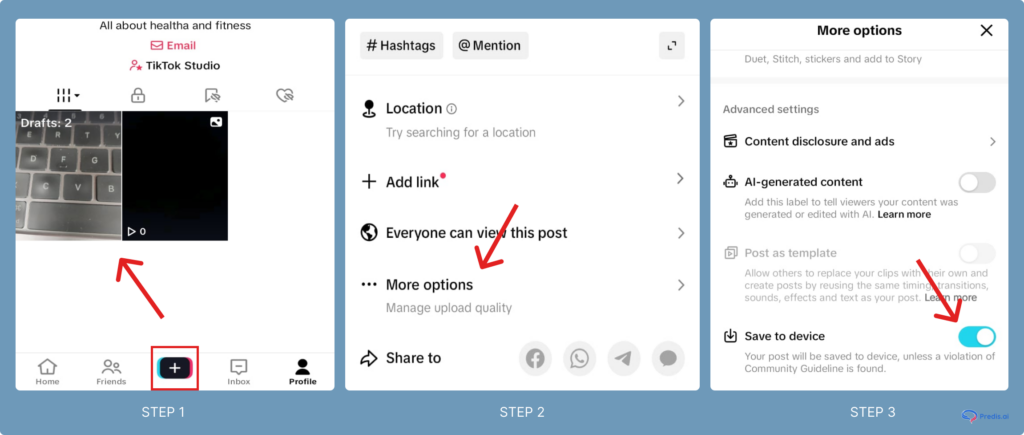
You can also save the TikTok post from your Drafts. Click on the draft > More options > Save video (As shown below).
2. Saving your TikTok to your device
Below are the steps that can be followed to save a video without posting it publicly:
- Open TikTok and create your video.
- Add edits, text, or filters as needed.
- Before posting, tap Who Can View This Video and select Only Me (this makes the video private).
- Post the video privately.
- Go to your profile and find the private video.
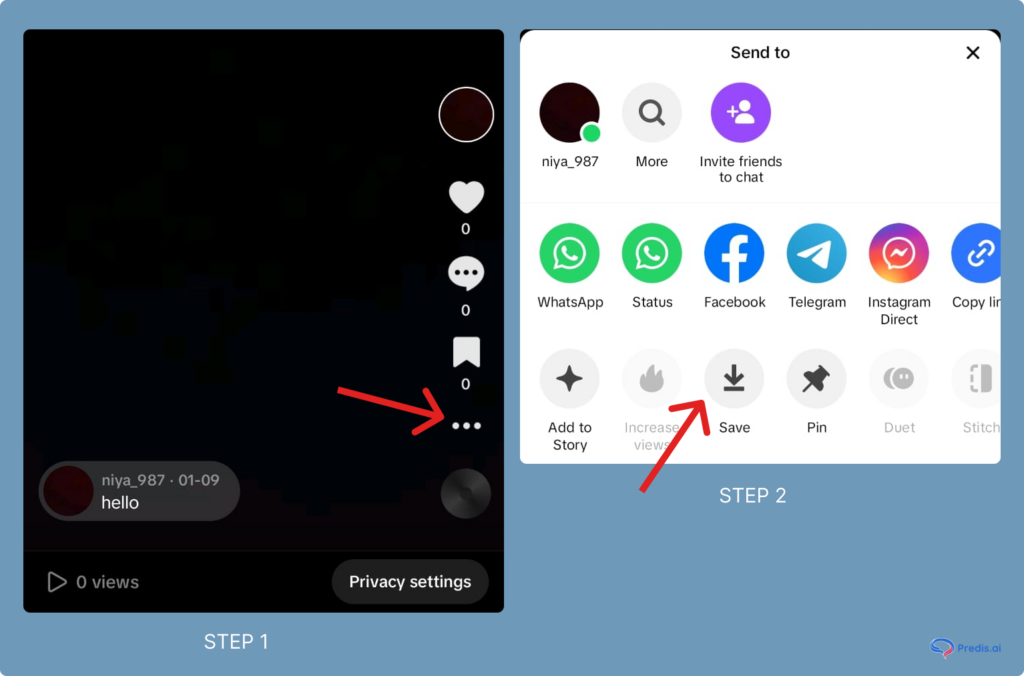
- Tap the three dots (•••) and select Save Video (as shown in the image below).
- The video is now in your phone’s gallery. You can delete the private post from your profile if needed.
3. How to Save a TikTok to your Device Without Posting It?
- Open the TikTok app
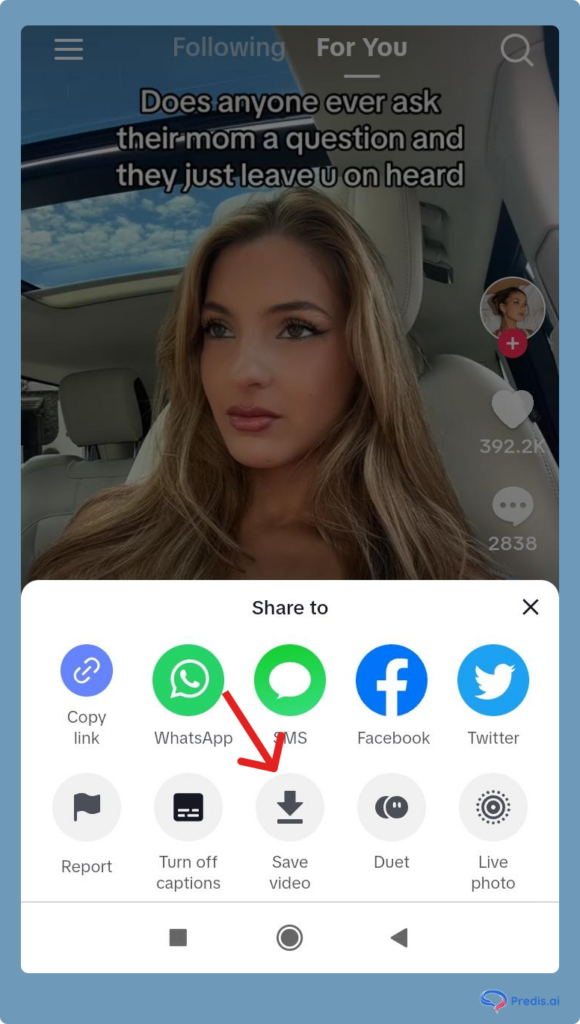
- Choose the video you wish to save to your device, and tap on “Share.”
- Here, tap on the “Save video” option
- The video will be saved to your device
Sharing a Saved TikTok Video
- Navigate to your drafts or your device’s gallery
- Select the video you want to share
- Use the share options to send the video to your friends or post it on other social media platforms
Alternate Ways to Save TikTok Videos Without Posting Them
Below are two alternatives to save TikTok if the above methods don’t work for you:
Screen Recording the TikTok Video
If you can’t save the video, then play it in full-screen mode and use your phone’s built-in screen recording feature. But, keep in mind that the video recorded may have low quality.
Using External Apps
You can save a TikTok using these third-party external apps. But you may be exposed to privacy risks. Hence, always use them with caution, and before using any third-party tool, do check TikTok’s policies. You can use apps like SaveTok, TikDown, TokSave, TikSave, TikPro, etc.
Why Save a TikTok Video to Your Device Without Sharing It?
Saving a TikTok video to your device essentially means that you are downloading it for offline viewing. Several compelling reasons make it a great choice to save TikTok videos from your own as well as others’ profiles:
- Perpetual access to favorite content: If there is a video that you thoroughly liked and would like to see time and again through the years, it is a good idea to save it to your device. This is because even if the user deletes their profile or the video becomes unavailable on the platform, you would still be able to view it whenever you like on the device where you saved it.
- Enhanced sharing: TikTok is a popular platform, but not all of your friends use it. If there are videos that you would like to share with everyone, regardless of whether or not they are on TikTok, you can do that by saving the video to your device. It is then possible to share the saved file through a variety of channels. It is even possible to share your downloaded TikTok video on other social media platforms like X (formerly known as Twitter).
Do keep in mind that you would need to modify the downloaded TikTok videos in some way before you post them elsewhere publicly. This is because not doing this may infringe on copyrights.
Does The Video Owner Know When A TikTok Video is Downloaded?
No, the TikTok platform does not yet notify users if and when their videos have been downloaded.
- The analytics feature in TikTok allows video owners to see how many times their videos have been downloaded. However, it does not show who downloaded the videos. It is pretty much anonymous at this stage.
- TikTok analytics also show the likes and favorites a video owner gets on their videos, in addition to downloads.
- If you are a TikTok creator and do not wish for others to download your content, the platform provides you with a tool to disable video downloads.

Tips to Enhance Your TikTok Experience
Keep scrolling to understand ways to enhance your TikTok experience through advanced techniques and strategies.
- Use editing tools to increase the appeal of your videos
- Collaborate with other creators to make interesting content for your audience
- Engage with your audience consistently to maintain a two-way rapport
- Use brand partnerships, affiliate links, and in-app options like TikTok Creator Fund strategically to monetize your platform
Stand Out on TikTok with AI Content 🌟
Conclusion
As you can see from this blog, TikTok does provide several options to save videos without posting them. Whether it is your own creative content or another creator’s video that you really liked, this blog has the solutions to your questions. This feature is especially helpful for creators who like to create content in advance or review their videos before posting.
It is also a handy feature if you are an avid collector of interesting videos that you like to share on different platforms or create new reels from your collections under specific categories (for example, Epic Fails of the Year, etc.).
This article will guide you through some essential tips and tricks for saving videos from TikTok, ensuring that you can enjoy your favorite content whenever and wherever you want.
Whether you’re seeking to optimize operations, enhance customer experiences, or stay ahead of market trends, Predis.ai equips you with the tools and expertise needed to thrive in today’s dynamic business landscape. So why wait? Unlock the power of predictive analytics with Predis.ai! To know more, sign up on Predis today.
Related articles
How To See Your Reposts On TikTok
How to Undo a Repost on TikTok
6 Ways To Increase TikTok Followers
How to Change Your TikTok Username
FAQs
No, you can not edit it later on. If you save a video using the private posting method, you can re-upload it and make changes. However, drafts allow better editing within TikTok.
No, TikTok does not send notifications when you save your own videos.
Yes — saving it as a draft lets you save a TikTok without posting it and come back to it for edits anytime.