Explore this content with AI:
Every piece of content you post on Instagram — every Reel, every Story, every carousel — is ultimately trying to do one thing: get someone to take a next step. For most accounts, that next step runs through a single link.
That link is doing more work than almost any other asset in your marketing stack. It’s the last point of contact between a curious viewer and your actual business. And for most accounts, it’s dramatically underbuilt.
This guide covers how to set up and add multiple links in an Instagram bio that convert — not just one that exists.
Why Instagram’s Native Multi-Link Feature Isn’t Enough
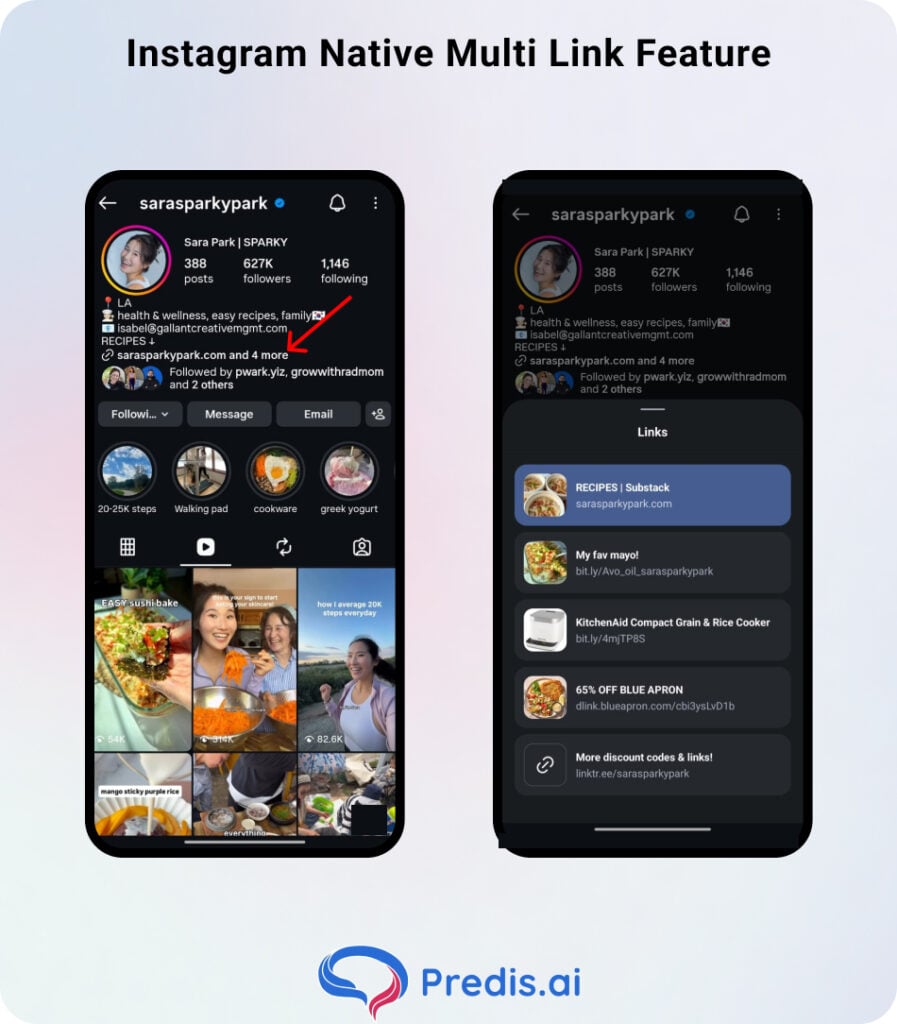
Instagram now lets accounts add up to five links directly in their profile without a third-party tool. On paper, that sounds like the end of the link hub era. In practice, it’s not — and the reason matters.
- When you add more than one native link, Instagram collapses the extras behind a drop-down. Visitors see your first link, then a prompt to expand for more. The friction is small but real.
- The second issue is data. Instagram’s native links give you no click tracking. You know how many people visited your profile — you have no idea how many tapped the link, which specific link they tapped, or where those visitors came from.
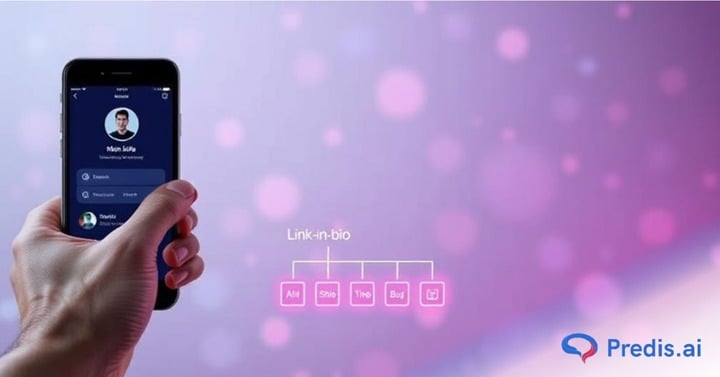
Third-party link hubs solve both problems. A dedicated landing page shows every link cleanly, loads in a single tap, and — crucially — gives you real-time click data, CTR by link, geographic audience breakdown, and device-type splits. That’s the difference between guessing what’s working and knowing.
Why a Dedicated Link Tree Is Worth Building
1. Eliminating Manual URL Swapping
Without a linktree, every new campaign means going back into your bio and replacing your existing URL. You launch a product — swap the link. Campaign ends — swap it back. Announce a podcast episode — swap again. After a few months, this becomes operational friction that quietly discourages you from driving traffic to anything at all.
A linktree page is a permanent infrastructure. Your bio URL never changes. What’s on the page changes whenever you need it to — new launch goes to the top, old promotion comes down, seasonal collection cycles in — all without touching your Instagram profile.
2. First-Party Click Data
The moment someone taps your bio link and lands on a third-party hub page, you can see it happen.
- Which button did they tap?
- How many unique visitors hit the page today vs. last week?
- Which links are being ignored?
That data makes every content and product decision sharper. When you know your newsletter signup link consistently outperforms your product page by 3:1, you design your Stories differently.
3. Add Any Number of Links
Unlike Instagram’s native five-link cap — which hides extras behind a drop-down — a dedicated hub page has no ceiling. This matters most for accounts with complex offerings: a creator who sells presets, runs a membership, hosts a podcast, takes brand partnerships, and publishes a newsletter needs more than five slots to represent everything accurately.
A hub page holds all of it without making any single link feel buried.
4. Tailor the Landing Page to Your Brand
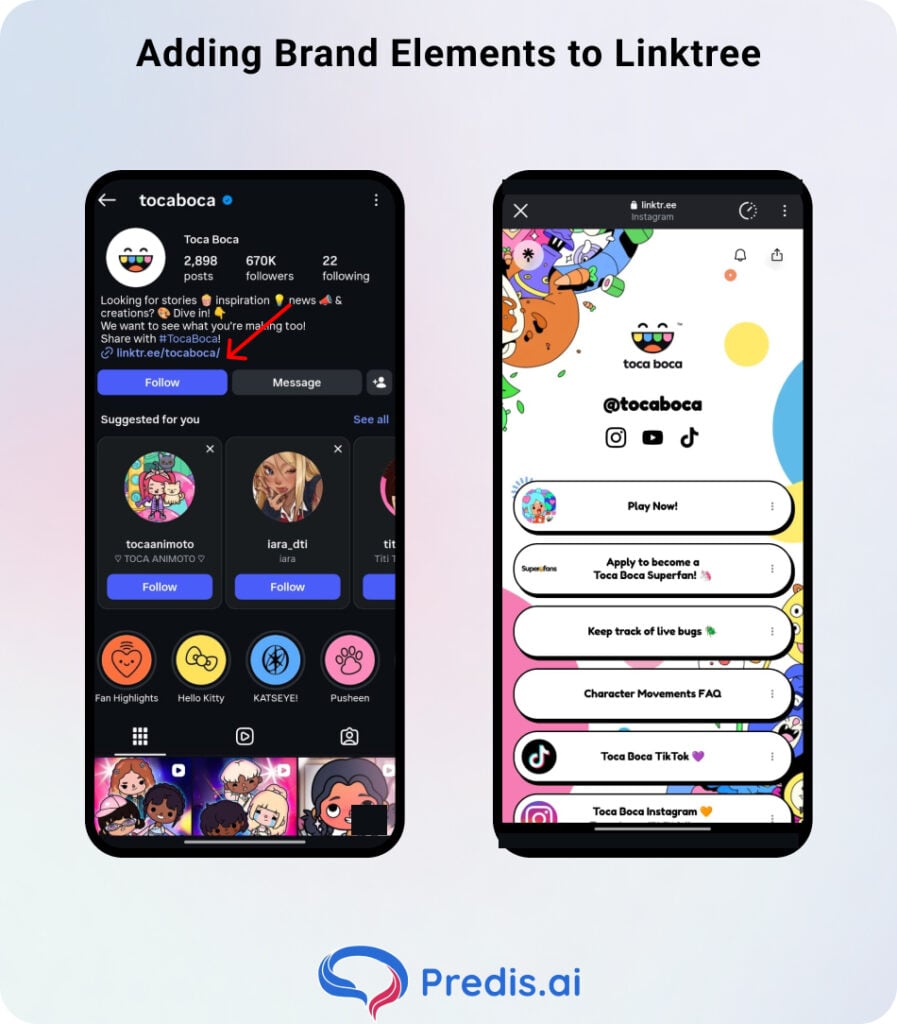
A linktree page is a brand touchpoint, not just a utility. Platforms like Linktree give you full control over background colors, button styles, fonts, profile images, and even animated backgrounds. The result should feel like a natural extension of your Instagram grid — same palette, same tone, same energy.
5. Offers QR Codes for Offline Use
Every major link hub platform generates a QR code tied to your hub URL. That code gives your Instagram link in bio a physical presence — on business cards, product packaging, event signage, pop-up banners, or printed marketing materials.
A brand selling at a weekend market can put a QR code on their table display, and anyone who scans it lands on the same hub page as someone who tapped from Instagram.
How to Build Your Link in Bio Page: Step by Step
Step 1: Claim a Consistent Handle
Most link hub tools (Linktree, Later, Beacons, Stan Store) give you a custom URL in a format like Linktr.ee/yourbrand. Choose a handle that matches your Instagram username exactly.
Inconsistency between your social handle and your link hub URL creates a subtle trust gap — visitors notice when the name doesn’t match.
Step 2: Design the Interface to Match Your Brand
Don’t use the default template. At minimum, upload your logo, set your brand colors as the background and button colors, and choose a font that’s consistent with your visual identity. Most platforms offer this at the free tier.
If your brand uses a specific color palette — say, warm terracotta and off-white — your link hub should reflect that immediately. A viewer who taps from your Instagram profile and lands on a page that looks completely different subconsciously registers a disconnect.
Step 3: Add Your Core Destinations
Start with your top three to five business-critical links. These are the destinations that directly serve your primary revenue or growth goals:
- Your main website or online store
- Your most recent or highest-converting product or collection
- Your email newsletter signup (if list-building is a goal)
- Your latest content piece — blog post, YouTube video, podcast episode
- A booking or inquiry page if you offer services
Resist the urge to add everything. A link hub with twelve options is a link hub where nothing gets clicked. We will discuss more on that in the optimization section.
Step 4: Publish and Lock In Your URL on Instagram
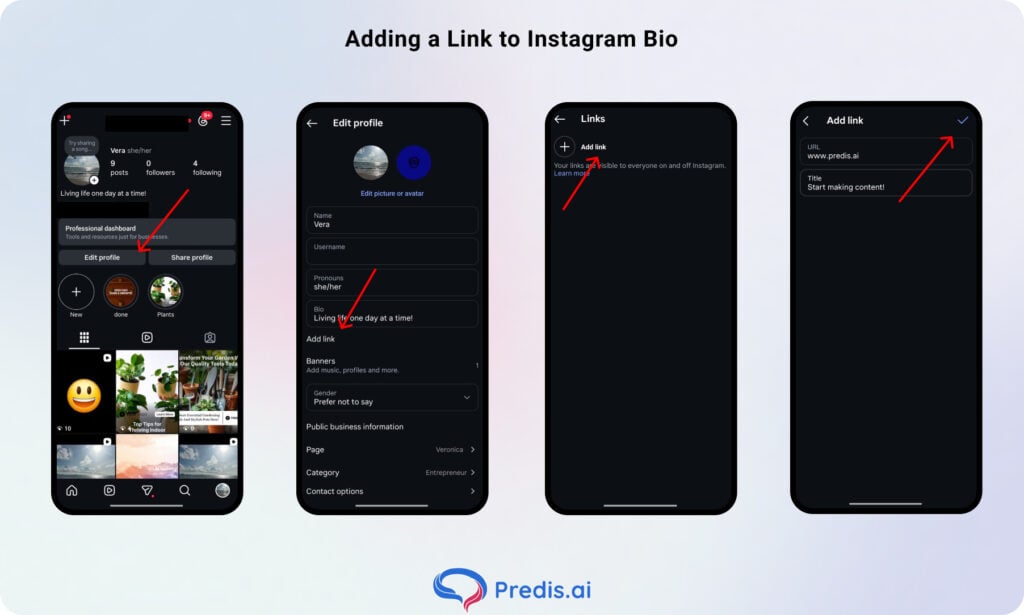
Once your hub page is live, go to Instagram, tap Edit Profile, and paste your link hub URL into the Website field. This is the only link that matters in your bio — everything else flows through it.
Write a bio line that actively directs people there. “All links below 👇” or “Shop, read, and book — link below” tells visitors there’s a reason to tap, rather than leaving them to figure it out.
How to Use Your Bio Link: Real Use Cases
The same link hub infrastructure supports very different strategies depending on what your business actually needs.
| Use Case | Primary Link Destination | Supporting Links |
|---|---|---|
| E-commerce brand | Current collection or sale page | Bestsellers, new arrivals, size guide |
| Content creator | Latest YouTube video or podcast | Blog, newsletter, collab form |
| Service business | Booking or inquiry form | Portfolio, testimonials, FAQ |
| Coach / consultant | Lead magnet or free resource | Course, community, discovery call |
| Personal brand | Newsletter signup | Press kit, speaking page, latest project |
A fitness coach, for example, might run their hub with three links:
- A free 7-day meal plan download (lead generation)
- Link to their paid program (conversion)
- Their latest YouTube video (content syndication)
Each link serves a different stage of the funnel. Together, they cover the full visitor journey without overwhelming anyone.
Tools like Predis AI can help surface which content formats and topics are driving the most profile visits — feeding that data back into which links you prioritize at the top of your hub page.
Optimization Tactics That Move CTR
1. Visual Hierarchy
Whatever drives the most business value should sit at the top of your page and look visually distinct from everything else. Most link hub tools let you pin a featured link, add a thumbnail image, or use an animated button for one entry. Use that feature for your highest-priority destination — not the link you posted most recently.
2. Replace Normal headings with Action-Oriented copy
“My Website” tells a visitor nothing about why they should tap it. “Download the Free Content Calendar” tells them exactly what they get. The difference in click-through rate between generic labels and specific, value-forward CTAs is significant — and it costs nothing to fix.
Rewrite every link label on your hub using this template: [Verb] + [specific thing they get]. Some examples:
- “Download the Free SEO Checklist” (not “Free Resource”)
- “Shop the Summer Collection” (not “Store”)
- “Book a Discovery Call” (not “Work With Me”)
- “Listen to the Latest Episode” (not “Podcast”)
3. The Rule of Five
Decision paralysis is real, and it shows up in click data. Link hubs with more than five or six visible options consistently show lower overall CTR than leaner pages with three to four. When everything is equally prominent, nothing gets chosen.
4. Attribute Your Traffic Properly
Adding a link to your hub without UTM tagging means your analytics will show traffic arriving at your website from a vague “direct” source. You won’t know it came from Instagram. You will have no way to know which specific campaign or Story drove it.
The Bottom Line
Your Instagram link in bio is the one piece of infrastructure that every post, every Story, and every Reel is pointing toward. Building it once and leaving it alone is the most common mistake. The second most common is making it so crowded that nobody knows where to tap.
Treat it like a digital concierge: clear, fast, on-brand, and updated regularly. Run a link audit every week — pull any expired promotions, move your current priority to the top, and check that every URL still resolves. A link hub that’s maintained weekly consistently outperforms one that was set up thoughtfully once and then left to drift.
Your next step: open your current bio link right now. Count how many links are visible. Check whether the top link reflects your actual #1 business goal today. If either answer is uncomfortable, you know where to start.
FAQs
No evidence supports this. The persistent myth that Instagram suppresses accounts using external link tools has never been confirmed, and accounts with heavy link hub usage don’t show systematic reach penalties. Instagram’s algorithm responds to engagement signals — saves, shares, comments — not to what your bio link points to.
It depends on your priorities. A third-party tool is faster to set up, requires no technical maintenance, and includes built-in analytics. A custom landing page on your own domain keeps all traffic on your site, contributes to your domain’s SEO, and gives you complete design control.
If you have the technical ability, a custom page on your own domain is a better long-term asset. If you don’t, a well-configured third-party hub is significantly better than a single raw URL.