Video editing model by Kuaishou (Kling AI)

Kling 4.0 Edit

Kling 4.0 Edit changes a video you already have from one sentence: the weather, the cast, the product or the whole style. It works on up to 30 seconds of footage at up to 1080p, and keeps the dialogue and the motion when you ask it to.

Edit a video with Kling 4.0
Edited with Kling 4.0 Edit

The edit instruction

Edit Video 1. Change the rainy night into a warm, sunny late afternoon in every shot: dry asphalt, low golden sun, soft long shadows and a clear blue sky. String colorful paper flags across the street above the truck. Keep the LUNA TACOS truck, the cook, the customer, the tram, every movement, all 5 shots and the camera moves exactly as they are. Keep the original dialogue and sound, but replace the rain with street chatter and birdsong.

References

  • Video 1, the original clip

Settings

  • 15 seconds
  • 16:9
  • Edit of the original clip

Edited with Kling 4.0 Edit on November 3, 2026 from a clip made with Kling 4.0. Compressed for the web, nothing else touched. The tram in the first shot came back as a white van.

Try this prompt

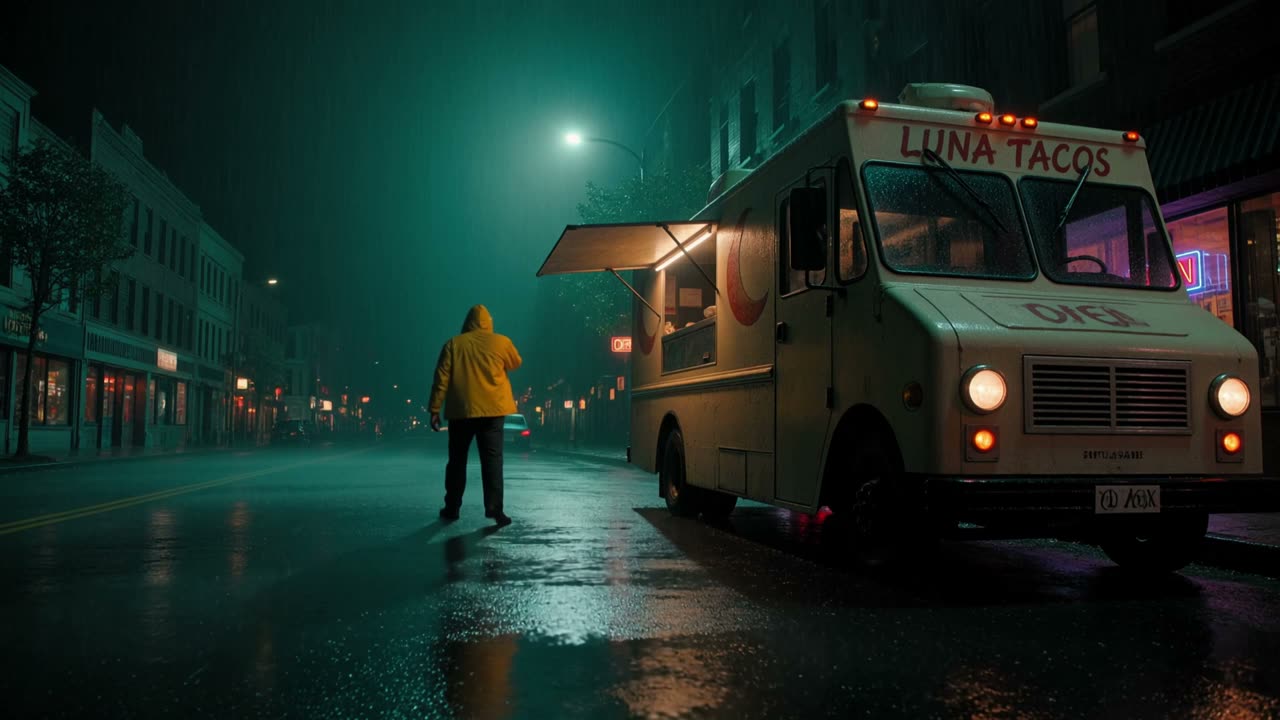
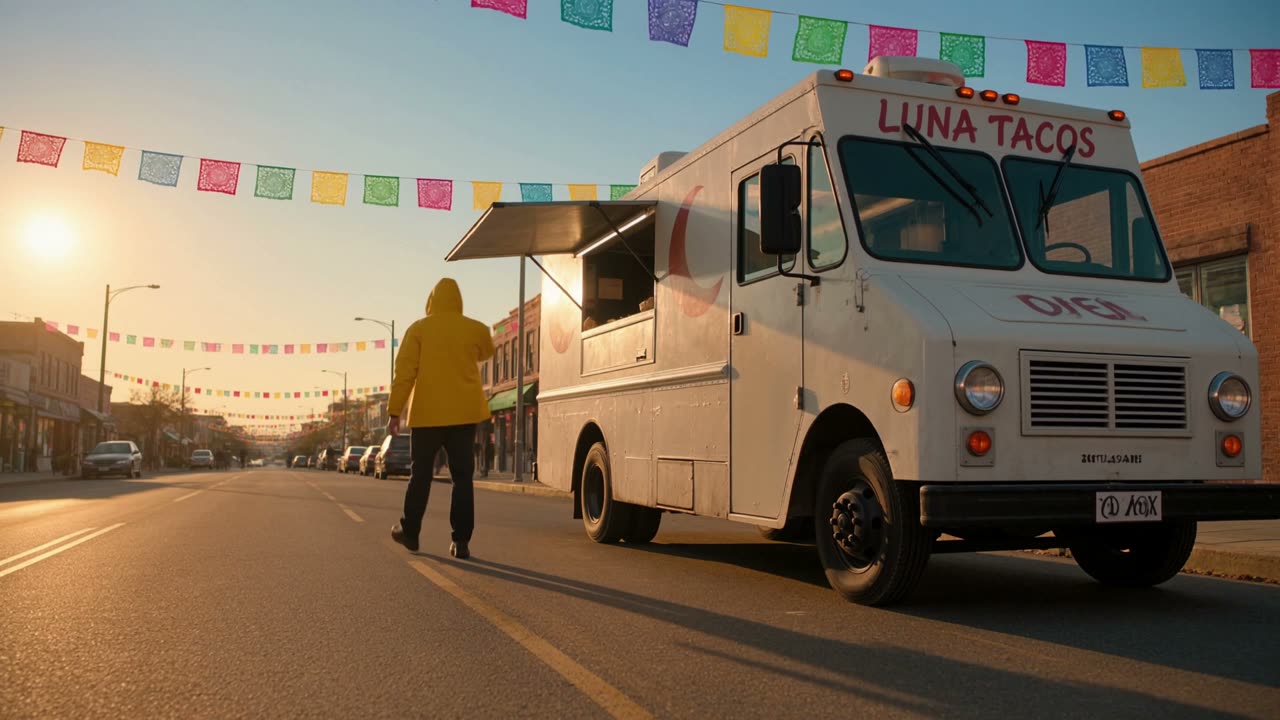
The rainy-night LUNA TACOS ad from our Kling 4.0 page, edited with Kling 4.0 Edit into a sunny afternoon under strings of paper flags, with the 5 shots, the movements and the dialogue unchanged.

Before and after

Same street, a different evening

Drag across the same moment from the original and the edit. The truck, the customer and the framing stay put, while the rain, the light and the sky change around them.

The LUNA TACOS food truck on a rainy street at night, a customer in a yellow rain jacket walking away, from the original clip The same truck and customer in the same framing on a dry, sunny street under paper flags, edited with Kling 4.0 Edit Original: rainy night Edited: sunny afternoon
The same frame at 0:13. Drag to compare.
Multi-shot, with sound

One sentence, 5 shots, the dialogue kept

The original has 5 shots and two lines of dialogue. Kling 4.0 Edit only keeps the sound if you ask, so the instruction says to keep the dialogue and swap the rain for street noise. Click a shot to check it.

Click a shot to jump to it.Tap a shot to jump to it.

Leave out "keep the original sound" and Kling may write new audio for the edit.

What it can change

One clip, three kinds of edit

Each edit below started from the same 5-second subway clip. One removes people, one recasts the lead and one changes the whole style.

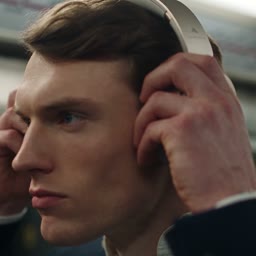
The original

A commuter takes his headphones out of his bag and puts them on in a crowded subway. Made with Seedance 2.5 and trimmed to 5 seconds.
Image references

Swap in your product from a photo

Add a product photo next to the clip and name it in the instruction. Here, a sunscreen tube on a beach towel became the DEWLINE serum bottle, while the towel, the waves and the camera carried on as they were.

  • Original clipSunscreen tube on a beach towel, 8 secondsVideo 1
  • ProductDEWLINE serum bottleImage 1

The clip is from our Google Veo 3.1 page and the bottle from our Nano Banana Pro page. On Predis.ai you can add up to 10 images to one edit.

Kling 4.0 Edit's result

A sunscreen tube on a striped beach towel, edited with Kling 4.0 Edit into the DEWLINE serum bottle from a product photo, with the towel, the waves and the camera unchanged.

The edit instruction

Edit Video 1. Replace the sunscreen tube with the serum bottle from Image 1: the same amber glass dropper bottle with the white DEWLINE label, standing upright on the towel where the tube was, the label facing the camera. Keep the striped towel and its flapping corner, the sand, the waves, the lighting, the camera and the original sound exactly as they are.

References

  • Video 1, the original clip
  • Image 1, the product

Settings

  • 8 seconds
  • 16:9
  • 1 reference video
  • 1 reference image

Edited with Kling 4.0 Edit on November 3, 2026 from a clip made with Google Veo 3.1 and a bottle made with Nano Banana Pro. Compressed for the web, nothing else touched.

Try this prompt
Kling 4.0 Edit or Aleph 2.0

Same clip, same instruction, two editors

This is the matte-black headphones edit from our Runway Aleph 2.0 page, run again on Kling 4.0 Edit with the same words. Watch the headphones, then his face and hands.

The instruction on both

Make the headphones matte black: black ear cups, black headband and black cushions, dark gunmetal hinges, and the small logo in white. Keep the man, his face, his suit, the subway, everyone's movements, the camera moves and the lighting exactly as they are.

References

  • Video 1, the original clip

Settings

  • 5 seconds
  • 16:9
  • Edit of the original clip

Edited with Kling 4.0 Edit on November 3, 2026 from a clip made with Seedance 2.5. The Aleph 2.0 side was edited with Runway Aleph 2.0. Both compressed for the web, nothing else touched.

Try this prompt
Runway Aleph 2.0
Kling 4.0 Edit
0:00 / 0:05

The subway clip with the headphones turned matte black, edited with the same instruction on Runway Aleph 2.0 and Kling 4.0 Edit. Both show the first 5 seconds.

FeatureKling 4.0 EditRunway Aleph 2.0Wan 2.7 VideoEdit
Longest clip30 seconds30 seconds10 seconds
Image referencesUp to 10 on Predis.aiUp to 4 edited frames on Predis.ai1 on Predis.ai
SoundKept if you ask, or rewrittenOriginal keptComes back silent
Resolution720p or 1080pUp to 1080p720p or 1080p
Best forRecasting, restyling and product swaps from a photoPrecise changes that leave the rest untouchedBig scene and style changes from a sentence

For a new cast, a new style or your product dropped in from a photo, we'd start on Kling 4.0 Edit. For a small change that must leave every other pixel alone, Aleph 2.0 is the safer pick, but it's your call.

Kling 4.0 Edit at a glance

  • Made byKuaishou (Kling AI)
  • ReleasedOctober 15, 2026, as the editing mode of Kling 4.0
  • What it doesEdits video you already have; for new video, use Kling 4.0
  • Clip length3 to 30 seconds in, the same length out
  • Resolution720p or 1080p, in your clip's aspect ratio
  • References1 video and up to 10 images on Predis.ai; up to 5 videos in Kling's app
  • What it changesObjects, people, backgrounds, weather, style, color, materials, expressions and actions
  • SoundKept when the instruction asks for it
  • Open weightsNo; Kling hosts it
  • InstructionPlain English; name the clip as Video 1 and photos as Image 1, Image 2
Last checked on October 30, 2026.
Three steps

How to edit a video with Kling 4.0 Edit

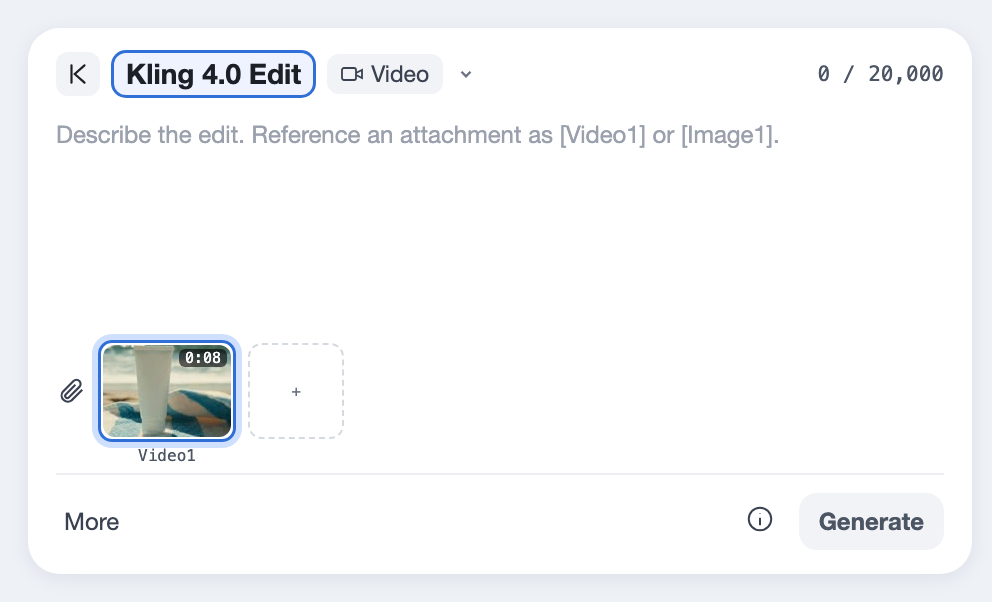
  1. Kling 4.0 Edit picked in the Predis.ai Model Studio, with an 8-second clip attached as Video 1
    01

    Add the clip

    Upload 3 to 30 seconds of footage you have the rights to. The edit comes back the same length, in the same shape.

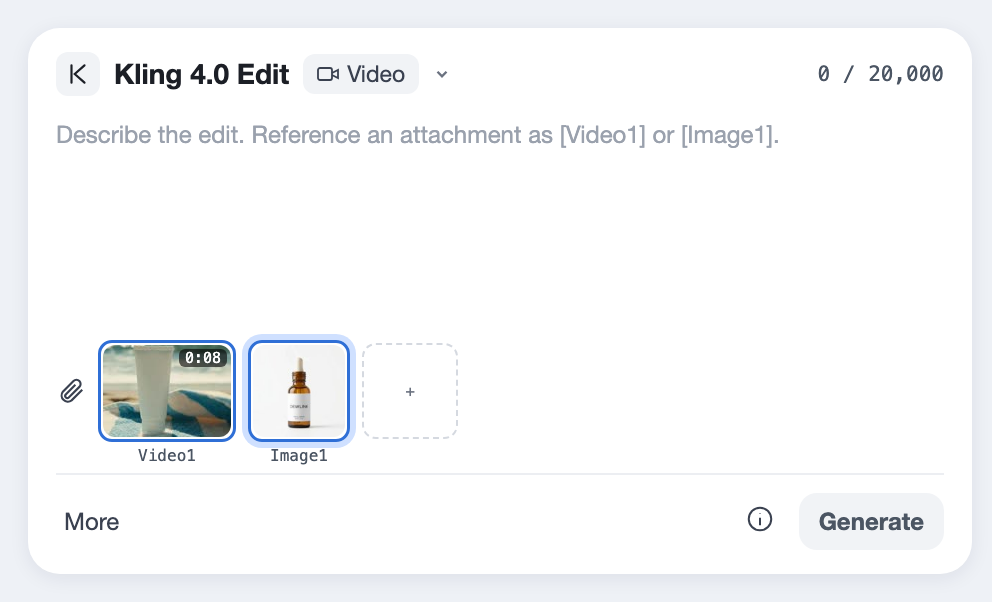
  2. A product photo added as Image 1 next to the clip
    02

    Add photos, if you need them

    To drop in a product, a face or a place, add up to 10 photos and name each one in the instruction as Image 1, Image 2 and so on.

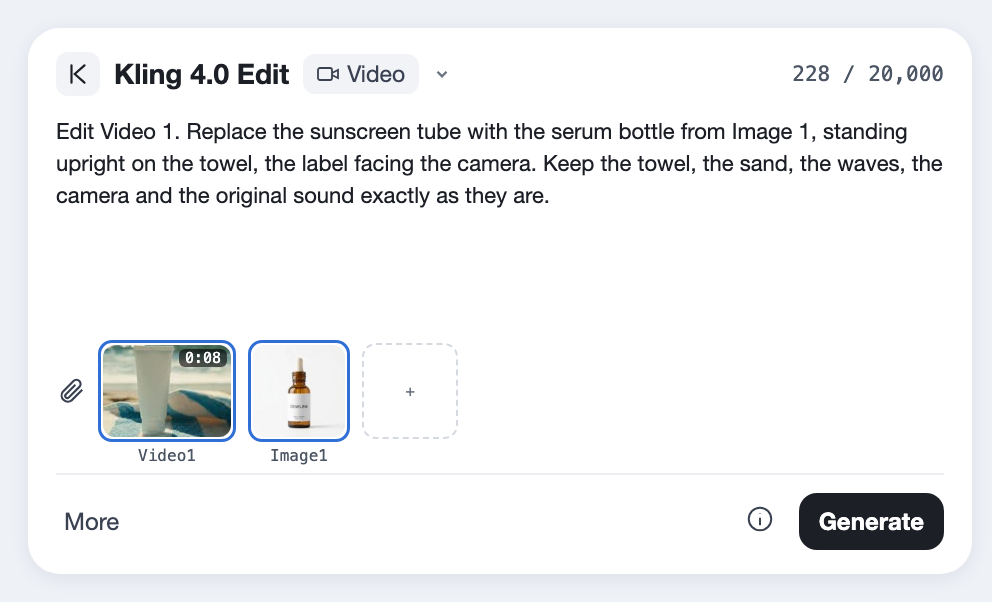
  3. An edit instruction that starts with Edit Video 1, names the change, and says what to keep
    03

    Say what changes, and what stays

    Start with "Edit Video 1", name the change, then list what must stay, including the sound. The Generate button shows the cost before you make anything.

Kling only keeps the motion and the sound if you say so, so the "keep" line matters as much as the change.

Edit Video 1. [Change, remove or replace the one thing], [what it becomes].
[Optional] Use [the product, the face, the place] from Image 1.
Keep [the people], [their movements], [the background], [the camera] and the original sound exactly as they are.
Before you upload

Where Kling 4.0 Edit falls short

These come from Kuaishou's own guide and from what Predis.ai offers today. Each one has a workaround.

It needs footage

The edit mode only changes a clip you upload; it doesn't start from nothing.

FixMake the source with Kling 4.0, then edit it here.

30 seconds at most

Clips shorter than 3 seconds or longer than 30 won't go in.

FixCut long videos into scenes and edit each one.

Sound isn't kept by default

Kuaishou says the original audio and motion are only kept when the instruction asks for them.

FixEnd every instruction with "keep the movements and the original sound".

1 video on Predis.ai

Kling's app takes up to 5 clips per edit; Predis.ai takes 1 clip and up to 10 images.

FixEdit one clip at a time, and bring the rest in as photos.

Small changes can spread

A bigger editor can touch more than you asked, like a face or a hand near the change.

FixList what must stay, or use Aleph 2.0 for very small changes.

Strict filters

Kling's content filters are strict, so some clips and instructions get blocked.

FixUse footage of invented people and plain wording. If an edit fails on Predis.ai, its credits are refunded.

Kling 4.0 Edit, answered

What is Kling 4.0 Edit?

It's the video editing mode of Kling 4.0, from Kuaishou. You give it a clip and a sentence, and it changes what you name, from the weather to the cast, while keeping the rest.

No. It edits footage you upload. To make a new clip from text, use Kling 4.0, then bring the result here.

From 3 to 30 seconds. The edited video comes out the same length and in the same aspect ratio as your clip.

Objects, people, backgrounds, weather, style, colors and materials, plus facial expressions and actions. It can also add or remove things.

Only if you ask. Kuaishou says the audio and the motion are kept when the instruction says so, so end each instruction with "keep the movements and the original sound".

Kuaishou lists the camera angle and movement among the things it can change. In our test, asking for a low angle from the floor of a subway car left the framing as it was, so plan on keeping your original shots.

Yes. Add the photo as a reference and name it in the instruction, as in "the bottle from Image 1". Predis.ai takes up to 10 images per edit.

720p or 1080p, in the aspect ratio of the clip you upload.

Kling 4.0 Edit can recast people, restyle a whole clip and use up to 10 photos. Aleph 2.0 keeps the original sound by default and is the safer pick for very small changes.

On Predis.ai you can try it during the 3-day trial, which needs a card and moves to a paid plan unless you cancel.

It's a paid model on Predis.ai, and the Generate button shows the cost of each edit before you make it.

Kling offers an API, and partners host it too. On Predis.ai you don't need it, since Kling 4.0 Edit is built into the Model Studio.

Shoot it once, recast it later

Upload a clip you already have and change the part that needs it.

Edit a video with Kling 4.0

Kling is a trademark of Kuaishou. Predis.ai is not affiliated with or endorsed by Kuaishou.