Video model by Google DeepMind

Google Veo 3.1

Veo 3.1 shoots in 8-second takes and lets you direct every one: write a line in quotes and it's spoken, name a sound and you hear it, set the first and last frame and it lands on both. Every clip on this page comes with the prompt that made it, so you can borrow the scene and recast it with your product.

Make a video with Veo 3.1
Made with Google Veo 3.1

The prompt

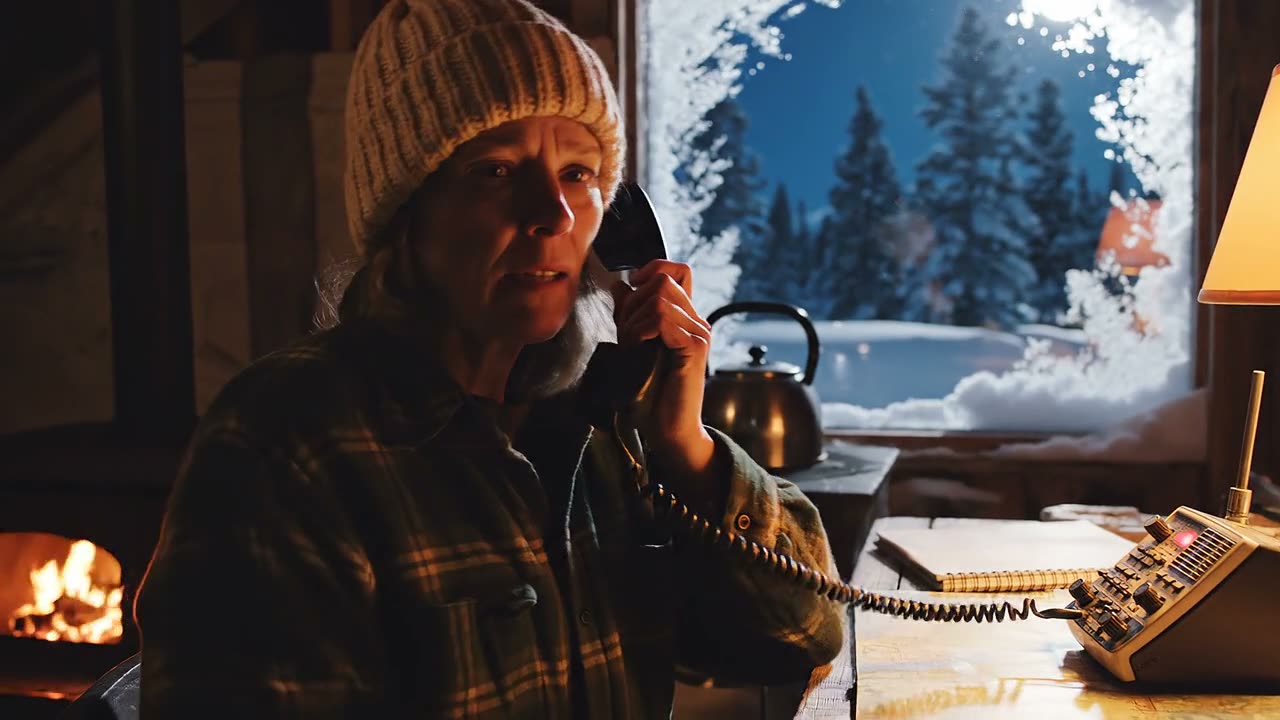
Cinematic, 35mm, slow push-in. Night, inside a snowed-in alpine ranger hut. A ranger in her fifties in a wool hat sits at a wooden desk lit by a single amber lamp; frost covers the window behind her, blue moonlight outside. She lifts a CB radio handset and says, calm and tired: "Base, this is Ridge Two. The pass is closed. I'm staying the night." Sound: wind howling against the walls, radio static crackling before and after her line, a kettle starting to whistle on the stove behind her.

Settings

  • 8 seconds
  • 1080p
  • 16:9
  • Sound on (always)

Made with Veo 3.1 on 10/12/26. Trimmed only, nothing else touched.

Try this prompt

A ranger in a snowed-in mountain hut radios base at night: "Base, this is Ridge Two. The pass is closed. I'm staying the night." Wind, radio static and a whistling kettle. Made with Google Veo 3.1.

Google Veo 3.1 specs

  • Made byGoogle DeepMind
  • ReleasedOctober 15, 2025
  • Clip length4, 6 or 8 seconds, extendable
  • VersionsVeo 3.1, Fast and Lite
  • ResolutionUp to 4K
  • SoundAlways on, made with the video
Checked against Google's documentation on October 8, 2026.
Sound

Write the sound, then hear it

Put a line in quotes and Veo 3.1 says it, with the room tone and effects you describe wrapped around it. Press play and watch each sound arrive on the line of the prompt that asked for it.

Click a sound to jump to that moment.Tap a sound to jump to that moment.

Our labels, not separate tracks. Veo 3.1 delivers one mixed soundtrack, so turn the sound on for this one.

Veo 3.1, Fast and Lite

3 versions, 3 budgets

All three make video with sound. Here's what each one keeps, so you can pick before you spend.

FeatureVeo 3.1FastLite
Highest resolution4K4K1080p
Reference imagesUp to 3Up to 3Not available
First and last frameYesYesYes
Extensions7 seconds at a time, at 720p7 seconds at a time, at 720pNot available
SoundAlways onAlways onAlways on
References

Cast it with 3 images

A character, your product and a location, each held to its own look for the whole take. That's how the bottle on screen stays your bottle instead of the model's best guess.

Hover a reference to see where it shows up.Tap a reference to see where it shows up. Reference images need an 8-second take.

The result

A trail runner stops on a red-rock ridge at golden hour, drinks from a steel bottle and says "Twelve miles. Still cold." Made from 3 reference images.

Prompt gallery

Prompts you can borrow

Each take comes with its full prompt. Keep the structure, then swap in your product and your lines.

Limits

Where it struggles

7 of these come from Google's own documentation, which is more candid than most. Knowing them up front saves you credits.

8-second takes

8 seconds is the ceiling for one take.

FixAnything longer is extended 7 seconds at a time, or stitched.

Extensions are 720p

Extended takes come out at 720p, even when the first take was 4K.

FixKeep 4K for single 8-second takes.

Sound across joins

If the last second of a take is silent, the extension can't carry the sound on.

FixKeep some sound in the last second.

Other languages

English is fully supported. Other languages aren't evaluated yet.

FixTest them on a 4-second take first.

Blocked audio

Google's safety filters sometimes block a take because of its audio.

FixReword the line and try again.

Adults only

Takes made from your images can only show adults, and in the EU, UK, Switzerland and MENA every take is adults-only.

FixCast adult characters in your references.

Busy scenes

Reviewers of Veo 3 saw crowded scenes and specific camera angles drift.

FixOne subject and one camera move per shot works best.

Lite

Lite skips 4K, reference images and extensions.

FixUse Fast when you need any of those.

How to

How to make one on Predis.ai

  1. Logos of the AI models you can choose from on Predis.ai
    01

    Pick Veo 3.1

    Open the Model Studio and choose Veo 3.1, Fast or Lite from the model list.

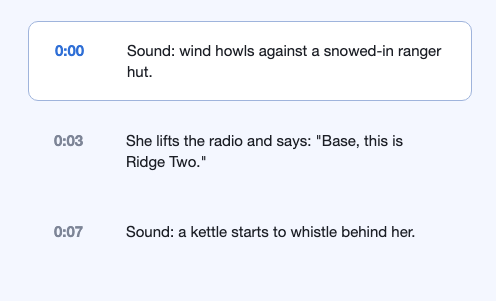
  2. A prompt written as a script, with the sound and the spoken line at 0:00, 0:03 and 0:07
    02

    Write it like a script

    Describe one shot, put dialogue in quotes and name the sounds you want. Read the line out loud, and if it runs past 8 seconds, cut it.

  3. A finished Veo 3.1 video: a ranger radioing base from a snowed-in mountain hut
    03

    Make it, then extend if you need more

    Need longer than 8 seconds? Extend the take 7 seconds at a time.

Google's own guidance is dialogue in quotes and sounds named plainly. Here's the shape we start from.

[The look: lens, light, camera move]. [Where and when].
[One subject doing one thing].
[Who speaks] says: "[The line]"
Sound: [what we hear].

Questions people ask

What is Google Veo 3.1?

It's Google DeepMind's video model, and it makes 4 to 8-second clips with sound generated alongside the picture. You can guide it with up to 3 reference images or a first and last frame.

Google released it on October 15, 2025, and added 4K output and vertical reference-image videos on January 13, 2026.

Google's API has no free tier for Veo 3.1. On Predis.ai you can try it in the 3-day trial, which needs a card and moves to a paid plan unless you cancel.

Each take is up to 8 seconds. Extending adds 7 seconds at a time, up to 148 seconds in total, at 720p.

All three make video with sound. Fast costs less and keeps 4K, reference images and extensions, while Lite costs least and drops all three.

Yes, for 8-second takes on Veo 3.1 and Fast. Extensions stay at 720p, and Lite stops at 1080p.

Pick it in the Predis.ai Model Studio, describe one shot, put dialogue in quotes and name the sounds you want. The template on this page gives you the shape.

Google doesn't claim ownership of what you make, though it may generate similar videos for other people. Every clip carries an invisible SynthID watermark that identifies it as AI-generated.

It's the current Veo generation. Google also offers Gemini Omni, a separate model for making and editing video by conversation.

Direct your first 8 seconds

Start from any prompt on this page and recast it with your product.

Make a video with Veo 3.1