In 2026, TikTok continues to dominate the social media landscape, not just as a platform for short-form videos but as a powerful tool for real-time engagement. With the rise of livestream commerce, interactive Q&As, and behind-the-scenes storytelling, learning how to Go Live on TikTok has become a must to deepen audience relationships and boost visibility.
Whether you’re launching a product, hosting a live tutorial, or simply chatting with your community, TikTok LIVE offers unmatched engagement potential in today’s creator economy.
In this guide, we’ll walk you through the latest requirements, best practices, and creative ideas to help you successfully Go Live on TikTok in 2026. However, before you can access this feature, it’s important to know how many followers on TikTok are required to go live.
How Many Followers on TikTok to Go Live?
Before you use the LIVE feature, there are a few prerequisites your account must fulfill. Let’s take a look at what the requirements are to go live on TikTok:
- You must have 1,000 followers on your account to use the LIVE feature on TikTok.
- You should be 18 years or older to go live using your TikTok account.
- The minimum age for a TikTok user to be able to send and receive gifts during a TikTok livestream is 18 years.
- You should make your TikTok account public.
- Country restrictions may also hinder your ability to go live on TikTok. If you are in India, the United Kingdom, the USA, or other countries that have banned TikTok, you’ll not be able to create or upload TikTok LIVE videos.
- Finally, you need to adhere to TikTok’s community guidelines when using TikTok Live. Violations of these guidelines can impact your eligibility to go live in the future.
How to Go Live on TikTok Without 1000 Followers?
Although there is the prerequisite that you need at least 1000 fans to go live, there is a workaround. For this, you need to follow the steps below:
- Step 1: Go to your TikTok profile and click the hamburger menu on the top right corner of your screen.
- Step 2: Go to ‘Settings and Privacy’.
- Step 3: Scroll to the Support option and choose the ‘Report a Problem’ option.
- Step 4: Next, go to the section ‘I can’t start a LIVE.’
- Step 5: Here, you will find the ‘Is your problem solved?’ option. Select ‘NO’. This will submit your feedback, and you need to click the option saying, ‘I could previously start a live but can’t anymore. Help!’
This hack has worked until recently, but we always recommend using organic ways to grow your TikTok account and then using the TikTok Live option.
6 Reasons Why You Should Go Live on TikTok?
Do you know that TikTok has over 1.04 billion monthly active users? Its download count was even higher than that of the world’s most-used social media platforms, such as Facebook and Instagram.
TikTok Live is a real-time broadcasting feature that lets creators connect directly with their audience through live video. It offers an authentic, interactive space to build stronger relationships with followers. Here are the top reasons you should go live on TikTok as soon as possible:
1. Engage With Your Audience in Real Time
TikTok LIVE opens a two-way street where you can answer questions, react to comments, and have genuine conversations with your followers. This type of interaction builds trust and keeps your viewers feeling seen and valued.
Whether you’re a creator, coach, or brand, real-time engagement humanizes your content. Also, it turns passive viewers into active participants, boosting your community loyalty.
2. Boost Visibility and Reach
When you Go Live on TikTok, your stream is pushed to the top of your followers’ For You and Following feeds. This prime visibility increases your chances of being discovered by new audiences, especially if your content encourages comments, shares, and likes.
In 2026, TikTok’s algorithm prioritizes active engagement, so a highly interactive live session can help you grow your reach and follower count faster than regular posts alone.
3. Strengthen Community and Build Trust
Going live helps you establish a personal connection that pre-recorded videos often can’t achieve. Viewers get to see the real you, your tone, energy, and authenticity, and that builds emotional rapport.
Responding to live comments, giving shoutouts, and sharing honest behind-the-scenes moments make your audience feel like part of something real. Over time, this creates a strong sense of community and brand loyalty.
4. Increase Website Traffic and Conversions
TikTok LIVE can be a powerful sales tool. During a live session, you can guide viewers to your bio link, website, or product page, often in the middle of a high-energy conversation or demo.
This real-time call-to-action can result in:
- More clicks to your website
- Increased product interest
- Higher conversion rates
- Impulse purchases during limited-time offers
5. Showcase Products or Services Live
Whether you’re launching a new product, offering a service, or promoting an event, going live lets you showcase it in real-time. You can demonstrate how it works, explain its features, and answer questions as they come.
This interactive format gives potential buyers the confidence they need to make a purchase, and it feels far more trustworthy than a static ad or sponsored post.
6. Leverage TikTok’s Algorithm for Growth
TikTok’s 2026 algorithm heavily rewards engagement, retention, and real-time interactions. Live videos that keep people watching, commenting, and sharing are more likely to be promoted by the platform.
By regularly going live, you’re sending strong signals to TikTok that your content is engaging, which helps your future posts perform better, too.
How Do You Set Up An Account To Go Live On TikTok?
After you’ve ensured you fulfill all the criteria to go live, you can set up your account by following the steps mentioned below:
- Enable the LIVE stream feature in your TikTok account settings to start your broadcasting journey on TikTok.
- You should have a stable internet connection and functional headphones for a smooth TikTok livestream experience.
- Interact regularly with your followers using engaging posts and other social media techniques. This will help garner enough engagement during your TikTok livestream.
- Finally, you should familiarize yourself with the TikTok LIVE stream interface tools to have a hassle-free live stream experience with your followers.

How to Go Live on TikTok on Phone?
Going live is a fantastic way to engage your fans on a mass level. Anyone who wants to use the TikTok LIVE feature using their cell phones should follow the steps below.
- Open the TikTok application on your mobile.
- On the bottom center of your mobile screen, tap the plus sign.
- Click the LIVE button which appears next to the record option.
- Pick an appropriate image for your LIVE stream and give it an apt title.
- You can change the moderator settings or assign LIVE gifts as per your requirements before starting to go live.
- When you are ready to start, click on the Go LIVE button at the bottom of the screen.
Sell More via TikTok 💰
TRY FOR FREE
How to Go Live on TikTok on PC?
Live streaming on TikTok is a golden opportunity for you to connect globally with your fans. While live streaming on TikTok, you get access to various camera effects and filters to make your video broadcast a delightful experience.
Use the TikTok LIVE Studio Software on your laptop/desktop:
- First, you need to download the TikTok LIVE Studio Software from the official website of TikTok.
- After installing the TikTok LIVE Studio Software on your PC, tick the checkbox to Run TikTok Live Studio.
- Click on Finish.
- The TikTok LIVE window appears.
- Log in with your TikTok username and password.
- Adjust the settings as per your TikTok LIVE requirements.
- For Instance, you should ensure the microphone and camera are working.
- Tap on Create when you are ready to go live.
Top 5 Ideas for Your TikTok LIVE
You can use this feature to interact with your fans in several ways. Some of the ways that can be used to create hype among your fans are listed below.
- You can invite well-known authors, bloggers, or another account user to participate in a Q&A session.
- Make your LIVE stream interactive by opening the stream to questions or suggestions from the audience.
- You may go live with other talented performers.
- You can also encourage your followers to donate to specific campaigns you are supporting.
- Hosting competitions can also be a great way to keep your fans happy and engaged
Top 3 Practices For A Successful TikTok Livestream
A successful TikTok LIVE Session always starts with a purpose. Is there something that you want to share with your fans? Some essential tips that make your broadcast session worth remembering are listed below.
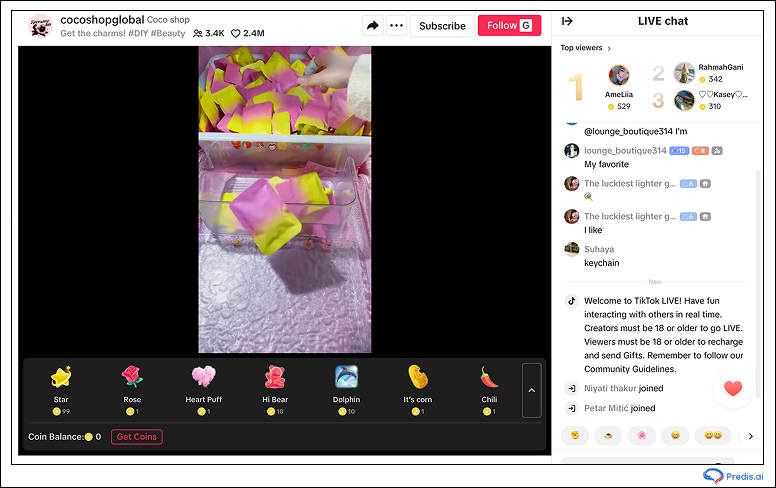
1. Find the ideal time to go live
If you want to grab the attention of your target audience, it’s always best to research and go live when they are the most active. Going live at the right time can be one of the most decisive factors in helping you achieve the ideal fan engagement for your TikTok livestream.
Per a survey of 1,00,000 posts, it was revealed that the ideal time to post on Monday is at 12 pm and 4 pm EST. This time zone defines when there is a maximum TikTok viewer engagement rate in the USA.
Going live during this time can lead to more followers joining you since this is the time most of your audience will be active on the platform.
2. Your TikTok LIVE Stream Session should be Well-Structured
Plan out your LIVE stream to make sure you know what is going to be shown from beginning to end.
You can start by introducing yourself and greeting your audience. After a considerable number of people join, you can begin by explaining the purpose of the LIVE stream and what the broadcast will include.
Allow a few minutes for a Q&A session at the end of your stream. This will not only help increase your engagement rates but will also help your viewers feel included in the video.
3. Add a Call to Action
Including a call to Action before you end your TikTok Livestream session will give the users an idea of what to do next.
You should emphasize enough what the viewers will gain from the broadcast and then provide them with a direction in the form of a CTA, like asking them to visit your website or fill out an inquiry form.
Conclusion
It would help if you realized the importance of engaging with your audience during TikTok LIVE Streams. It can make your live broadcast session a huge success and help you gain a loyal fan following.
If you want to add life to the video content you post on TikTok, check out Predis.ai. It has customizable designs that help you align your content as per your brand voice. Sign up for a free account to start creating today!
Make stunning TikTok videos effortlessly with Predis.ai’s TikTok Video Maker – use AI to add premium templates, images, voiceovers, and music.
FAQs
Yes, you can go live without showing your face by using screen sharing, product demos, slides, or voice-only formats, as long as your content follows TikTok LIVE guidelines.
TikTok LIVE sessions can last as long as you want as there is no hard limit, but shorter, focused streams (30–90 minutes) usually perform better in terms of engagement and retention.
Yes, going live regularly can increase followers because TikTok prioritizes LIVE streams in feeds and promotes sessions with high real-time engagement.
Absolutely. Business accounts can use TikTok LIVE for product launches, demos, Q&As, and live shopping, provided they meet the eligibility requirements.
This can happen due to age restrictions, community guideline violations, country limitations, or delayed feature rollout. Updating the app and checking account status often helps.
At minimum, you need a stable internet connection, good lighting, and a clear microphone. For PC streams, a webcam and streaming setup via TikTok LIVE Studio improves quality.
The best time depends on when your audience is most active. Generally, evenings and lunch hours perform well, but checking your TikTok analytics gives the most accurate timing.
Yes, eligible creators can earn through LIVE gifts, brand collaborations, affiliate links, and product promotions during livestreams.