Explore this content with AI:
Instagram’s ad platform reaches over 1.74 billion people. For most businesses, that scale is both the opportunity and the problem — broad targeting means your budget gets spread across people who are too far away, in the wrong market, or simply unable to act on your offer.
Location targeting solves this. By narrowing delivery to specific countries, cities, zip codes, or a custom radius around your address, you ensure your ads are seen by people who can actually become customers. For local service businesses, retailers, and eCommerce brands with regional promotions, it’s one of the highest-leverage targeting levers available.
This guide covers every location targeting option available in Meta Ads Manager, how Instagram identifies user location, the strategies that work best by business type, and the creative alignment that makes geo-targeted ads convert — not just reach.
Why Location Targeting Matters in Instagram Ads?
Geo-targeting or location targeting is more than just showing ads to people nearby. It changes the game and makes your Instagram ads work even better if you do it right.
That’s why location planning is so important:
- Higher Intent: Users who are close by are more likely to act right away, especially when it comes to in-store or nearby services.
- Cost-effectiveness: You don’t waste money on people who are too far away to convert.
- Personalized Messaging: with local references seems more important and gets more people to click on them.
- Real-time relevance: You can reach out to people during certain holidays, events, or time zones in their area.
How Instagram Identifies User Location
Before setting up targeting, it helps to understand how Instagram actually knows where your potential customers are. Meta uses three primary signals:
IP Address
Instagram estimates location by matching a user’s IP address against geographic databases. This is a broad signal — accurate to the city level in most cases, but imprecise for neighbourhood or radius targeting. Users on VPNs or public Wi-Fi may register at a different location than where they physically are.
Device Location Services
For users who have granted location permissions to the Instagram app, the platform can access far more precise data via:
- GPS — accurate to within a few metres
- Wi-Fi networks — building-level accuracy
- Mobile towers — area-level accuracy
This is the most precise signal and powers radius targeting accuracy. Users who have denied location permissions to the Instagram app fall back to IP-based estimates.
User-Provided Location Data
Instagram also collects location information that users share voluntarily:
- Geotagged posts and Stories
- Profile location settings
- Business account addresses
- Check-ins and location stickers
This user-provided data is considered the most valuable targeting signal because it reflects real interest in or connection to specific locations, and it’s consent-based. A user who regularly geotags posts from a specific neighbourhood, for example, is a reliable match for a local radius campaign targeting that area.
What this means for advertisers:
Radius and city-level targeting are most accurate for users who have location permissions enabled and who actively geotag content. For broader targeting (country, region), IP-based signals are sufficient. Always give your location targeting settings a small buffer — if you want to reach people within 5km of your store, targeting 6–7km is a reasonable adjustment for signal imprecision at the edges.
Types of Location Targeting Options on Instagram Ads
Meta Ads Manager lets you segment your audience by location. The key choices are:
1. Countries/Regions
- Ideal for global brands releasing products internationally.
- Ideal for awareness-stage or multilingual marketing.
- Combine with language targeting for accuracy.
2. Pin Codes and Cities
- Ideal for urban targeting.
- Great for small businesses, citywide deals, and regional marketing.
- Test city-specific ads with granular control.
3. Radius Targeting (Around a Specific Address)
- Ideal for retailers, clinics, cafes, gyms, and events.
- Helps serve advertising within 3–10 miles.
- Boosts foot traffic and hyperlocal service bookings.
4. Exclude Location
- Avoid squandering money on unnecessary things.
- Dismiss underperforming areas or those beyond your service zone.
- Helps optimize campaign reach.
5. DMA (Designated Market Area) Targeting
- Ideal for US-based advertisers and regional brand campaigns.
- DMAs are predefined geographic media markets (e.g., the New York DMA, the Dallas–Fort Worth DMA).
- Useful for brands running campaigns aligned with broadcast or regional media schedules.
- Available in Meta Ads Manager under the location search field — type the DMA name directly.
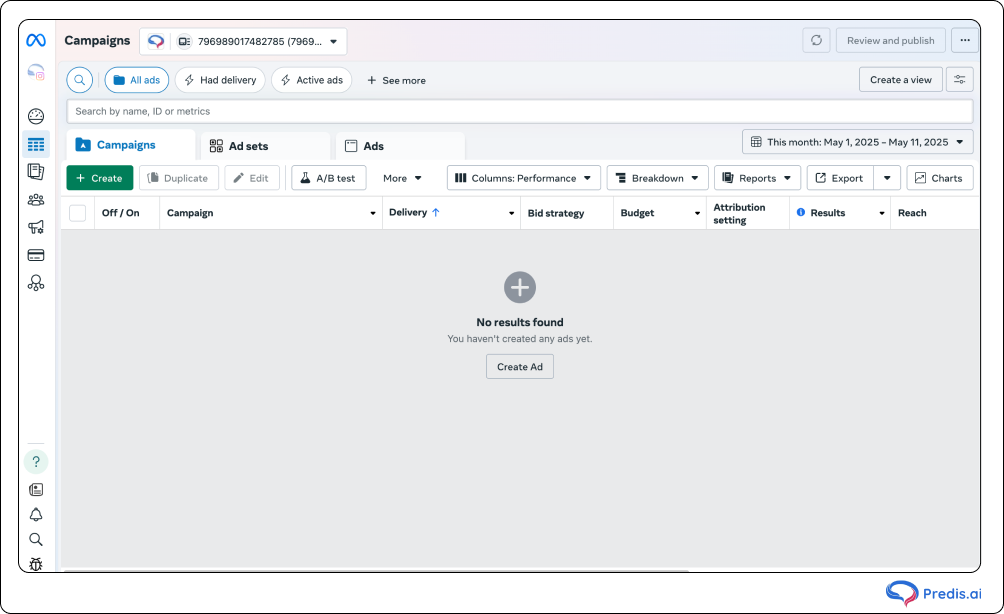
How to Set Up Location Targeting in Meta Ads Manager?
To appropriately set location targeting:
- Visit Meta Ads Manager > Start a fresh campaign.
- Choose your campaign goal—that is, conversions, reach, traffic.
- View Audience settings at the Ad Set level by scrolling.
- Choose under Location:
- “People living in this location.”
- “People recently in this location.”
- People traveling in this location.”
- Add or exclude
- Countries
- States and Territories
- Cities or postal codes
- Custom radius around a pin or address
Always match your business type with your target goal. Radius targeting will help a restaurant; an e-Commerce firm could want region-based targeting.
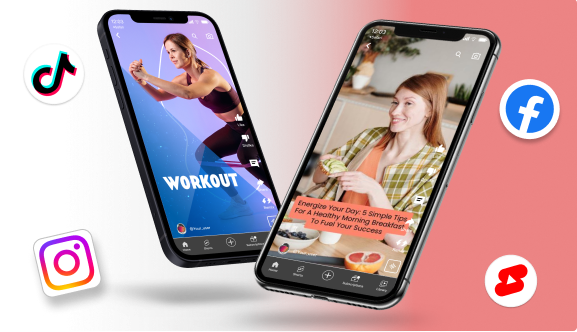
Making Your Creative Feel Local
Geo-targeting determines who sees your ad. But whether they click depends entirely on whether the ad feels relevant to them and where they are. This is the part most advertisers skip — and it’s why two campaigns with identical targeting can have completely different CTRs.
Local creative alignment has three layers:
1. The Ad Itself
Use location-specific signals in your creative:
- Local language and phrasing — “Book a table in [insert city]” converts better than “Book a table near you” for that city audience. Use the neighbourhood or city name if your audience is that specific.
- Recognisable landmarks or references — A real estate ad showing a building near a well-known local landmark outperforms a generic property photo.
- Local social proof — “Join 200+ members in [Area}” or “Rated #1 in [City]” creates immediate in-group relevance.
- Local offers with urgency — “Free delivery in [Area] tonight only” perform better than a generic discount because the specificity creates credibility.
2. The CTA and Offer
Make the offer specific to the location. A generic “Order Now” CTA is weaker than “Order in [City] — Delivered in 45 min.” If you’re running the same campaign across multiple cities, create separate ad sets with city-specific copy rather than one generic version. Mobile proxies can help verify how each version appears to mobile users in the target city.
3. The Post-Click Experience
This is where most geo-targeted campaigns lose conversions. If your ad says “Book your free consultation in [City]” and your landing page is a generic national homepage, the user experiences a disconnect. For local campaigns, the landing page should:
- Confirm the location name in the headline
- Show the specific address, map, or service zone
- Include a city-specific CTA (not just “Book Now” — “Book at our Chennai clinic”)
If you don’t have location-specific landing pages, even a URL parameter that personalises the page headline can improve conversion rates meaningfully.
Best Location Targeting Strategies for Instagram Ads
Location targeting works best when aligned with business goals and backed by strategic execution. Here’s how to do it right:
- Align Location Targeting with Your Campaign Goals
- Decide on larger areas for marketing for brand awareness.
- For local store visits, apply radius targeting or pin-code.
- Change your approach to fit the availability of your product and service range.
- A/B Test on Various Locations
- Test radius vs city aiming.
- Analyze advertisement performance in two separate cities.
- Invest more where you find data to be most appropriate.
- Match Location with Demographics and Interests
- Filters audience according to location, age, and interest.
- Target, for instance, gym buffs within a 10-mile radius between 25 and 40.
- Produces highly relevant, high-converting advertising.
- Use Lookalike and Custom Audiences by Location
- Create similar audiences from local website visitors or consumers.
- Combine to double the effect with local targeting.
- Create unique location-based lists from CRM data.
Mistakes to Avoid in Instagram Location Targeting
These are the kinds of pitfalls that even seasoned advertising professionals fall into:
1. Targeting too broadly
Setting an entire country when your business only serves three cities means paying for impressions from people who will never convert. Always start with the smallest geography that includes your realistic customer base, then expand based on data.
2. Not using exclusions
If you serve specific zones but not others, failing to exclude the non-served areas wastes budget and produces “not available in my area” bounce rates on the landing page. Add exclusions for every area outside your service zone.
3. Ignoring performance by location
Running a single campaign across five cities and reporting on blended performance hides which cities are working. Break campaigns down by city or region, or use breakdown reporting in Ads Manager (Breakdown → Delivery → Region) to see performance per geography. Double down on the cities with the lowest CPA and pause or reduce budget in underperforming ones.
4. Misusing “recently in this location.”
“Recently in this location” includes tourists, business travellers, and people who passed through — it’s a much broader audience than your resident base. For businesses that serve only long-term local customers (gyms, subscription services, local professionals), this setting inflates reach without improving relevance. Use “People living in this location” as your default.
5. Not refreshing exclusions after service zone changes
If your delivery zone, franchise territory, or service area changes, update your location settings immediately. Advertisers who expanded their delivery zone to new cities but forgot to update ad set targeting have generated orders they couldn’t fulfil — a costly experience for both the brand and the customer.
Measuring the Success of Your Location-Based Campaigns
Tracking performance is critical for refining your targeting strategy:
- Check CTR and CPC by location: See which regions are engaging most.
- Monitor conversions per geo-zone: Double down on high-converting cities.
- Analyze foot traffic (if applicable): Use Meta’s offline event tracking.
- Compare performance over time: Adjust your geo-targeting monthly based on new data.
Bonus Tips & Strategies for Hyperlocal Instagram Ad Success
Take your location targeting to the next level with these tactics:
- Use local language or slang: Makes your brand relatable and boosts engagement.
- Add location tags and hashtags: Increase organic reach and discovery.
- Collaborate with micro-influencers: Pick local creators who have strong trust in the area.
- Run flash offers with urgency: Encourage quick action from nearby users.
- Highlight maps or landmarks in visuals: Enhances trust and recognition.
Conclusion
Location targeting on Instagram works best when all three layers are aligned: the right targeting settings, creative that references the specific geography, and a landing page that confirms the local promise.
For local businesses, start with radius targeting (5–10km), use “People living in this location” as your behavioural setting, and create ad copy that names the neighbourhood or city. For eCommerce brands, target by shipping zone and high-performing regions, then let performance data guide budget allocation.
Test, measure by geography in Ads Manager’s breakdown reports, and shift budget toward the locations delivering the lowest CPA. Most advertisers find that geographic performance is highly uneven — identifying and doubling down on your top 20% of locations is one of the fastest paths to ROAS improvement.
Ready to build Instagram ads that convert locally? Predis.ai’s Instagram ad design platform lets you create platform-optimised ad creatives from a product link or prompt — with brand-consistent visuals for every location-specific campaign you run.
Frequently Asked Questions (FAQs)
Use a layered approach: radius targeting for local businesses (5–10km for walk-in traffic, 10–25km for delivery zones), city-level targeting for regional brands, and country-level targeting for national campaigns. Combine location with demographic and interest filters for maximum relevance, and always create ad creative that references the specific location for higher CTR.
In Meta Ads Manager, go to your Ad Set level, scroll to the Audience section, and click the Location field. You can search by country, state, city, zip/postal code, or drop a pin to set a custom radius. Set the behavioural option (living here vs. recently here) based on your campaign goal, then add exclusions for areas you don’t serve.
Advantage+ campaigns treat location settings as preferences, not hard constraints. Meta’s AI may deliver ads beyond your specified geography if it predicts a conversion is likely. For businesses where geographic boundaries are business-critical, use standard manual campaign types with the “People living in this location” behavioural setting.