Explore this content with AI:
In an era dominated by high-definition Reels and complex AI-generated videos, making Boomerang on Instagram remains a remarkably effective tool for one reason: it captures the “micro-moment.”
Social media users are increasingly fatigued by “over-produced” content. The Boomerang offers a refreshing, raw alternative that stops the scroll by focusing on a single, rhythmic motion. It is the perfect bridge between a static photo and a full-length video—delivering just enough “life” to keep a user’s attention without requiring a 60-second commitment.
What is an Instagram Boomerang?
At its core, a Boomerang is a burst of photos stitched together into a high-quality mini-video that plays forward and then backward in a seamless loop.
One of the reasons they are popular is that they are the ultimate “low effort, high reward” content. You don’t have to script a whole Reel or worry about transitions; you just capture a second of movement and let the loop do the work. Plus, because they’re so satisfying to watch, people usually let them loop three or four times, which gives your engagement a nice little boost without you having to spend an hour in an editing suite.
How to Create an Instagram Boomerang?
You no longer need a separate app to create these loops. Instagram story has integrated several native ways to generate them, whether you are shooting live or using your existing library.
Method 1: Using the Instagram Story Camera
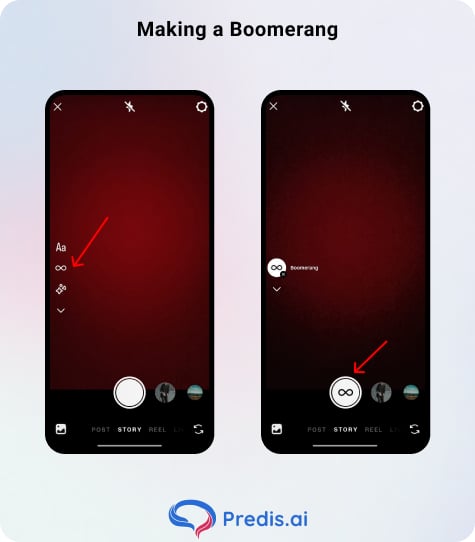
- Open the Instagram app and swipe left to access the Story Camera.
- On the left-hand sidebar, look for the Infinity (∞) icon. This is the Boomerang mode.
- Tap the icon. You will see the capture button change to the Boomerang symbol.
- The Secret Sauce: Don’t just tap the button. Press and hold to capture a slightly longer burst, which gives the AI more data to create a smoother loop.
Method 2: Turning a Live Photo into a Boomerang
If you captured a great moment using your phone’s camera instead of the app, you can still “Boomerang” it.
- Open your Stories and swipe up to access your Camera Roll.
- Select a Live Photo (look for the infinity badge on the thumbnail).
- Now, apply the boomerang feature and add the right effects and filters.
- Once you are done, publish the boomerang and share it with your friends.
Method 3: Turning Existing Video into a Loop
You can now retroactively apply the effect to any video clip in your gallery.
- Upload a short video clip (under 5 seconds works best) to your Story.
- Tap the three dots in the top right corner and select the Boomerang (∞) icon.
- Instagram will automatically pick the most “loopable” segment of your video. You can then use the slider at the bottom to trim the exact start and end points for the perfect bounce.
Pro Tips for the Perfect Loop
1. The “Statue” Rule
For the loop to look professional, the camera must be perfectly still. Use a tripod or brace your phone against a wall. If the camera moves while the subject moves, the loop feels chaotic rather than hypnotic.
2. Lighting is Non-Negotiable
Boomerangs are captured at high speeds. This means the camera “shutter” is open for a very short time, letting in less light. If you shoot in a dark room, your Boomerang will look grainy and “noisy.” Always shoot toward a natural light source.
3. The “Apex” Point
Every great Boomerang has an apex—the furthest point of a motion (like a glass clinking or a person jumping). Ensure your loop captures that peak moment clearly.
4. Stick to One Simple Action
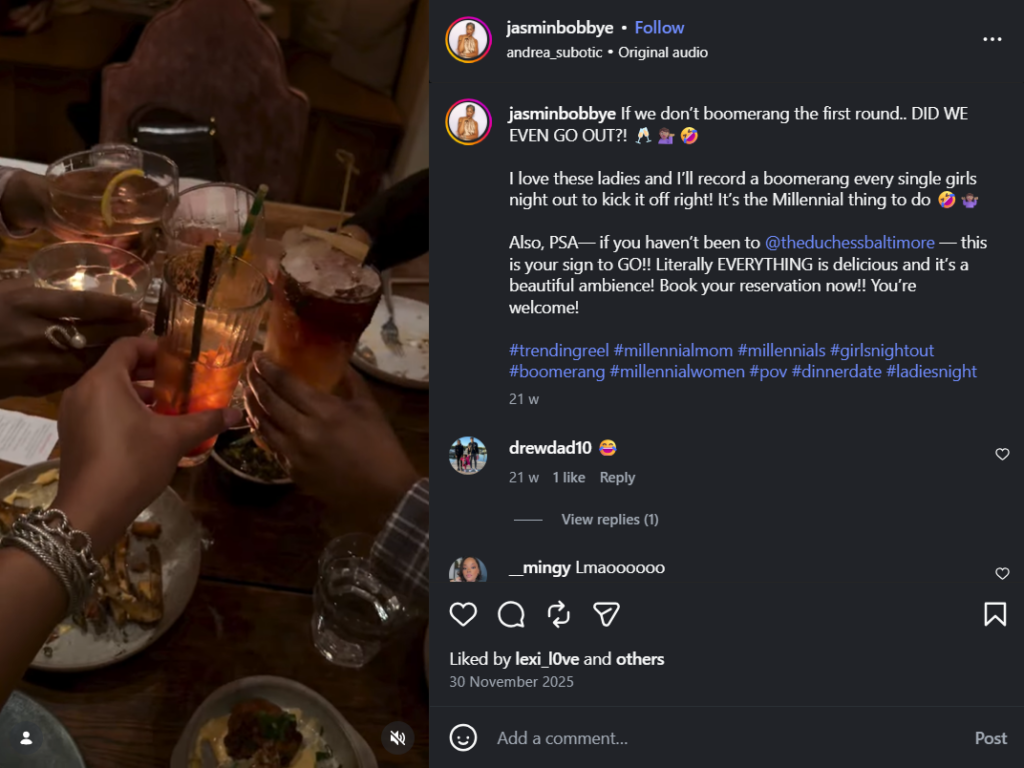
Look at this example, where the creators focus on a simple action of clinking glasses. Boomerangs work best when they focus on one clear move. Don’t try to do too much. A quick wave, a door opening, or a single blink is usually enough to make a great loop.
5. Focus on the Subject’s Motion
Keep your phone as still as possible while your subject moves. If you move the camera and the subject moves at the same time, the final result will look shaky and confusing.
6. Change Your Viewpoint
Don’t just hold the phone in front of your face. Try holding it high up to look down at a table, or low to the ground to make a step or a jump look more impressive. Experiment with different angles to find the most aesthetic one.
7. Use Built-in Filters and Effects
After you film, use Instagram’s stickers or text to add some personality. You can also use effects like Echo (which adds a blur) to change the vibe of the clip.
8. Take a Few Practice Shots
It’s hard to get the perfect timing on the first try. Record the same action a few times so you can pick the one where the movement looks the smoothest.
9. Change the Speed
You can actually slow down your Boomerang inside the app. If your movement was too fast, hit the “slow-mo” button in the settings to make it easier for people to see what’s happening.
10. Think Before You Shoot
Decide exactly when you want the “bounce” to happen. If you’re throwing something in the air, the best time to loop is when the object reaches its highest point.
11. Add an Object for Detail
Using things like blowing bubbles, pouring water, or throwing confetti adds a lot of life to a loop. These items look great when they play backward and forward.
12. Check for App Updates
Instagram updates its camera tools fairly often. Keep an eye on your Story settings to see if they’ve added any new ways to edit or trim your clips.
Boomerang Creative Ideas for 2026
Here are some creative ways in which you can use boomerangs in your product or brand strategy.
- Product Reveals: Slowly sliding a product out of its box and letting it “bounce” back in.
- Atmospheric Motion: Capture steam rising from a coffee cup, bubbles in a glass, or a flickering neon sign.
- The “Twirl”: A person spinning in a dress or a chair—the back-and-forth motion makes the fabric look like it’s dancing.
Why You Should Keep Posting Them
Apart from Boomerangs being fun and all, there are many more reasons why having them in your content roster can be beneficial:
- Algorithmic Dwell Time: Because they loop infinitely, users often watch a Boomerang 4–5 times before moving on. This tells the algorithm your content is engaging, which can boost the visibility of your next Story or post.
- Low Production Cost: You can create a high-performing Boomerang in 3 seconds. It’s the highest ROI content format for busy business owners.
- Personality Boost: They feel “real.” In 2026, followers crave the unpolished, fun side of a brand, and boomerangs are a way to make that happen.
Common Mistakes to Avoid When Making a Boomerang
Making an engaging boomerang is easy, provided that you do not make these mistakes:
- The “Wobble”: If you’re walking while shooting, the background will bounce violently, causing motion sickness. Keep the background static.
- Busy Environments: If 10 things are moving in the frame, the viewer doesn’t know where to look. One subject, one motion.
- Bad Trimming: If the loop cuts off mid-motion, it feels like a technical error. Use the trim tool to ensure the motion completes before it reverses.
Level Up: How to Make Boomerangs Longer
If the standard 1-2 second loop feels too short, you have options:
- The “Slo-mo” Feature: After filming your Boomerang, tap the infinity icon at the top to see the advanced settings. Select the Slo-mo icon (the clock). This doubles the length by slowing the frames down, making it feel more cinematic.
- The Stitch Method: Use a tool like Predis.ai to take three different Boomerangs of the same subject and stitch them into a rhythmic sequence. This creates a “long-form” loop that feels like a music video.
Conclusion: Mastering the Micro-Moment
In 2026, the Instagram Boomerang is more than a novelty; it’s a strategic tool for maintaining a “human” presence on your feed. It allows you to showcase products, emotions, and environments with zero friction. Don’t overthink it—find a single motion, keep your hands still, and let the loop do the talking.
Frequently Asked Questions
Yes! Always add a trending track via the music sticker to increase your chances of appearing on the “Exploration” pages.
Yes, just hit the “Save” icon (downward arrow) before posting, and the video will be automatically saved to your gallery.
The video must be short (usually under 5 seconds) and have clear movement. If the video is too static, the AI won’t be able to find a “bounce” point.