Reference-to-video
Add up to 9 images and name each one in the prompt ("Image 1 is the product"). This is how your actual sneaker, bottle or packaging ends up in the ad instead of a lookalike.
Seedance 2.0 is ByteDance's video model for clips of up to 15 seconds with sound, and it can work from your own photos, video clips and audio. Use it on Predis.ai to put your real product into a multi-shot ad, in any resolution from 480p to 4K, and see the exact prompt behind every example below.
The promptOne product photo as Image 1, then 3 shots: the sneaker on a concrete step, a jogger running down the steps, and her line to camera, "Built for the city." Full prompt and settings
A 10-second, 3-shot sneaker ad made with Seedance 2.0 from one product photo. Unmute to hear the footsteps and the line.
Seedance 2.0 is an AI video generator from ByteDance's Seed team, launched on February 12, 2026. It makes videos of 4 to 15 seconds with sound from text, images, video clips and audio, and it can cut between several shots in one generation.
The step up from Seedance 1.5 was in what it accepts. Earlier versions worked from text and a frame or two. Seedance 2.0 takes up to 9 images, 3 video clips and 3 audio clips in one prompt, so you can give it a product photo, a motion reference and a voice, and say what each one is for. It also makes stereo sound with the picture: dialogue, effects and music.
ByteDance released Seedance 2.5 in July 2026 with 30-second takes and more references. Seedance 2.0 is still the version with 4K output on Predis.ai, which keeps it the practical choice for most 5 to 15 second ads.
Every option you can pick for Seedance 2.0 in the Predis.ai Model Studio.
| Spec | Seedance 2.0 on Predis.ai |
|---|---|
| Clip length | 4 to 15 seconds, or let the model pick |
| Resolution | 480p, 720p, 1080p, 4K |
| Aspect ratios | 16:9, 9:16, 1:1, 4:3, 3:4 |
| Audio | On by default: dialogue, sound effects, music |
| Image references | Up to 9 |
| Video references | Up to 3, each 2 to 15 seconds, 15 seconds in total |
| Audio references | Up to 3, each 2 to 15 seconds, 15 seconds in total |
| Start and end frame | Yes, and you can still add video and audio references |
| Videos per run | 1 to 4 |
| Faster version | Seedance 2.0 Fast: 480p or 720p, quicker to make |
Checked in the Predis.ai Model Studio on November 23, 2026. Release date and reference limits from ByteDance Seed's launch post.
What it does that many video models don't, and the line in your prompt that turns each one on.
Add up to 9 images and name each one in the prompt ("Image 1 is the product"). This is how your actual sneaker, bottle or packaging ends up in the ad instead of a lookalike.
Give it a clip to copy the camera move or choreography from, and an audio clip for the voice or the beat. Few video models take all three kinds of reference at once.
Write "Shot 1, Shot 2, Shot 3" and Seedance 2.0 cuts between them in a single clip, keeping the same person and product across the cuts.
Dialogue with lip-sync, sound effects and music come out with the picture, in stereo. Put spoken lines in quotes and say who says them.
Long enough for a hook, a product moment and a payoff. Make it at 4K when the clip will run large, or at 480p to test the idea first.
Pin the first and last frame and let Seedance 2.0 animate between them, for packshot endings, reveals and transitions that have to land exactly.
4 clips made on Predis.ai with Seedance 2.0, untouched apart from compression. Each card shows the prompt and the settings. Unmute to hear the audio.
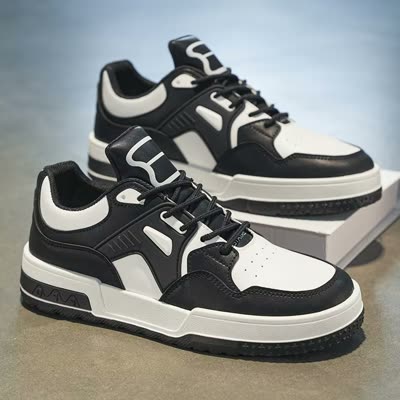
Image 1, the only reference: a plain product photo of the sneaker.
A 10-second sneaker ad in three shots. Image 1 is the product: keep this exact black and white sneaker, same panels, same white sole, same laces. Shot 1 (0-3s): Close-up of the sneaker from Image 1 on a concrete step in an empty city street at golden hour. The camera slowly slides along the side of the shoe. Sound: distant traffic, a soft bass pulse starts. Shot 2 (3-7s): A young woman in grey joggers wearing the same sneakers jogs down the concrete steps toward the camera, low angle, the shoes in focus. Sound: footsteps on concrete in rhythm with the beat. Shot 3 (7-10s): She stops, turns to the camera, smiles and says in English: "Built for the city." The camera pushes in on the shoes. Sound: the beat drops out on the last word. Photoreal, warm golden light, shallow depth of field. No text on screen, no logos.
The sneaker matches the product photo in all 3 shots, down to the panels and sole. In shot 3 she stays in a wide shot, so the line plays more like a voiceover than her talking to camera. Ask for a "medium close-up" if you need to see her say it.
Vertical selfie-style video, filmed on a phone at arm's length in a bright bathroom with morning light. A woman in her late 20s with curly hair holds up a small amber glass serum bottle with a dropper and a plain white label next to her face. She looks into the camera and says in English, casually, like she's talking to a friend: "Okay, three weeks with this one, and my skin's never looked this calm." She puts one drop on the back of her hand and shows it to the camera. Natural handheld shake. Sound: her voice close to the mic, a tap running softly in the background. No text, no captions, no logos.
Her line came out word for word, with a natural handheld feel. She held up the dropper instead of putting a drop on her hand, so the last action needed to be spelled out more plainly.
Macro food shot in slow motion. Thick golden honey pours from a wooden dipper onto a stack of three fluffy pancakes topped with a pat of butter. The honey folds over itself, runs down the sides and pools on the plate while the butter starts to melt. The camera slowly cranes down from above to eye level. Warm side light, dark wooden table, shallow depth of field. Sound: a soft sticky drip, a quiet sizzle, calm acoustic guitar.
The honey folds and runs down the sides as asked, and the butter melts. The stack came out as 4 pancakes rather than 3, and the crane move is subtle.
One continuous take, warm documentary look, small café in morning light. A barista grinds beans, tamps, pulls an espresso shot, steams milk and pours a leaf of latte art. Continuous close tracking. Sound: grinder, steam wand, café ambience.
The longest clip Seedance 2.0 makes, with every step of the drink in order. This is a shortened version of the prompt; the full one described the counter and lens in more detail.
Made on Predis.ai with Seedance 2.0. The barista clip is from October 9, 2026 and the others from November 23, 2026. People shown are invented.
You don't need a BytePlus or CapCut account. Seedance 2.0 is in the Predis.ai Model Studio, and it's available in the US.
Open the Model Studio and choose Seedance 2.0, or Seedance 2.0 Fast for quicker drafts.
Upload product photos, a motion clip or an audio track. Skip this step for pure text-to-video.
Name each reference ("Image 1 is the product"), then write the shots in order with what we see, what the camera does and what we hear.
Choose 4 to 15 seconds and 480p to 4K. Draft low and finish high.
Seedance 2.0 follows a prompt written like a shot list better than one long paragraph. Name your references first, then give each shot its own line with a time range.
A Seedance 2.0 prompt template for a short ad
Image 1 is [the product]. Keep it exactly as shown. Video 1 is [the camera move to copy]. Audio 1 is [the voice or track].

Shot 1 (0-4s): [What we see]. Camera: [move]. Sound: [what we hear].
Shot 2 (4-9s): [Your product in use]. Camera: [move]. Sound: [what we hear].
Shot 3 (9-12s): [Person] says in [language]: "[one short line]". Camera: [move].

[Look: light, lens, palette]. No text on screen, no logos.
"Image 1 is the product, Image 2 is the location" works far better than uploading 3 photos and hoping. Unnamed references get mixed together.
For products, list the details that matter ("same panels, same white sole"). Seedance 2.0 keeps what you name and improvises the rest.
In 10 to 15 seconds, 2 or 3 shots read clearly. Five quick cuts in a short clip tend to blur together.
Background signs and labels can come out smudged. Ask for "no text on screen" and add your headline and offer in Predis.ai afterward.
Real people's faces, including your own selfies, are restricted. Describe a character instead, or use the same invented character across clips.
Get the prompt right at a low resolution first, then make the final at the size you need.
Seedance 2.0 is strongest when you have something real to show: a product, a place or a track.
Turn the product photos you already have into a moving, multi-shot ad that keeps your packaging recognizable.
Selfie-style talking clips in 9:16 for Reels, TikTok and Shorts, with an invented creator and your product in hand.
Slow-motion pours, textures and macro shots, the kind of footage that used to need a studio day.
Add a track as an audio reference and a motion clip as a video reference, and the movement follows the beat.
Predis.ai has 4 Seedance versions in the Model Studio. Here's what separates them.
| Spec | Seedance 2.0 | Seedance 2.0 Fast | Seedance 2.5 | Seedance 1 Pro |
|---|---|---|---|---|
| Clip length | 4 to 15 s | 4 to 15 s | 4 to 30 s | 2 to 12 s |
| Highest resolution | 4K | 720p | 1080p | 1080p |
| References | 9 images, 3 videos, 3 audio | 9 images, 3 videos, 3 audio | 30 images, 10 videos, 10 audio | Start and end frame |
| Native audio | Yes | Yes | Yes | No |
The video models people most often weigh against Seedance 2.0, compared on the options you get in the Predis.ai Model Studio.
| Spec | Seedance 2.0 | Kling 3 Pro | Veo 3.1 | Vidu Q3 |
|---|---|---|---|---|
| Made by | ByteDance | Kuaishou | ShengShu | |
| Clip length | 4 to 15 s | 5 to 10 s | 4, 6 or 8 s | 4 to 8 s |
| Highest resolution | 4K | Set by the model | 4K | 1080p |
| Reference inputs | 9 images, 3 videos, 3 audio | Start and end frame | 3 images, or start and end frame | 4 images, or start and end frame |
| Native audio | Yes | Yes | Yes | Yes |
Settings from the Predis.ai Model Studio on November 23, 2026.
Seedance 2.0 runs longer, goes to 4K and takes your photos, clips and audio as references. Kling 3 Pro works from a start and end frame only, so it suits shots where you already have both frames. See Kling 3.0 Pro
Both reach 4K with sound. Veo 3.1 tops out at 8 seconds and takes 3 image references, while Seedance 2.0 runs to 15 seconds with video and audio references too. See Veo 3.1
Vidu Q3 is simpler for a short talking clip or an anime scene, and Seedance 2.0 is the one for longer, multi-shot ads built from your own footage. See Vidu Q3
MiniMax H3 is another option for short clips, with video input and four versions to choose from. Seedance 2.0 is the pick when you need 4K or several kinds of reference in one prompt. See MiniMax H3
ByteDance lists several of these itself in its launch notes. The rest come from reviewers and from making the clips on this page.
Signs and labels in the background can come out smudged or misspelled.
FixKeep text off the frame and add it in Predis.ai.
ByteDance restricts real people's faces, so uploading a selfie or a celebrity photo won't work.
FixDescribe an invented character and reuse them.
With several people interacting, details can drift between them.
FixKeep to 1 or 2 people and say who does what.
ByteDance notes that the sound can occasionally distort.
FixAlways check with sound on, and keep the sound line in your prompt short and specific.
Sources: ByteDance Seed launch post, DataCamp review.
Seedance 2.0 is ByteDance Seed's AI video generator, launched on February 12, 2026. It makes 4 to 15 second videos with sound from text, images, video clips and audio, and can cut between several shots in one generation.
It's part of paid Predis.ai plans, and you can try it during the 3-day trial, which needs a card and moves to a paid plan unless you cancel.
4 to 15 seconds per clip. For a single take longer than 15 seconds, Seedance 2.5 goes up to 30 seconds.
Yes. On Predis.ai you can pick 480p, 720p, 1080p or 4K. Many people draft at a lower resolution and render only the final in 4K.
Yes. Add up to 9 images and say what each one is in the prompt, for example "Image 1 is the product". The sneaker ad on this page was made from one product photo.
Yes. It makes dialogue with lip-sync, sound effects and music with the video. You can also add up to 3 audio clips as references for a voice or a beat.
ByteDance restricts real people's faces in Seedance 2.0, including selfies, after copyright and likeness complaints in February 2026. Describe an invented character instead.
Seedance 2.5 makes single takes of up to 30 seconds and takes up to 30 images, 10 videos and 10 audio clips. Seedance 2.0 keeps 4K output on Predis.ai.
A quicker version of Seedance 2.0 with the same references and lengths, limited to 480p and 720p. It's useful for drafts before you make the final on Seedance 2.0.
For reference-driven ads, Seedance 2.0 does more: longer clips, 4K, and photos, clips and audio as references. Kling 3 Pro works from a start and end frame.
Yes, through ByteDance's BytePlus ModelArk and Volcano Engine and providers such as fal. BytePlus isn't available in the US. On Predis.ai you don't need an API key.
No. ByteDance hasn't released the model weights. You use it through ByteDance's own apps, its API, or platforms like Predis.ai.
Start from the 3-shot template above, add your product photo, and draft it at 480p first.
Seedance is a trademark of ByteDance. Predis.ai is not affiliated with or endorsed by ByteDance.