Video model by Kuaishou (Kling AI)

Kling 3.0 Pro

Kling 3.0 Pro cuts between several shots inside one 10-second clip, and keeps your product, your people and even the words on your label consistent from cut to cut. Every clip on this page comes with its prompt, so you can see exactly how the shots were called.

Make a video with Kling 3.0 Pro
Made with Kling 3.0 Pro

The prompt

16:9, 10 seconds, sound on. Multi-shot, 4 shots: "One Ride, Four Seasons". Look: premium motorcycle commercial. Cinematic 35mm, low tracking shots, rich natural color, soft film grain. One rider on a sport superbike in white, blue and red racing colors rides the same mountain road in every shot, so the four seasons read as one continuous ride. Hide each cut in motion: spray off a wheel, a burst of sunlight, a dark tunnel. Rider (adult): black helmet, black leather riding jacket and gloves. Keep the rider, the helmet and the motorcycle identical in every shot. Shot 1 (0-2.5s): Spring. Low close shot at wheel height as the motorcycle leans through a wet bend between fresh green trees, the front tire throwing spray off the road. Shot 2 (2.5-5s): Summer. The same road in golden backlight, the sun flaring behind the rider as the bike rolls toward the camera between green meadows. Shot 3 (5-7s): Autumn. Side tracking shot alongside the bike through a forest of orange and red leaves, low sun flickering through the trunks. Shot 4 (7-10s): Winter. The motorcycle bursts out of a dark tunnel onto a snow-covered mountain road, snowbanks on both sides and snowy peaks behind. Sound: the engine and the road, rushing wind, cinematic music. Negative prompt: misspelled text, a different motorcycle, the rider changing between shots, cartoon style.

Settings

  • 10 seconds
  • 720p
  • 16:9
  • Sound on

Made with Kling 3.0 Pro on October 21, 2026. Trimmed only, nothing else touched.

Try this prompt

A 10-second ad in 4 shots: one rider on a white, blue and red superbike rides the same mountain road through spring rain, summer sun, autumn leaves and winter snow. Made with Kling 3.0 Pro.

Photo to video

Start from the product photo you already have

Upload a photo of your product and describe the world around it, and Kling 3.0 Pro turns it into a finished product film. Here, one bottle photo becomes 9 shots in a green world, with the label intact in every one.

Hover a reference to see where it shows up.Tap a reference to see where it shows up.

Shooting your own product photo? Light it evenly and keep the label facing the camera, since the video can only keep what the photo shows.

The result

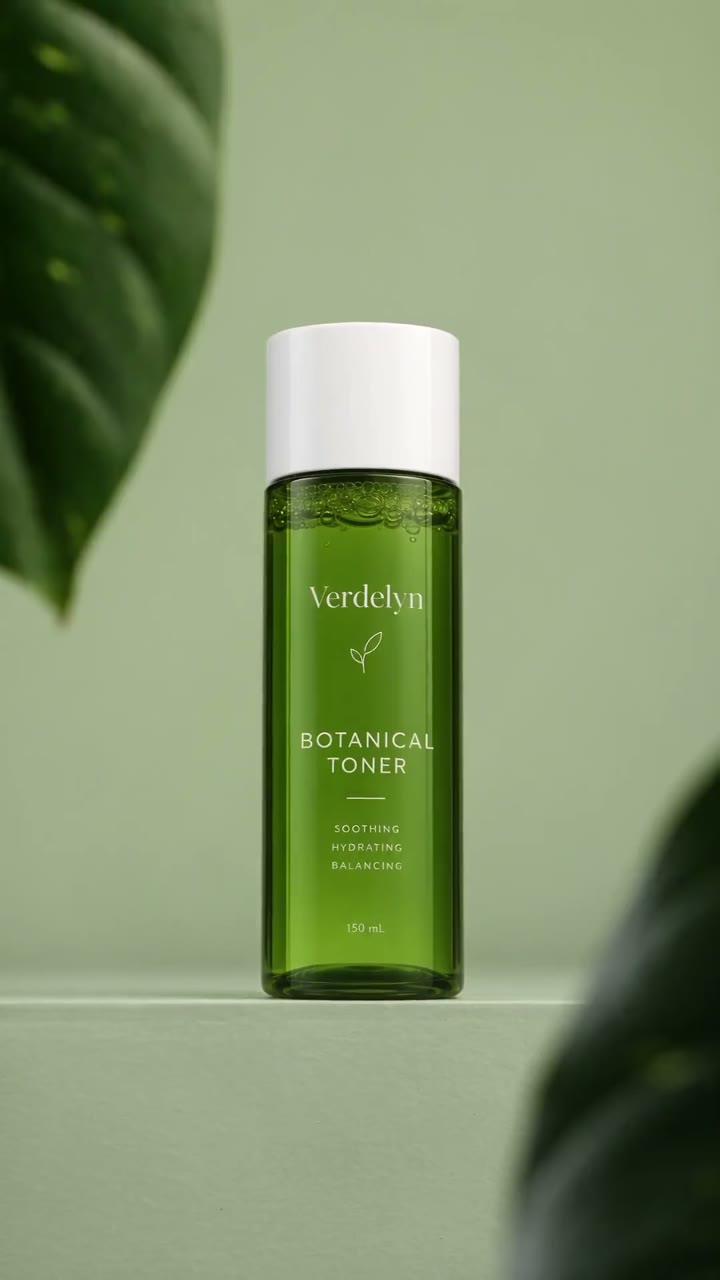
The Verdelyn toner bottle in 9 shots: floating on green water, a leaf in macro, a drop falling from the bottle, its label in macro, rippling water, rising bubbles, the tilted bottle, the bottle on a mint surface, and a hero shot on a sage-green ledge. Made from 1 product photo.

Text that holds

Your label, still readable at 0:08

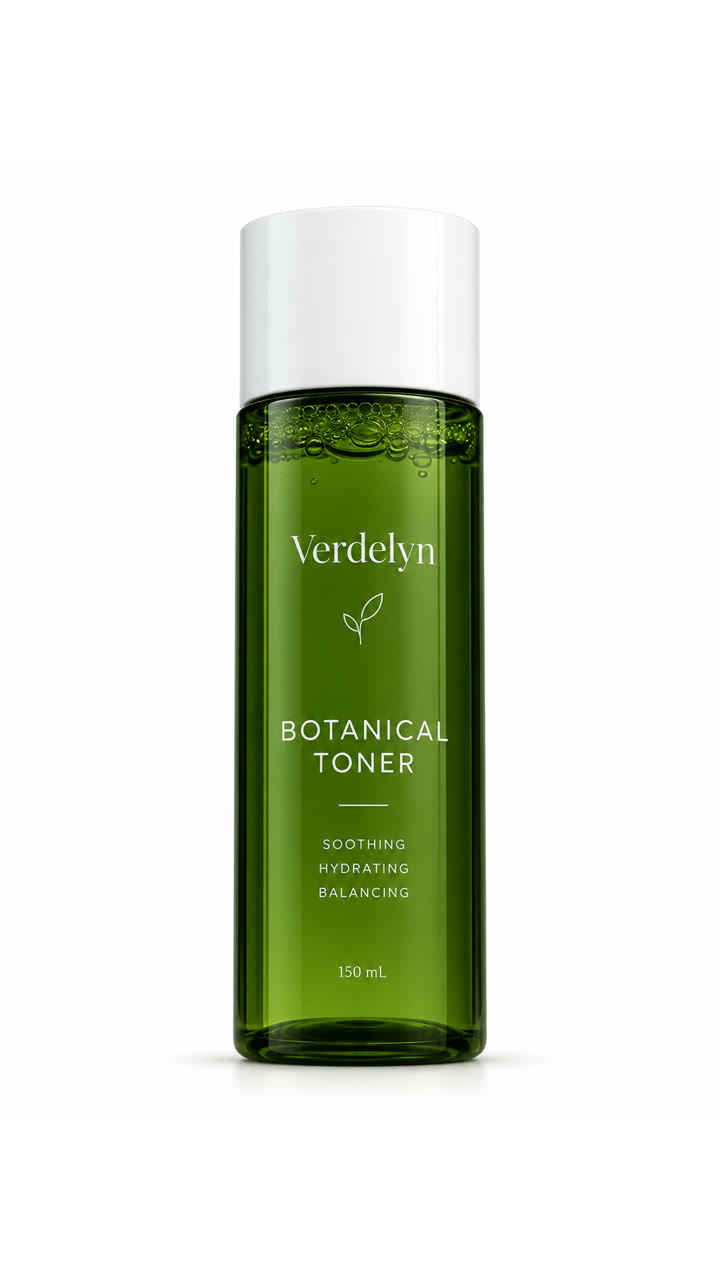
Small text is usually where AI video gives itself away. Kuaishou built Kling 3.0 to keep labels, signs and captions legible, so drag across and compare the photo you uploaded with a frame from the video.

The Verdelyn toner bottle product photo on white, label facing the camera The same bottle on a green ledge at 0:08 in the Kling 3.0 Pro video, with the Verdelyn label still readable Your photo Frame at 0:08
Image 1 against the video at 0:08, in the final shot. Drag to compare.
Specs

Kling 3.0 Pro at a glance

  • Made byKuaishou (Kling AI)
  • LaunchedFebruary 5, 2026
  • Clip lengthUp to 10 seconds on Predis.ai
  • Shots per clipUp to 6
  • Resolution1080p in Pro mode
  • Formats16:9, 9:16 and 1:1
  • SoundMade with the video, in 5 languages
  • Starts fromText, or images as the first and last frame
Last checked on October 26, 2026.
Multi-shot

One prompt, 4 seasons, cut for you

Write each shot with its own framing and length, and Kling 3.0 Pro cuts between them while the rider, the motorcycle and the road stay the same. Click a shot to see the line of the prompt that called it.

Click a shot to jump to it.Tap a shot to jump to it.

Planning an ad? Give your product its own shot near the end, so the label is the last thing people see.

Step by step

How to use Kling 3.0 for character consistency

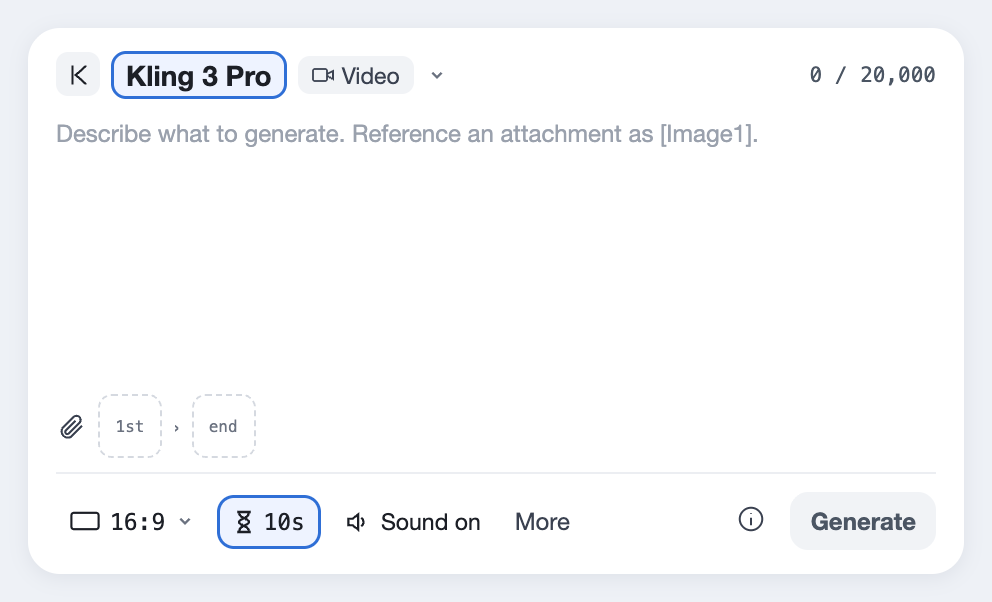
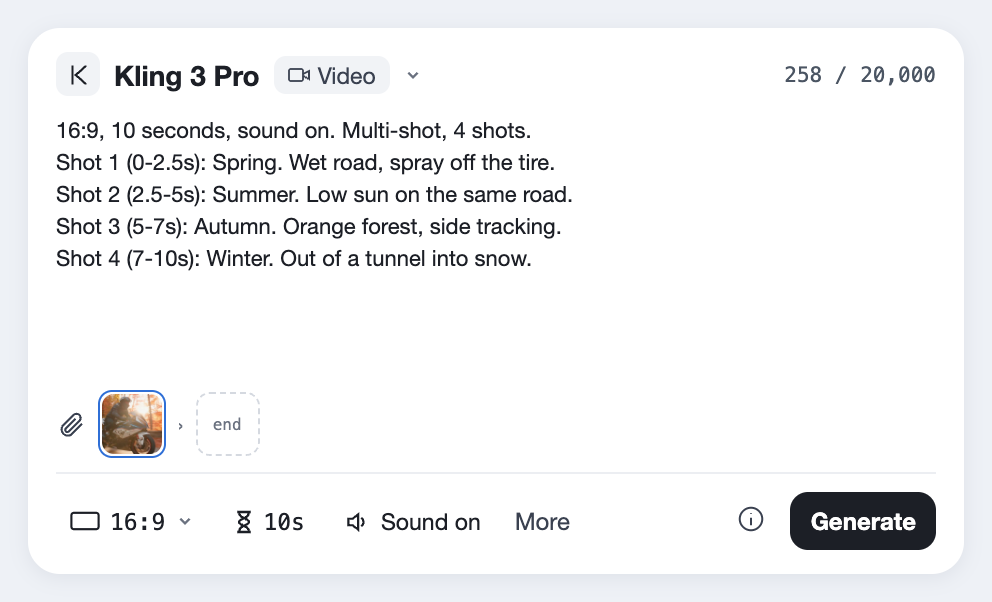
  1. Kling 3 Pro selected in the Predis.ai Model Studio, with the length set to 10 seconds
    01

    Pick Kling 3.0 Pro

    Open the Model Studio and choose Kling 3 Pro. Kling 3 Standard sits next to it in the list, for cheaper test runs.

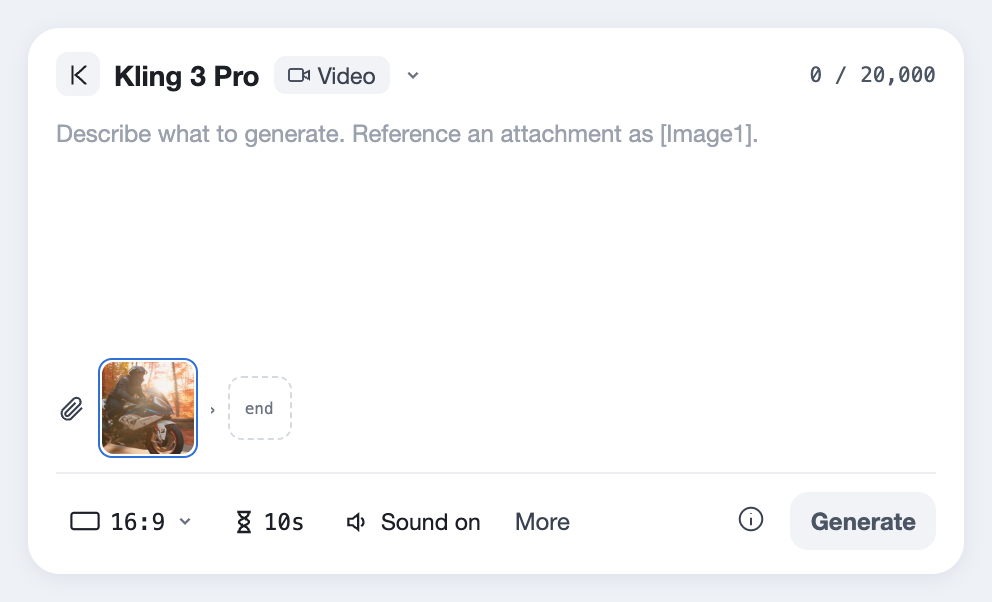
  2. One photo added in the first frame slot under the prompt
    02

    Use the same photo every time

    Upload one clear photo as the first frame, and reuse that exact file for every clip in the campaign. Kling keeps things consistent inside a clip, so a matching first frame is what carries the look from one clip to the next.

  3. A prompt with 4 shots, each with its timing, typed above the settings bar
    03

    Write one line per shot

    Give each shot its length, its framing and what happens, and describe the product the same way in every line. A 10-second Pro clip takes about 3 minutes.

Kling's multi-shot mode is built around a shot list, so write it as one. Here's the shape we start from.

[The look: lens, light, palette]. [16:9, 9:16 or 1:1], 10 seconds, sound on.
Image 1 is [the product]. Image 2 is [the person or the place].

Shot 1 (0-2s): [Wide. Where we are.]
Shot 2 (2-5s): [Medium. What happens.]
Shot 3 (5-8s): [Close-up. The product, label facing the camera.]
Shot 4 (8-10s): [How it ends.] [Who speaks] says: "[The line]"

Sound: [music], [effects], [voice and accent].
Standard or Pro

Is Pro worth it?

Same prompt on Standard and Pro, played side by side. Pro renders at 1080p instead of 720p, so look at the rebar, the dust and the glass panels before you check the cost below.

The prompt on both

16:9, 10 seconds, sound on. One continuous FPV shot, no cuts. Run once on Standard and once on Pro, with the same seed if available. Look: photorealistic construction blockbuster at IMAX scale. A 14mm extreme wide-angle FPV camera, bright volumetric sunlight, aggressive speed ramps, realistic materials, concrete dust and metallic reflections. One modern tower, the same design throughout. Gravity reverses over a construction site, and the tower assembles itself from the ground up. 0-2s: The camera races just above rough ground toward an unfinished building. Stones, bolts and dust lift off and float up past the lens while cranes and excavators stay below. 2-4s: Steel beams and rebar cages launch skyward and the camera rockets up through them, near-misses on both sides. 4-6s: The camera climbs beside the concrete frame as columns lock in and floor slabs swing into place. 6-8s: Outside in a fast orbit, blue glass panels snap onto the tower in a wave, sparks and dust streaming upward. 8-10s: The last facade pieces lock into place, and the camera pulls back to reveal the finished building: a white cube whose whole front is a giant glowing screen of colorful waves, cranes standing beside it. Sound: deep rumbling bass, groaning steel, a sharp metallic lock on every snap, wind rushing past the lens. Negative prompt: morphing architecture, a second building, floating islands, people, text, captions, logos, watermark.

Settings

  • 10 seconds
  • 720p and 1080p
  • 16:9
  • Sound on
Try this prompt
Kling 3.0 Standard, 720p
Kling 3.0 Pro, 1080p
0:00 / 0:10

Gravity reverses over a construction site and a building assembles itself in one continuous FPV shot, ending on a giant glowing screen facade, made with the same prompt on Kling 3.0 Standard and Kling 3.0 Pro.

FeatureStandardPro
Resolution720p1080p
Clip length on Predis.aiUp to 10 secondsUp to 10 seconds
Multi-shotYesYes
SoundMade with the videoMade with the video

We'd write and test on Standard, then make the version you'll post on Pro, but that's your call.

Made with Kling 3.0 Pro

Prompts with the cuts written in

Every clip here came from one prompt, shots and all. Open one to see how the cuts were called, then swap in your product.

Before you spend

Where it falls short

These come from Kuaishou's own specs and from reviewers who've used it on real work. Each one has a workaround, so read them before your first 10-second clip.

10 seconds per clip

Kling 3.0 can run 15 seconds, but on Predis.ai each generation stops at 10, shots included.

FixFor a 30-second ad, make 3 clips with the same references and join them, or use Seedance 2.5 for 30 seconds in one take.

Consistency between clips

Faces and products hold steady inside a clip, but a new clip can drift.

FixReuse the exact same reference photos for every clip.

Hands in close-ups

Fingers can still come out wrong when a hand fills the frame.

FixKeep hands at medium distance, and let the product fill the close-up.

Long spoken lines

Reports on lip sync are mixed, and some users find it weaker on lines longer than 5 seconds.

FixSplit dialogue into short lines, one per shot.

End frames in multi-shot

In multi-shot mode you can set the first frame, but not the last.

FixUse single-shot mode when the final frame has to be exact.

Render time

The more shots you ask for, the longer the clip takes to make.

FixDraft on Standard with fewer shots, then make the final on Pro.

Strict filters

Kling's content filters are strict, so some prompts get blocked.

FixUse invented characters and plain wording. If a clip fails on Predis.ai, its credits are refunded.

Pro stops at 1080p

Kling's 4K mode isn't on Predis.ai.

FixFor a clip headed to a big screen, use Google Veo 3.1, which makes 4K.

Kling 3.0 Pro, answered

What is Kling 3.0 Pro?

It's Kling 3.0, Kuaishou's video model, running at Pro quality: clips of up to 10 seconds on Predis.ai, at 1080p with sound. One prompt can call several shots, and the model cuts between them.

Kling AI announced it on February 5, 2026, starting with early access for its top subscribers.

Kling AI's own app has a limited free tier. On Predis.ai, Kling 3.0 Pro is a paid model you can try during the 3-day trial, which needs a card and moves to a paid plan unless you cancel.

It's a paid model on Predis.ai, and the Generate button shows the cost of each clip before you make it.

Kling 3.0 itself goes up to 15 seconds, but on Predis.ai each generation runs up to 10 seconds, whether it's one shot or several. For 30 seconds, make 3 clips and join them, or use Seedance 2.5, which makes 30 seconds in one take.

Upload the same clear photo of your character for every clip, and describe them the same way in every shot. Kling holds them steady inside a clip, so reusing the exact reference is what carries them across clips.

Omni is a separate model in the same family, built around references: it can pick up a character's look and voice from a reference video. Kling 3.0 is the main video model, and this page covers it at Pro quality. Predis.ai offers Kling 3 Omni as its own model, with up to 7 reference images and 1 reference video.

Motion control is a separate Kling model that copies movement from one video onto another character, so it isn't part of Kling 3.0 Pro. Predis.ai doesn't offer it.

Not in Pro mode, which stops at 1080p. Kling 3.0 has a separate 4K mode, but Predis.ai doesn't offer it. For 4K, use Google Veo 3.1.

English, Chinese, Japanese, Korean and Spanish, with American, British and Indian accents. Two characters can even speak different languages in the same scene.

Yes, through Kling AI's developer platform and third-party providers. On Predis.ai you don't need one, since it's built into the Model Studio.

Call your first 5 shots

Start from any prompt on this page and swap in your own product photo.

Make a video with Kling 3.0 Pro

Kling is a trademark of Kuaishou. Predis.ai is not affiliated with or endorsed by Kuaishou.