

Video model by MiniMax (Hailuo AI)

MiniMax H3 Highspeed and Lite

MiniMax H3 makes 5 to 15 seconds of video with sound, cuts between shots and speaks more than one language. Highspeed and Lite are its quicker, lower-cost versions at up to 768p, so you can test an idea several times before you pick one. Every clip on this page comes with its prompt.

Make a video with MiniMax H3
Made with MiniMax H3 Highspeed

View the prompt

16:9, 10 seconds, 768p, with sound. Three shots. Look: warm winter commercial, 35mm, low golden sun on snow, steam rising from mugs, soft film grain. The product is an invented mountain café called ALPENGLOW: a timber hut with "ALPENGLOW" carved into a wooden sign above the door. Characters (invented, adults): a ski instructor in a red jacket and a black beanie; the café owner, a woman in her fifties with a grey braid and a green apron. Keep both identical in every shot. Shot 1: Wide. The ski instructor glides to a stop in front of the hut, kicking up powder, the "ALPENGLOW" sign sharp above the door. [Shot 2] At 00:03.500, the camera cuts to a close-up on the counter: the owner pours thick hot chocolate into a white mug and drops a marshmallow on top. [Shot 3] At 00:06.500, the camera cuts to a medium shot of both at the counter. The instructor says in German: "Einmal das Beste, bitte." The owner smiles and answers in French: "Toujours le meilleur." Sound: wind, boots on snow, a spoon against a mug, both lines. Music: solo acoustic guitar, slow tempo.

Settings

  • 10 seconds
  • 16:9
  • 768p
  • Sound on

Made with MiniMax H3 Highspeed on November 8, 2026. Compressed for the web, nothing else touched.

Try this prompt

A 10-second ad in 3 shots: a ski instructor stops in front of the ALPENGLOW mountain café, the owner pours hot chocolate, and he orders in German while she answers in French. Made with MiniMax H3 Highspeed.

Four versions

One prompt on all four versions

Predis.ai offers MiniMax H3 in four versions. We ran the same 5-second prompt on each, so you can see what the lower price buys before you choose. They are ordered from the lowest price per second to the highest.

The prompt on all four

16:9, 5 seconds, one continuous shot, with sound. A matte black aluminum can with "NIGHTSHIFT" in white capitals and "COLD BREW" underneath stands on a wet black bar counter. Ice cubes drop into a tall glass beside it and coffee pours over them in a dark swirl. The camera pushes in slowly toward the can until the label fills the frame. Look: a moody bar at night, a neon blue rim light, condensation on the can, shallow depth of field. Sound: ice clinking, coffee pouring, the low hum of a bar. Music: N/A

Settings

  • 5 seconds
  • 16:9
  • 768p on Lite, Highspeed and Max
  • Sound on

Made with MiniMax H3 Lite, Highspeed, Max and H3 on November 8, 2026. Compressed for the web, nothing else touched. The H3 clip was scaled down from 2K.

Try this prompt
MiniMax H3 LiteThe lowest price per secondMade in under a minute
MiniMax H3 HighspeedMiniMax: "balances quality and speed"Made in under a minute
MiniMax H3 MaxBuilt by fal for fast generationMade in under a minute
MiniMax H3The flagship, and the only one in 2KMade in about 7 minutes

A matte black NIGHTSHIFT cold brew can on a wet bar counter as ice drops into a glass and coffee pours over it, made with the same prompt on MiniMax H3 Lite, Highspeed, Max and H3.

FeatureH3 LiteH3 HighspeedH3 MaxH3
Price per secondLowestLowMiddleHighest
Resolution on Predis.ai480p or 768p480p or 768p480p or 768p2K (2544 by 1456 in our test)
Clip length5 to 15 seconds5 to 15 seconds5 to 15 seconds5 to 15 seconds
References9 images, 3 videos, 3 audio9 images, 3 videos, 3 audioNot on Predis.ai9 images, 3 videos, 3 audio
First and last frameYesYesYesYes
Time to make our clipUnder a minuteUnder a minuteUnder a minuteAbout 7 minutes
Made byMiniMaxMiniMaxfal, from MiniMax's open H3MiniMax

Lite misspelled the brand as "NIGHTSIHIFT", so keep it for clips without a label. Highspeed spelled it right but swapped the neon blue for warm bar lights. Max and H3 got both, and H3 rendered in 2K, but it took about 7 minutes where the others took under a minute. For a label that has to be right, we'd start on Max or H3, but that's your call.

Multi-shot, with sound

3 shots and 2 languages from Highspeed

MiniMax H3 cuts between shots where the prompt tells it to, and writes the dialogue, the wind and the music with the picture. The hero clip asks for a German order and a French reply. Click a shot to see the line of the prompt that called it.

Click a shot to jump to it.Tap a shot to jump to it.

MiniMax's prompt guide marks each cut as "[Shot 2] At 00:03.500, the camera cuts to...", with the times in order. The first shot has no time.

References

Hand it the product and the brand

H3, Highspeed and Lite take up to 9 images, 3 videos and 3 audio clips in one clip, and you call each one by name in the prompt. Here, a serum bottle and a brand ad become a 10-second bathroom ad on Highspeed.

Hover a reference to see where it shows up.Tap a reference to see where it shows up.

Both images were made on our Nano Banana Pro page. Reference videos and audio clips can be 2 to 15 seconds each, and 15 seconds in total.

The result

A drop of serum falls onto a glass shelf, a hand sets down the DEWLINE bottle with its label to the camera, and the wordmark appears on a teal card by the mirror. Made with MiniMax H3 Highspeed from 2 reference images.

The prompt with the references

9:16, 10 seconds, 768p, with sound. Three shots. Image 1 is the product: the DEWLINE facial serum, an amber glass dropper bottle with a white label. Image 2 is a DEWLINE ad: use its "DEWLINE" wordmark and its deep teal color. Keep the bottle, its label and the wordmark exactly as they are in the images. Look: a bright morning bathroom, white tiles, soft window light, macro detail. Shot 1: Macro close-up. One drop of serum falls from the dropper and lands on a glass shelf, catching the light. [Shot 2] At 00:04.000, the camera cuts to a medium shot: a hand sets the bottle from Image 1 down on the shelf, label facing the camera, and the camera pushes in slowly. [Shot 3] At 00:07.500, the camera cuts to a deep teal card leaning against the mirror, with the "DEWLINE" wordmark from Image 2 printed on it in white. Sound: a soft drip, glass on glass, quiet room tone. Music: soft piano, slow tempo.

References

  • Image 1, the product
  • Image 2, the brand

Settings

  • 10 seconds
  • 9:16
  • 768p
  • Sound on
  • 2 reference images

Made with MiniMax H3 Highspeed on November 8, 2026. Compressed for the web, nothing else touched.

Try this prompt
First and last frame

Set the opening and the ending, and it fills the middle

Every H3 version accepts a first frame, a last frame or both. These are the same two frames and the same prompt we gave Kling 4.0 and Wan 2.7, so you can compare the three reveals.

Hover a frame to see where it shows up.Tap a frame to see where it shows up.

References and keyframes can't be used in the same clip, so pick one: references when the product has to be exact, keyframes when the ending does.

What Highspeed made between them

A silk sheet slides off a car in a dark showroom as spotlights snap on, revealing the AERO concept car. Made with MiniMax H3 Highspeed from a first and a last frame.

The prompt between the frames

16:9, 10 seconds, 768p, with sound. Single continuous shot, starting on the first frame and ending on the last frame. Look: premium automotive launch film, deep blacks, crisp highlights, slow and confident. In the dark showroom, the silk sheet begins to slide off the car toward the back, pulled by unseen wires, rippling and catching the light as it falls away. One by one, spotlights snap on overhead, each lighting more of the pearl-white body. The ice-blue light line glows on from nose to tail. The camera makes a slow, smooth arc to the right and settles on the final framing, the AERO lettering sharp behind the front wheel. Sound: the soft hiss of sliding silk, a heavy click as each spotlight switches on, a low electronic hum rising as the light line glows, then one deep bass note.

Settings

  • 10 seconds
  • 16:9
  • 768p
  • Sound on
  • First and last frame

Made with MiniMax H3 Highspeed on November 8, 2026. Compressed for the web, nothing else touched.

Try this prompt
Specs

MiniMax H3 at a glance

  • Made byMiniMax (Hailuo AI); H3 Max by fal
  • ReleasedH3 on July 31, 2026
  • Clip length5 to 15 seconds on Predis.ai
  • Resolution480p or 768p on Lite, Highspeed and Max; 2K on H3
  • Formats21:9, 16:9, 4:3, 1:1, 3:4 and 9:16
  • SoundStereo on all four versions in our tests, with dialogue in 11 languages
  • ReferencesUp to 9 images, 3 videos and 3 audio clips
  • Starts fromText, references, or a first and last frame
Last checked on November 8, 2026.
Step by step

How to make a video with MiniMax H3 Highspeed or Lite

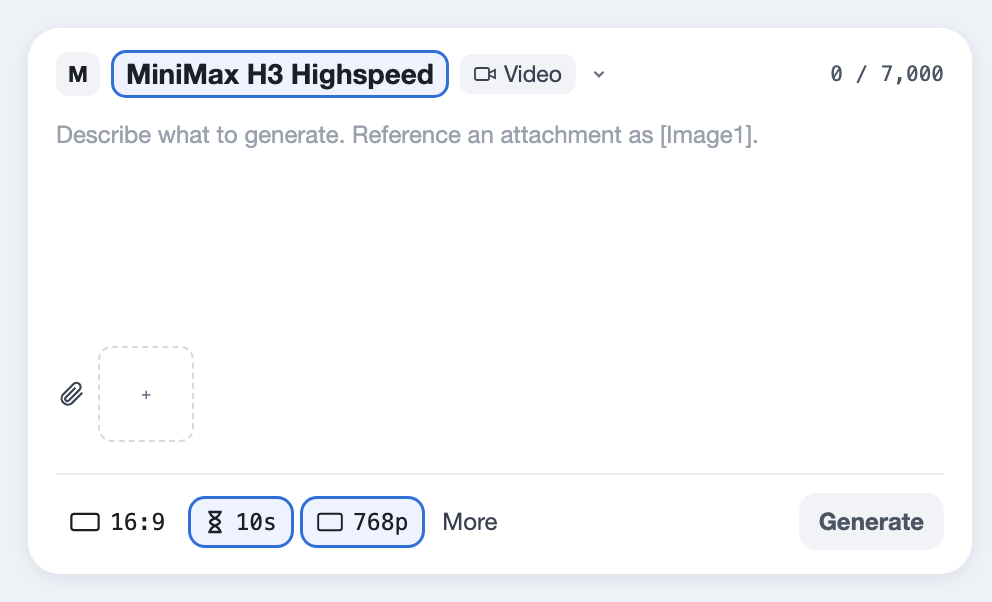
  1. MiniMax H3 Highspeed picked in the Predis.ai Model Studio, with 768p and 10 seconds set
    01

    Pick a version and a resolution

    Open the Model Studio and choose Lite to try an idea, or Highspeed for the one you post. Set 480p or 768p, the length and the format. The Generate button shows the cost before you make anything.

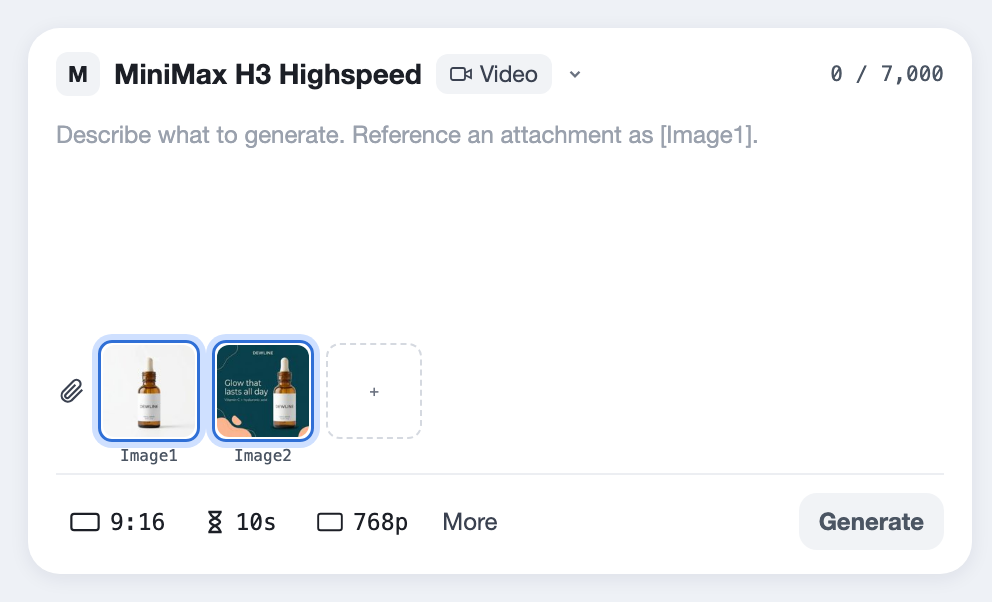
  2. A product photo and a logo added as Image 1 and Image 2 under the prompt
    02

    Add what has to stay exact

    Upload your product, your logo or a person as references, or a first and last frame if the ending has to be exact. You can't use both in one clip.

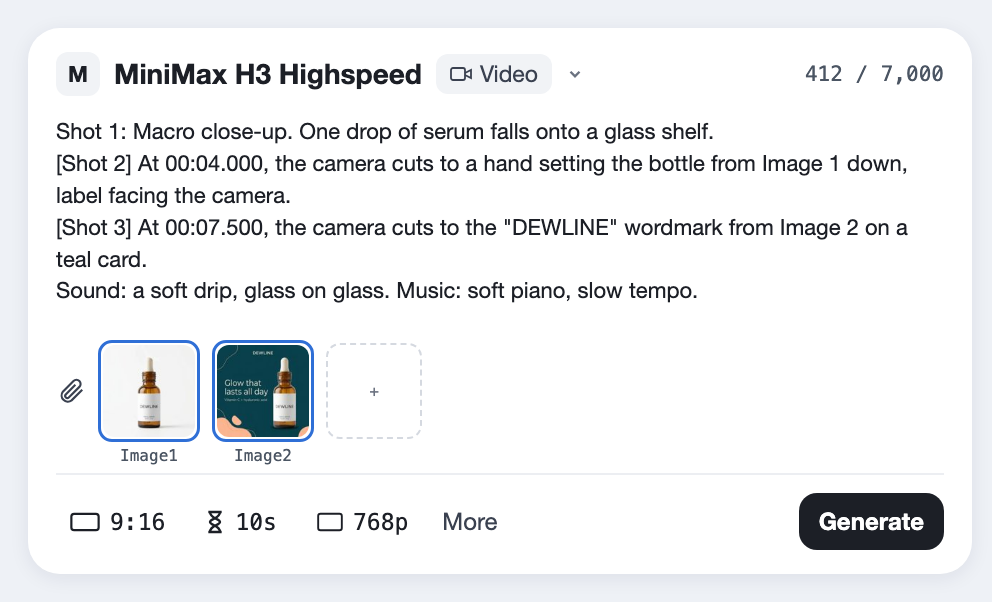
  3. A prompt with 3 shots and their cut times, with the product and the brand attached as Image 1 and Image 2
    03

    Write the shots in order

    Describe the first shot, then mark each cut as "[Shot 2] At 00:03.500, the camera cuts to...". Put dialogue in quotes with the language, and end with the sound and the music.

This is the shape MiniMax's own prompt guide uses: the picture first, then the sound, then the music.

[16:9, 9:16, 1:1 or 21:9], [length] seconds, with sound.
Image 1 is [the product]. Image 2 is [the logo]. Keep them exactly as they are.
Look: [lens, light, palette].

Shot 1: [Wide. Where we are and what happens.]
[Shot 2] At 00:0[X].000, the camera cuts to [close-up. The product, label facing the camera].
[Shot 3] At 00:0[X].000, the camera cuts to [how it ends]. [Who speaks] says in [language]: "[The line]"

Camera: [The camera pushes in / pans right / tracks left] with [small or large] amplitude at [slow or fast] speed.
Sound: [the sounds of the scene].
Music: [instruments and tempo, or N/A].
Made with H3 Lite

Quick social clips on Lite

Lite is the version to reach for when you need a lot of short clips. A Reel with one spoken line, a square product loop at 480p and a cinema-wide shot. Open one to see the prompt, then swap in your own product.

Before you spend

Where it falls short

These come from MiniMax's own notes and from what Predis.ai offers today. Each one has a workaround.

768p at most on the fast versions

Highspeed, Lite and Max stop at 768p. Only H3 itself makes 2K, and our 5-second clip took about 7 minutes.

Fix768p is plenty for a phone feed. Draft on Highspeed or Max, then make the final on H3 if you need more detail.

15 seconds per clip

Every version makes 5 to 15 seconds, and reference videos and audio can add up to 15 seconds in total.

FixFor longer ads, end one clip on the frame the next one starts from, or use Kling 4.0 for up to 30 seconds.

References or keyframes, not both

MiniMax doesn't allow reference media and a first or last frame in the same clip.

FixUse references when the product has to be exact, and keyframes when the ending has to be.

H3 Max is about speed

The name suggests the top tier, but fal built Max for fast generation. On Predis.ai it doesn't take references.

FixPick H3 for the best result, and Max when you want speed and only a first or last frame.

Reading references

MiniMax says H3's understanding of mixed references still has room to improve.

FixName every reference in the prompt and say what must stay exact, such as the label or the face.

Fine detail

MiniMax notes that visual detail can still fall short in some scenes.

FixKeep text short and large, and get close for the product shot.

Filters can be cautious

MiniMax says its moderation can block prompts that are fine.

FixUse invented characters and plain wording. If a clip fails on Predis.ai, its credits are refunded.

Lite can misspell labels

In our test, Lite wrote "NIGHTSHIFT" as "NIGHTSIHIFT", and small print came out garbled on all four versions.

FixUse Lite for clips without a label, keep text short and large, and check the brand name before you post.

MiniMax H3, answered

What is MiniMax H3?

It is MiniMax's third-generation Hailuo video model, released on July 31, 2026. It makes 5 to 15 seconds of video with sound from text, from reference images, videos and audio, or from a first and last frame, and it comes in four versions on Predis.ai: H3, H3 Max, H3 Highspeed and H3 Lite.

Both make 480p or 768p video from the same inputs. MiniMax describes Highspeed as balancing quality and speed and Lite as its lightweight version. Lite costs less per second, so it suits drafts and high-volume social clips, and Highspeed suits clips you plan to post.

No. H3 Max was built by fal on top of MiniMax's open H3 weights to generate faster. The flagship is MiniMax H3, the only version MiniMax offers at 2K. On Predis.ai, H3 Max starts from text or from a first and last frame.

From 5 to 15 seconds on Predis.ai, in whole seconds. Reference videos and audio clips can be 2 to 15 seconds each, and 15 seconds in total.

H3 Highspeed, H3 Lite and H3 Max make 480p or 768p. H3 itself made our clip in 2K, at 2544 by 1456, and took about 7 minutes where the others took under a minute.

Yes. MiniMax says H3 generates stereo sound with the picture: dialogue, sound effects and music. Its model card lists 11 languages for dialogue, including English, Spanish, French, German, Japanese and Arabic. In our tests, Highspeed, Lite and Max made stereo sound too, though one Lite clip came back almost silent.

Yes. H3, Highspeed and Lite take up to 9 images, 3 videos and 3 audio clips as references in one clip. Name each one in the prompt, for example "Image 1 is the product", and say what has to stay exact.

Yes, on all four versions. Upload a first frame, a last frame or both, and describe what happens in between. You can use references or keyframes in one clip, not both.

In plain sentences. MiniMax's prompt guide uses terms like push in, pan right, tracking shot and arc shot, with "small" or "large amplitude" and "slow" or "fast speed", for example "The camera tracks right with small amplitude at slow speed."

MiniMax published the H3 weights on Hugging Face under its own community license, with a separate application for some regions. The 2K regeneration step is not part of the open release, and Highspeed, Lite and Max are not open models.

Try the idea on Lite, post it from Highspeed

Start from any prompt on this page and swap in your own product photo.

Make a video with MiniMax H3

MiniMax and Hailuo are trademarks of MiniMax. Predis.ai is not affiliated with or endorsed by MiniMax or fal.