


Free AI TikTok Video Generator

Type a prompt and get a ready-to-post TikTok video back. The AI can write the script, pick visuals, add captions and match trending audio. If you want to change anything, use the built-in TikTok video editor with templates, stock media and watermark-free HD 1080p export. Then post it straight to TikTok from the Predis app.

Text to video Faceless videos AI voiceovers Trending audio 9:16 HD export
g2-logo shopify-logo play-store-logo app-store-logo
star-icon star-icon star-icon star-icon star-icon
3k+ Reviews
Rated 4.8/5 by 3,097 Users

How to create TikTok videos with AI?

1

Step 1: Type a prompt (Takes 30 seconds).

Type a single line, paste a blog, drop in a product link, or add your business details. The AI writes a full TikTok script from your prompt, then picks matching visuals, captions and hashtags. From brand stories to product ads, you get a ready-to-post TikTok in minutes with no learning curve.

2

Step 2: Let AI create, edit, and publish.

The AI picks a template, adds captions and trending audio, and syncs it together. Fine-tune in the built-in editor with transitions, animations, 10,000+ stock assets, or your own clips, then export in HD and schedule straight to TikTok without leaving the Predis app.

features-icon

AI TikTok Video Generator Features

One idea goes in, and a finished TikTok comes out. Here is what the tool can help you create:

  • Ready-made templates: Pick from the preset library (dance, comedy, DIY, travel, or a product promo) and the AI builds the whole short-form video for you, no editing skills required.
  • Text, blog, or link: Describe your idea in a single line, paste a blog, or drop in a product link, and it writes the script, generates the visuals, matches trending audio, and lays out captions for you.
  • Built-in TikTok video editor: The AI matches a template and styles the layout for you. Swap templates, add stickers, layer in animated entry and exit effects, and apply your brand kit colors and fonts so every TikTok looks like yours.
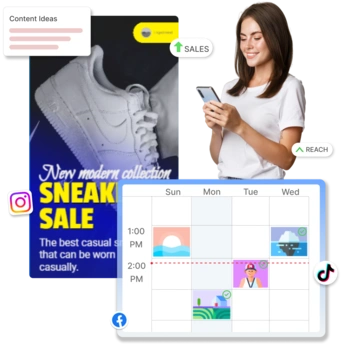
  • Bulk creation: Generate a batch of TikToks from one idea, so a single topic becomes a week of posts and your calendar stays full.
  • Perfect vertical export: Every video comes out in the exact 9:16 (1080x1920) format with nothing cropped, exported in crisp, watermark-free HD 1080p that is ready to publish.
  • Create on mobile: The Predis app for iOS and Android lets you generate, edit, and schedule TikTok videos straight from your phone.
TikTok captions, AI voiceovers and translations
voice-icon

AI Voices & Video Translation

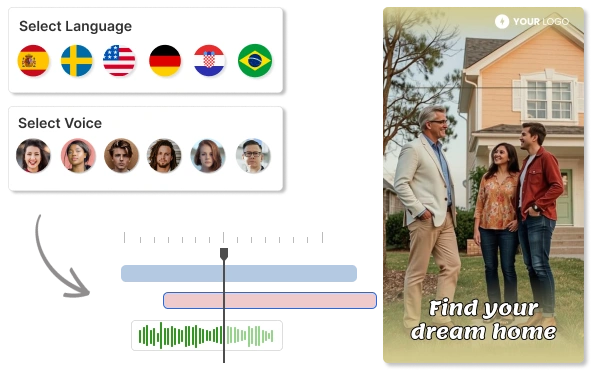
Give any TikTok a voice without picking up a mic. The AI turns your script into a natural-sounding voiceover, and captions make it easy for people to watch without sound. Then translate and dub the same TikTok into 19+ languages and reach viewers in new markets.

Add AI Voices & Translation
faceless-channel-icon

UGC & Faceless Video Creation

Run a faceless channel without going on camera. Pick an AI avatar, type a script, and get a talking-head video in minutes. It is how you make UGC-style ads and product demos for every offer without booking a creator or setting up a shoot.

Make UGC & Faceless Videos
faceless TikTok videos and AI avatars
Customer stories

Hear from our customers

Reviews and stories from businesses creating their social content with Predis.ai.

Frequently Asked Questions

How to use Predis.ai to make trending TikTok videos?

Sign up on Predis.ai, then:
1. Go to Content Library and click Create.
2. Select Text to video.
3. Add a text prompt, your business details, a blog, or a script.
4. Pick a template and hit Generate.

1. Go to Content Library and click Create.
2. Select Text to video and choose your input type.
3. Select the Voiceover video option, choose a template, and generate the TikTok using our TikTok Video Generator.
4. Open the generated TikTok to see the voiceover script and voices. Both can be edited.

It is a tool that turns a text prompt, a blog, or a product link into a finished TikTok video. Predis.ai writes the script, builds the visuals, adds captions and voiceover, and gives you an editor to change anything before you post.

Yes. Use text, stock visuals, an AI voiceover, and music to build the whole video, or pick an AI avatar to present it. Your face never has to appear.

Most TikTok videos are ready a few minutes after you hit Generate. Longer videos, or ones with voiceovers and animations, take a little more time. You can start editing as soon as the first version lands.

Yes, TikTok allows AI-generated videos as long as they comply with the platform's community guidelines and terms of service. Using our TikTok Video Maker, you can create AI-generated content safely, ensuring it doesn't include prohibited material such as hate speech, misinformation, or copyrighted content without permission.

Yes. Sign up, add a card, and the 7-day free trial gives you the full TikTok video maker: AI voiceovers, templates, the editor and scheduling. You are not charged during the trial.

More AI video tools