To excel in local SEO, businesses must harness the power of their Google Business Profile. In the digital landscape, it has transformed into the new homepage for local businesses, serving as the first point of contact for potential customers. As more users turn to Google as their primary search engine, having a well-optimized profile is crucial to stand out in the competitive market.
In this blog, we will be discussing in depth how to optimize your Google Business Profile and rank better in organic search results.
Why Optimization Matters: Beyond Just “Being There”
When it comes to optimizing your Google Business profile, it’s crucial to understand why optimization matters beyond just “being there.”
1. First Impressions:
First Impressions are vital in the digital age. According to data, customers often make decisions without even clicking through to your website. This highlights the significance of having a fully optimized profile that captures attention and conveys key information effectively.
2. Search Real Estate:
Your Google Business profile is prime Search Real Estate. A fully optimized profile not only enhances your online presence but also takes up more space on the Search Engine Results Page (SERP). This increased visibility can drive more traffic and potential customers to your business.
3. Conversion Lift
One of the key benefits of optimization is the Conversion Lift it can bring. Optimized profiles tend to see higher “Action” rates, including calls, directions, and bookings. By providing relevant and engaging content on your profile, you can encourage users to take the desired actions, ultimately leading to increased conversions and business growth.
Optimizing your Google Business profile goes beyond just being present online. It is about making a lasting impression, maximizing your visibility on search engines, and driving meaningful actions from potential customers.
Benefits of a Robust Google Business Profile
When it comes to optimizing your Google Business Profile, there are numerous benefits that come along with it. Let’s delve into the advantages of having a robust GBP:
- Enhanced Local Visibility: By having a well-optimized Google Business Profile, you increase your chances of appearing in Google Maps and local searches.
- Customer Social Proof: One of the key benefits of a robust Google Business Profile is the ability to showcase customer reviews and star ratings. This social proof plays a crucial role in building trust and influencing their purchasing decisions.
- Insights and Analytics: You can also gain access to valuable insights and analytics. This includes understanding how customers are finding your business, whether it’s through organic search or Google Maps. By analyzing this data, you can make informed decisions to further optimize your profile for better visibility.
- Zero-Cost Marketing: With a well-optimized GBP, you can effectively market your business at zero cost, reaching a wide audience without having to allocate a marketing budget.
Getting Started: How to Set Up and Claim Your Listing
How to Set Up a New Google Business Profile
To optimize your Google Business Profile effectively, follow these step-by-step instructions to set up a new profile.
- Firstly, creating a Google Account is the initial step. This account is crucial for managing your business information and engaging with customers online.
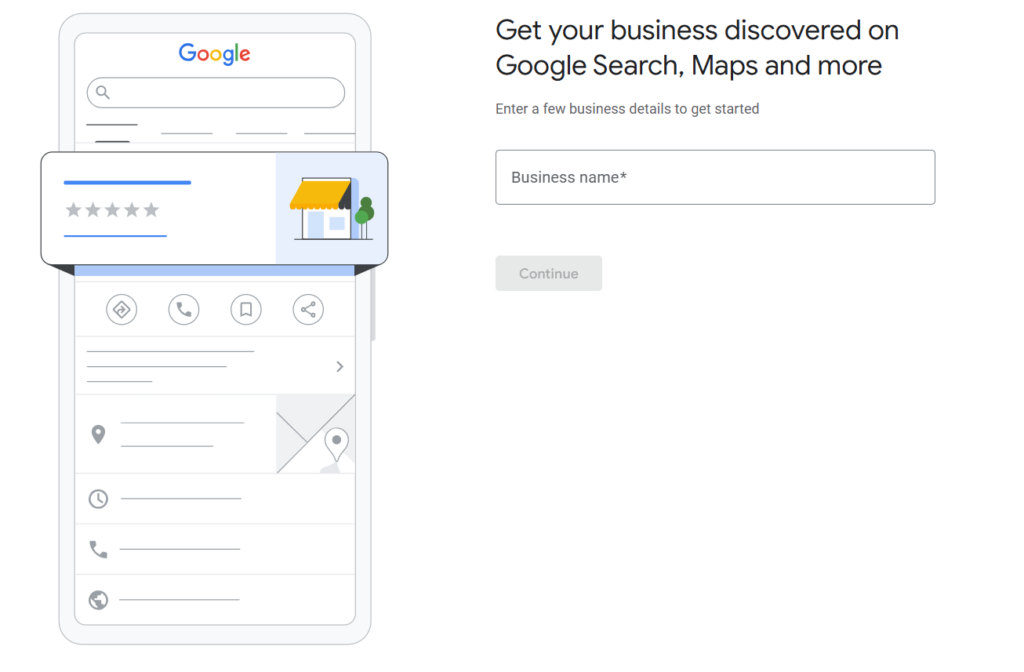
- Next, when entering your business name, ensure it is accurate and reflects your brand identity. This is essential for customers to find your business easily in search results.
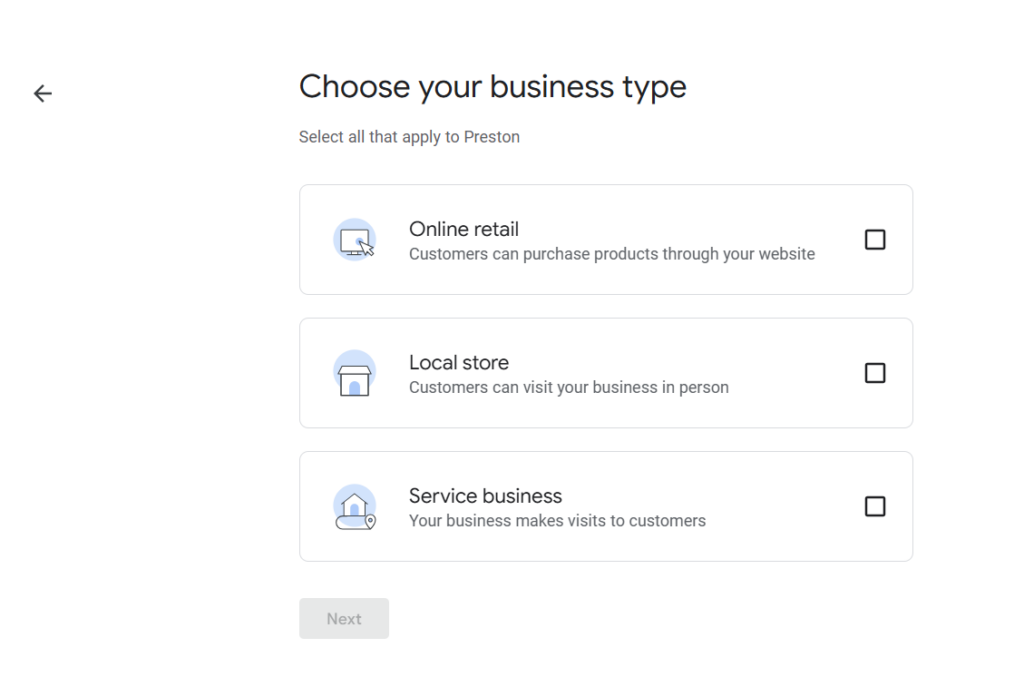
- Choosing the correct category for your business is crucial for SEO purposes. Selecting the most relevant category helps Google understand your business better and improves your chances of appearing in relevant searches.
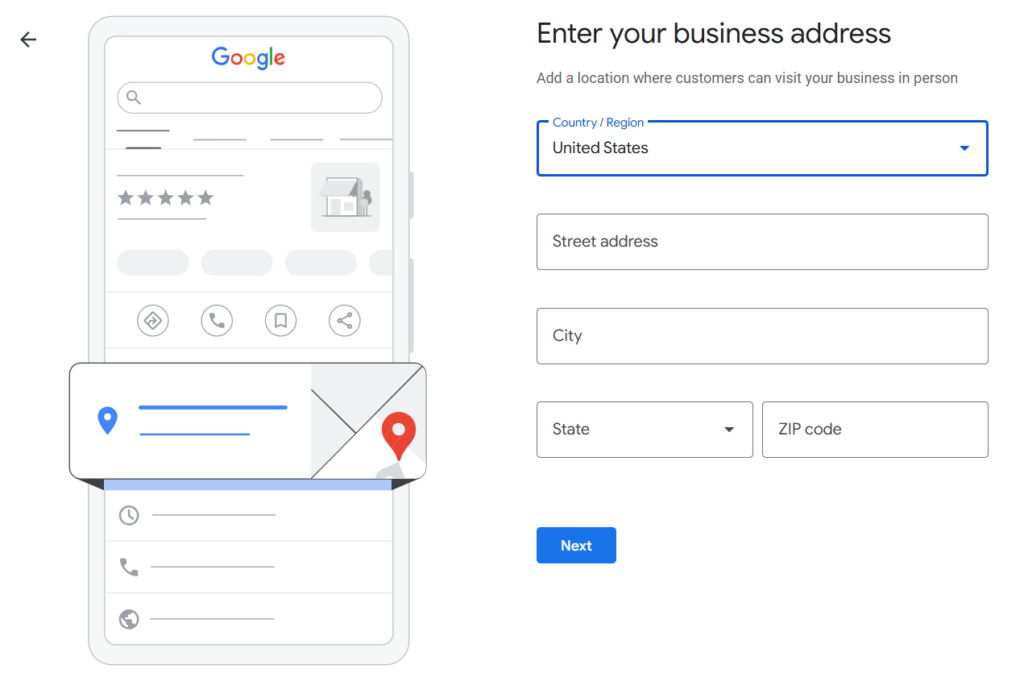
- When adding your service area versus your physical location, make sure to include all the areas you serve. This helps potential customers know if your business caters to their location.
- The verification process is a critical step in confirming the authenticity of your business. Google will offer multiple verification methods, such as video verification, phone verification, or mail verification. Choose the method that is most convenient for you.
By following these steps diligently, you can ensure that your Google Business Profile is optimized to its full potential, helping your business gain visibility and attract more customers online.
How to Claim an Existing Listing
When it comes to optimizing your Google Business Profile, one crucial step is claiming your existing listing. This is essential to ensure that you have control over your brand’s representation online. But how do you go about claiming an existing listing?
Identifying “Unclaimed” Profiles:
The first step in claiming an existing listing is to identify profiles that are labeled as “unclaimed.” These profiles are often placeholders created by Google or other users and can lack accurate information. By claiming these profiles, you can update the details to reflect your business accurately.
The “Request Access” Workflow:
In cases where someone else manages your listing, Google provides a “Request Access” workflow. This process allows you to gain control over the listing by verifying your ownership or association with the business. By following the steps outlined in the workflow, you can establish your authority over the listing.
Why Claiming is the First Step to Brand Protection:
Claiming your Google Business Profile is the foundational step in brand protection. By managing and updating the information on your listing, you can ensure that customers are accessing accurate details about your business. This not only enhances your online presence but also helps in maintaining a positive brand image.
The Core Guide: 10 Strategies to Optimize Your Google Business Profile
1. Choose Specific Sub-Categories
It’s crucial to delve into specific sub-categories rather than opting for broad terms like “Restaurant.” By choosing a niche such as “Authentic Italian Restaurant,” you enhance your profile’s visibility and relevance to potential customers searching for precisely what you offer.
Specifying your sub-category not only helps Google understand your business better but also allows you to target a more defined audience. This specificity can lead to higher rankings in relevant searches, increasing your chances of attracting quality leads.
2. Write a Keyword-Rich Description
A well-crafted description not only provides valuable information about your business but also plays a significant role in attracting potential customers. Incorporating relevant keywords related to your services and location naturally signals to Google what your business is about, helping it rank higher in search results.
Avoid the temptation to overuse keywords in your description. Instead, focus on including them in a way that reads naturally and aligns with the tone of your brand.
Remember, your Google Business Profile serves as a virtual storefront for your business. Make the most of this opportunity by crafting a compelling and informative description.
3. Use High-Resolution Visuals
When potential customers land on your profile, engaging visuals can capture their attention and leave a lasting impression. Here are some tips for effectively using visuals to enhance your Google Business Profile.
- High-Quality Images: Upload high-resolution images of your business, products, and services. Clear, vibrant pictures help showcase what your business has to offer and attract more customers.
- Virtual Tour: Consider adding a virtual tour of your business location. This feature allows customers to explore your premises virtually, giving them a sneak peek into what to expect when they visit in person.
- Before-and-After Photos: If your business offers services that yield visible results, such as renovations or makeovers, showcasing before-and-after photos can be compelling. This visual evidence can build trust with potential customers.
- Videos: Incorporate videos to introduce your team, demonstrate your products in action, or share customer testimonials. Videos can create a more personal connection with your audience and increase engagement. You can always create AI UGC videos and images to showcase your business through tools like Predis AI.
4. Manage and Respond to All Reviews
Reviews are the lifeblood of local SEO. While getting five stars is the goal, your responsiveness is a massive ranking signal for Google.
- The Power of the Positive: Thanking happy customers reinforces loyalty and shows potential leads that you value your community.
- The Necessity of the Negative: Ignoring a bad review is like hanging a “we don’t care” sign on your front door. Respond calmly, professionally, and offer to take the conversation offline. Ironically, a thoughtful response to a critique often builds more trust than a sea of perfect 5-star ratings.
- Keywords in Context: Encourage customers to mention specific services or products in their reviews. When they say, “Best vegan cupcakes in Austin,” it helps Google understand exactly what you offer.
5. Utilize the Q&A Section
Most business owners don’t realize that anyone can ask and answer questions on their profile—including competitors or disgruntled ex-employees.
- Control the Narrative: Don’t wait for customers to ask. You are allowed to “seed” your own Q&A. Think of the five most common questions your front desk gets and post them yourself.
- Upvote Helpful Answers: If a customer leaves a particularly helpful answer, give it a “thumbs up” to ensure it stays at the top of the section.
6. Enable Messaging
The “Chat” feature allows leads to reach out without ever leaving the Google search results.
- Real-Time Lead Capture: By enabling messaging, you reduce the friction between “searching” and “buying.”
- Set Expectations: Use the “Welcome Message” feature to let people know your typical response time (e.g., “Thanks for reaching out! We usually reply within 30 minutes.”).
7. List Your Products and Services
Think of your GBP as a mini-website. If you aren’t using the Products and Services tabs, you’re missing out on valuable “real estate” in the search results.
- The Digital Catalog: Use high-quality images, clear pricing, and “Buy” or “Learn More” buttons.
- Categorization: Group your offerings logically so users can find exactly what they need at a glance.
8. Consistent NAP Data
NAP stands for Name, Address, and Phone Number. If Google finds different versions of your info across the web, it gets “confused” and may lower your rankings.
- The Rule of Exact Matches: If your website says “123 Main St., Suite 4,” don’t write “123 Main Street #4” on your Google profile.
- Audit Your Citations: Ensure your data matches exactly across Yelp, Yellow Pages, Facebook, and your local Chamber of Commerce.
9. Use Google Posts Regularly
Treat your Google Business Profile like a social media feed, but with one major advantage: the people seeing these posts are already looking for you.
- The Three Pillars:
- Offers: Flash sales or seasonal discounts.
- Events: Grand openings or workshops.
- Updates: “We just renovated!” or “Meet our new team member.”
- Call to Action (CTA): Always include a button like “Book Now,” “Order Online,” or “Visit” to drive immediate traffic.
10. Add Special Attributes
Attributes are the small icons that appear on your profile to provide specific context. They help you stand out to niche audiences.
- Identity Attributes: Highlight if your business is “Women-led,” “Veteran-owned,” or “LGBTQ+ friendly.”
- Amenity Attributes: Mention “Free Wi-Fi,” “Wheelchair accessible,” or “Outdoor seating.” These are often used as filters when users search on Google Maps.
Advanced Tips for Stronger Rankings (The “Pro” Edge)
Ready to move past the basics? These high-level strategies provide the “edge” needed to dominate the Local 3-Pack.
- Geotagging Your Photos: Before uploading photos, ensure the EXIF metadata contains your business’s GPS coordinates. This reinforces to Google’s algorithm that the content is being generated at your verified physical location.
- Local Backlink Strategy: Google’s local algorithm weighs “prominence” heavily. Getting a link or a mention from a local news outlet, a neighborhood blog, or a local charity event carries more weight for your GBP than a generic guest post on a global site.
- The “Review Velocity” Factor: Google prioritizes consistency. Getting 20 reviews in one afternoon (often a sign of a “review blast”) is suspicious. It is far better to have a velocity of 3–5 reviews every week, showing that your business is consistently active and satisfying customers.
- AI Integration: Use AI tools to analyze your reviews for sentiment. Are people complaining about the wait time but praising the staff? Use these insights to tweak your operations and draft empathetic, personalized response templates that address specific keywords.
Conclusion
There is a common misconception that Google Business Profile is a “set it and forget it” task. In reality, the local landscape is incredibly competitive.
If you aren’t posting updates or responding to reviews weekly, you are essentially letting your profile decay. Your competitors are likely one “Update” post away from taking your spot in the top three.
When fully optimized, your profile works while you sleep. It answers questions, showcases products, and builds trust before a customer ever sets foot in your store.
Having trouble creating images and videos for your business profile? Let Predis AI take care of it for you! With a single prompt, you can get everything from review videos to an introduction video in no time!
Frequently Asked Questions
While some changes (like updating hours) are instant, ranking improvements typically take 3 to 6 weeks of consistent activity and review gathering.
Yes, Google provides a “Business Profile Manager” specifically designed for franchises or businesses with multiple branches.
No. While ads can place you at the top of the map pack as a “Sponsored” result, they do not directly boost your organic, non-paid ranking.