Explore this content with AI:
Here’s the reality: AI video tools are no longer experimental toys. They’re core parts of content stacks for creators, marketers, and brands of all sizes. Today’s tools do more than generate clips — they shape storytelling, automate editing, add voice-overs, translate, optimize for platforms, and unlock new creative possibilities.
Two AI platforms often in that conversation are Steve AI and Veed.io. Both leverage AI — but they serve very different needs.
Steve AI started as a script-to-video engine built around automation and templates. It aims to help non-editors produce video quickly. Veed.io, meanwhile, has become a full-spectrum online video editor powered by AI features like auto-subtitles, background removal, translation, and generative tools.
The question most buyers wrestle with in 2025–2026 isn’t just “which is better?” but “which fits my workflow, budget, and output goals?”
This comparison answers that by looking at:
- Feature depth in 2026
- AI automation capabilities
- Ease of use
- Output quality
- Collaboration and team workflows
- Pricing and value
If you’re deciding between Steve AI and Veed.io right now, this guide cuts through the hype with practical insights and examples.
High-Level Snapshot: Steve AI vs Veed.io
| Category | Steve AI | Veed.io |
|---|---|---|
| Best for | Automated script-to-video creation | Comprehensive online video editing |
| AI writing & storyboarding | Yes | Yes (but more supplemental) |
| Manual editing control | Limited | Extensive |
| Templates & automation | Strong | Strong + flexible |
| Collaboration tools | Basic | Better team features |
| Enterprise readiness | Small-to-medium teams | Small to large teams |
| Output formats | Standard social formats | Social + broadcast + repurpose workflows |
| Pricing (as of 2026) | Mid-range | Mid-range to premium |
These platforms are increasingly being used as an AI ad generator, helping marketers turn ideas into high-performing video creatives at scale.
Steve AI vs Veed IO – A brief outlook
Steve AI and Veed IO are both video editing and text-to-video generators. Their use cases pretty much overlap with each other, which makes choosing between them a tad difficult. To overcome this, we decided to try out both to find out which one is better. And we are taking you along the journey.
The sign-up process for both these platforms was pretty straightforward, so no complaints from our end here.
Once that is out of the way, let us see how both these platforms function basically!

Steve AI

The script-to-video generator process in Steve AI is pretty much streamlined and easy. All you have to do is provide the prompt for the video and then choose some basic customizations such as:
- Duration of the video
- Video type (Animated, generative AI, live stock video)
- Choose the language and the voice of the narrator
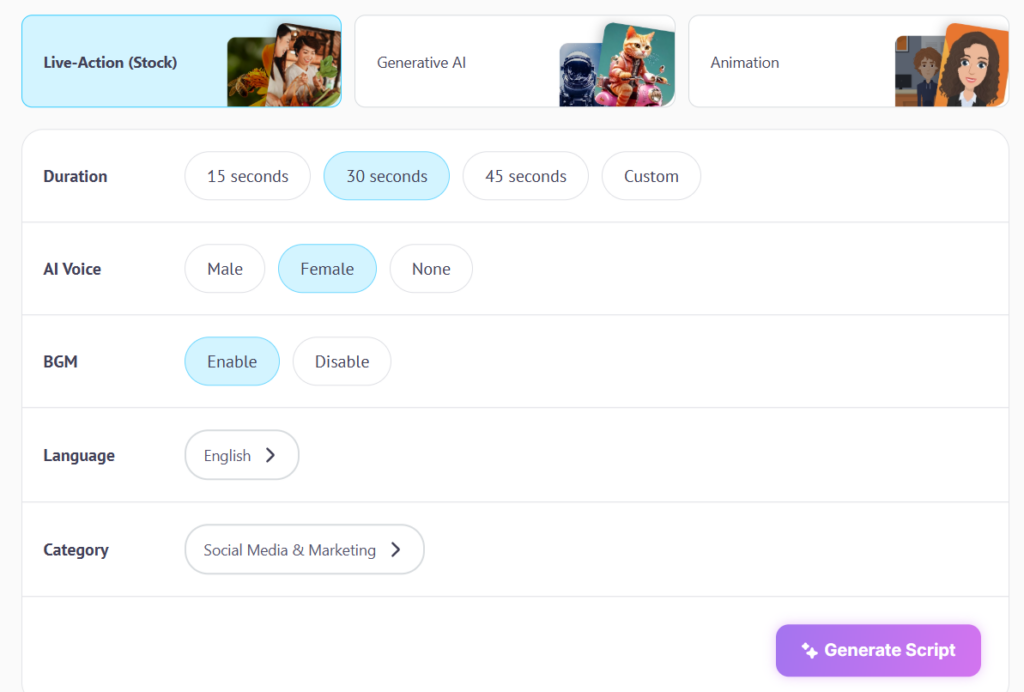
After which, the script for the video will be generated, and once approved, the video will be created based on a template of your choice.
You can edit the video after it is generated, and some of the customization options Steve AI offers are:
- Changing the color of the template
- Transition between slides
- Adjust the time of each scene
- Duplicating scenes and so on
Pros:
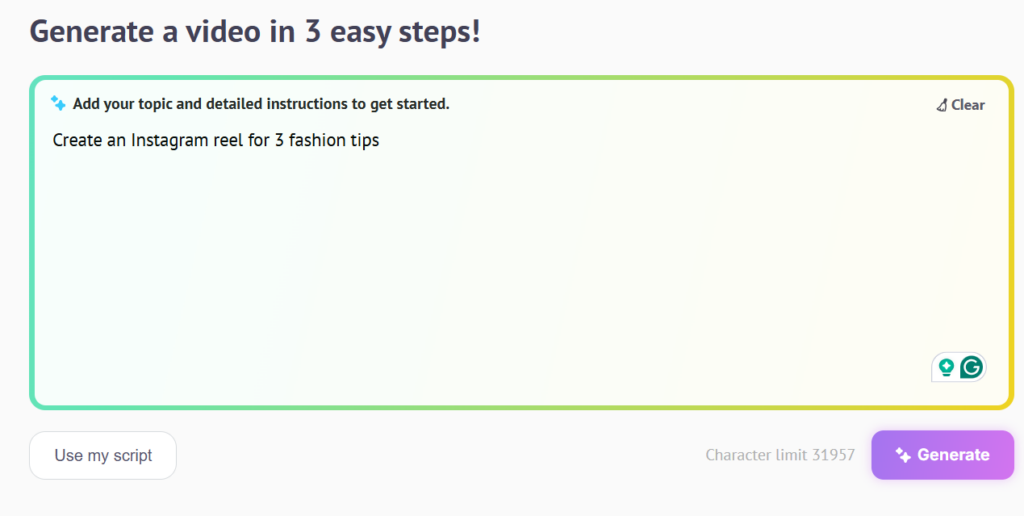
- Can make videos easily with simple prompts. Such as this:
- Letting us choose the style of the video, such as Live, AI-generated, and so on, is a plus.
- Allows scene-by-scene editing, which makes editing scripts very easy.
Cons:
- Although my prompt said I wanted an Instagram reel kind of video, the final output was not in the right dimension. Check out the video generated by Steve AI:

- Some important features, such as Resizing and adding a Logo, are hidden behind a pay wall.
- The template options were limited. Take a look:

Veed IO
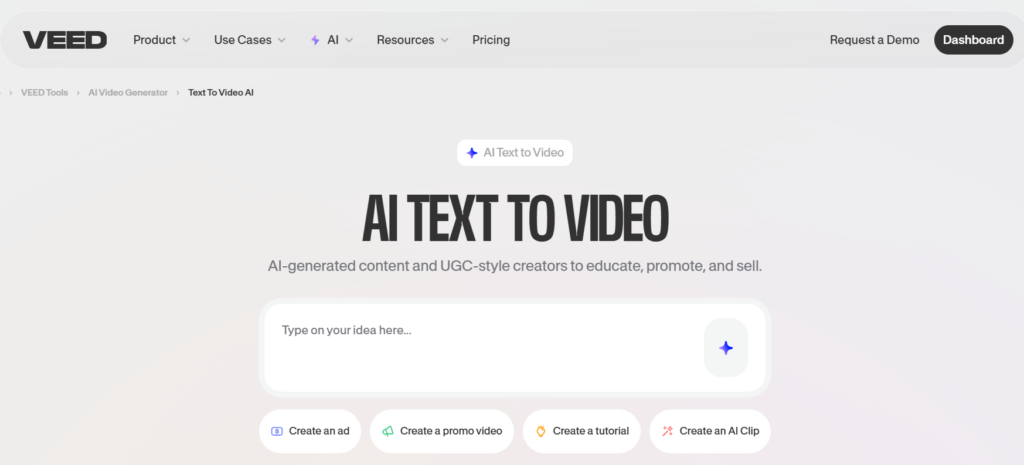
With Veed IO, the process is pretty much similar. After writing a prompt for a video, Veed IO just goes on to generate the video. Some of the customization options that are offered to you are:
- Scene-by-scene script editing option
- Change the aspect ratio (You can choose between Portrait, Landscape, and square)
- Switch to a different language or voice based on your preference
- Change the music choice
- Caption font can be switched to something else.
Pros:
- Easy to make videos with, user-friendly interface
- Has multi-lingual options and can do voice in 29 different languages
- Easy script editing option
Cons:
- There are no branding options available (for the free version)
- There are not many customization options available
Getting The Best Out of Both Worlds – Predis AI
With Predis AI, you do not have to pick and choose between features, because it offers offers everything Steve AI and Veed IO do and much more, making it a powerful Instagram post generator AI for managing both static and video content seamlessly.
As soon as you log in and click on the “Assistant”, a ChatGPT-style chatbox opens up that allows you to interact with AI and make your videos.
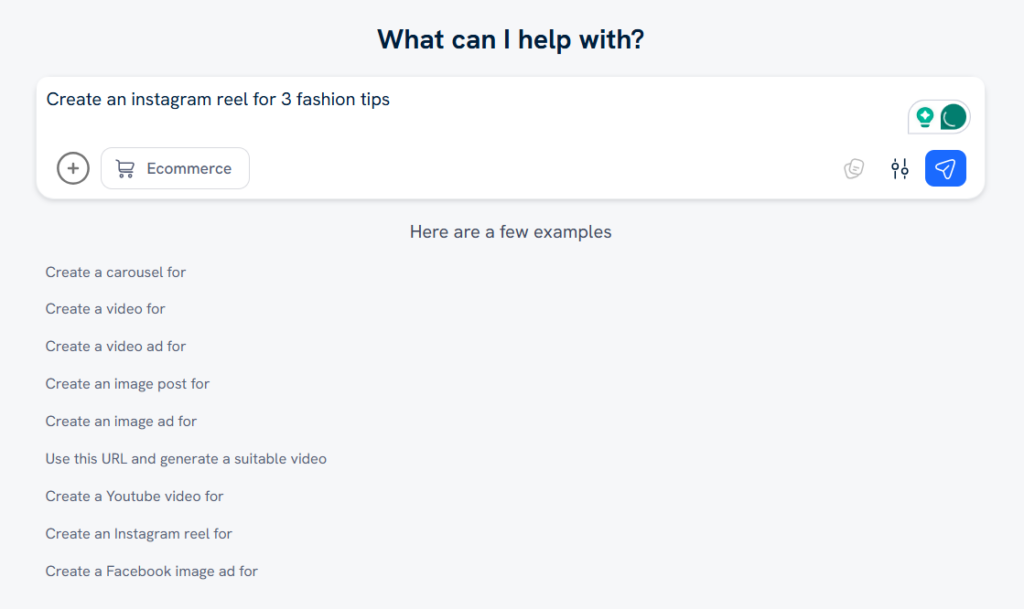
After shuttling back and forth a few times, Predis AI generates the video in a matter of seconds. And, if I need any additional reworks, I can easily mention it in the chatbox and get the video remade.
Here’s what Predis AI offered that Steve AI and Veed IO did not:
- The interactive style chatbox that allowed iterative changes to the creative
- Being able to schedule and publish the content to socials from the same platform.

- A lot of template options to choose from in the customization stage later.
- Ability to brand elements such as logo, colors, and fonts.
- Captions and hashtags are generated automatically along with the content.
- Extensive AI suggestions based on the previous post’s performance.
Pricing Options
Now that we know how each AI video generator works, let us find out how much each costs us. The thing to keep in mind is that both these tools come with different payment tiers, so based on your requirement, your price point will change. They also offer free trials of their tools, so you can try using them, figure out what you require out of the tool, and purchase the right plan accordingly.
With that being said, let us check out what their price points are.
Steve AI
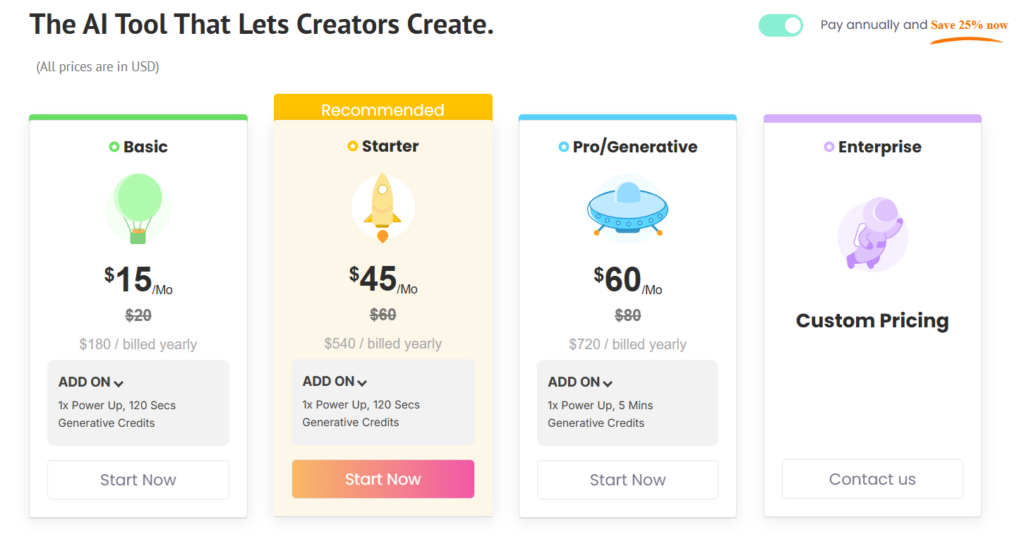
Steve AI comes with a four-tier payment option plan, with the starter pack being suggested for users. And this is what their prices are:
Veed IO
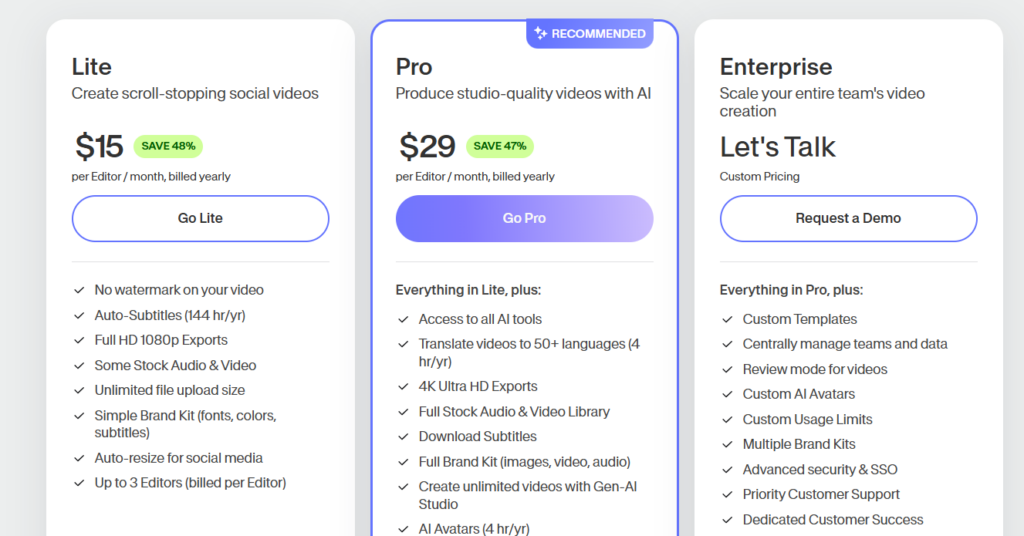
Veed IO is a bit on the pricier side, and if you want tier 3 and tier 4 kinds of plans, then it can blow your budget out of the water. To put it in context, these are the prices:
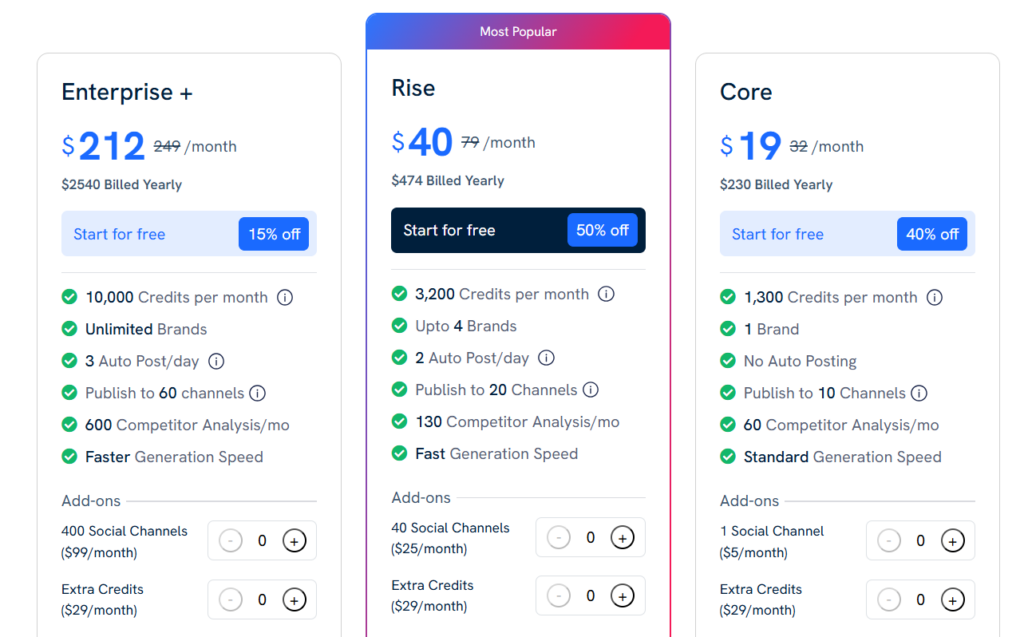
Predis AI
Predis AI comes with 3 different pricing tiers for creators who are on the lookout for low-budget options.
Ultimately, it comes with many other features as well, such as scheduling, analysing performance, hashtag generation, and so on.,
The price point for the paid version is as follows:
Feature Comparison: AI, Editing & Automation
AI Script & Idea Generation
- Steve AI: Core strength. Built-in script ideas and storyboard generation. Ideal for when you start with concept text.
- Veed.io: Offers headline caption generation, auto subtitles, and some prompt-based features — but not a full script engine.
Timeline Editing
- Steve AI: Minimal timeline editing; focuses on automated cut-generation.
- Veed.io: Full timeline editor with drag-and-drop control — more like a traditional NLE, but browser-based.
Audio & Voice
- Steve AI: TTS and voice options optimized for quick narration.
- Veed.io: Adds audio cleanup, noise removal, leveling, and sound effects — stronger for raw footage.
Templates
- Steve AI: Template-driven for quick builds.
- Veed.io: Template packs plus manual workflows for deeper customization.
AI Subtitles & Translation
- Steve AI: Automated subtitling exists, but remains basic.
- Veed.io: Best-in-class auto subtitles, translated captions, and export options.
Bottom line:
Steve AI takes you quickly from text → video.
Veed.io gives you both AI assistance and real editing power.
Final Thoughts
There’s no universal “winner.”
There’s only the right tool for your workflow.
Pick Steve AI if:
- You want fast video from text
- You don’t want to edit manually
- Automation and templates are your priority
Pick Veed.io if:
- You need real editing power with AI support
- Collaboration matters
- You’re producing for multi-platform use with subtitles, translations, and repurpose pipelines
In 2026, video creation isn’t about brute force tools anymore. It’s about fit — what gets your content made, refined, and distributed with minimal friction.
Both platforms have their strengths. The better choice depends on how much control you want versus how much automation you need.
Do not take our word for it, sign up here to get your Predis AI account and check out its features!
FAQ:
Steve AI and Veed IO are both AI video generator that turns text into videos. Veed IO goes a step further and offers additional editing tools that improve the outlook of the video.
Steve AI has a streamlined video creation process and limited customization options, which makes it a better option for beginners. Veed IO, on the other hand, requires you to have a little bit of a learning curve.
Go with Predis AI. This tool allows you to create professional videos with a simple prompt without any hassle. However, if you want more control over your video, then you can also use the built-in editor to modify the video as per your preference.