TikTok Post Scheduler
To Boost Growth

Plan, create, and auto publish your TikTok videos from one place. Work with your team, get posts approved, and schedule them in advance so they go out when your audience is actually watching.

g2-logo shopify-logo play-store-logo app-store-logo
star-icon star-icon star-icon star-icon star-icon
1.5k+ Reviews
Rated 4.8/5 by 1523 Users
Free TikTok Post Scheduler

Trusted by creators and businesses all over the world


money-saved-icon

40%

Savings in Cost
time-saved-icon

70%

Reduction in Hours Spent
globe-icon

500K+

Users Across Countries
posts-icon

200M+

Content Made
semrush logo icici bank logo hyatt logo indegene logo dentsu logo

Connect TikTok, Instagram, Facebook, and YouTube in one place.

How to Use the TikTok Scheduler?

1

Link your TikTok Account

Connect your accounts through the official TikTok integration. Log in once and link every account you want to post to.

2

Upload videos or make with AI

Upload your own videos or make new TikToks in a few clicks with our TikTok templates. Edit them to fit your brand, then add AI captions and relevant hashtags to help each video reach more people.

3

Schedule and Publish

Drag and drop your videos onto the visual calendar and pick the day and time for each one. Add any platform details, then hit schedule or publish now.

stars-icons

Check Out Our User Success Stories


4.8/5 from 1523 Reviews

lisa testimonial

Lisa Gomez

Founder, Skincare Brand

"Before Predis.ai, I'd skip posting for days just trying to catch up on orders. Now, all my product drops, reviews, and offers go out like clockwork. It's like having a full-time social media manager at lowest cost."

tyler social media manager testimonial

Tyler Reed

Social Media Strategist

“Managing 8 client accounts was chaos until I found Predis.ai. I now schedule a week of TikToks for each client in under 2 hours.

ava Influencer testimonial

Ava Brooks

Wellness Influencer & YouTuber

“I used to spend my Sundays batch-creating and scheduling everything. Now Predis.ai does it for me. My content stays consistent even when I'm off filming or traveling."

Find content ideas, generate videos, and schedule them
TikTok content creation icon

One-Stop Solution for Everything TikTok

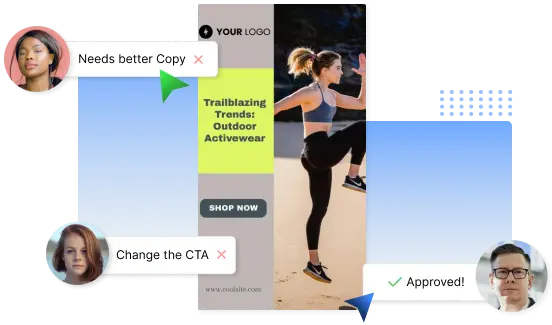
Predis handles your whole TikTok workflow in one place, from making videos to publishing them. Create your TikToks and schedule them right where you build them with one-click scheduling. Manage several TikTok accounts from a single dashboard, and connect Instagram, Facebook, and YouTube so you can plan every channel together instead of switching between tools. Send posts to your team for approval, leave comments, and keep everyone in sync before anything goes live.

Try our TikTok Scheduler
TikTok auto posting icon

TikTok Auto Posting

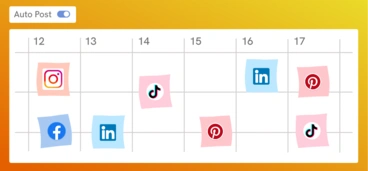
Stop posting every TikTok by hand. Set your preferred days, times, and how often you want to post, give Predis a few ideas, and it creates and publishes the videos for you. Make a video once and auto publish it to TikTok, Instagram Reels, and YouTube Shorts at the same time. Need to change something after it is scheduled? Update the caption, swap the video, or move the time whenever you want, which the native TikTok app does not let you do.

Auto Post on TikTok
Predis content calendar with Auto-posting enabled
Predis content calendar with multiple videos scheduled across the month
Bulk TikTok scheduling icon

Schedule TikTok Videos in Bulk

Plan a whole week or month of TikToks in one sitting. Bulk upload your videos, drop them onto the calendar in a few clicks, and set every date at once. You never have to worry about forgetting to post, so you can spend your time growing your audience instead.

Try Now
TikTok analytics icon

TikTok Analytics

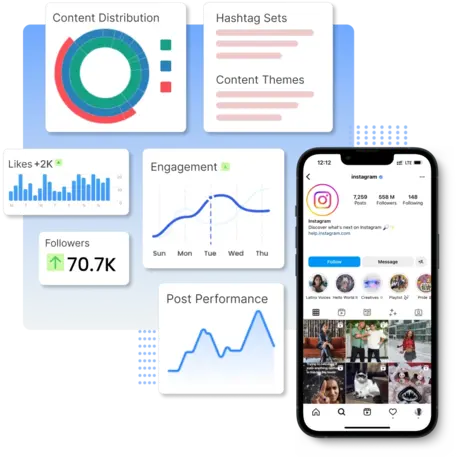
See how each video performs at a glance, from your best days and follower growth to the times your audience is most active. Predis uses this to suggest the best times to post, so your videos go out when people are watching.

Try Now for Free
Analytics and metrics for your account
Managing multiple TikTok accounts from one dashboard
Multi-account TikTok management icon

Manage Multiple TikTok Accounts from One Dashboard

Agencies and brand managers can connect every client TikTok account in one place. Schedule posts for each account, see what is queued, and keep every client calendar full without switching logins.

Manage All Your Accounts

You may also like to explore

Frequently Asked Questions

1. How do I create a TikTok schedule?

To create a TikTok schedule, use a TikTok scheduler like Predis.ai. You simply have to link your TikTok account, create or upload your videos, and drag them into your calendar. Choose the date and time you want to post, and they will be posted automatically.

Yes! Predis.ai provides you with video ideas, trending hashtags, and even automatically generates captions for you based on your input. It is a complete TikTok content creation and management wizard.

Yes. Our AI recommends optimal time slots based on performance trends and the algorithm of TikTok, so you can schedule when your audience is actively engaged.

Yes. Bring team members in, assign roles, and manage content approval. Add notes, track feedback, and streamline collaboration right within the platform.

Use Predis.ai's auto-posting feature to automate your TikTok content creation. After connecting your account and you can set days, times, and intervals for posting your content. Predis will take care of everything from content creation to publishing.