
Have you ever wanted to save a TikTok video without actually posting it? Or perhaps you’re looking for a way to hide certain videos from your profile without deleting them entirely. While TikTok doesn’t have a built-in “archive” button like Instagram, there are still several smart ways to keep your content private, safe, and ready for future use.
In this guide, we’ll show you exactly how to archive TikTok videos. Whether you’re a creator managing content or just want more control over your videos, this step-by-step walkthrough has you covered.
Can You Really Archive TikTok Videos?
If you’re searching for how to archive TikTok videos, it’s important to know that TikTok doesn’t currently offer a traditional archive feature like Instagram. That means there’s no one-click “Archive” button to hide your content while keeping it stored within the app.
But the good news? There are still a few effective workarounds that let you save TikTok videos without posting, hide them from public view, or keep them stored privately for future use.
Here are the three most reliable ways to simulate “archiving” on TikTok:
✅ 1. Save as Draft
Saving your videos as drafts is the most straightforward method to store content without sharing it. Drafts are only visible to you and are stored locally on your device. This method is perfect for creators looking for TikTok draft saving tips or who want to edit and post later.
✅ 2. Set Privacy to ‘Only Me’
Before posting a video, you can change the TikTok video privacy setting to “Only Me.” This makes the video live but completely hidden from others. It stays on your profile and can be accessed or edited anytime—great for those wanting to hide TikTok videos from the public without deleting them.
✅ 3. Download Videos Without Posting
If you want to keep a backup of your video or reuse the content on other platforms, you can save the video to your phone without posting it. This method works through screen recording, draft download (if enabled), or third-party tools—ideal when you want to save TikTok videos without posting them at all.
Method 1: Save TikTok Videos as Drafts
1: Open The TikTok App
You need to open the app and let the exploration begin simply.
2: Find The Desired Video
Video hunting time has come!
- Let’s locate that particular visual content we’re after.
- Click on the “search” icon and type the keyword.
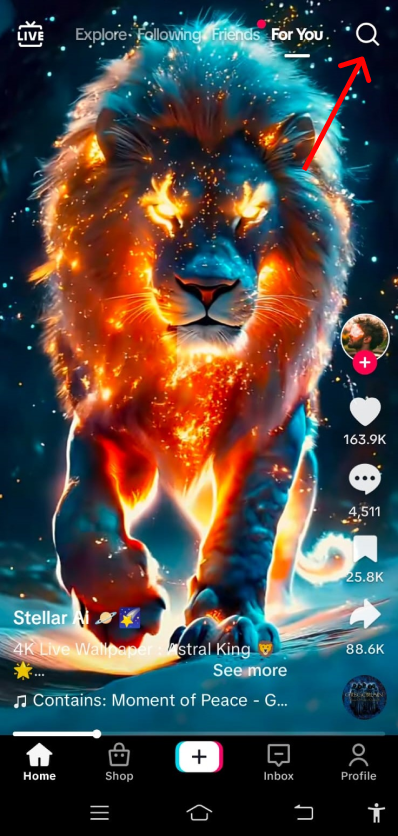
3: Open TikTok Video Options
- Click on the video.
- Find the option to save it by clicking “share.” After that, you will find an option to save the video. Click on it.
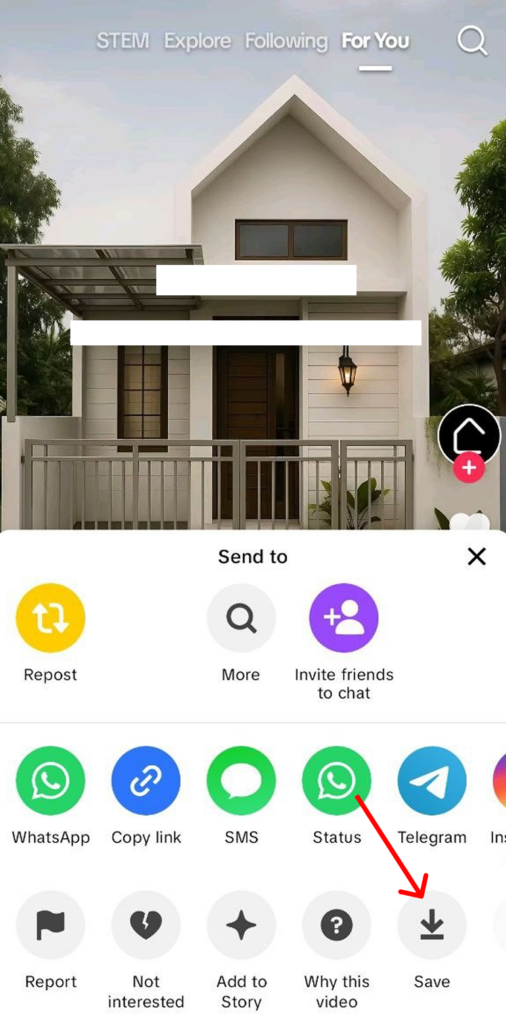
4: Save the Desired Video to Your Device
- In the lower-left corner of your mobile screen, locate the option to “Save Video.”
- Click on it to discover the video in your mobile gallery or camera roll.

Method 2: Using a Third-Party App to Download
1: Find a Reliable App
- Find a website to download TikTok videos using a search engine like Google. Simply search for something like “TikTok Video Downloader,” and a variety of websites will appear.
- To get your hands on TikTok’s videos, you could opt for an app. Look up a third-party app and download away. Doing some investigation beforehand to bypass any hitches is key.
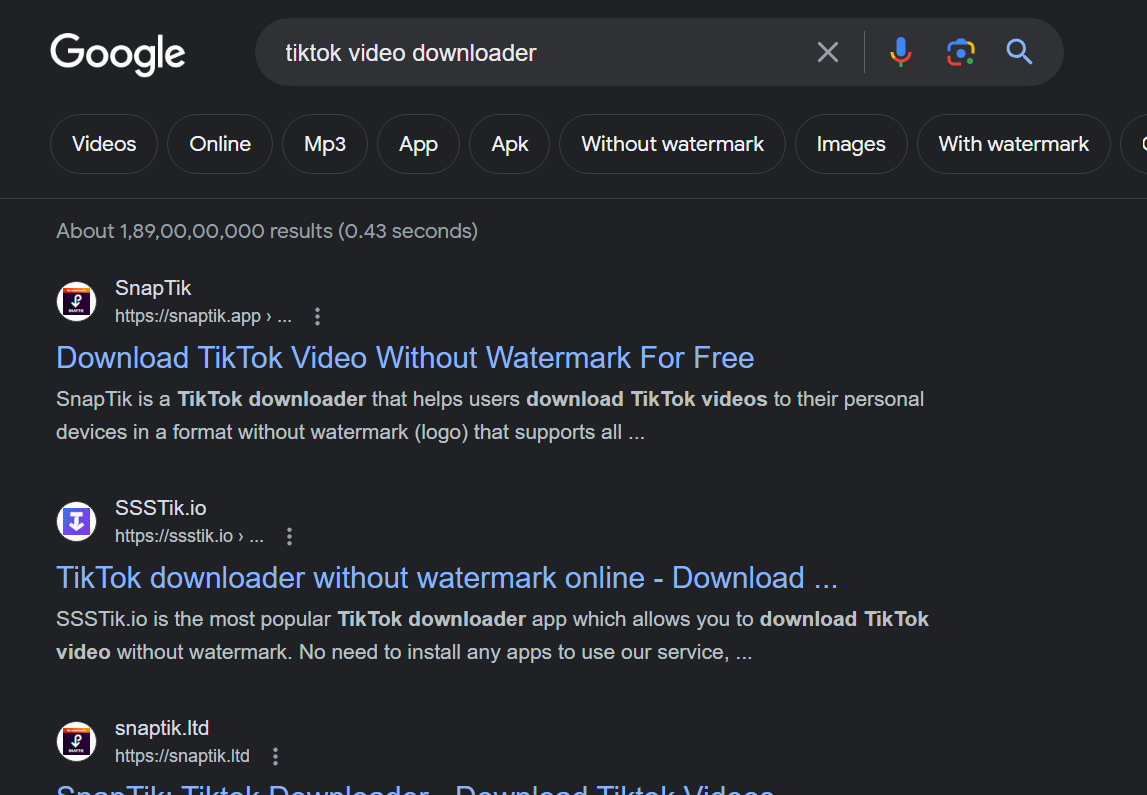
2: Copy The Desired TikTok Video Link
To obtain the link address for a specific TikTok video, one must
- First, access the video
- Click on the “copy link” option within the sharing options.
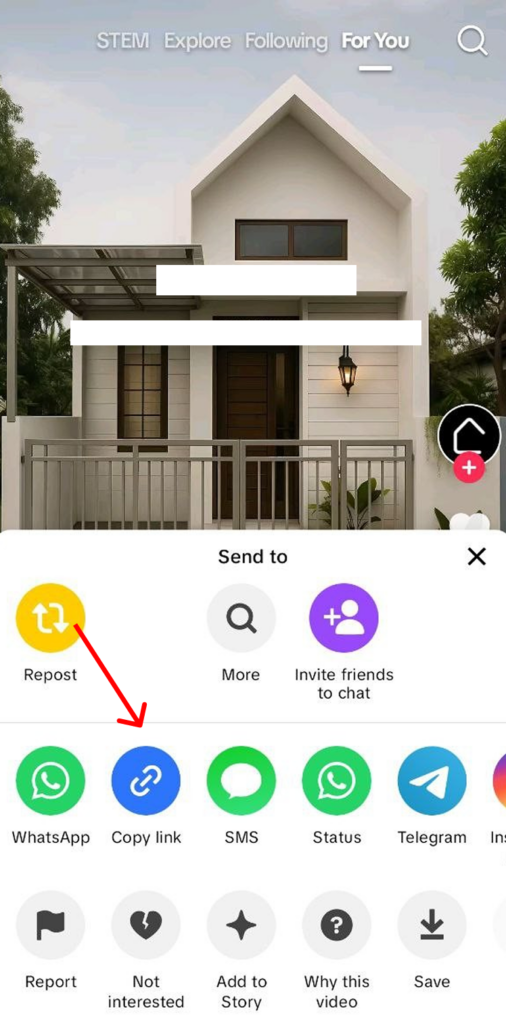
3: Paste the Link Address in the third-party App or Website
- Find a TikTok video downloader website in any search engine, such as Google or Edge.
- Paste the link address into the open third-party application.

4: Download the desired TikTok video
- Download the video by finding the download button on the screen.
This step is essential if you want to archive the video offline.
Method 3: Screen Recording
1: Open the installed TikTok app
- Open the TikTok app on your mobile device.
2: Find the desired video
- Browse your desired video by typing a keyword in the search option
3: Start Screen Recording Within Your Device
- Your device needs to have its screen recording feature allowed in the background before moving forward.
4: Play the Desired TikTok video
Now, click on the video so it plays, and you need to relax until it finishes playing.
5: Stop Screen Recording and Save the Desired TikTok Video
- Save the video in your mobile’s gallery or camera roll once the TikTok video finishes.
- Stop the enabled ‘screen recording’ option.
Method 4: Change the Privacy to “Only Me.”
The easiest way to hide a TikTok video without deleting it is by changing its privacy settings:
Steps:
- Go to the video you want to hide.
- Tap the three-dot menu (
...) on the right. - Select Privacy Settings.
- Under “Who can view this video,” choose Only Me.
How to Unarchive a Video?
Unarchiving a video is as simple as archiving and storing the content. To do that, follow these steps:
- Navigate to your profile and click on the three horizontal lines option in the top-right corner.
- You will see a list of videos that you have already archived. Click on the one that you want to unarchive.
- Tap the three-dot option on the video, then click “Unarchive” to make the video visible again.
Archiving a video: What it does and doesn’t do?
When you archive a video, it does and does not do the following:
| What it does | What it does not do |
| Obscure it from public view | Delete the likes of the video |
| Keeps a record of content | Removes duets done with it |
| Can be restored when needed | Lose the comments |
Importance of Archiving TikTok Content
As a creator, you can save a lot of time if you archive TikTok videos. You can certainly save many hours of work, as you do not have to reproduce those videos again when needed. This helps you in multiple ways, such as:
- Good content gets repurposed from time to time. To efficiently make that happen, you need to keep an inventory of your content, which archiving can help you do.
- Helps save data efficiently for future use
- Offers the ability to access the video even when the TikTok platform is down
- By saving the videos, you can repurpose them for other platforms efficiently.
Best Practices for Backing Up and Archiving TikTok Content
Archiving several videos together might be very tough work for a content creator. Thus, TikTok creators should follow the best techniques for backing up and archiving his/her TikTok content for future usage.
- Schedule backups regularly to avoid losing precious content.
- Organize your content properly so you can access it later without a hassle.
- Use a descriptive file name with key information to recognize content without opening
- Make sure that all metadata is consistently stored in Git version control.

Conclusion
You know three methods for archiving TikTok videos and a few tips to ensure you have a backup of all the TikTok content you want. You can now scroll and save your content for the right time. For more such guides, keep reading!
And if you want to build stellar content in a matter of minutes, you can use AI-driven platforms like Predis.ai. You can use this powerful tool to create breathtaking TikTok videos and build a large following using just a few prompts.
Head over to Predis.ai TikTok Video Maker and unlock the full potential of your TikTok presence.
Related Content:
- Learn how to reverse a video on TikTok to create fun and engaging effects.
FAQ:
No, other viewers will not be notified when you archive a video.
No, TikTok does not have an archive feature, but you can get the same results by using the “Only Me” feature.
Yes, you can save TikToks without posting them as drafts. These drafts will only be visible to you until you publish them.