Explore this content with AI:
The digital landscape of 2026 has moved beyond simple “social media.” We are now firmly in the era of the Visual Search Economy. While platforms like Instagram and TikTok prioritize entertainment and “the scroll,” Pinterest remains the only platform where users arrive with a specific mission: to plan and to buy.
In this guide, we’ll explore how to master the 2026 Pinterest algorithm, leverage AI-driven creation tools, and turn “Inspiration” into “Invoiced.”
Why Pinterest Marketing Strategy Works Differently
To succeed on Pinterest, you must unlearn everything you know about Facebook or X (formerly Twitter). Pinterest is a Visual Discovery Engine.
- Search vs. Social: On social media, content is pushed to users based on who they follow. On Pinterest, content is pulled by users based on what they search for.
- The Intent Gap: A user on TikTok might see a blender and think, “That’s cool.” A user on Pinterest searches for “best smoothie recipes for weight loss” and is actively looking for a blender to buy.
- The Evergreen Factor: The average lifespan of a Tweet is 18 minutes; a Facebook post lasts 5 hours. A high-quality Pin has a half-life of 3.88 months and can continue to drive traffic for years.
Benefits of Pinterest Marketing for Brands
Pinterest has solidified its position as the “Full-Funnel” king. Here is why your brand needs to be there:
- High-Value Demographics: Pinterest users historically have higher household incomes and a higher “intent to spend” than users on other platforms.
- Visual SEO: With Pinterest’s advanced visual recognition AI, your products are indexed not just by keywords, but by their physical attributes (color, shape, style), allowing for “Shop the Look” features to work automatically.
- Lower CPCs: Compared to the skyrocketing costs of Google and Meta Ads, Pinterest advertising remains a cost-effective way to reach top-of-funnel leads.
- Reach a variety of audiences: With Gen Z getting on the platform as well, Pinterest has now become a platform that hosts all age groups of the audience. This makes Pinterest a viable option for brands trying to reach a new audience.
How to Build a Pinterest Marketing Strategy (Step-by-Step)
Now that we know why you should market your products on Pinterest, it is time to get into the next step. This is where we build a Pinterest marketing strategy that gains you a spot in your audience’s mind and shopping cart.
1. Checking the Math (ROI & SMART Goals)
Before you spend a second on design, you need to know whether Pinterest will actually make you money. By setting SMART goals (Specific, Measurable, Achievable, Relevant, and Time-bound), you stop guessing and start measuring. This is where you decide exactly what “winning” looks like for your brand.
- Check the “Trends” tool to see if people are actually searching for your products right now.
- Pick one “North Star” metric, like “100 website visits a week,” so you don’t get distracted by useless stats.
- Calculate your “Target Sale Value” to know how many clicks you need to make a profit.
- Spy on your competitors to see which of their Pins have the most “Saves”—that’s what your audience likes.
- Set a 3-month deadline to review your progress; Pinterest is a marathon, not a sprint.
2. Setting Up Your Digital Storefront (Business Account)
You wouldn’t run a physical shop out of your living room without a sign. A Business Account is your official sign. It unlocks the “Shop” tab and gives you the data you need to see who is looking at your stuff.
- Switch to a Business Account (it’s free in settings) to unlock professional analytics.
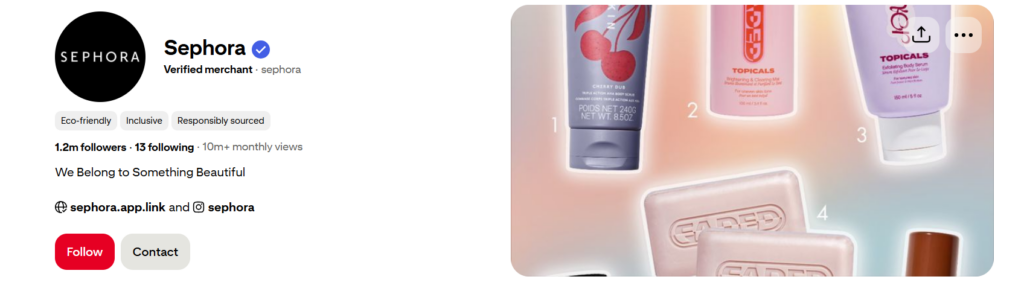
- Apply for the “Verified Merchant” tick to show shoppers you’re a real, safe business.
- Claim your website so Pinterest knows every Pin leading to your site belongs to you.
- Upload your logo as your profile picture to build brand recognition immediately.
- Link your product catalog (if you have one) so your Pins update their prices automatically.
Look how Sephora has done with their profile, the same thing:
3. Dressing Up Your Profile (Optimization)
Your profile shouldn’t just have your name; it needs to have your keywords. This helps the Pinterest search engine show your profile to people who have never heard of you but are looking for exactly what you sell.
- Add keywords to your Display Name (e.g., “Jane Doe | Minimalist Jewelry & Gold Hoops”).
- Write a “What’s In It For Them” bio that tells users exactly what they’ll find on your page.
- Use a “Cover Image” that showcases your best-selling product or most popular Board.
- Create 5-10 specific Boards with clear names, such as “Summer Outfits,” rather than “Stuff I Like.”
- Write descriptions for every Board using 2-3 sentences filled with natural keywords.
4. Finding Your People (Audience Research)
You can’t sell to everyone. You need to find the specific “sub-groups” on Pinterest who are already looking for your vibe. Once you know what they like, you can make content that feels like it was made just for them.
- Use the “Audience Insights” tab to see the age, location, and other interests of your followers.
- Search for your top keyword and look at the “related searches” bubbles at the top for more ideas.
- Join “Group Boards” in your niche to get your Pins in front of an established audience.
- Look at “Suggested for You” Pins to see what the algorithm thinks people in your niche want.
- Check the “Interests” section in your analytics to see what other topics your fans are pinning.
5. Keeping an Eye on the Competition
You don’t need to reinvent the wheel. By tracking your competition, you can see what’s already working in your industry and do it better. Look for gaps in their strategy—maybe they post great photos but no videos.
- Follow the 5 top competitors and see which of their Boards get the most followers.
- Note their “Text Overlays”—what words are they using on their images to get clicks?
- See when they post to get an idea of when your shared audience is most active.
- Check their “Shop” tab to see which products they are pushing the hardest.
- Look at their “Comments” section to see what questions their customers are asking.
6. Making Your Pins (Content Creation)
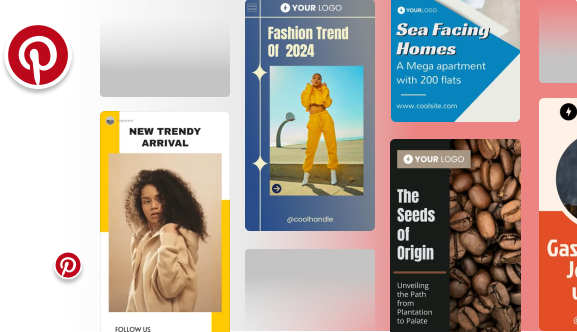
In 2026, you need a mix of content. Standard photos are great for traffic, but videos and “Collages” are what keep people looking at your brand for longer. The goal is to be helpful, not just “salesy.”
- Always use a 2:3 ratio (vertical)—long pins take up more screen space and get more clicks.
- Use high-quality images; Pinterest is a visual-first platform, so blurry photos won’t work.
- Add “Text Overlays” to your Pins so people know exactly what they are clicking on.
- Create “Video Pins” for tutorials or behind-the-scenes content to grab attention.
- Make “Collage Pins” that show how different products work together in a set.
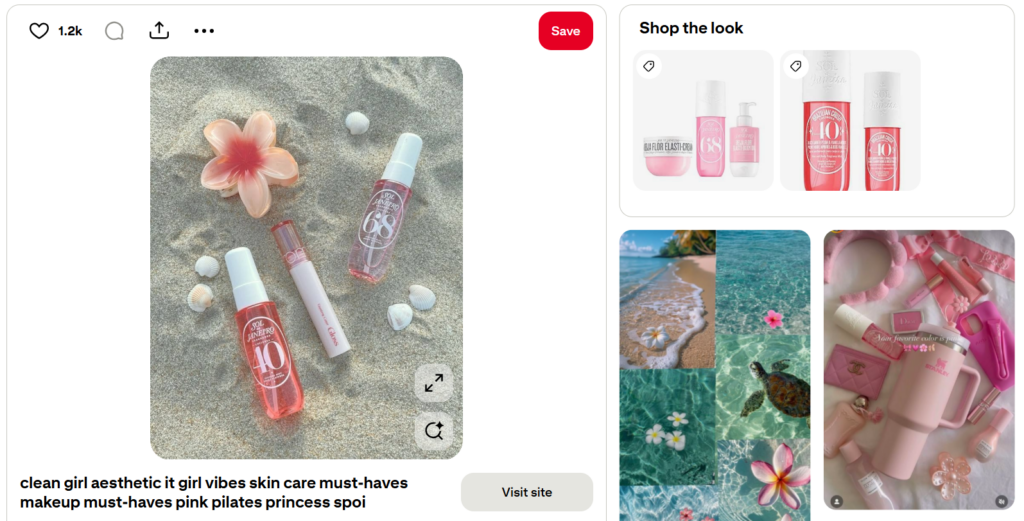
Look at how this pin is designed: An aesthetic image, links to the proper site, ability to shop the look from the post itself, and relevant hashtags to get more reach!
7. Getting Found (SEO Optimization)
Since Pinterest is a search engine, your text matters just as much as your photos. You need to “label” your Pins correctly so the Pinterest AI knows who to show them to.
- Put your main keyword in the Pin Title—make it bold and clear.
- Write a description like a human, not a robot, but include 2-3 keywords naturally.
- Use “Alt Text” to describe the image for the AI (and for people who use screen readers).
- Ensure your Pin link matches the content—don’t send someone to a homepage if they clicked a shoe.
- Add 2-3 relevant hashtags at the very end of your description (though keywords are more important).
8. Putting It on Autopilot (Scheduling with Predis.ai)
You shouldn’t be manually pinning every day. Using an AI tool like Predis.ai allows you to create and schedule a whole month of content in one afternoon. It does the design work and the “posting” for you.
- Connect your store to Predis.ai to turn your products into Pins instantly.
- Use the “AI Caption Generator” to save time writing descriptions for every post.
- Schedule 2-5 Pins per day to keep the algorithm happy without being “spammy.”
- Set your “Best Time to Post” based on when your specific audience is online.
- Use the “Calendar View” to make sure you have a good mix of videos and photos throughout the month.
9. Checking Your Report Card (Analyze Performance)
Every month, you need to see what worked and what flopped. Pinterest Analytics tells you exactly which Pins made people go to your website. If a certain style of Pin is winning, make more of that!
- Focus on “Outbound Clicks”—this tells you how many people actually went to your site.
- Look at “Saves”—this shows that your content is helpful enough for people to keep for later.
- Identify your “Top 5 Pins” and try to figure out why they did so well (was it the color? the text?).
- Check your “Conversion Insights” to see if those clicks actually turned into sales or sign-ups.
5 Foolproof Tips for Pinterest Marketing Strategy
- Contextual Overlays: Use text that solves a problem. Instead of “Blue Shoes,” use “The Most Comfortable Blue Shoes for 8-Hour Shifts.”
- Video for “Dwell Time”: The algorithm prioritizes Pins that keep users on the platform. A 10-second “How-to” video is more powerful than a static image for boosting your overall account authority. You can even use these videos to run ads.
- Seasonal Lead Times: Start pinning Christmas content in September. Pinterest is a planning tool; if you wait until December, you’ve missed the search wave.
- Brand Logos: Place your logo on every Pin, but keep it subtle. Avoid the bottom right corner where the “Visual Search” icon sits.
- Link Accuracy: Never link to a homepage. If the Pin shows a blue velvet sofa, the link must go directly to the blue velvet sofa product page.
The 2026 Toolkit for Pinterest Users
- Predis.ai: Your “AI Social Media Manager” for design and scheduling.
- Pinterest Trends Tool: For real-time data on what the world is searching for right now.
- Pinterest Analytics: Your internal compass for strategy shifts.
Conclusion
Pinterest marketing strategy in 2026 is about the intersection of Aesthetic and Algorithm. By leveraging AI tools like Predis.ai to maintain a consistent presence and focusing on “Intent-Based SEO,” your brand can tap into a traffic source that grows more powerful with every Save.
Ready to start? Begin by auditing your current Boards and start creating content with Predis AI today!
FAQ:
Yes! Pinterest is very affiliate-friendly, provided you disclose the relationship (e.g., #ad) and link directly to the merchant via a “clean” link.
Quality over quantity. Aim for 10–15 highly specific boards rather than 50 generic ones.