As social media managers, you juggle multiple tasks, from content ideation to analytics reporting. If you were to do everything manually, your day and the to-do list might never end. But if you effectively use AI video tools, you can make your life much easier. If you don’t know how or which tools can help you do that, then you are in the right place, because we are going to elaborate on that in this blog. Stay tuned!
Top 7 AI video tools for social media managers
Let us get down to business. What are some AI video tools that you can use? Honestly, the options are overwhelming. But we tested and tried the most popular ones and condensed them into a list of 7 AI tools that are some of the best in terms of ease of use, output quality, and so on.
So, let us get on with the list, shall we?
1. Predis AI
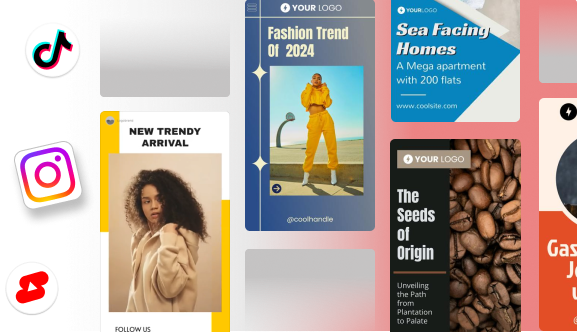
Starting strong, we have Predis AI, which is a multi-purpose tool that can make everything from social media posts, ads, to different types of videos, from AI avatars to product videos. And all you have to do is write a prompt, and Predis AI even has a writing assistant to help you with that.
Predis Ai is a great tool to generate images or videos easily. I have used it for the last 4 months! Enter the prompt and there you have it ready to publish immediately or via scheduling. It saves me hours every week!
This is for the people who have no problem shooting content and only require assistance in editing. Capcut enables easy editing of videos with pre-made templates and a user-friendly interface. It also consists of AI capabilities like the generation of captions and voiceovers as well. And best of all, it is free to get started!
The actual worst editing app ever. Yes it does some stuff, but the playback is horrendous. I literally pay for pro and can’t even use it. I’ve tried on every device. They’re all updated. Cancelling my subscription now and switching to something else. I actually don’t even care if it’s more expensive wtf am I paying for.
Contains a library of templates that you can use to create content for your social media
Has a quick, efficient, and user-friendly editing interface
Can save your projects to the cloud and access them via both mobile and laptop.
Pros:
An intuitive user interface
Massive library of templates, effects that are ready to use
Cons:
Most of the good AI stuff is hidden behind a paywall
Works best for videos under 15 minutes
Does not allow you to stack multiple videos and audios on top of one another
Complex editing is not possible
3. ElevenLabs
This is for the people who hate recording voice-overs for their videos, because once again, AI got you covered. With ElevenLabs, you can clone your own voice or get a custom voice generated from scratch and use it in your videos. It offers text-to-speech and speech-to-speech in 29 languages and accents.
Doesn’t let you try for free which mean these sell compute power of other suppliers not their own which means I wasted 10 min that I wont get back-
Offers Instant voice cloning feature that allows you to provide voiceover in your own voice
Text-to-speech that lets you convert text into voiceover with pre-made voices
Provides options to record voiceover in 29 different languages and accents
Has a library of 40 different voices and a community library of 10,000 voices that you can choose from
You can also record your own voice and switch it out with a different voice while retaining tone and intonation
Generate sound effects with the help of AI
Pros:
Ease of use
Ability to choose from a large library of voices
Cons:
AI pronunciation can be off-putting at times
Most of the voices are not authorized for commercial use
4. Sprinklr
Sprinklr is for those managers who require help with streamlining their content creation process and maybe throw in a little bit of automation. From having a unified dashboard to review analytics and collaborating with other team members, Sprinklr makes your admin work proceed much more smoothly.
They are hopeless with there services, they product is no good. very disappointed 🙁
Has a centralized social inbox from where you can engage with your audience
Allows setting up of automated responses that make prompt responses easier
Optimize your strategy with advanced analytics like sentiment tracking to find trending topics
Assign tasks, provide role-based permissions, and collaborate with teams easily
Pros:
Unified dashboard to manage customer engagement
Scalable for a business of any size
Cons:
An extensive feature set requires you to undergo a learning curve
Can be expensive for smaller teams
Has too many customization options, which can be confusing
5. Synthesia
Apart from social media videos, many businesses also use videos for knowledge transfer, from training their employees, to creating guides for their new users. If that is the use case that you are after, then Synthesia can work. They have a huge library of AI avatars and offer the ability to make your own.
I tried to generate a test video for promotion of a business and it rejected the video. It said that the video does not comply with the Content Moderation Policy because I cannot use Stock Avatar for Promotion of the Business. I went through the Content Moderation page and it is something else.
Offers a massive collection of 230+ avatars from different ethnicities
Ability to generate voice-overs in 140+ languages and accents
Can create a personal avatar for your business
Drag and drop video creation and editing workflow
A library of 60+ templates to get started with your video creation
Access to stock libraries like Getty and Pexels
Pros:
Multilingual video creation for text prompts
Maintains consistency throughout the videos
Cons:
AI avatars lack in expressing emotions, thus sometimes leading to the ‘uncanny valley’ effect
Does not offer advanced editing features like animation, transitions, and stop motion
6. Invideo
Invideo AI is also a video creator that can help you turn anything from prompts to blog posts into video content. It adds everything from stock footage to transitions and captions, and you do not require any editing skills to make this happen.
Having using this app for some time I’m not very happy when you get locked out it tells you to login back in 24 hours and that’s very inconvenient, it shouldn’t be like that that’s why I’m canceling my subscription. For a AI company they should have a better security measures. Good luck.
Helps you create videos with AI and also make edits with text prompts
Generate voiceovers in 50+ languages, ensuring global reach
Create AI avatar videos from their pre-made avatars
Get assistance developing scripts with their AI script generator
Choose pre-made voices or clone your own to get voice-generated for your videos
Pros:
Instant translation for reaching a global audience
Vast template library
Cons:
Free plan comes with watermarks
The mobile app is very basic, so sticking to the desktop is the best option
7. Madgicx
We talked about all these AI tools for making videos, but what if you need a tool to help with videos that are going to get uploaded as ads? Then you need a special set of features to cater to this requirement, like ad optimization and so on. Madgicx is the tool that can help you achieve that.
They’re scammers. I can’t cancel the free trial. They charged me €171.56. I immediately wrote to them, and they replied today that it’s all Moa’s fault for not canceling in time. This is their business policy and the protection they offer customers. Scammers.
Like all things in the world, AI video-making tools have their own pros and cons. Here is a glimpse into both sides of the coin, so if you can figure out whether it is worth the time and money you spend.
Pros of using AI video tools
Can cut the time you spend on content creation by at least half
AI developments have grown leaps and bounds. This means your content output will be more realistic than you can imagine.
Helps in ideation, although it might require some creativity on your side
If you can integrate tools properly, you can automate the end-to-end content creation process
Cons of using AI video tools
Based on your usage, you can rake in bills pretty quickly
Most free tier ccontent come with watermarks
The quality of content can be inconsistent, which means you have to manually proofread every AI-generated content
Relying entirely on AI-content can make your content soulless; it needs you to add your own ideas to make it human.
Conclusion
Outsourcing your video creation process to AI tools can simplify your process by multifold. When that is done, you can allocate all the time you save to strategize and plan how to grow your brand in the future. So start your video creation process with Predis AI today!
FAQ:
1. Can AI video tools create videos from texts or prompts?
Yes, AI video tools can convert blog topics, prompts or any text into videos that can hook your audience.
2. How beginner friendly are AI tools?
All the video tools are beginner-friendly with drag-and-drop interface, automation and templates.
Tanmay, Co-founder of Predis.ai, is a seasoned entrepreneur with a proven track record, having successfully built two companies from the ground up. A tech enthusiast at heart, a recognized SaaS expert, and years of hands-on experience in leveraging technology to fuel marketing success, Tanmay offers invaluable insights on how brands can boost their digital presence, improve productivity, and maximize ROI.
Why trust us? Predis.ai is trusted by over a million users and business owners worldwide, including industry leaders who rely on our AI’s output and creativity. Our platform is highly rated across review sites and app stores, a testament to the real world value it delivers. We consistently update our technology and content to ensure you receive the most accurate, up to date, and reliable guidance on leveraging social media for your business.