Scroll through Instagram, YouTube Shorts, or LinkedIn for five minutes and you’ll notice something interesting.
A huge percentage of videos aren’t filmed with a camera anymore.
They’re generated.
AI videos are no longer experimental or niche. According to recent industry data, short-form video delivers the highest ROI across social platforms, and businesses using AI tools for content creation are producing 3–5× more content without increasing team size.
What changed isn’t just the tools.
It’s the workflow.
Instead of treating video creation as a messy, manual process, creators are now building end-to-end AI-video pipelines. These pipelines connect everything: idea → script → visuals → voice → edits → captions → posting.
If you’re a beginner, that might sound overwhelming.
Here’s the thing: it doesn’t have to be.
This guide breaks it down step by step. No jargon overload. No “AI will replace humans” drama. Just a clear explanation of how to build a simple, scalable AI-video pipeline that actually works — whether you’re a small business owner, marketer, content creator, or social media manager.
What Is an End-to-End AI-Video Pipeline?
Let’s simplify this before we go any further.
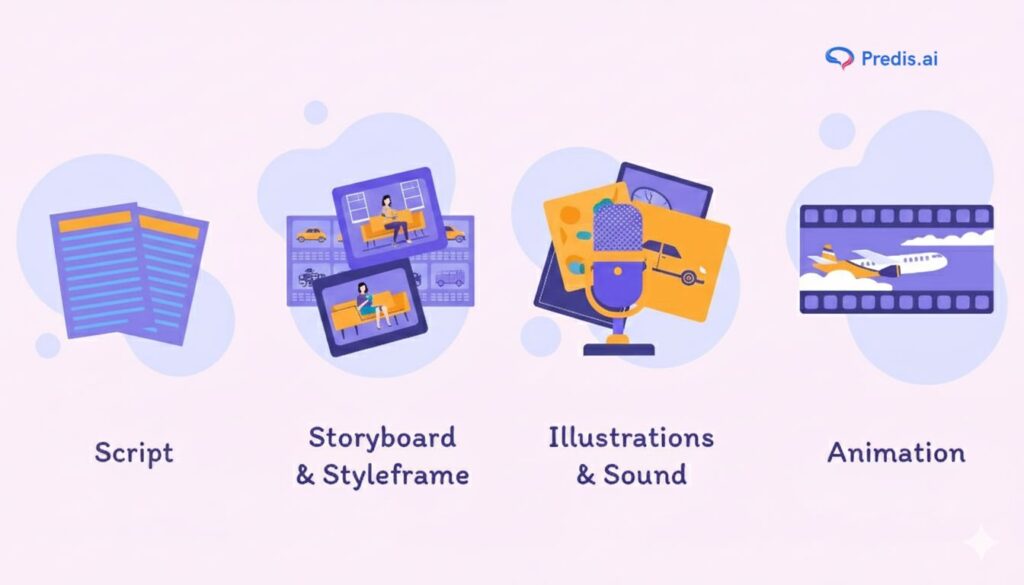
An end-to-end AI-video pipeline is a connected system that handles the entire video lifecycle:
- You start with an idea or prompt
- AI helps turn it into a script
- Another tool generates visuals or footage
- AI edits, adds voice, music, and captions
- The finished video gets formatted and posted to social platforms
Instead of jumping between random tools and manual steps, everything flows logically from start to finish.
Think of it like a production line — but flexible and creative, not rigid.
Why Building a Pipeline Matters? (Especially for Beginners)
Most beginners fail at video not because they lack ideas, but because the process feels chaotic.
Here’s what usually happens:
- You write scripts randomly
- You try different tools every week
- Editing takes forever
- Posting becomes inconsistent
- Burnout kicks in
A pipeline solves this by doing three things:
- Reduces decision fatigue
- Improves consistency
- Makes content scalable
Once the system is set, creating videos becomes repeatable. You stop “starting from scratch” every time.

Step 1: Start With the Right Prompt (The Foundation of the Pipeline)
Why Prompts Matter More Than Tools?
In an AI-video pipeline, the prompt is your creative brief.
Bad prompt = confusing output
Clear prompt = usable video
Beginners often blame tools when the real issue is unclear input.
How to Think About Prompts as a Beginner?
A good prompt answers four questions:
- Who is this video for?
- What is the main message?
- What emotion should it trigger?
- Where will it be posted?
Example of a Weak Prompt
“Create a video about AI marketing.”
Example of a Strong Prompt
“Create a 30-second Instagram Reel explaining how small businesses can use AI tools to save time on social media, in a friendly and beginner-friendly tone.”
This clarity feeds the entire pipeline.
Step 2: Script Generation Using AI (But With Human Direction)
AI Is a Co-Writer, Not the Author
One common mistake is letting AI write scripts with zero guidance. The result? Generic, lifeless content.
Instead, use AI to:
- Structure ideas
- Simplify explanations
- Improve flow
But you control the message.
How to Generate Better Scripts
Start with:
- Video length
- Platform
- Audience awareness level
- One clear takeaway
Then ask AI to draft, not finalize.
Tip for Beginners
Always read scripts out loud.
If it doesn’t sound like something a human would say, rewrite it.
Step 3: Choosing the Right AI Video Generation Method
This is where many beginners get stuck. There isn’t just one way to generate AI videos. Businesses also leverage Data & Artificial Intelligence services to implement professional AI video pipelines efficiently
Common AI Video Generation Approaches
1. Text-to-Video
You provide a script, AI generates visuals.
Best for:
- Explainers
- Educational content
- Faceless channels
For more demanding workloads, especially when generating high-quality or real-time video content, teams often rely on a GPU dedicated server to ensure consistent performance and speed up rendering and model inference tasks.
2. Avatar-Based Videos
AI avatars deliver your script.
Best for:
- Business updates
- LinkedIn content
- Training videos
3. Image-to-Video
Still images animated into video.
Best for:
- Product showcases
- Storytelling reels
- Brand aesthetics
Step 4: Voiceovers, Music, and Sound Design
Why Audio Quality Makes or Breaks AI Videos
You can get away with average visuals.
You can’t get away with bad audio.
Sound is what makes AI videos feel real.
Voiceover Options in an AI-Video Pipeline
- Text-to-speech voices
- Voice cloning
- Human-recorded voice + AI editing
For beginners, clean text-to-speech with natural pacing works just fine.
Music and Background Audio
Choose music that:
- Matches platform tone
- Doesn’t overpower voice
- Supports emotion
Step 5: Editing and Visual Flow (Keep It Simple)
The Goal Isn’t Cinematic Perfection
AI editing tools can:
- Auto-cut scenes
- Add transitions
- Sync visuals to voice
- Insert captions
Your goal isn’t perfection.
Your goal is clarity and retention.
Beginner-Friendly Editing Principles
- One idea per video
- Short scenes
- Clear text overlays
- Consistent pacing
If the viewer understands the message in 3 seconds, you’re doing it right.
Step 6: Captions, Subtitles, and Accessibility
Why Captions Are Non-Negotiable
Over 80% of social videos are watched on mute.
Captions aren’t optional anymore. They’re part of the pipeline.
How AI Helps With Captions
AI can:
- Auto-generate subtitles
- Highlight key phrases
- Format captions for different platforms
Always do a quick manual check. Small errors reduce trust.
Step 7: Formatting Videos for Different Social Platforms
One Video, Multiple Outputs
A proper end-to-end AI-video pipeline doesn’t stop at creation. It adapts content for each platform.
Instagram Reels
- Vertical (9:16)
- Fast pacing
- Strong hook in first 3 seconds
YouTube Shorts
- Slightly longer retention
- Clear storytelling
- Educational tone works well
LinkedIn Video
- Professional but conversational
- Slower pacing
- Value-driven content
Step 8: Scheduling and Posting With AI Assistance
Why Posting Consistency Matters More Than Frequency
Posting daily doesn’t help if it’s random.
AI scheduling tools help you:
- Choose best posting times
- Maintain consistency
- Analyze engagement patterns
This turns your pipeline from creative to strategic.
Step 9: Analytics and Feedback Loops
A Pipeline Isn’t Complete Without Learning
AI can track:
- Watch time
- Drop-off points
- Engagement rates
Use this data to refine:
- Prompts
- Scripts
- Video length
- Visual style
The pipeline improves over time — if you let it.
How Small Businesses Can Benefit From an End-to-End AI-Video Pipeline
For small teams, AI video pipelines:
- Reduce production costs
- Speed up content creation
- Improve brand consistency
- Enable experimentation without risk
You don’t need a studio. You need a system.

Final Thoughts: Think Systems, Not Single Videos
Here’s the mindset shift that changes everything.
Don’t ask:
“How do I make one good AI video?”
Ask:
“How do I build a repeatable system that creates good videos consistently?”
That’s what an end-to-end AI-video pipeline really is.
Not automation for the sake of automation.
But clarity, structure, and creative freedom — supported by AI.
If you’re just starting out, keep it simple. Build one step at a time. Let the pipeline grow with you.
That’s how sustainable content is made.