Explore this content with AI:
The LinkedIn of 2026 is a vastly different landscape than the one we knew just a few years ago. If you’ve noticed your views dropping or your once-reliable strategies falling flat, you aren’t alone. Data from early 2026 shows that average reach is down by nearly 50%, and follower growth has slowed by almost 60% for those sticking to old playbooks.
The LinkedIn algorithm has pivoted from a “broadcasting” tool to a “precision engine.” LinkedIn’s current AI model, often referred to as 360Brew, no longer rewards shallow engagement or generic “thought leadership.” Instead, it prioritizes Expertise, Dwell Time, and Topic DNA. This guide will break down exactly how to master the 2026 algorithm to rebuild your reach and authority.
The 2026 LinkedIn Algorithm Pivot: What Has Changed?
In 2026, LinkedIn’s primary goal is to keep high-value professionals on the platform by showing them content that is actually useful to their specific jobs. To do this, they’ve made three massive shifts.
1. Dwell Time Outweighs Likes
A “like” used to be the gold standard. Today, it’s just a vanity metric. LinkedIn now measures Dwell Time—the exact number of seconds a user spends looking at your post.
- 0–3 seconds: Labeled as a “click bounce.” This signals to the algorithm that your hook was clickbait and the content was poor, leading to limited distribution.
- 61+ seconds: The “Golden Threshold.” Posts that hold attention for over a minute see a higher engagement rate.
2. The Death of the External Link
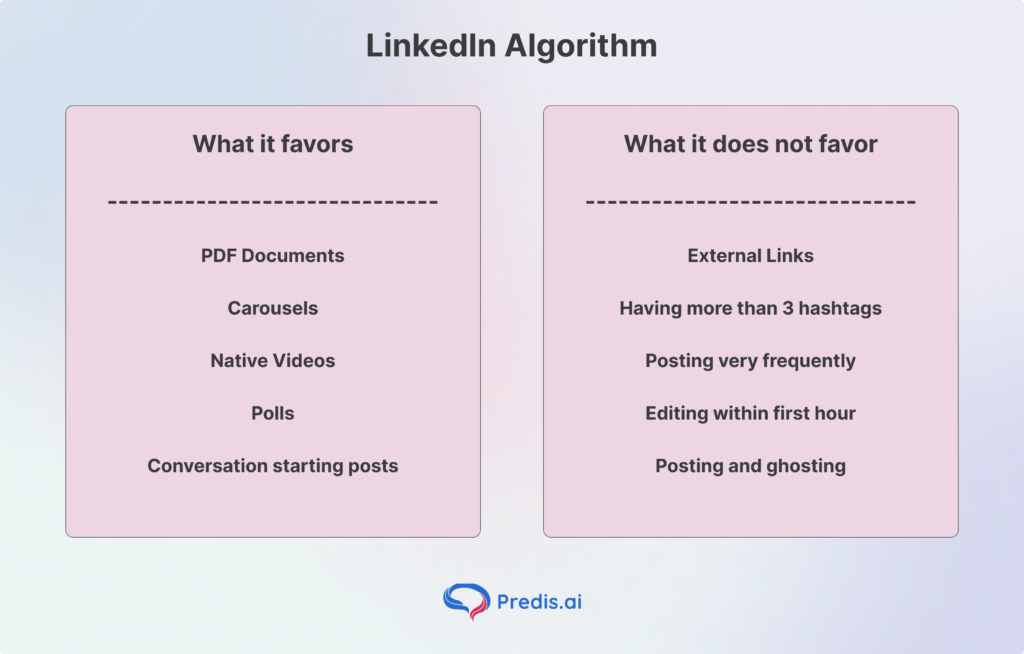
LinkedIn wants to keep users on LinkedIn. In 2026, posts containing external links see an average 60% reach penalty. Even the old “link in the first comment” trick is now detected and penalized. The algorithm favors native content that delivers the value directly within the feed.
3. Niche Authority and “Topic DNA.”
The algorithm now assigns your profile a “Topic DNA” based on your headline, about section, and past posts. If you are a “Data Scientist” but suddenly post about “Crypto Trading,” the algorithm will suppress that post because it doesn’t align with your established niche authority. Consistency is now a technical requirement for reach.
4. Long Comments Matter More
A simple “Like” or “Great post!” doesn’t help much anymore. In 2026, LinkedIn loves long, helpful comments. When people write a few sentences to join the conversation, the algorithm shows your post to way more people.
5. Your Network Quality Counts
The app now looks at who you talk to. If you interact with spammy accounts, your reach will drop. But if you connect with real experts who post good content, LinkedIn trusts you more and pushes your posts higher in the feed.
6. Vertical Video is Winning
Short, vertical videos (like TikTok style) are the best way to get views now. Videos that are filmed on a phone and have captions perform much better than expensive, professional commercials.
7. The Fast “Test” Window
The algorithm decides if your post is “good” much faster than before. You now have about 1 – 3 hours to get people to click “See More.” If they skip it early on, the post will likely stop growing.
8. Creator Mode vs. Regular Profiles
If you want to reach people who don’t follow you, Creator Mode is a must. It helps the AI understand your “topics,” so it can show your posts to the right audience across the globe.
How the LinkedIn Algorithm Actually Works (The Step-by-Step Process)
When you hit “Post,” your content goes through a four-stage gauntlet.
Stage 1: The AI Quality Filter
Before a single human sees your post, the 360Brew AI reads it. It checks for:
- Spam signals: Too many tags (more than 5), hashtag stuffing, or “engagement bait” phrases.
- AI Fingerprinting: It detects generic, unedited AI-written text. If it sounds like a robot, it gets demoted.
- Formatting: It looks for “white space.” Wall-of-text posts are flagged as low-quality because they have poor mobile readability.
Stage 2: The “Golden Hour” Test
Once cleared, your post is shown to a tiny sample (2–5%) of your most engaged followers. The first 1 -3 hours are critical. If this group scrolls past without clicking “See More” or spending time on the post, the algorithm stops pushing it. Only 5% of posts that fail in the first hour ever recover.
The signals that LinkedIn is looking for include:
- Dwell time
- “See more” expansion rate
- Saves
- Profile actions
- Thread depth
Stage 3: Engagement Velocity
If the test group likes it, the algorithm measures “velocity”—how fast the comments and saves are coming in. Thoughtful comments (3+ sentences) are weighted 15x heavier than likes.
If your post hits high dwell time and engagement velocity, it breaks out of your network. This is where you see your content appearing in the feeds of CEOs and decision-makers who don’t follow you but share your “Topic DNA.”
LinkedIn understands everything from your posts and hashtags so that it can find people who will be interested in your post and share it with them. This way, you get to interact with like-minded individuals.
Best Performing Content Types in 2026
If you want to maximize dwell time, you must use the right formats. With the right content formats, you can retain users for an extended period and also get them to engage better.
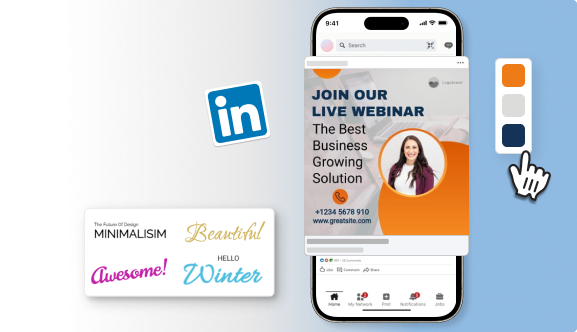
1. PDF Document Carousels
Documents are the undisputed kings of 2026. Because users have to click through slides, they naturally spend more time on the post.
- Sweet Spot: 5–10 slides.
- Tip: Each slide should have one clear takeaway. Use a 1080x1350px (portrait) ratio for maximum mobile screen real estate.
2. Short-Form Native Video
LinkedIn has seen double-digit growth in video uploads. With short videos less than 2 minutes, you can get more engagement.
- Length: 30–90 seconds.
- Requirement: You must include captions. Data shows that users predominantly watch LinkedIn videos on mute.
- Hook: Show your brand or logo in the first 4 seconds to boost dwell time.
3. “Human-Powered” Text Posts
Personal stories about career failures, contrarian industry takes, and “behind-the-scenes” solves perform better than corporate press releases. In a world of AI noise, a raw human perspective is a premium product.
4. Polls: The “Click” Boost
Polls are great for getting more views because they are super easy for people to click on. LinkedIn sees those clicks and thinks your post is interesting, so it shows it to more people. To get the best results, make sure your poll actually starts a conversation in the comments—just getting votes isn’t enough anymore.
5. Links: The “Exit” Penalty
LinkedIn hates it when you try to send people to another website (like a blog or YouTube). If you put a link in your post, the algorithm will hide it from most of your followers because it wants to keep users on the app. It’s much better to just explain your point in the post itself and leave the link out entirely.
How to Optimize Your Content to Match the LinkedIn Algorithm
1. The “Two-Line” Hook
On mobile, LinkedIn cuts off your post after the first two lines. Your only goal for those lines is to get the user to click “See More.” * Bad Hook: “I am happy to announce that we launched a new product.”
- Good Hook: “90% of B2B campaigns fail for one specific reason. Here is the data we found after 6 months of testing.”
2. Mobile-First Formatting
Most of the LinkedIn activity happens on mobile. So, it makes sense for you to optimize your posts for mobile.
- Use short sentences.
- Use bullet points.
- Leave a line of “white space” between every paragraph. This reduces “cognitive load” and increases dwell time.
3. Strategic Engagement
Don’t just post and ghost. Instead, interact with the comments and build conversations. This back-and-forth conversation is actually a signal that lets LinkedIn know that your post is interesting.
- Warm up: Leave 5–10 thoughtful comments on other industry leaders’ posts before you publish yours. This signals to the algorithm that you are active.
- The Reply Rule: Reply to every comment on your post within the first hour. This doubles your engagement velocity and keeps the post in the “Golden Hour” loop.
4. Build Your Digital Storefront
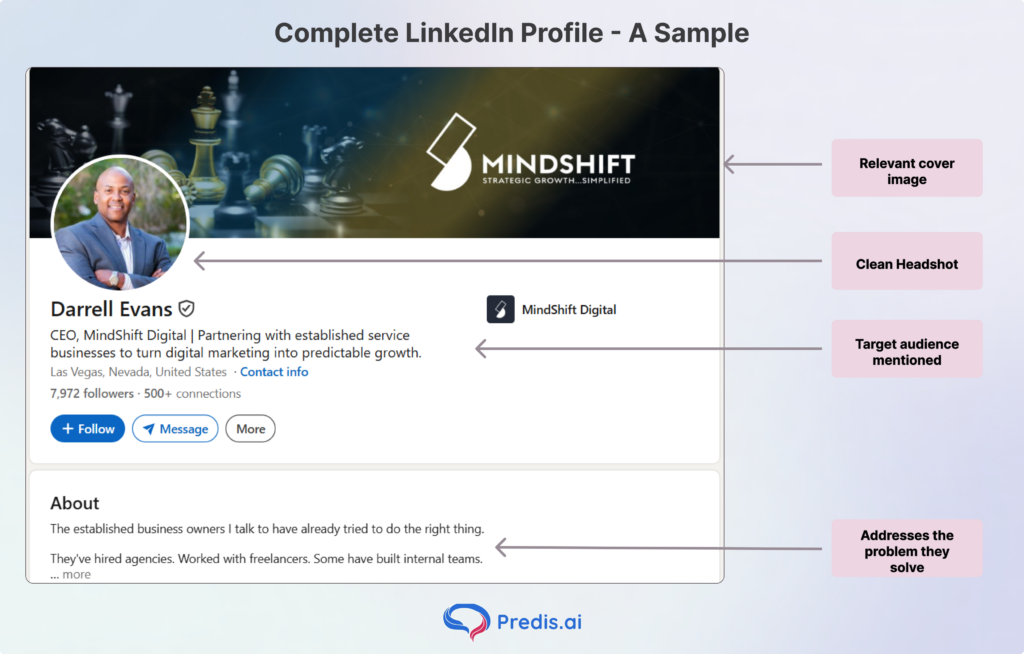
Your profile acts like a landing page. Instead of a boring resume, use a clear headshot and a headline that says exactly what you do. When your profile looks professional and complete, the algorithm trusts you more and is more likely to show your posts to strangers.
5. Focus on Real Talk
A “Like” is just a quick tap, but a comment shows real effort. The algorithm prioritizes “meaningful social interactions,” so one thoughtful comment is worth way more than ten likes. If people are talking in your comments section, LinkedIn will keep pushing that post into more feeds for days.
6. Time It for the Crowd
Posting when your followers are actually staring at their phones gives you an “engagement spike.” If you get activity right away, the algorithm thinks your post is “hot” and gives it a huge reach boost. If you post while everyone is asleep, your content might die before anyone sees it.
7. Play the Long Game
Going viral is like winning the lottery—it’s rare and usually temporary. It is much better to post 3 times a week every week than to post 10 times in one day and then disappear. Consistency builds a “reliable creator” score, which keeps your average views high over time.
8. Give Your Content a Nudge
Don’t just post and ghost. Share your post link in a private message to a few close colleagues or post it in a relevant Slack group. Getting those first few “seed” engagements tells the algorithm that your content is worth showing to a wider audience.
9. Use Relevant Hashtags
Hashtags are like filing folders. Using 3–5 specific tags helps the algorithm understand who should see your post. Avoid giant, generic tags like #Work; instead, use niche ones like #ContentMarketingTips so you land in the feeds of people who actually care about your topic.
10. Let Your Posts Breathe
If you post twice in two hours, you’re competing with yourself. The algorithm usually focuses on your newest post and “mutes” the previous one to avoid spamming your followers. Space your posts out by at least 18–24 hours to make sure each one gets its full chance to go wide.
11. Be a Good Neighbor
Social media is a two-way street. Before and after you post, go comment on other people’s content. This signals to LinkedIn that you are an active member of the community, not just a bot dumping links, which results in a “favorability boost” for your own reach.
Advanced Tips to Maximize Performance
- Post Reactivation: If a post is dying, go back 24 hours later and reply to an old comment or tag a new expert in the comments to spark a “second wave.”
- Verification Boost: In 2026, profiles with the “Verified” shield icon get a notable organic reach lift. It’s the ultimate trust signal for the AI.
- Employee Advocacy: Posts from personal profiles reach further than posts from Company Pages. Encourage your team to share insights, not just company links.
Tools and Resources to Help You Create
- Predis AI: Create LinkedIn posts, carousels, and other design elements with just a simple prompt using Predis AI – no experience required!
- Canva: Still the best for creating high-conversion PDF carousels.
- CapCut: Use the 2026 direct-to-LinkedIn integration for auto-captions and vertical formatting.
- Grammarly/Hemingway: To ensure your “Human-Powered” text is readable and punchy.
- TextToPDF.net: Useful when you want to turn written carousel copy into a clean PDF using a text to PDF tool before uploading it on LinkedIn.
Final Thoughts
The 2026 LinkedIn algorithm is designed to kill “ghost accounts” and generic spam. It wants to hear from you—the expert with lived experience. If you focus on providing deep value, holding a reader’s attention for more than 60 seconds, and staying consistent within your niche, you will not just survive the algorithm changes; you will dominate your industry feed.
FAQ
Yes, editing a post within the first 2 hours resets the “Golden Hour” testing. Check your typos before you hit publish!
You can use AI for outlines or brainstorming, but 360Brew will penalize “pure” AI text. You must edit it to include your personal voice and specific data points.
Use 1–3 relevant hashtags. Using more than 5 is a “spam signal” that tells the algorithm you’re desperate for reach, which results in a penalty.