Explore this content with AI:
We are officially living in a Visual-First Economy. In 2026, the average user scrolls through nearly 300 feet of content daily. If your imagery is blurry, awkwardly cropped, or stretched, users won’t just keep scrolling—they will subconsciously associate your brand with lower quality.
Platform-Specific Rendering is no longer a suggestion; it’s a requirement. Modern algorithms on platforms like Instagram and TikTok prioritize content that fits their native aspect ratios perfectly. Furthermore, with the mainstream adoption of 4K mobile screens and foldable displays, the 72dpi standards of the past are dead. 2026 is the year of ultra-sharp, high-bitrate visuals.
Essential Things to Know About 2026 Image Standards
Before we dive into the specific numbers, you need to understand the structural shifts in how social media handles media today. When an image is hosted online, its image URL is the web address that points to that image.
- The Rise of Vertical-First (9:16): Across almost every platform—from YouTube Shorts to LinkedIn—the 9:16 vertical ratio has become the dominant format. It maximizes “screen real estate,” leaving no room for distractions.
- AI-Upscaling & Smart Compression: Social platforms now use AI to compress your images. To fight this, you must upload the highest resolution possible. Don’t compress your files before uploading; let the platform’s native AI handle it to maintain edge sharpness.
- Dynamic Displays & Safe Zones: With foldable phones (like the latest Pixel and Galaxy Z series) and integrated desktop displays, your image might be viewed as a square, a slim rectangle, or a massive 4:5 portrait. Sticking to “Safe Zones” ensures your text isn’t cut off by UI buttons or folding hinges.
Instagram Image Sizes (Feed, Stories & Reels)
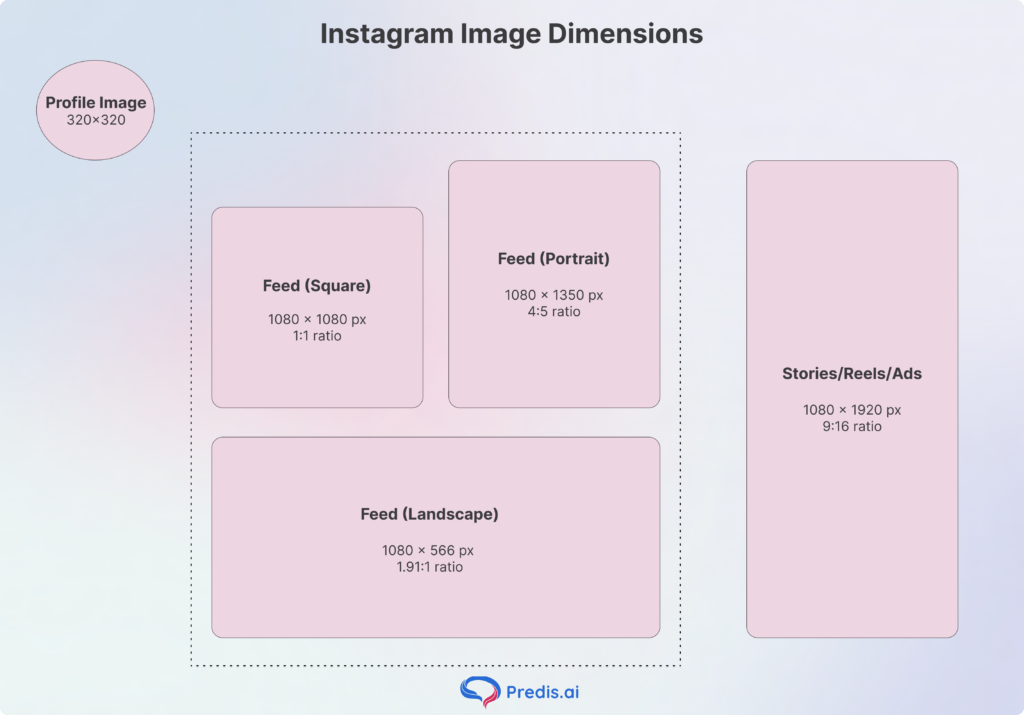
Instagram remains the visual heavyweight with many different types of image and video dimensions. In 2026, the platform leaned heavily into the “Tall Feed” to compete with TikTok.
- Profile Photo: 320 x 320 pixels (Displays at 110 x 110, but needs the extra resolution for high-res screens).
- Instagram Feed (Square): 1080 x 1080 pixels (1:1 ratio).
- Instagram Feed (Portrait): 1080 x 1350 pixels (4:5 ratio).
- Instagram Feed (Landscape): 1080 x 566 px (1.91:1)
- Instagram Stories & Reels: 1080 x 1920 pixels (9:16 ratio).
- Carousel: 1080 x 1080 px or 1080 x 1350 px
- Instagram Ads: 1080 x 1920 (Stories/Reels) or 1080 x 1080.
- The Safe Zone Rule: For Reels and Stories, keep all text and logos within the 1080 x 1420 central area. This prevents your caption or CTA from being covered by the “Like” heart, “Comment” bubble, or the user’s notch.
TikTok Image & Asset Sizes
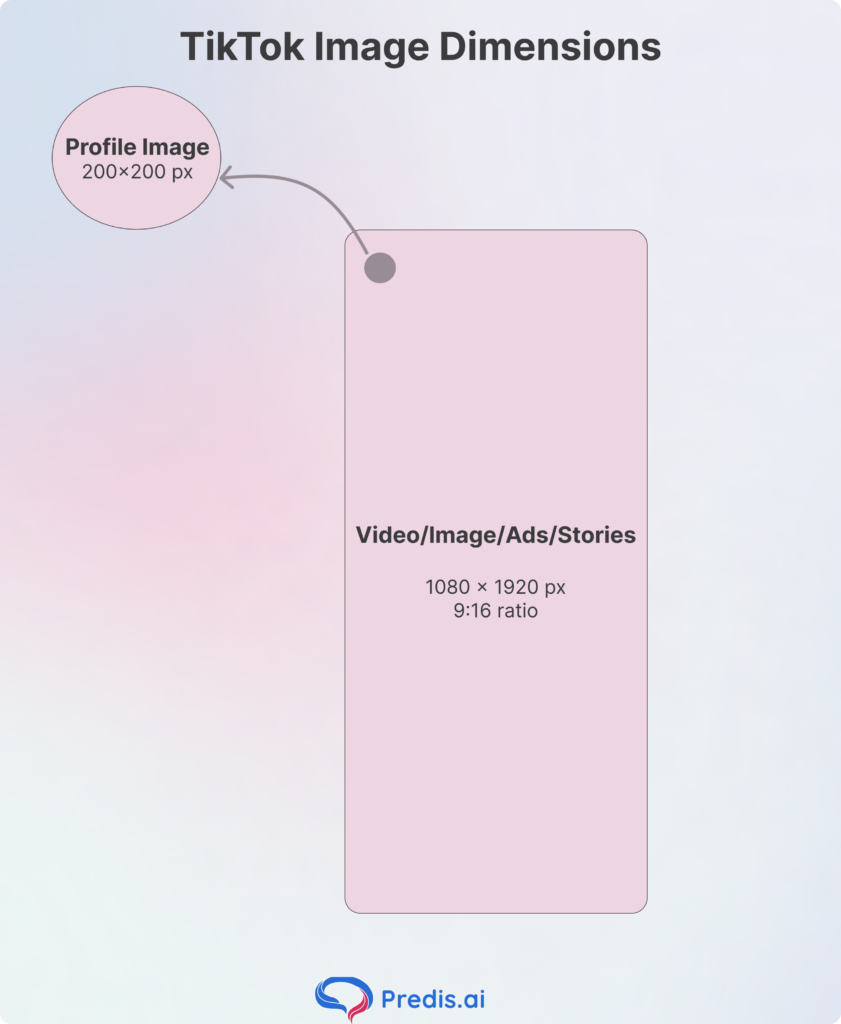
TikTok is no longer just for video. Its “Photo Mode” carousels are currently driving massive reach.
- Profile Photo/Video: 200 x 200 pixels.
- TikTok Video/Image Posts: 1080 x 1920 pixels.
- TikTok Carousel Images: 1080 x 1920 (preferred) or 1080 x 1080.
- TikTok Ads: 1080 x 1920 pixels.
- Stories: 1080 x 1920 px (9:16)
YouTube Social Media Image Sizes
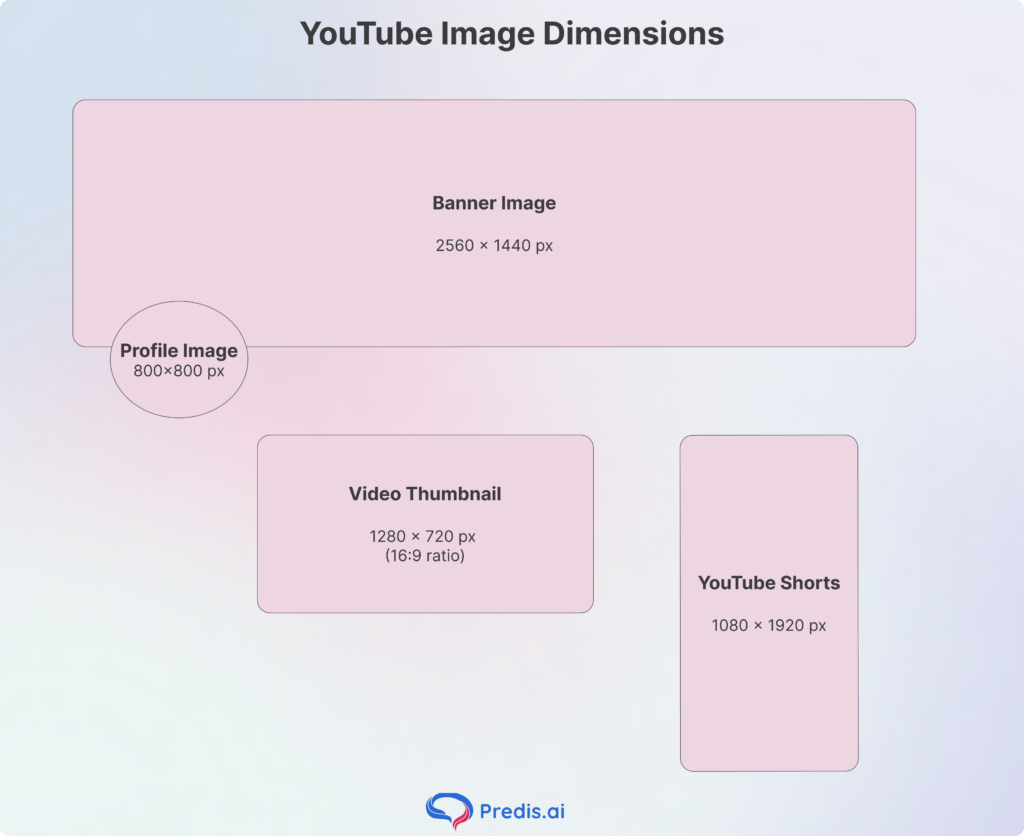
YouTube has become a hybrid platform between long-form cinema and “Shorts” snackable content.
- Channel Profile Photo: 800 x 800 pixels.
- Channel Banner: 2560 x 1440 pixels.
- The Safe Area: This is the most important metric. Keep your text centered within a 1546 x 423-pixel banner to ensure it’s visible on mobile, desktop, and TV.
- Video Thumbnail: 1280 x 720 pixels (16:9 ratio).
- YouTube Shorts: 1080 x 1920 pixels.
Threads Image Sizes
Threads has stabilized as the “conversational” hub, favoring clean, portrait-style imagery.
- Profile Image: 320 x 320 pixels.
- Thread Image Post: 1080 x 1350 pixels. Portrait images get significantly higher engagement than landscape ones on Threads.
- Thread Carousel: 1080 x 1080 pixels.
Pinterest Pin & Header Sizes
Pinterest is a discovery engine, and its users expect high-quality “aspirational” visuals.
- Profile Image: 165 x 165 pixels.
- Standard Pin: 1000 x 1500 pixels (2:3 ratio).
- Story Pins: 1080 x 1920 pixels (9:16 ratio).
- Board Cover: 800 x 450 px (16:9)
Snapchat Social Media Image Sizes
Snapchat remains the king of ephemeral and AR-based content.
- Profile Image: 320 x 320 pixels.
- Snap Ad: 1080 x 1920 pixels (9:16 ratio).
- Banner Image size: 375 x 278 pixels
LinkedIn Image Sizes (Personal & Business)
In 2026, LinkedIn is more visual than ever. Professionalism now requires high-end design assets.
- Profile Picture: 400 x 400 pixels.
- Personal Cover Photo: 1584 x 396 pixels.
- Company Page Banner: 1128 x 191 pixels.
X (Formerly Twitter) Image Sizes
While these platforms are older, they still command massive traffic for news and community building.
- X Header Photo: 1500 x 500 pixels.
- X In-Stream Image: 1200 x 675 px (16:9).
- Profile Picture: 400 x 400 px (1:1)
- Ads: 600 x 335 px (single image)
Facebook Social Media Image Sizes
- Profile Picture: 320 x 320 px (1:1)
- Cover Photo: 851 x 315 px (2.7:1)
- Feed Posts – Square: 1080 x 1080 px (1:1)
- Feed Posts – Vertical: 1080 x 1350 px (4:5)
- Feed Posts – Horizontal: 1200 x 630 px (1.91:1)
- Stories: 1080 x 1920 px (9:16)
- Event Cover: 1920 x 1005 px
- Ads: 1080 x 1080 px (Feed), 254 x 133 px (Right Column)
2026 Cheat Sheet: Aspect Ratio Comparison Table
| Platform | Recommended Size | Aspect Ratio | Best Use Case |
| Instagram Reel | 1080 x 1920 | 9:16 | Viral Short-form Video |
| Pinterest Pin | 1000 x 1500 | 2:3 | Vertical Discovery/Shopping |
| YouTube Thumb | 1280 x 720 | 16:9 | High-CTR Video Hooks |
| Threads Post | 1080 x 1350 | 4:5 | Conversational Storytelling |
| Snapchat Snap | 1080 x 1920 | 9:16 | Ephemeral Ads/Updates |
| LinkedIn Banner | 1128 x 191 | ~6:1 | B2B Professional Branding |
Common Mistakes & Best Practices
Even with the right numbers, you can fail if you don’t follow these best practices:
- Ignoring the “Rule of Thirds” in Cropping: Don’t put your subject’s eyes at the very top of a 9:16 frame. Platforms often add a “gradient overlay” at the top and bottom; keep the action in the center two-thirds.
- Over-Compressing Before Upload: Many creators save as “Low Quality” to save space. In 2026, this is a mistake. Upload high-bitrate PNGs or WebPs and let the platform’s advanced AI algorithms do the downscaling.
- Mobile vs. Desktop Safe Zones: Always check your design on a phone. The TikTok “Like” heart and the Instagram “Send” button sit in very specific spots. If your text is under those buttons, it doesn’t exist.
- Inconsistent Branding: If you’re making a carousel, don’t mix 1:1 and 4:5 images. It creates a jarring “jump” in the UI that feels amateur.
Conclusion: Staying Sharp in a Changing Landscape
Social media platforms are living organisms. They update their user interfaces (UI) almost every quarter, which can shift where buttons sit and how images are cropped. Treat this guide as a living document—bookmark it and check back every few months to ensure your templates are still accurate.
Final Takeaway: Content is king, but presentation is the gatekeeper. Correct sizing ensures your message isn’t lost in a blurry crop or hidden within a “safe zone.” Being “pro” means being precise.
Frequently Asked Questions
This is caused by platform compression. If your file is too large or the wrong resolution, the app’s AI “crunches” it to save space. To fix this, upload in the exact recommended dimensions and use PNG or WebP formats for maximum sharpness.
A Safe Zone is the area of your image or video that won’t be covered by UI elements like “Like” buttons, captions, or notches.
Most platforms have a cap between 10MB and 30MB for static images. If your file is too heavy (common with high-res PNGs), the platform might reject it or apply Compression, which ruins the quality.