Explore this content with AI:
Here’s the thing: people don’t scroll like they used to.
Long posts? Skipped.
Perfectly designed banners? Ignored.
Stories? Still watched.
Across platforms like Instagram, Facebook, and even Snapchat, Story Ads have become one of the highest-performing ad formats for e-commerce brands. Studies consistently show that vertical, full-screen story ads see higher engagement and lower cost per click compared to traditional feed ads.
Now pair that with another reality of e-commerce:
- Your product catalog keeps changing
- Prices update
- Stock runs out
- New products launch frequently
Manually creating story ads every day for dozens or hundreds of products is exhausting. For small businesses and growing brands, it’s simply not realistic.
This is where Story Ads from an E-Commerce Product Feed come in.
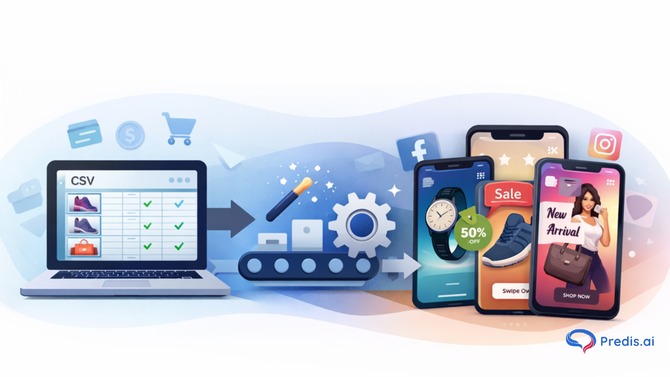
Instead of designing ads one by one, you can use a product feed (usually a CSV file) to automatically generate fresh, on-brand story ads daily. Tools like Predis.ai make this process much simpler, even if you’re not technical or design-savvy.
This guide walks you through what it means, why it matters, and exactly how beginners can do it without feeling overwhelmed
What Are Story Ads from an E-Commerce Product Feed?
Before we go any further, let’s clear the basics.

What Is an E-Commerce Product Feed?
An e-commerce product feed is simply a structured file that contains details about your products.
Most commonly, this comes as a CSV file and includes information like:
- Product name
- Product image URL
- Price
- Discounted price
- Product description
- Product link
- Availability
If you’ve ever uploaded products to Facebook Catalog or Google Merchant Center, you’ve already worked with a product feed, even if you didn’t realize it.
What Are Story Ads?
Story ads are vertical, full-screen ads designed to appear inside Stories on platforms like:
- Snapchat
They’re immersive, quick to consume, and designed for mobile-first behavior.
So What Does “Generating Story Ads from a Product Feed” Mean?
It means this:
Instead of designing each ad manually, a AI tool reads your product feed and automatically turns product data into visual story ads.
For example:
- Product image becomes the visual
- Product name becomes the headline
- Price becomes the callout
- Brand colors and fonts stay consistent
The result? Fresh, daily story ads generated at scale.

Why Generating Daily Story Ads Matters for E-Commerce Growth
Let’s talk honestly about why this approach works so well.
1. Consistency Beats Occasional Perfection
Most e-commerce brands don’t fail because their ads are bad.
They fail because they’re inconsistent.
Daily story ads keep your brand visible without burning your team out.
2. Stories Create Urgency by Design
Stories disappear in 24 hours. That natural urgency works beautifully for:
- Limited-time discounts
- Flash sales
- New arrivals
- Low-stock products
Automated story ads let you tap into this urgency every single day.
3. You Can Promote More Products Without Extra Work
Manually, you might promote:
- 3–5 products per week
With automated story ads:
- You can rotate through your entire catalog
This is especially powerful for stores with large inventories.
Understanding CSV Import for Product Feeds (Beginner-Friendly Explanation)
The words “CSV import” can sound intimidating, but it’s much simpler than it seems.

What Is a CSV File?
A CSV file is basically a spreadsheet saved in a specific format.
Each row represents one product.
Each column represents a product detail.
Think of it as:
- One row = one product
- One column = product name, price, image, etc.
Most platforms export this for you automatically.
Where Do You Get Your Product Feed From?
Common sources include:
- Shopify
- WooCommerce
- Magento
- Custom e-commerce platforms
You can usually download a product feed directly or generate one using plugins.
How Predis.ai Uses CSV Imports to Create Story Ads
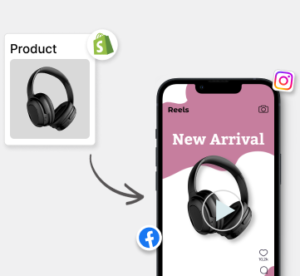
Predis.ai supports CSV import, which means you don’t need to manually upload products one by one.
Here’s the general idea:
- You upload your CSV product feed
- Predis.ai reads the product details
- It maps product fields to ad elements
- It generates story ads using predefined or customizable templates
The key benefit here is speed without sacrificing quality.
Step-by-Step: How to Generate Daily Story Ads from an E-Commerce Product Feed
Let’s walk through the full process like a beginner would.
Step 1: Prepare Your Product Feed Correctly
Before uploading anything, make sure your CSV includes:
- Clear product names
- High-quality image URLs
- Accurate prices
- Working product links
Messy data leads to messy ads.
Step 2: Upload the CSV File
Once your feed is ready:
- Upload the CSV into Predis.ai
- Ensure each column is correctly recognized
Most tools guide you through this visually, so you’re not guessing.
Mapping Product Data to Story Ad Elements
This step is crucial and often overlooked.
What Does “Mapping” Mean?
It simply means telling the system:
- This column = product name
- This column = price
- This column = image
Once mapped, the system knows how to build ads correctly.
Why This Matters
Correct mapping ensures:
- Prices appear in the right place
- Images aren’t stretched or cropped badly
- Text stays readable
Designing Story Ads That Actually Convert
Automation doesn’t mean boring.
Choosing the Right Story Ad Templates
Good story ads are usually created with free AI ad generator as it comprises of:
- Minimal text
- Highlights the product visually
- Shows price or discounts clearly
- Include a clear call to action
Predis.ai offers ready-made layouts that are optimized for stories, which helps beginners avoid design mistakes.
Brand Consistency Still Matters
Even with automation:
- Use your brand colors
- Stick to one or two fonts
- Keep tone consistent
This builds recognition over time.
Boost Sales on Social Media with AI ⚡️
TRY NOW
Setting Up Daily Story Ad Generation
This is where the real magic happens.
How Daily Generation Works
Instead of creating ads once, you:
- Set rules
- Choose templates
- Select product rotation logic
The system then generates new story ads daily, pulling different products from your feed.
Why Daily Rotation Helps Performance
Fresh creatives:
- Reduce ad fatigue
- Improve engagement
- Keep returning audiences interested
Customizing Story Ads for Different Platforms
Not all stories are the same.
Instagram Stories
- Clean visuals
- Strong product focus
- Minimal text
Facebook Stories
- Slightly more informational
- Clear CTAs
Predis.ai allows you to adapt formats while keeping the core product data intact.
How Story Ads from an E-Commerce Product Feed Improve ROI
Let’s connect this back to what actually matters: returns.
When brands hear “automation,” they often worry it means losing control or quality. In reality, Story Ads from an E-Commerce Product Feed tend to improve ROI precisely because they remove inefficiencies that quietly drain budgets.
Lower Creative Costs (Without Sacrificing Quality)
Traditionally, every new ad means:
- A new design
- New copy
- Another round of revisions
That adds up quickly, especially if you’re running daily or weekly campaigns.
With product-feed-based story ads, the heavy lifting happens once. Templates are designed upfront, and product data fills them automatically. You’re not paying for repeated design work or spending hours recreating similar visuals.
What this really means is:
- Fewer hours spent on production
- Lower dependency on designers for everyday promotions
- Consistent output without increasing costs
The savings don’t come from cutting corners. They come from eliminating repetition.
Faster Campaign Testing and Learning
One of the biggest challenges in e-commerce advertising is knowing which products actually convert. Manual ad creation limits testing because:
- You can only promote a handful of products at a time
- Creating ads for every SKU isn’t practical
When you generate story ads directly from a product feed, testing becomes effortless. You can:
- Rotate through dozens of products
- Let performance data show you what works
- Quickly pause underperformers and scale winners
Better Use of Ad Budgets (No Wasted Spend)
Nothing hurts ROI like promoting:
- Out-of-stock products
- Old prices
- Discontinued items
When story ads pull directly from your e-commerce product feed, ads stay aligned with real inventory. If a price changes or a product sells out, the feed updates and your ads follow.
This ensures your budget goes toward:
- Products customers can actually buy
- Offers that are still valid
- Inventory you want to move
In short, your ad spend works harder because it’s always relevant.
Reduced Ad Fatigue Through Daily Creative Rotation
Audiences get tired of seeing the same ads quickly, especially in stories.
Daily story ad generation introduces natural variation:
- Different products
- Different visuals
- Fresh messaging
Even small changes help maintain engagement. This reduces ad fatigue, keeps click-through rates healthier, and prevents performance drop-offs that force you to increase spend just to maintain results.
More Predictable, Scalable Performance Over Time
When you combine:
- Lower creative costs
- Faster testing
- Inventory-aligned promotions
- Consistent creative output
You get something many advertisers struggle with: predictability.
Instead of spikes followed by drop-offs, performance stabilizes. And once something is stable, it’s easier to scale.
Over time, this leads to:
- More efficient ad spend
- Better return on every campaign
- Growth without constant firefighting
That’s the quiet power of story ads generated from an e-commerce product feed. They don’t just look efficient. They behave that way.
Is This Approach Right for You?
If you:
- Run an e-commerce store
- Want consistent story ads
- Don’t want daily manual work
Then yes, Story Ads from an E-Commerce Product Feed are worth adopting.
You don’t need to be technical.
You don’t need a big team.
You just need clean product data and the right tool.
Final Thoughts: Automation That Still Feels Human
The fear many beginners have is that automation will make their ads feel robotic. In reality, the opposite happens when done right. Using a CSV product feed with tools like Predis.ai’s AI ads generator free tool allows you to:
- Show up daily
- Stay visually consistent
- Focus your energy on strategy, not repetitive tasks
If you’re serious about scaling e-commerce advertising without burning out, this is one of the smartest systems you can put in place.
And the best part?
Once it’s set up, it quietly works in the background while you focus on growing your business.