



MCP for Ecommerce: Product Videos and Ads from a Product Link
Paste a product page into Claude or ChatGPT and Predis.ai makes the product video, static ads and UGC-style ads for it, in your brand kit. Point Claude Code at a CSV and it does the same for every product on the list.
Connect Predis.ai MCP



From a product list to ads for every row
Point Predis.ai at a CSV or a product feed and it makes ads for each product on it. You see the cost of the whole batch before it starts.
| Product | Video | Statics | Status |
|---|---|---|---|
| Linen throw pillow | | | Ready |
| Trail bottle 750 ml |  |   | Ready |
| Matte lip tint |  |  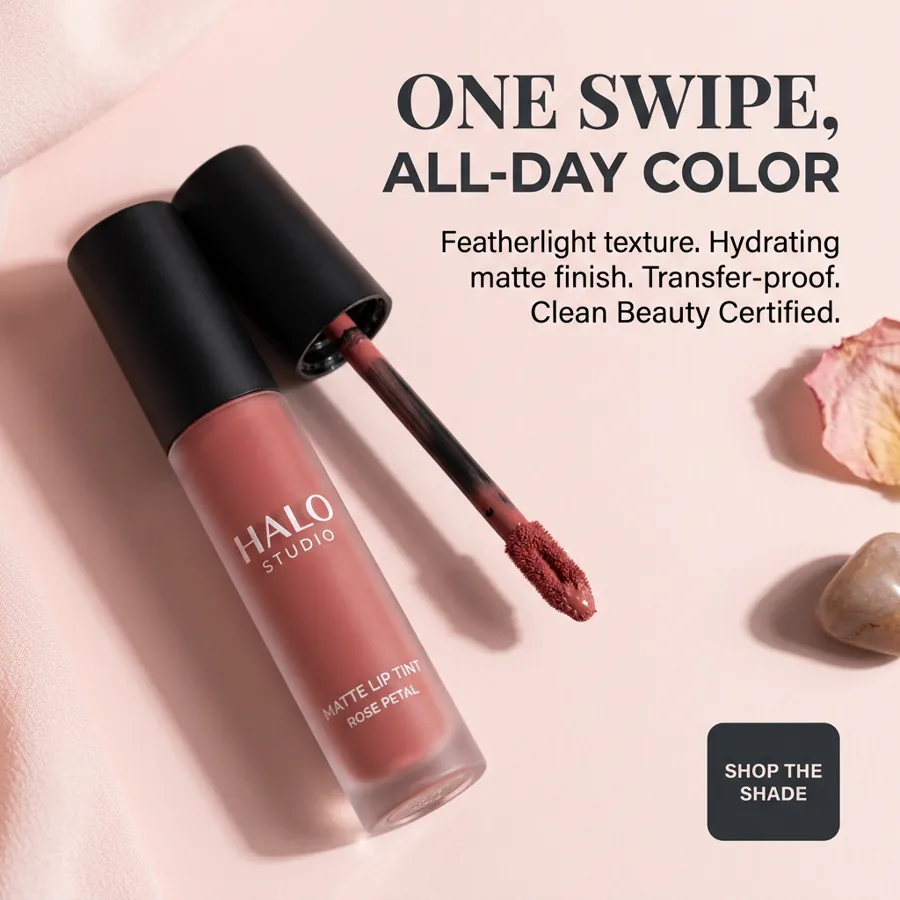 | Ready |
| Canvas tote | Not yet | Not yet | Making |
| Desk lamp | Not yet | Not yet | Queued |
Batch: 5 products · 15 ads · credits quoted before it starts
Paste a product link and skip the brief
Predis.ai reads the name, images and details off your product page and saves them to your account. Next time, “make ads for the linen pillow” is enough.
Try it with your product link- Name: Linen throw pillow
- Images: 1 product photo
- Details: $38, washed linen, 20 x 20 in
One product, every format you sell with
Ask for a studio product video, statics and a UGC-style review in one message instead of one asset at a time. Each one comes back sized for where it will run.
 StoriesFeedSquareReels
 Feed
Feed Square
 Slide 1
 Slide 2
 Slide 3
Remake an ad you like around your product
Share an ad that caught your eye and get the same structure rebuilt for your product, in your colors and fonts.

 ReferencePredis.ai
Reference ad on the left. The version Predis.ai made on the right.
Connect Predis.ai to the assistant you already use
Sign in with your Predis.ai account. There's no API key to copy, and your brand kit and saved products come with you.
-
Open Connectors
In Claude on the web or Claude Desktop, go to Settings, then Connectors.
-
Add a custom connector
Name it Predis.ai and paste the MCP server URL below.
-
Sign in and ask
Click Connect, sign in with your Predis.ai account and start a new chat.
Then try: “Use Predis.ai to make a product video and 2 static ads for [your product link].”
-
Add a custom MCP server
In ChatGPT on your desktop browser, open Settings, then Apps (or Plugins, depending on your account). Select +, then Add custom MCP server.
-
Connect it to Predis.ai
Name it Predis.ai, paste the MCP server URL below under Connection, and sign in with your Predis.ai account.
-
Create the plugin and ask
Review the security warning, select Create as a plugin, then install it. Start a new chat and type @Predis.ai.
Then try: “Use Predis.ai to make a product video and 2 static ads for [your product link].”
-
Add the server
Run the command below in your terminal.
-
Sign in
Type /mcp in Claude Code and sign in with your Predis.ai account.
-
Make ads in bulk
Point it at a product feed or a CSV, and it makes ads for every row.
Then try: “Use Predis.ai to make a product video and 2 static ads for [your product link].”

Selling on Shopify? Start from the product page
Paste any Shopify product link and Predis.ai pulls in the product for you, then makes the video and ads from it.
Stores already making ads with Predis.ai
Rated 4.7/5 on G2.
The images and the videos it has generated have been very beautiful and very successful in helping me sell my product. I would highly recommend them.

"Everything actually looks put together without me spending hours on it. I don't sit there staring at a screen wondering what to post anymore."

"There is no store that sells time, and that is exactly what Predis does. Once you've tried it, you won't let go."

"Social media was something we knew we had to do, but it never really got done properly. Predis made content creation faster, simpler, and way more consistent for us."

"Social media used to take too much time and energy. It has helped me stay visible in the marketplace and keep my marketing activities moving."

"Everything actually looks put together without me spending hours on it. I don't sit there staring at a screen wondering what to post anymore."
"There is no store that sells time, and that is exactly what Predis does. Once you've tried it, you won't let go."
"Social media was something we knew we had to do, but it never really got done properly. Predis made content creation faster, simpler, and way more consistent for us."
"Social media used to take too much time and energy. It has helped me stay visible in the marketplace and keep my marketing activities moving."
Frequently Asked Questions
What is an ecommerce MCP?
It's an MCP server that lets an assistant like Claude or ChatGPT do store work through an outside tool. The Predis.ai MCP makes product videos and ads from your product links, in your brand kit.
Can I make a product video from a product link?
Yes. Paste the link in the chat and ask for the video. Predis.ai reads the product page and plans the shots for you.
Does it work with Shopify products?
Yes, from any Shopify product link.
Can I make ads for my whole catalog?
Yes. In Claude Code, point it at a CSV or a product feed and it makes ads for every row. Your assistant shows the cost of the batch first.
Will the ads use my brand kit?
Yes. Your saved logo, colors, fonts and voice go into every ad.
Can my assistant launch the ads on Meta or Google?
The Predis.ai MCP makes the ads. Launching campaigns depends on the other tools you connect to your assistant, such as your ad platform.
Is there a free trial?
Yes, for 3 days. A card is required, your first charge is on day 4, and you can cancel anytime before then.
Ads for every product, then scale the ones that sell
Connect Predis.ai once and your next product launch starts from its link.
Connect Predis.ai MCP