Explore this content with AI:
There is no longer just one format or feed for video. In 2026, content will be on reels, stories, feeds, advertising, websites, and platforms, all of which need videos in varied shapes. If your video has the wrong aspect ratio, it will lose clarity, reach, and engagement before the message even gets across.
That’s why video aspect ratios for social media are becoming more than just technical parameters. They have a direct effect on how long people watch, how much of the screen they cover, and how natural your content feels on each platform.
This post goes over the most essential video aspect ratios, where each one works best, and how to choose the proper format based on the platform and the goal, without having to guess.
What Is a Video Aspect Ratio?
A video aspect ratio describes the proportional relationship between a video’s width and height, written as width:height.
For example:
- 16:9 = widescreen
- 1:1 = square
- 9:16 = vertical
Aspect ratios define how much screen space your video occupies and how it appears across devices.
Why Aspect Ratio Matters More in 2026?
Social platforms now prioritize native-looking content. Videos that fit recommended dimensions:
- Take up more screen space
- Avoid awkward cropping or black bars
- Feel natural inside feeds and stories
- Get higher watch time and engagement
On the flip side, incorrect ratios often lead to zoomed visuals, cut-off text, and lower performance.
Most Common Video Aspect Ratios & When to Use Them?
1:1 – Square Video
Best for: Instagram feed, Facebook feed, LinkedIn
Square videos balance visibility and flexibility. They take up more feed space than landscape videos and work well across multiple platforms.
Use cases: Product demos, explainer videos, branded social posts

16:9 – Widescreen
Best for: YouTube, websites, presentations, TV
This is the traditional video format and still dominates long-form and desktop viewing.
Use cases: YouTube tutorials, vlogs, webinars, website embeds
9:16 – Vertical Video
Best for: TikTok, Instagram Reels, YouTube Shorts, Facebook Stories
Vertical video is now the most consumed format on mobile. It fills the entire screen and delivers higher engagement.
Use cases: Short-form content, behind-the-scenes clips, trend-based videos
4:5 – Portrait Video
Best for: Instagram feed, Facebook feed ads
Portrait videos take up more vertical space than square videos, making them ideal for storytelling and ads.
Use cases: Promotional videos, social media ads, announcements
21:9 – Ultra-Wide Video
Best for: Cinematic content, film trailers
This format creates a cinematic experience but is not optimized for social feeds or mobile viewing.
Use cases: Short films, high-end brand storytelling
Additional Aspect Ratios You May Encounter
- 2:1 (Univisium): Cinematic but adaptable for streaming
- 4:3: Retro or artistic content
- 3:2: Hybrid photo-video formats from digital cameras
These are niche formats and usually not recommended for social-first content.
Best Video Aspect Ratios by Platform (2026)
Each social media platform has its own preferred aspect ratios. Here’s a breakdown:
YouTube
- For Youtube the best video aspect ratio is 16:9 (widescreen)
- YouTube optimizes its platform for landscape videos, which makes 16:9 the default aspect ratio.
- Feed Posts: 1:1 (square) or 4:5 (portrait)
- Reels & Stories: 9:16 (vertical)
- IGTV: 9:16 (full-screen vertical)
- Instagram is mobile-first, so vertical formats perform best.
TikTok
- Best Aspect Ratio: 9:16 (vertical)
- TikTok videos are designed for full-screen vertical viewing.
- Feed Videos: 1:1 or 4:5
- Stories: 9:16
- Square and portrait videos work well in the Facebook feed, while Stories need a vertical format.
Twitter/X
- Best Aspect Ratio: 16:9 or 1:1
- Landscape and square formats work best on Twitter, as users often play videos within tweets.
- Best Aspect Ratio: 1:1 or 16:9
- LinkedIn’s professional audience prefers well-framed, clear videos, hence this aspect ratio is best suited.
Websites and Blogs
- Best Aspect Ratio: 16:9 or 4:3
- These formats make sure that there is compatibility across different screens and this helps to make the videos engaging.
How to Change Video Aspect Ratio?
You can change the video aspect ratios using the below methods. We will explore each of the following methods further below:
- Editing tools and software: You can do this by using different editing tools, because different tools cater to different needs. From professional video production to quick social media edits, you can change the aspect ratio of videos accordingly.
- Cropping vs. resizing vs. adding borders: When changing a video’s aspect ratio, you have three main options. Each has its pros and cons, depending on how you want your video to look.

Predis AI
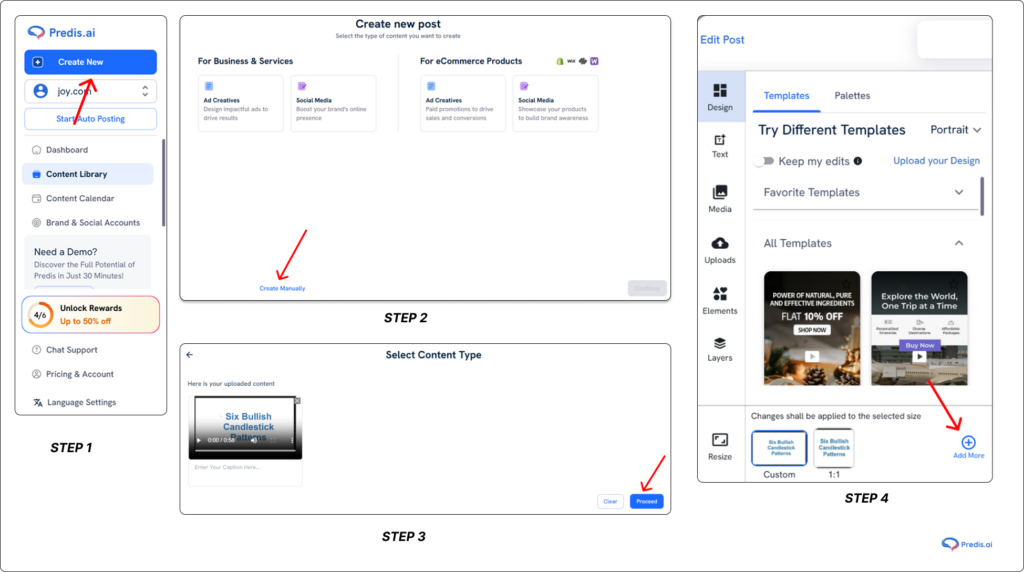
Predis AI is an all-in-all content creation platform that helps you create, edit, collaborate, schedule, and publish your content. We have everything you need to make your content a success, we did not forget the resize tool as well.
- With Predis AI, you can resize the videos swiftly, easily, and efficiently.
- Select the “Create New” option in the left-hand side menu.If you have your video created already, you can click the “Create Manually” option. Here you can upload the video you created and hit “Proceed”
Adobe Premiere Pro
Adobe Premiere Pro is one of the most capable video editing software options available. You can change aspect ratios manually or with predefined templates.
- Adjust the framing with the Auto Reframe tool to keep the main subject in focus.
- Export in several formats to accommodate diverse systems.
- Ideal for filmmakers, multimedia creators, and professionals seeking high-quality edits.
Final Cut Pro
Final Cut Pro is Apple’s professional-level video editing program. This software works better on Mac. Features include:
- With built-in crop and scale tools, you can easily modify the aspect ratio.
- The Smart Conform tool automatically adjusts video dimensions to multiple formats.
- High-quality rendering for professional video production.
- Ideal for Mac users, professional editors, and YouTube makers.
CapCut
CapCut is a great free mobile editor, perfect for quick aspect ratio changes. It is best for beginners, mobile content creators, and TikTok users. It offers:
- One-tap aspect ratio selection for TikTok, Instagram, and YouTube.
- Drag-and-drop editing for an easy user experience.
- AI-powered cropping to keep subjects in frame.
Canva
It’s not traditional video editor, but it’s perfect for resizing social media clips. Canva is best for marketers, social media managers, and non-tech users looking for quick fixes. Features include:
- Preset templates for Instagram, TikTok, Facebook, and YouTube.
- Simple drag-and-drop interface for resizing and cropping.
- Ability to add branding elements like text and overlays.
How To Crop, Resize & Add Borders?
When changing a video’s aspect ratio, you have three main options. Each has its pros and cons, depending on how you want your video to look.
1. Cropping
- Cuts out unwanted areas to fit a specific ratio, but might also cut out important parts of the video.
- Removes unnecessary background elements.
- Keeps the video visually appealing without stretching.
- Can result in a loss of visual context.
- Adjusting composition when resizing from a wide format (16:9) to a square or vertical format (1:1, 9:16).
2. Resizing
- Stretches or compresses the video to match a new ratio.
- Maintains the entire frame without cutting content.
- Works well for minor adjustments.
- Can distort the video if stretched too much.
- May reduce quality if not done correctly.
- Converting a high-resolution video to a slightly different aspect ratio without losing key details.
3. Adding Borders
- Keeps the original video intact and fills extra space with a background color or blur.
- Prevents distortion and cropping.
- Maintains the full-frame look.
- May not look professional if the borders are too thick.
- Some platforms might auto-crop the video.
- Repurposing widescreen (16:9) videos for vertical formats (9:16) without losing important content.
Best Practices for Using Video Aspect Ratios
Below are some of the best practices that should be used to maintain quality, avoiing black bars or distortion, and repurposing content efficiently, according to the different social media platform needs:
- Choose the right aspect ratio to ensure your videos look great on all devices and stay engaging.
- Use high-resolution footage (4K or 1080p) to maintain clarity when resizing.
- Crop and scale high-quality videos without losing important details.
- Export videos in the highest resolution supported by each platform, such as YouTube supports 1080p or 4K (16:9); Instagram Reels/TikTok uses 1080×1920 pixels (9:16) and Facebook feed supports 1080×1350 pixels (4:5).
- Use professional editing software like Adobe Premiere Pro, Final Cut Pro, or DaVinci Resolve to minimize quality loss.
- Choose the right aspect ratio from the start based on where your video will be published.
- Film with extra space around the subject so you can crop for different formats without losing key details.
- Use smart reframing tools instead of stretching the video.
- Add blurred background borders instead of cropping if your video doesn’t fit the required ratio.
- Keep the main subject centered while filming so it can be cropped into different formats.
- Use built-in templates in editing software to quickly adjust aspect ratios.
- Invest in batch editing—edit once, then export multiple versions for different platforms.

Conclusion
It’s important to pick the right video aspect ratio so that your content looks good, is professional, and works on all platforms. Using the right aspect ratio will make your videos run faster, get more people to watch them, and look great on all devices. So, make sure your movie is set up for the best viewing experience before you hit “upload!”