Explore this content with AI:
The “Intentional Viewing” shift is the dominant force that we are seeing in social media these days. Getting views is harder because the algorithm has become a stricter gatekeeper, but those views are significantly more rewarding. A view in 2026 isn’t just a number; it’s a high-intent signal. This guide is your deep dive into the algorithm, the updated mechanics of “the view.” And finally, 22 actionable tactics on how to get more views on Instagram Reels.
The Core Metrics: What Actually Counts as a “View” in 2026?
Before you can win the game, you have to understand how the score is kept. Instagram unified its metrics. Whether it’s a Story, a Reel, or a Video Carousel, the “View” is the primary currency. But not all views are created equal.
1. The 3-Second Rule
The days of counting a “millisecond scroll” as a view are over. To prevent vanity metrics from skewing creator data, Instagram now requires a minimum of 3 seconds of continuous play for a view to be “qualified.” This makes your “hook” more than just a creative choice—it’s a technical necessity for monetization and reach.
2. Intentional vs. Passive Watching
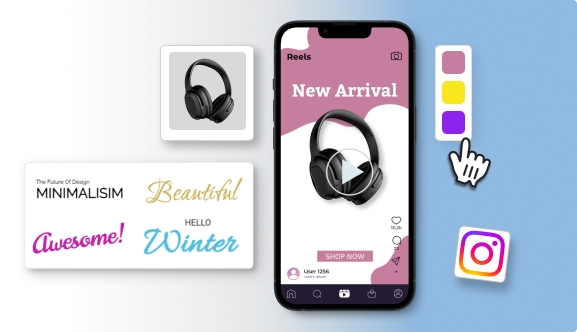
The AI now distinguishes between “Passive Scrolling” (users mindlessly flicking through the feed) and “Intentional Watching” (users who stop, expand the caption, or watch until the end). If the algorithm sees that users are actively choosing to stay on your content, it will push your Reel to the “Explore Prime” slots. Before launching your paid Reel campaign, prototype your video creatives using an AI reel maker free to test different hooks and formats at no cost.
3. The Replay Bonus
The “Replay” is the holy grail of 2026. When a user watches your Reel more than once, it signals to the AI that your content is high-value or complex enough to warrant a second look. This triggers an immediate “Velocity Boost,” pushing your content to users with similar interests.
Cracking the Code: What Changed in the 2026 Instagram Algorithm?
The 2026 algorithm is less of a mystery and more of a partnership between the creator, the user, and the AI.
1. The “Your Algorithm” Dashboard
Instagram introduced a transparency feature where users can see and “tune” their interests. As a creator, this means you can no longer “trick” the algorithm. You must be hyper-relevant to your chosen niche because users can literally toggle your category “off” if they aren’t interested.
2. The Death of the “Like.”
In 2026, “Like” is a secondary metric. Instagram realized that “liking” is a low-effort habit. Now, Saves, Shares, and DM Sends are the primary drivers of reach.
3. The Aggregator Penalty
Instagram has officially declared war on “repost” accounts. The algorithm now uses visual fingerprinting to identify the original uploader. Accounts that primarily “curate” or repost content without significant transformative editing are downranked. Originality is the only way to sustain long-term growth.
4. SEO > Hashtags
The real power lies in Reels SEO. Instagram’s search bar functions like Google; it crawls your transcript, your on-screen text, and your caption keywords. If you see a creator has so many keywords in their caption, then this is because of SEO, and you should be doing it too.
5. Trial Reels (A/B Testing)
A game-changer for 2026 is the Trial Reels feature, which lets you test a Reel to a non-follower segment. To start creating Reels that are worth testing, try a free AI reel maker. It generates professional short-form videos from a text prompt, so you always have fresh content ready for trials.
How to get more views on Instagram Reels? – 22 Tips
1. Prioritize Raw Authenticity
Instagram prioritizes aesthetics, but not as much as you think. Audiences are highly skeptical of over-produced, highly filtered content. The highest-performing Reels today are shot in natural lighting, often with minimal makeup and “messy” backgrounds. This “Raw Feed” approach builds a level of trust that polished ads cannot buy.
2. Purge the Watermarks
This is non-negotiable. If the algorithm detects a TikTok or CapCut watermark, your reach is instantly capped at your current follower base. Instagram wants to keep its ecosystem distinct. Always export “clean” videos and add your music/text within the Instagram app when possible.
3. Optimize for “Sound-Off” Browsing
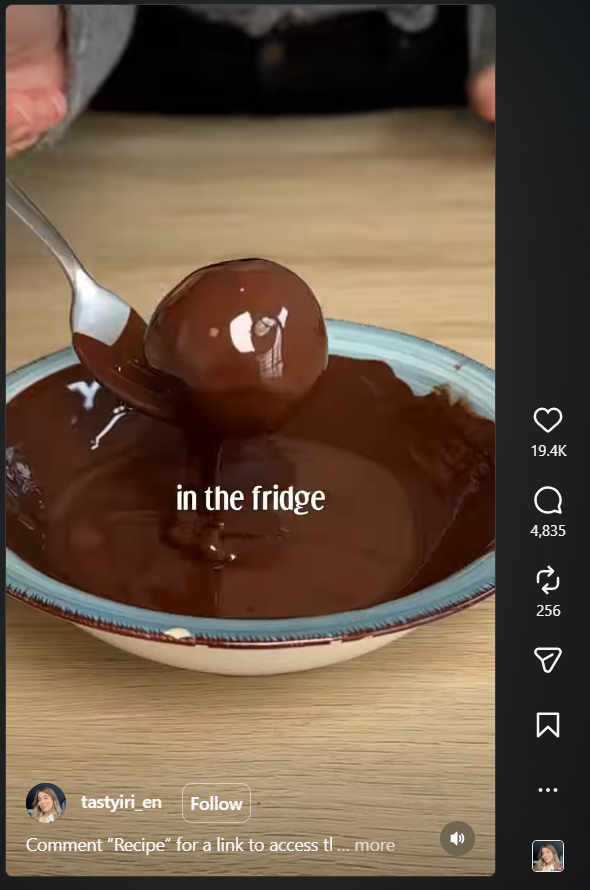
With more people consuming content in public spaces or work environments, a major portion of Reels is watched without sound. If your Reel doesn’t make sense on mute, you’ve lost the majority of your audience. Use high-accuracy, stylized closed captions for every spoken word.
Here are a few tips that can help you make it accessible for those viewers:
- Use the auto-caption feature that many editing platforms have to add subtitles automatically.
- Make important content bold so that it stands out to the viewer.
- Choose colors and borders that make it stand out from the background.
- Time the text so it appears right when the person speaks it.
- Add only important words to the screen so that it is less crowded.
- Place the captions in the zone of visibility, which we will be discussing in the safe zone point next.
4. The “Safety Zone” Layout
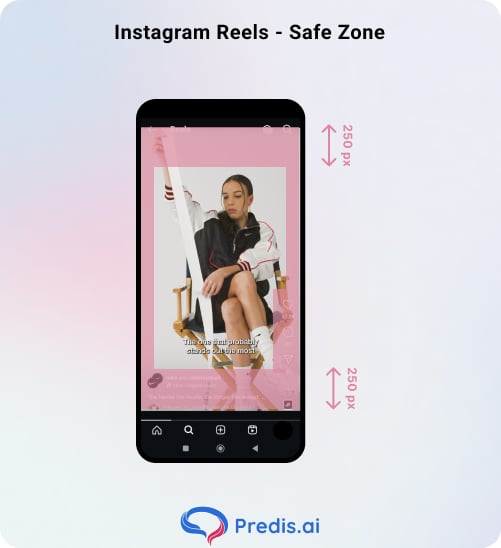
Don’t let your hard work be hidden by the UI. Avoid placing text in the top 15% (where the “Following” tab sits) or the bottom 25% (where the caption and music info live). Keep your “action” and text in the center “Safe Zone” to ensure visibility on all device types.
5. Produce High-Definition, Original Content
Making content that stands out from the crowd starts with making content that is high-quality, original, and engaging to the audience. Some of the important things that you need to keep in mind when making such content are:
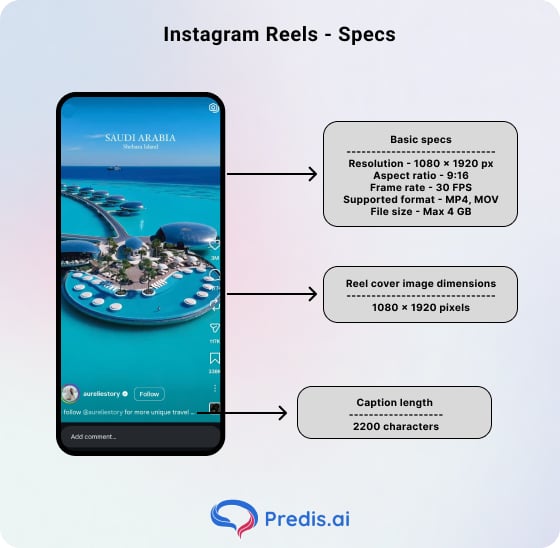
- Always align with the optimum dimension requirements so your video does not get cropped out.
- Toggle the “Upload at highest quality” button to ensure Instagram does not compress your content.
- Use the hook-body-CTA format to structure your reel content so it is engaging.
- You have 3 seconds to get the attention of your audience before they scroll away.
- Add the right hashtags and keywords so your video gets categorised properly.
6. The “Power of 5” Hashtags
The era of 30 hashtags is over. Now, using more than 5 hashtags can actually confuse the AI’s categorization engine. Use 1 broad tag (e.g., #Fitness), 2 niche tags (#PostpartumYoga), and 2 brand/community tags.
Check out how this creator has leveraged hashtags the right way:

Having trouble finding hashtags? Here are some Instagram hashtag generator tools to help you out!
7. Keyword-Rich Captions
Think of your caption as a blog post. Use the first two lines to include your primary keywords. If your video is about “Budget Travel in Tokyo,” those exact words need to appear in the first 50 characters of your caption.
8. Niche Authority Building
The algorithm rewards “Subject Matter Experts.” If you post about cooking one day and crypto the next, the AI won’t know who to show your content to. Pick one lane and stay in it for at least 30 posts to “train” the algorithm on your identity. To keep brand consistency across formats, use Predis.ai to create reels with AI that visually match your carousel ad style and messaging.
9. Early Adopter Audio
Don’t wait for a song to hit the Top 50. Use the Trending audio in the music library to find songs with under 5,000 uses. Being one of the first 100 people to use a sound often grants you “Originality” points when that sound eventually goes viral.
10. The “Original Audio” Advantage
Instagram prioritizes “Audio Creators.” By recording a unique voiceover or creating a custom soundscape, you allow other people to “Remix” or use your audio. Every time someone uses your sound, you get a “backlink” view credit to your original video.
11. The “Link in Bio” Funnel
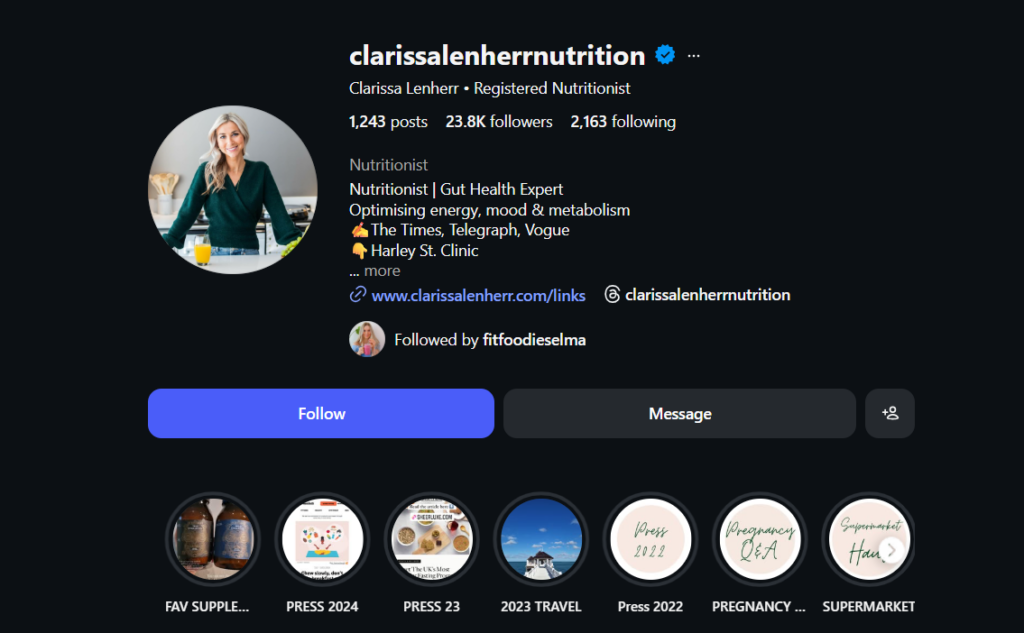
Instagram still hates when you send people off-platform. To get around this, use the “Comment Trigger” method. Ask viewers to comment on a specific word (e.g., “GUIDE”) and use automation tools to DM them the link. This boosts your comment count while driving traffic.
Here is how creators place their links and leverage them to drive traffic to their sites:
12. The 24-Hour Story Boost
When you post a new Reel, immediately share it to your Story but hide it behind an engagement sticker. For example, put a “Poll” over the video so people have to click or interact to see what’s behind it. This initial “Story Heat” tells the algorithm the Reel is interesting.
So the next time you add a reel to your profile, here is what you are going to do:
- Post the reel to your story and add a sticker on top so that the viewer has to click on it.
- Add the story to a highlight on your profile so it gets the spotlight for a bit longer.
- Share it to your feed as well so that it stays on your primary grid.
- Place your top reels on your website and other locations to get additional views.
- Boost well-performing content to reach a wider audience.
13. Feed Consistency
While Reels are the growth engine, the “Grid” is your resume. Ensure that your Reel cover images are cohesive. Users often visit a profile after seeing one Reel; if the grid looks messy, they won’t hit “Follow.”
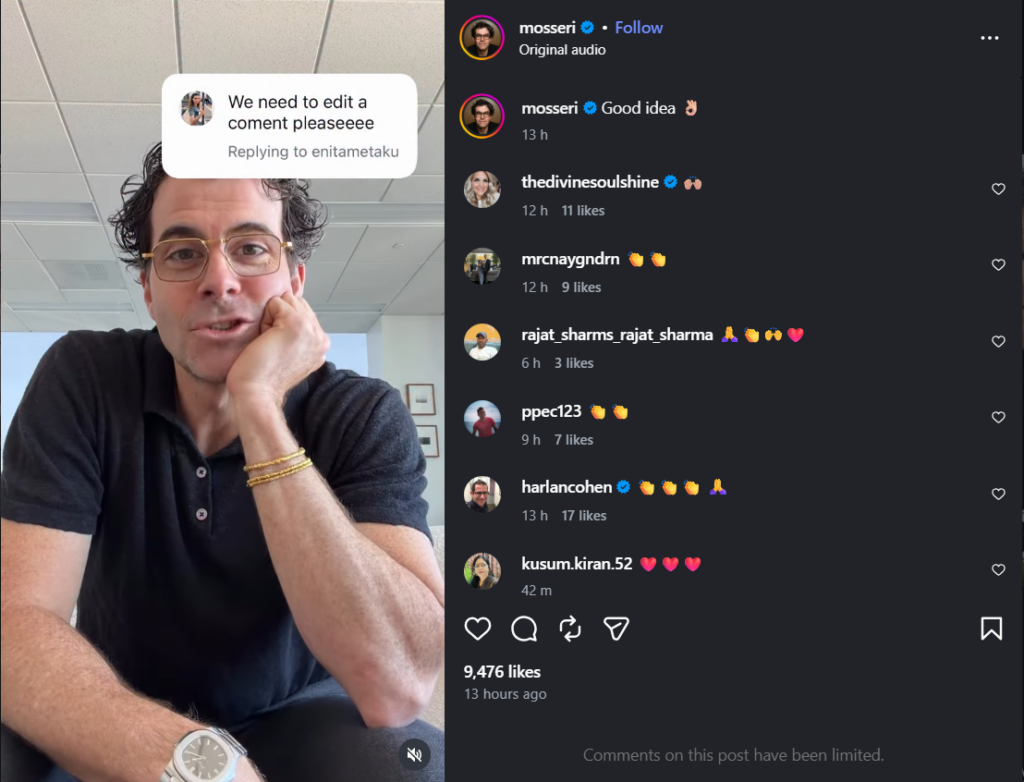
14. Reply with Reels
Community management is the new growth hacking. When someone asks a great question in your comments, don’t just type a reply—Reply with a Video. This creates a “Part 2” that is automatically linked to the original, creating a loop of views.
Here is how Adam Mosseri uses this technique:
15. Collaborative Posting
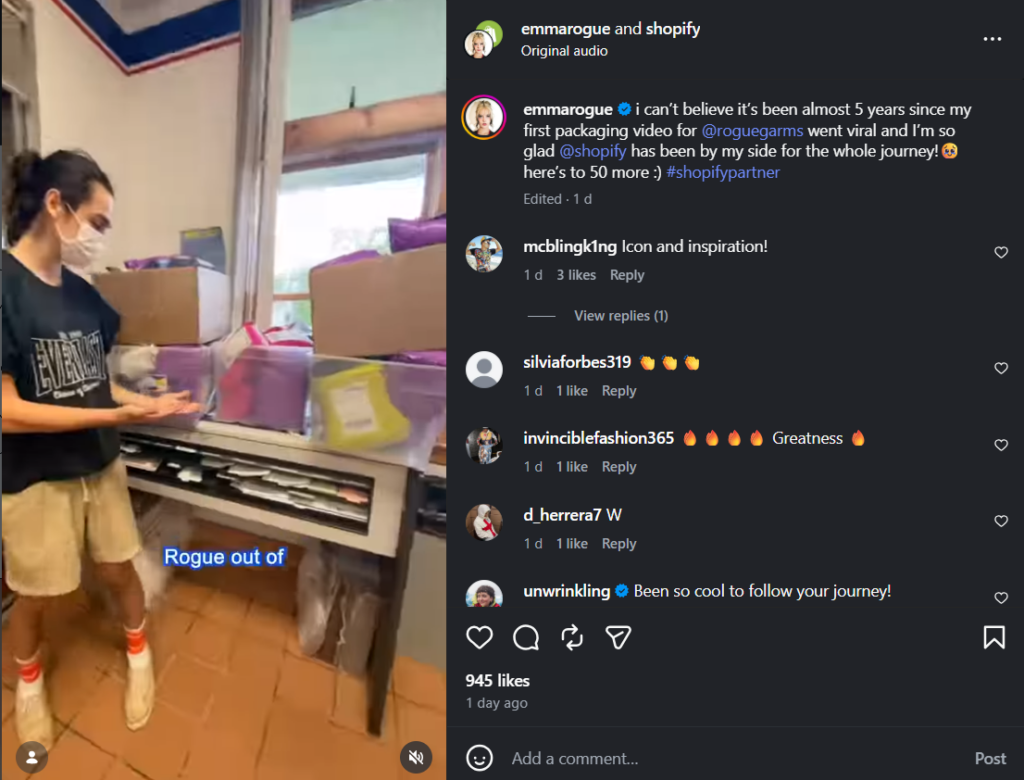
The “Collab” feature is the most underutilized tool. By inviting another creator to be a collaborator, the Reel lives on both grids and shares the same view count, likes, and comments. It’s the fastest way to “borrow” another creator’s trust.
Here is how Shopify collaborated with a creator and posted a video in both their feeds:
16. Experiment with optimum length
Instagram has expanded Reel lengths to compete with YouTube. While short is still king for reach, 3-minute Reels are now eligible for the “Explore Prime” recommendation if they have high retention. You can use these for deep dives and tutorials.
But each type of audience prefers different video lengths. To know what works best for your viewers, always experiment with length. Instagram analytics is a gold mine and can provide you with this information.
17. Cross-promote to other platforms
To maximize your reach, always enable the “Recommend on Facebook” toggle in your Instagram settings. This taps into Meta’s unified ecosystem, pushing your content to a massive, distinct audience without extra work. Since Facebook’s algorithm heavily prioritizes original Reels in its Feed and Watch tabs, cross-posting is the fastest way to double your view count and gain followers from a completely different demographic.
18. Post at Prime Time
Posting at the right time is still a major factor in going viral. When you post as your followers are logging on, you get a quick burst of views and shares. This “early traction” signals to the app that your video is high quality, prompting it to show it to even more people.
- Prime Time Evenings: For fun or relaxing content, 7:00 PM to 9:00 PM is best.
- Use Your Insights: Go to your profile’s Insights to see exactly when your followers are most active and post just before that peak.
- Avoid Weekends: Engagement usually drops on Saturdays and Sundays, so save your best content for the work week.
19. Engagement is the key move
Interacting with the community is the fastest way to train the algorithm to show your Reels to the right people. When you engage with similar creators and reply to your own comments, you create a “social signal” that boosts your visibility. This tells the app that you are an active, valuable member of the community, which helps your content appear in the feeds of users who like similar topics.
- Reply Within the Hour: Try to respond to comments in the first 60 minutes after posting to keep the momentum going.
- Engage with Niche Leaders: Like and comment on top Reels in your category to help their followers discover your profile.
- Ask Questions: End your caption with a specific question to encourage viewers to leave a comment.
20. Batch and Schedule Content for Consistency
Batching is the ultimate way to stay consistent without feeling the daily pressure to create. By filming and editing several Reels in one sitting, you maintain a steady flow of content that keeps the algorithm happy. This “systematic” approach ensures you always have a high-quality video ready to go, even on your busiest days, helping you build long-term momentum and reach.
- Plan in Bulk: Set aside one day a week to script and film 3–5 Reels at once. This keeps your “creative brain” focused and saves hours on setup.
- Use a Smart Scheduler: Tools like Predis.ai can automate this entire process. The free AI Instagram post generator doesn’t just schedule your posts; it can actually generate post ideas, captions, and hashtags from a simple text prompt.
- Set It and Forget It: Use the Predis.ai content calendar to pick the best times for your audience. Once scheduled, your Reels will go live automatically, so you can focus on running your business.
- Maintain Branding: Scheduling tools help you see your upcoming feed at a glance, ensuring your videos look cohesive and professional before they even hit the profile.
21. Leverage Instagram Analytics
By checking your metrics weekly, you can identify exactly where viewers are dropping off and adjust your editing style to keep them hooked longer, which tells the algorithm to push your video to a wider audience.
- Watch Time & Completion Rate: These are the most important metrics. If people stop watching after 3 seconds, your “hook” needs to be more exciting or visual.
- Shares per Reach: This is the ultimate “viral” signal. If your share count is low, try creating content that is more relatable or provides a “saveable” tip.
- Follows from Reels: Check the “Follows” metric under each Reel. If a video gets views but no followers, you might need a clearer Call to Action (CTA) in your caption.
- View-to-Impression Ratio: If this is low, it means people are seeing your Reel in their feed but not stopping to watch. Try using a bolder, high-contrast cover image.
22. Do Trends Your way
Jumping on trends is a fast pass to the Explore page because the algorithm actively prioritizes popular audio and formats. By adding your own unique spin to a trending sound or challenge, you signal to the app that your content is culturally relevant, increasing your chances of being discovered by people who don’t follow you yet.
- Adapt, Don’t Adopt: Don’t just copy a trend—tailor it to your specific niche so it feels authentic to your brand rather than forced.
- The 70/20/10 Rule: Aim for a mix where 20% of your content is trend-based, while the rest remains focused on your core value and experimental ideas.
- Speed is Key: Trends move fast in 2026. If you see a trend peak, try to film and post your version within 48 hours to ride the wave of maximum visibility.
Conclusion
The “Wild West” days of Instagram Reels are over, replaced by a sophisticated, AI-driven economy. In 2026, the creators who win are those who prioritize Depth over Breadth. A thousand views from people who save your content and join your community are worth more than a million views from people who scroll past without a second thought.
The golden rule for the algorithm is simple: Create content that creates a conversation. If you can move a user from being a passive spectator to an active participant, you will never have to worry about “the algorithm” again.
Frequently Asked Questions (FAQ)
Quality has officially overtaken quantity. 3 high-quality Reels per week will outperform 7 mediocre daily posts. The algorithm now “fatigues” your followers if you post too much low-value content.
Actually, no. Instagram has integrated its own AI voiceover tools. Using “standard” AI voices is fine, but “Custom AI Voices” (trained on your own voice) are getting a significant boost in the “Originality” score.