Explore this content with AI:
You might be trying to find an ad you saw earlier and can’t track down. You could see what ads a competitor or brand is actively running. Or you might be trying to understand what types of Instagram ads exist and how they’re identified in the feed.
This guide covers all three — including the step-by-step process for finding your own ad history inside the app, how to use the free Meta Ad Library to see any brand’s active ads, and a shortcut to view a competitor’s ads directly from their Instagram profile.
Understanding Instagram Ads
Before we move on to how to find Ads on Instagram, let us first understand what Instagram ads are. Unlike organic posts posted by accounts you follow, Instagram ads are sponsored marketing content intended to reach specific target populations.
These advertisements can take several forms, including single images, videos, carousel postings, and stories. They enable businesses to promote their products, services, and brand messaging to a specific audience based on their demographics, hobbies, and behaviors.

Instagram ads seem like regular posts, but they always have a ‘Sponsored’ label to highlight that they are advertisements. They also frequently include more elements than a standard post, including links, CTA buttons, and product tags.
Did you know you can reach over 1.628 billion Instagram users via advertising? To reach this audience, you need the right tools that will engage your target audience and ensure more conversions. Using an AI ad generator can help you quickly produce high-quality, professional creatives that stand out in a crowded feed.
Head over to Predis.ai and create an Instagram ad with the Instagram Ad Maker that aligns with your advertising goal.
How to Find Ads on Instagram?
Has it ever happened to you that you found an appealing ad and just as you were about to click on it, your feed refreshed? Or you may wish to see the ads you have interacted with in the past. Don’t worry, you’re not alone! Just follow the methods below.
Find Ads on the Instagram App
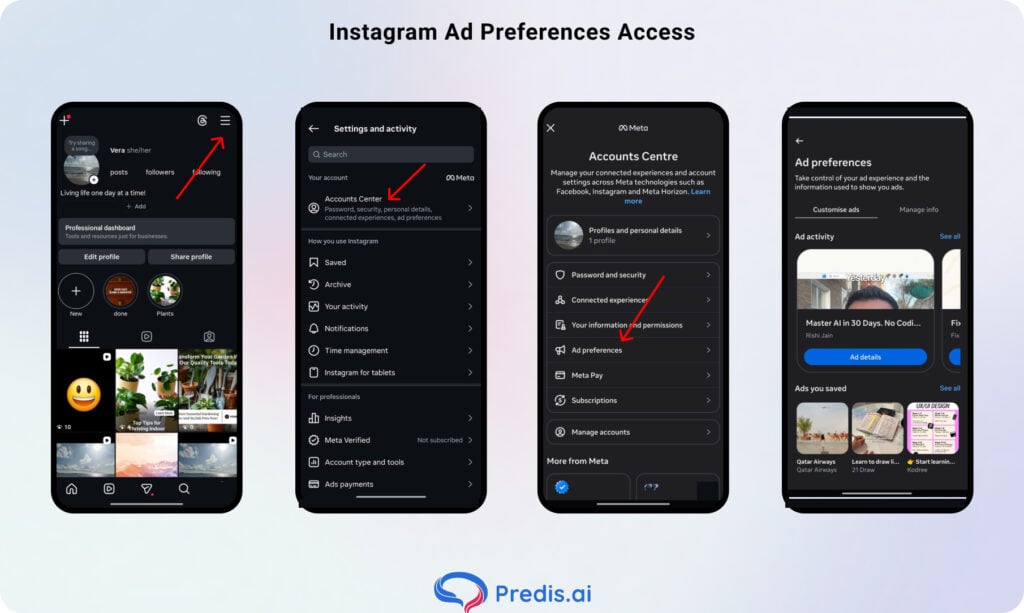
Step 1: Open Instagram and Go to Your Profile
Tap your profile icon in the bottom-right corner of the app.
Step 2: Open the Menu
Tap the three horizontal lines (☰) in the top-right corner of your profile page.
Step 3: Go to Settings and Privacy
From the menu, tap Settings and Privacy.
Step 4: Open Accounts Center
Tap Accounts Center near the top of the settings page. This is Meta’s unified hub for managing your Facebook and Instagram account preferences.
Step 5: Select Ad Preferences
Inside Accounts Center, tap Ad preferences. You’ll see four options:
- Ad activity — A chronological list of ads you’ve recently interacted with (tapped, liked, saved, or clicked). Tap any entry to revisit the ad or the advertiser’s page. Note: this list only shows ads you engaged with, not every ad you saw. It’s also not permanent — ads from several months ago may no longer appear.
- Ads you saved — A collection of ads you’ve bookmarked. You can organise these into collections for easy reference.
- Advertisers you saw ads from — A list of brands whose ads appeared in your feed or Stories recently.
- Ad topics — The interest categories Instagram uses to decide which ads to show you. You can add or remove topics here to refine what you see.
Find Ads on Instagram Desktop
Instagram invited convenience to its users’ entertainment party by offering them the freedom to use Instagram on a desktop. Now, you can find ads on Instagram on your desktop by following the steps mentioned below.
Step 1: Log in or Sign up to Instagram
Log in to your Instagram account on your desktop. If you don’t have one, then sign up.
Step 2: Find the ‘Settings’ Option
Once you’re logged in, drag your cursor to the bottom of the page and click on the ‘More’ option. Three horizontal parallel lines will denote it. As soon as you click on it, a drop-down option will appear. Select the ‘Settings’ option.
Step 3: Visit the Accounts Center
On the left panel of the page, you will notice an option ‘See More in Account Center’. Click on it, and a new page will be displayed.
Step 4: Visit Ad Preferences
Again, on the left side of the homepage, you will find the ‘Ad Preference’ option; click on it. The new page will display options like Ad Topic, Ad Settings, and Recent Ad Activity.
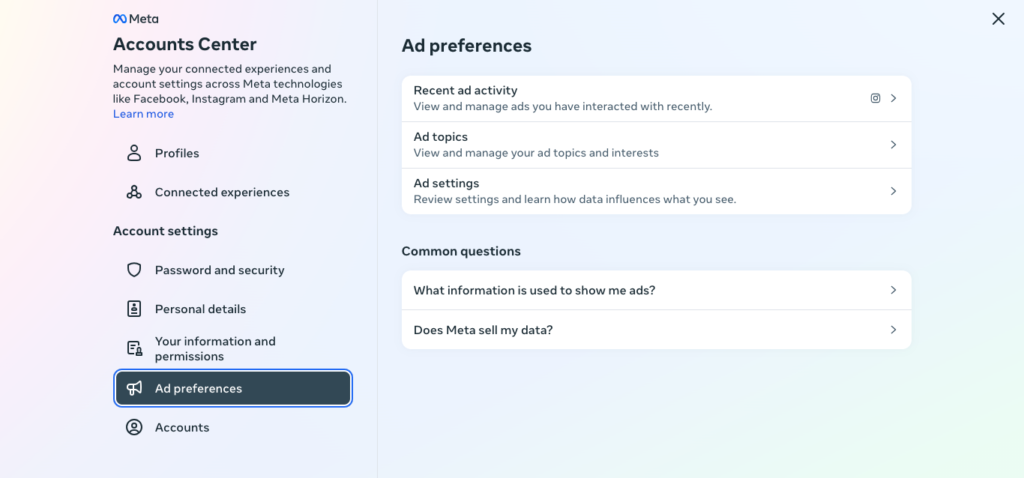
When you choose the ‘Recent Ad activity’ option, you view and manage the ads you’ve interacted with lately
Step 5: Congratulations, You’ve Done it!
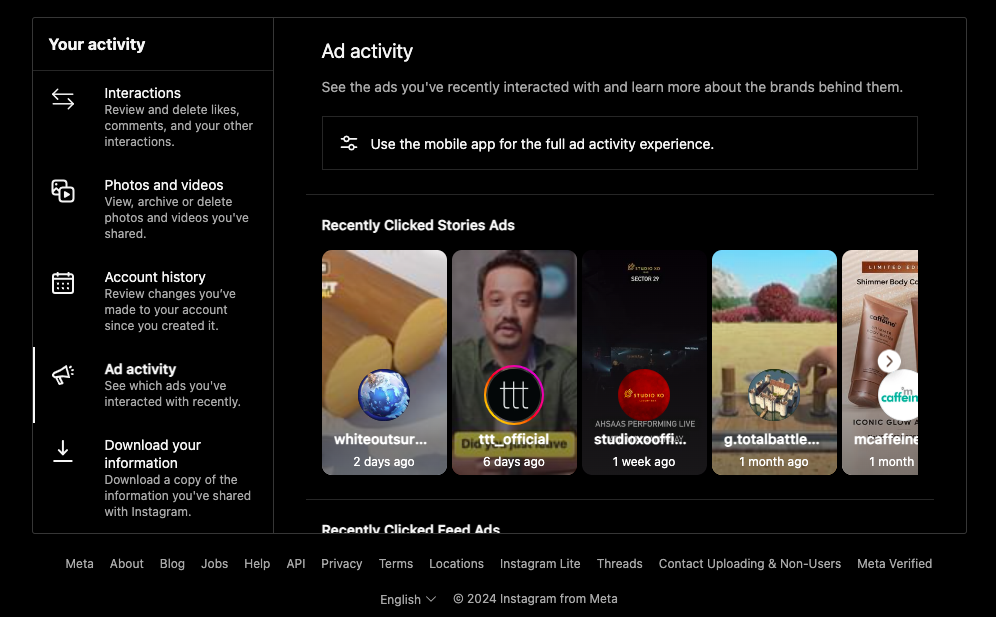
A new window will open, displaying the ads you have recently interacted with. You can find the ad you were searching for and make your move now!
What If You Can’t Find the Ad in Your Activity Log?
The “Ad activity” log only shows ads you actively interacted with — not every ad that appeared in your feed. If you scrolled past an ad, glanced at it, and moved on, it probably won’t appear there.
Three backup options:
1. Check “Why am I seeing this ad?” in real time
When an ad appears in your feed, tap the three-dot menu (⋯) in the top-right corner of the post. Select Why am I seeing this ad? Instagram will explain what targeting criteria served you the ad, and there’s usually a link to the advertiser’s full ad listing. This also works as a real-time tool to investigate any ad that catches your eye before you scroll past it.
2. Search by brand name in the Meta Ad Library
If you remember the product, brand name, or any keyword from the ad copy, go to facebook.com/ads/library in any browser and search for it. The Meta Ad Library is a free, public database of all active ads across Facebook and Instagram. Type the brand name or a keyword and you’ll see all their currently running ads — including the one you saw.
3. Check your Instagram notifications and saved posts
If you tapped “Save” on the ad at any point, it will appear in Profile → Saved. If you followed the brand after seeing the ad, check Profile → ☰ → Following and look for any new accounts you don’t recognise.
How to Find Any Brand’s Active Instagram Ads (Free)
The Meta Ad Library is the most powerful free tool available for Instagram ad research. It’s a public, searchable database of every active ad running across Facebook, Instagram, Messenger, and Audience Network. No login required.
Why it matters for your own advertising: If a competitor’s ad has been running for 3–6 months without pausing, that’s a strong signal it’s working. Brands don’t keep paying for ads that don’t convert. Studying long-running ads reveals what messaging, formats, and offers are resonating in your market — before you spend a dollar testing them yourself.
Step 1: Go to the Meta Ad Library
Open any browser and go to facebook.com/ads/library
Step 2: Set Your Country and Category
Select the country you want to research from the dropdown (use “All” for a global view). Set Ad category to All ads for commercial advertising.
Step 3: Search for the Brand or Keyword
Type the brand name into the search bar. Meta will return matching Facebook Pages — select the correct one. You can also search by keyword (e.g., “protein powder” or “email marketing”) to see all brands running ads around that topic. This is useful when you’re new to a niche and don’t yet know who the major players are.
Step 4: Filter to Instagram-Specific Ads
Once you see the results, use the Filters panel to narrow down:
| Filter | What to select | Why |
|---|---|---|
| Platform | Shows only ads served on Instagram | |
| Media type | Video / Image | Isolate format strategies |
| Active status | Active | See what’s running right now |
| Date range | Sort by oldest first | Long-running = high-performing |
The most underused filter: Sort by oldest start date first. If an ad started 6 months ago and is still running, it’s almost certainly profitable. Advertisers don’t keep paying for ads that don’t work. The date an ad started is the closest free proxy for performance data.
Step 5: Analyze What You Find
When reviewing a competitor’s ads, look for:
Creative strategy and format — Are they using polished brand content or lo-fi UGC? Reels-style vertical videos or static images? The format signals their target audience and brand positioning.
Copywriting and messaging — What pain point does the first line address? What promise does the headline make? Their CTAs reveal which funnel stage each ad is designed for: “Learn More” = top-of-funnel; “Shop Now” = bottom-of-funnel.
Offers and promotions — Free shipping, discount codes, free trials. If a competitor constantly runs steep discounts, they’re competing on price. If they never discount, they’re building on brand and value — two very different strategies.
Signs of A/B testing — Scroll through their active ads and look for duplicates with slight variations: same image, different headlines; same video, different opening line. Each variation is a test. You can see what they’re optimizing without running the tests yourself.
How long each ad has been running — The library shows the date each ad started. Ads running 3+ months are winners. Screenshot them and note the offer, headline, and creative format.
Boost Sales on Social Media with AI⚡️
TRY NOW
Understanding the Cost of Instagram Ads
Depending on your campaign purpose, Instagram ads can include up to 18 call-to-action button alternatives, link to your website, and provide consumers the option to download programs or shop online.
The cost of Instagram advertisements is determined by the overall budget, timeframe, and objectives you choose for your ad or campaign. You can set a daily or lifetime budget for your Instagram advertisements, so you can decide how much to spend.
Advertisers can either set their maximum bids for each auction or allow Instagram to optimize them automatically. So, if you’re new to Instagram advertising, start with a low maximum bid to gather experience.
Once you’ve gained a better understanding of the competitive landscape for your selected industry and demographics, you can evaluate whether upping your maximum bid is required.
Tips and Tricks for Instagram Ads
Instagram has developed as a powerful medium for businesses to engage with their target customers in visually appealing ways. Sometimes, you come across an ad that captivates your mind and inspires you to make an ad of your own.
You can use the following tips and tricks to create one of your own:
Smaller Screen, Bigger Impact
Given that Instagram is mostly accessible via mobile devices, make sure your advertising is suited for mobile viewing. Keep pictures and text simple, and use Instagram’s ad preview tools to make sure your ads appear excellent on smaller screens.
Mix it Up with the Influencers!
Collaboration with influencers can help you expand your reach and credibility on Instagram. To legitimately market your products or services, collaborate with influencers whose audiences are similar to your target demographic.
Let Your Ad Find its Passion
Before you start creating ads, define your campaign’s objectives. Clarifying your goals, whether they are to increase brand awareness, drive website traffic, or generate leads, will help frame your ad approach and success measures.
Become Friends with Your Audience
Understanding your target demographic is essential for developing relevant and compelling marketing. Use Instagram’s advanced targeting features, such as demographics, interests, behaviors, and custom audiences, to reach the right individuals with the right message.
Fine-Tune Your Ad
Monitor your ad performance data regularly, and use Instagram’s analytics tools to learn more about audience engagement, demographics, and conversion rates. Use these insights to fine-tune your targeting and creative ideas for future ads.
Wrapping Up!
Finding ads on Instagram comes down to knowing which tool to use for which need:
- Your own ad history → Instagram app → Settings and Privacy → Accounts Center → Ad preferences → Ad activity
- Broad competitor or industry research → facebook.com/ads/library → search by brand or keyword → filter to Instagram
The Meta Ad Library is the most underused free tool in digital marketing. A competitor’s long-running ads are essentially a window into what’s working in your market — without spending a cent on testing.
Once you know what’s resonating with your audience, the next step is creating your own. Predis.ai’s Ad Creative Generator lets you generate Instagram ad creatives — single image, carousel, and Reels-ready video — from a product description or URL. Use competitor ad research for inspiration, then let AI handle the creative production.
Create Instagram ads with Predis.ai →
Related Content,
Instagram Ads: Top 8 Alternatives in 2024
FAQ:
Yes, through the Meta Ad Library at facebook.com/ads/library. It’s a free, public database of all active ads across Facebook and Instagram. You can search by brand name or keyword without needing to log in.
Instagram’s “Ad activity” log inside the app doesn’t retain ads indefinitely. Ads you interacted with several months ago may no longer appear. For longer-term research, the Meta Ad Library retains ad data for up to 7 years after an ad stops running, making it the better tool for historical research.
Yes. The Meta Ad Library is completely free and shows all active ads from any business account. You can filter by platform (Instagram only), media type, and date range. No account or login is required.