

Explore this content with AI:
According to Wyzowl’s 2026 State of Video Marketing report, 63% of video marketers have now used AI video tools to make or edit their videos. A year earlier, it was 51%. That’s a 12-point jump in one survey cycle.
For most SaaS teams, the explainer video used to be a quarterly event. You wrote a brief, hired a studio, sat through script rounds and storyboard calls, and 6 weeks later you got a polished 90 seconds. By then your onboarding flow had changed twice.
An AI explainer video changes that math. The software isn’t doing anything mysterious; it removes the handoffs that ate most of the month. So yes, the afternoon version is real, as long as you know which parts of the month you’re cutting and which parts you still own.
Where the Month Actually Went
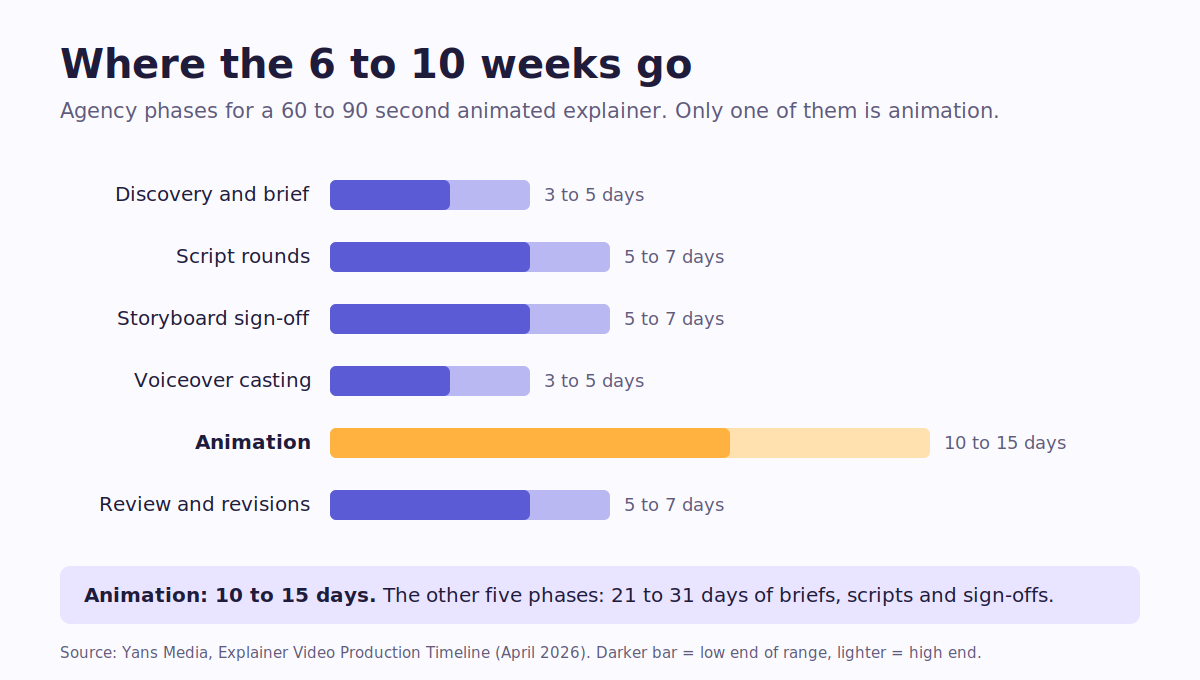
Ask a studio how long a custom animated explainer video takes and you’ll get a range. Yans Media puts a professionally produced 60- to 90-second explainer at 6 to 10 weeks. Yum Yum Videos quotes around 6 to 8 weeks, review time included.
Now look at what fills those weeks. In Yans Media’s own breakdown, animation takes 10 to 15 days. Everything else is discovery, two rounds of script, storyboard sign-off, voice casting, and review rounds. That’s the bigger half of the calendar, and the script alone can eat a couple of weeks of back-and-forth before anyone animates a frame.
Then there’s the part agencies rarely put in writing. The same studio says that in over 80% of delayed projects, the bottleneck is on the client’s side: late feedback, missing brand files, approval chains that wait on one person who’s always traveling.
So the month wasn’t really production; it was handoffs and waiting.
An AI explainer video maker collapses the handoffs, because the scriptwriter, designer, voice artist, and editor become one person with one tool. That’s the real shift explainer video AI brings. It doesn’t collapse the decisions, though. You still pick the message and check the product, and someone still signs off. Good news on that front: 59% of businesses already make their video in-house, per Wyzowl, so the skills gap is smaller than it looks.
See what your category already runs
Check competitor ads before you write a single line of script.
What an AI Explainer Video Actually Is
An AI explainer video is a short video, usually 60 to 90 seconds, that answers one question about your product. Software drafts most of the production: script options, scene visuals, voiceover, captions, and the rough cut. Text to video tools handle that first assembly.
What it isn’t: a product demo video. A demo walks someone through every click. An explainer tells them why they’d want to click at all. (If you’re weighing formats, this guide to explainer video types lays them side by side.)
It also isn’t a brand film. If the goal is to make people feel something about your company, that’s a different brief (more on that below).
The Afternoon Plan: 1 PM to 6 PM
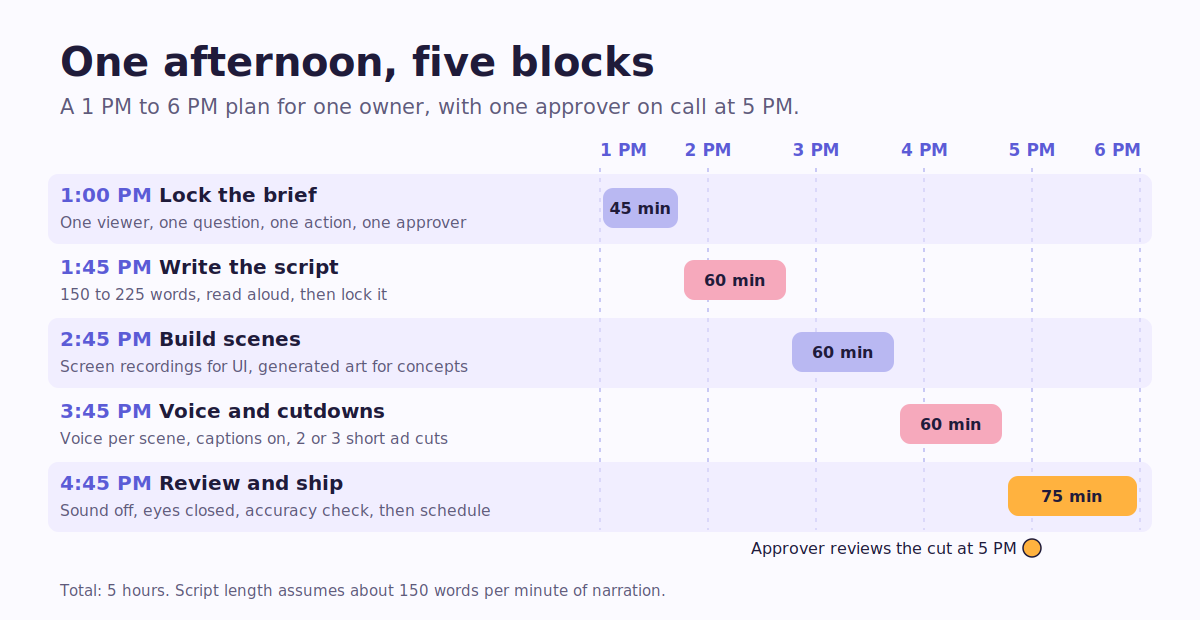
This is how to make an explainer video with AI in one sitting: 5 blocks, one owner, and one approver who has agreed to be reachable at 5 PM. Block the calendar and mute Slack before you start.
Plan your explainer afternoon
Pick a start time. The 5 blocks shift with it, and you can tick off each step as you go.
Nothing you tick is saved or sent anywhere. Refreshing the page clears it.
1:00 PM: Lock the brief (45 minutes)
Write 3 lines before you open any tool:
- Who’s watching: a trial user on day 2, not “our audience”
- Their one question: “Will this replace our spreadsheet?”
- The one action you want next: “Connect your first data source”
If it won’t fit in 3 lines, you have 2 videos. Split them.
Next, name a single approver. Yans Media delivered a project for a client called Arbling in 5 weeks, and the studio credits the founder’s role as the sole decision-maker. Your afternoon depends on the same thing at a smaller scale.
Spend the last 15 minutes on what explainer-style ads already run in your category. Predis.ai’s competitor intelligence shows you which ads others in your space are running, so your hook doesn’t echo theirs.
1:45 PM: Write the explainer video script (60 minutes)
Start with math. Conversational English runs at about 150 words per minute, according to the National Centre for Voice and Speech. So a 60-second explainer is roughly 150 words. A 90-second one is about 225.
That’s probably shorter than the copy on your homepage.
Length matters too. In the same Wyzowl survey, 71% of marketers said videos between 30 seconds and 2 minutes work best. For a first explainer, aim for 60 to 75 seconds.
A structure that fits:
- Problem (10 seconds): the pain, in the viewer’s words
- What it is (10 seconds): one sentence, no feature list
- How it works (30 to 35 seconds): 3 steps, one per scene
- Proof (5 to 10 seconds): a number, a customer logo, or a before-and-after
- Ask (5 seconds): the single action from your brief
Let the AI draft 3 versions, then edit hard. Read it out loud, and wherever you trip, cut.
Then lock it. Yans Media’s rule of thumb is that a fix costing 10 minutes at the script stage costs about 10 hours once animation starts. With AI the gap is smaller, but every late script change still ripples into the voice track and the timing, then the captions. If your drafts keep coming back generic, this detailed guide on scripts and prompts shows how to brief the AI better.
How long will your script run?
Paste your explainer video script. The runtime updates as you type.
Paste a script to see its runtime.
Pace is based on about 150 words per minute for conversational English (National Center for Voice and Speech). Slow down for dense product steps.
2:45 PM: Build scenes from your real product (60 minutes)
This is where SaaS explainers go wrong most often.
Generated visuals are great for ideas, but they're risky for interfaces. A model can invent a button that doesn't exist or put a menu in the wrong corner, and now your video teaches the wrong click to every new user who watches it.
So split your scenes by job:
- Any moment that shows your UI gets a screen recording of the current build.
- The "before" pain and abstract ideas (messy spreadsheets, scattered data) can be generated.
- Logos, colors, and fonts come from your brand kit, applied once.
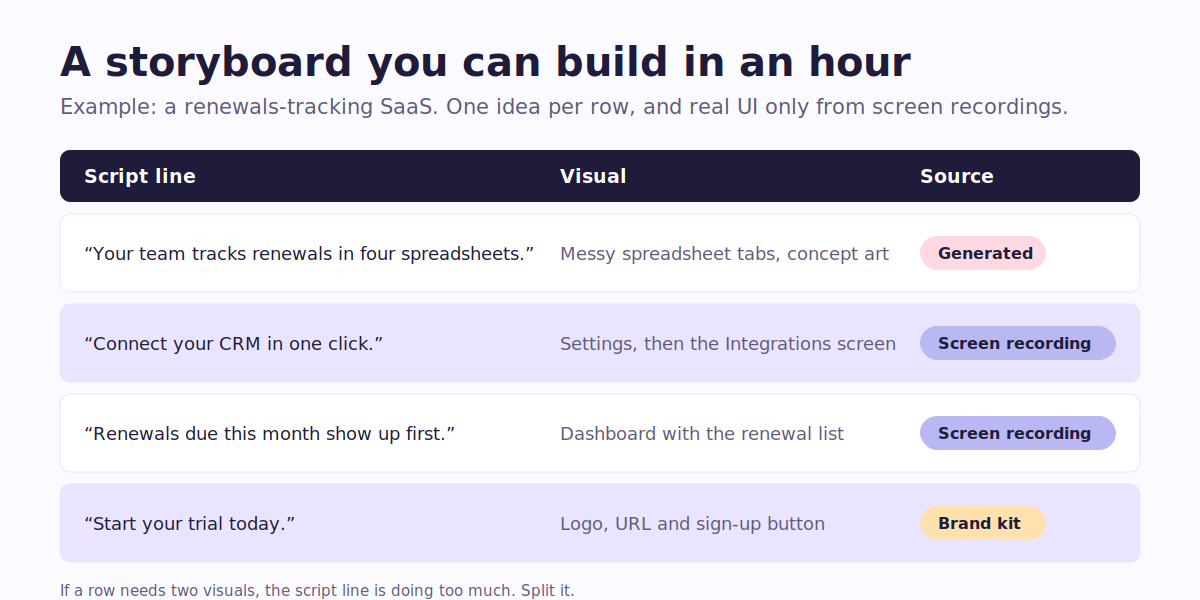
Build a quick video storyboard as a 3-column table: script line, visual, source. One idea per row. If a row needs 2 visuals, the line is doing too much, so rewrite it.
Record clean. Use a demo account, hide real customer data, and bump the browser zoom so text survives a phone screen.
3:45 PM: Voice, captions, and the cutdowns (60 minutes)
Generate the AI voiceover in sections, one per scene. When legal wants a word changed, you redo 4 seconds instead of the whole track. Check how the voice says your product name before anything else.
Turn captions on by default. Plenty of viewers will watch on mute in a feed, and captions carry the message there.
Now the step most teams skip. Wyzowl found that 82% of businesses post video to YouTube and 70% to LinkedIn. A 70-second explainer is too long for most ad slots on either. Cut 2 or 3 versions of 15 to 30 seconds now, while the scenes are fresh (one per step, or one per pain point).
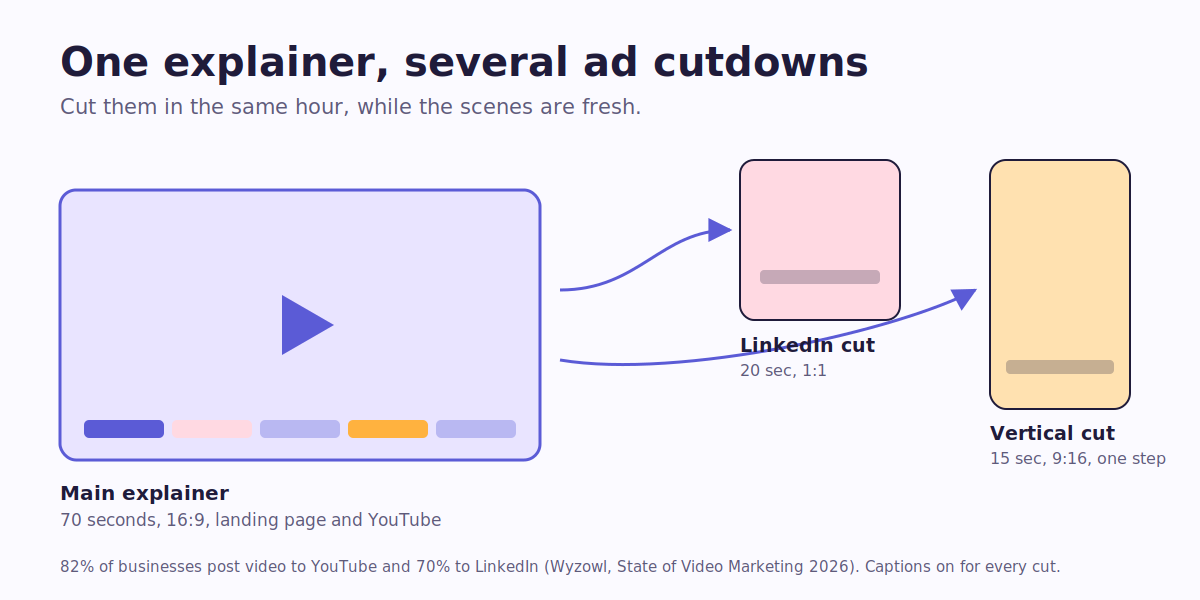
In agency land, Yans Media warns that social cuts requested after delivery restart production on those assets. Here, it fits inside the same hour. For more on producing lots of versions without budget creep, read this article on scaling video creative output.
This is where Predis.ai fits. Paste a cutdown script into the AI text to video maker, or build versions for B2B feeds with the LinkedIn ad maker, and see which one earns attention before you put more budget behind it.
Turn your explainer into video ads
Make short ads from your script that look like your brand.
4:45 PM: Review like a skeptic, then ship (75 minutes)
Watch the cut 3 times, each with one job:
- Sound off. Can you follow it from visuals and captions alone?
- Eyes closed. Does the narration make sense without the screen?
- Accuracy. Does every label, price, and step match today's build?
Send it to your approver with timestamped notes, not a "thoughts?" message. Give it one round of feedback, then fix it and export.
Then schedule the cutdowns so they don't sit in a folder. Predis.ai's autoposting publishes them to your channels on the dates you set.
Where an AI Explainer Video Still Falls Short
AI is good at clear. It's weaker at moving.
If you need a brand film with original characters and real emotional weight, hire people. The same goes for anything a regulator will read. Compliance claims need a human reviewer, and probably a lawyer.
Complex, multi-step flows are another trap. A flow with 7 clicks across 3 screens is a tutorial, not an explainer, and it should be recorded, never generated.
Synthetic voices also stumble on invented product names and acronyms. Spell them phonetically in the script, then listen twice.
None of this kills the afternoon plan. It just tells you where to slow down.
Keep It Current Every Sprint
Nobody talks about this advantage enough. A studio explainer is frozen on delivery day, while your product ships something new every sprint.
Keep the script, scene table, and recordings in one folder per version. When a feature changes, re-record that one scene and regenerate its voice line before you export again. An AI explainer video gets cheaper to keep current with every version you save. Predis.ai's fix-one-frame editing works the same way for your ad cutdowns: you swap the frame that's wrong instead of rebuilding the ad.
The upkeep pays for itself. In Wyzowl's survey, 93% of video marketers said video improved user understanding of their product, and 57% said it reduced support queries. An onboarding video that shows last quarter's UI does the opposite.
Ready for Your Afternoon?
The month was never really about making the video. It was about waiting for the next person in the chain.
Take the chain away and an AI explainer video fits in an afternoon. You still own the message and the product accuracy, and the final yes stays with one person. Block 1 PM to 6 PM one day this week and pick one viewer with one question. By 6, you'll have a reviewed explainer and a few cutdowns ready to test.
When you want those cutdowns to look like your brand, Predis.ai helps you make ads that are yours and scale the ones that sell.
FAQs
Aim for 60 to 90 seconds for the main version, which is about 150 to 225 words of script at a normal speaking pace. Wyzowl's 2026 survey found 71% of marketers rate 30 seconds to 2 minutes as the most effective range. Make separate 15- to 30-second cuts for paid social rather than forcing one video into every slot.
Studio pricing varies a lot. Yans Media's own inquiry form starts at $3,500 for AI-assisted work and runs to $20,000 for premium productions. An AI explainer video costs a tool subscription plus an afternoon of someone's time. Check each tool's pricing page before you commit, since plans change often.
For most product explainers, yes, as long as you review it. Generate it scene by scene, check how it pronounces your product name and acronyms, and slow the pace for dense steps. If your founder's voice is part of the brand, or this is a high-stakes launch film, record a human instead.
An explainer answers why: what problem the product solves and why the viewer should care, in about a minute. A product demo video answers how, walking through real clicks and settings over several minutes. Most SaaS teams need both: the explainer earns the click, and the demo takes over after it.
You may also like: