Explore this content with AI:
Now imagine posting a single Story with a Questions sticker and waking up to 87 responses in your inbox — product ideas, personal stories, direct sales enquiries, and a week’s worth of content ideas, all delivered by the people you actually want to reach.
The difference isn’t luck. It’s the shift from broadcasting to your audience to building with them.
The Instagram Questions sticker is one of the simplest, most underused tools for engaging your audience best. This guide covers everything: what it is, how to set it up, the question prompts that actually generate responses, and how to turn a 24-hour Story into a lasting business asset.
What Is the Instagram Questions Sticker?
The Questions sticker is an interactive Story element that lets your followers submit open-ended, text-based responses directly to you — no DMs required, no friction beyond tapping the sticker and typing. You post a prompt, they answer, and the responses land in your Story’s private activity panel.
Unlike comments on posts, which are public, question responses come through your Story’s private viewer panel, enabling one-on-one engagement that feels more personal and less performative. That privacy is what makes it work.
On the creator side, you can see the names of everyone who responded — useful for identifying your most engaged followers and potential brand advocates. But when you choose to share a response back to your Story (which keeps the loop going and encourages more submissions), the responder’s identity stays private.
Their answer appears on screen; their name does not. This makes followers far more willing to share honest feedback, genuine questions, and unfiltered opinions.
How to Use the Instagram Questions Sticker: Step-by-Step
Setting up a Questions sticker takes under two minutes. Here’s the full process:
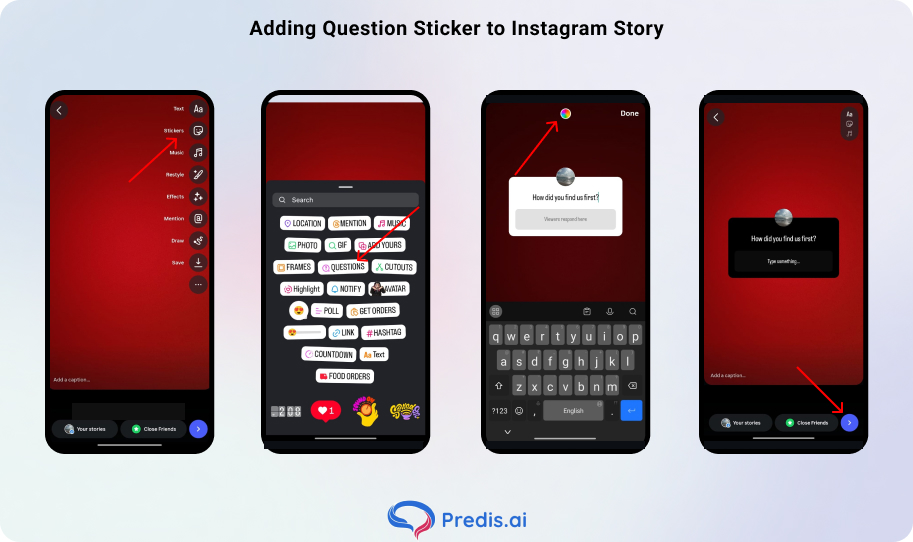
- Open Instagram Stories. Swipe left from anywhere in the app.
- Create or upload your background. Film a face-to-camera video, upload a photo, or use Create Mode for a plain colour or gradient background — whatever fits the context of your question.
- Open the Sticker tray. Tap the sticker icon at the top of the screen (the square smiley face).
- Select “Questions” from the sticker options. You’ll see the default prompt “Ask me anything” appear.
- Type your prompt. Replace the default text with your specific, compelling call-to-action. Note: You’re limited to 3 lines for your question prompt, so keep it tight and clear.
- Customise the colour. Tap the colour circle to cycle through palette options and match the sticker box to your brand colours or Story aesthetic. This small detail matters more than most creators realise — a well-matched sticker looks intentional; a clashing one looks like an afterthought.
- Position the sticker. Drag it into the safe zone — away from the top 10% and bottom 20% of the screen, where interface elements may obscure it.
- Publish your Story. Tap “Your Story” to post.
Instagram Questions vs. Polls vs. Quizzes: When to Use Each
Not all Instagram interactive stickers serve the same purpose. Combine multiple interactive elements in a single story sequence for even higher engagement — start with a poll, follow up with a quiz, and end with a question sticker. But understanding when each tool earns its place is what separates a strategic creator from one who uses them at random.
1. Use Instagram Questions when
- You want open-ended insight
- Personal storytelling
- Deep audience feedback
This is the high-effort, high-reward option. Responses take more from your follower — they have to type — which means the people who answer are genuinely engaged. The payoff is qualitative data that no poll can give you.
2. Use Polls and Sliders when
- You want fast, low-friction participation.
Binary “this or that” choices are easy to answer, generate high response rates, and work well for quick preference testing or product decisions. The engagement bar is lower; so is the depth of insight.
3. Use Quizzes when
- You want to test their knowledge
- Gamify your content
- Educate your audience about your brand, product, or niche
Quizzes create a micro-game loop — followers feel rewarded when they get the answer right, and curious when they don’t.
The Engagement Funnel in practice: Start a Story sequence with a simple Poll to warm up your audience. Follow it immediately with a Question sticker that goes deeper into the same topic. The poll lowers the first engagement barrier; the question harvests the real insight from the audience it has already activated.
Instagram Questions Ideas That Actually Generate Responses
The prompt is everything. Vague questions get ignored. Specific, curiosity-driven prompts get answered. Here’s what works by category:
Questions For Businesses:
- “What’s one product you wish we sold?” — pure product development research, delivered free
- “How did you first find our brand?” — qualitative marketing attribution that your analytics dashboard can’t give you
- “POV: You’re shopping our new collection. What’s the first thing you grab?” — generates engagement and surfaces which products have the strongest pull
- “If you could change one thing about our product, what would it be?” — direct product feedback with zero gatekeeping.
- “What’s stopping you from trying us for the first time?” — surfaces objections your sales page isn’t addressing
- “Which feature do you use the most — and which do you wish existed?” — separates what you think matters from what actually does
- “Describe your experience with us in one word.” — quick sentiment check that also generates shareable response collages
- “What made you decide to trust us with your purchase?” — surfaces the real conversion triggers behind your best customers
- “What’s something we do that a competitor doesn’t?” — free competitive positioning research, written in your audience’s own language
- “What topic do you want us to cover next?” — audience-led content calendar that guarantees relevance
- “What’s a question you’ve always wanted to ask us but never did?” — opens up the conversations that live in people’s heads but never make it to the comments
For Creators:
- “Ask me anything about [your niche]!” — positions you as an authority and gives you a week of content from the answers
- “What should I film for my next Reel?” — audience-directed content planning that guarantees the result will resonate
- “Share your most unpopular opinion about [topic]” — generates strong, varied responses because people love defending a contrarian view
- “What’s the one thing you wish someone had told you when you started [niche]?” — generates deeply relatable answers you can reshare and build entire content series around
- “What’s the biggest myth about [your niche] that drives you crazy?” — positions you as the myth-buster and sparks strong, opinionated replies
- “What skill do you most want to learn in [niche] this year?” — real-time intel on exactly what your audience wants to be taught next
- “Tell me something good that happened to you this week.” — low-barrier, high-warmth prompt that turns your Story into a positive space people want to return to.
For Fun and Community Engagement:
- “Caption this photo!” — highly shareable, zero-barrier, great for brand humanisation
- “Describe your current mood using only 3 emojis” — emoji-based answers are fast and fun, and you can reshare the best ones as a compilation Story
- “What’s something you’re proud of this week?” — creates positive community energy and positions your account as a space people enjoy visiting
- “Coffee or tea — and there’s no right answer (there is).” — low-stakes debate format that gets people defending their choice in the replies
- “Remote work forever or back to the office — go.” — taps into a genuinely polarising topic without being political or divisive
- “Early bird or night owl? And be honest about which one you actually are vs. which one you tell people you are.“ — the twist at the end makes people laugh and respond more honestly
Specific CTAs drive 3x more responses than generic ones. “Questions?” as a prompt is a missed opportunity. “What’s your biggest struggle with [specific topic]?” is an invitation.
Sell More via Instagram 💰
TRY FOR FREE
Pro-Tips for Getting More Responses
1. The Seed Strategy
Craft a clear prompt — be specific.
“Ask me about summer skincare” beats “Questions?” Incentivize responses: offer a giveaway or feature the best answer. Beyond incentives, consider answering your own sticker first — post a response as if you were a follower — to model the type of answer you’re looking for.
When people see the format and tone of an expected response, participation rates go up significantly.
2. Safe Zone Placement
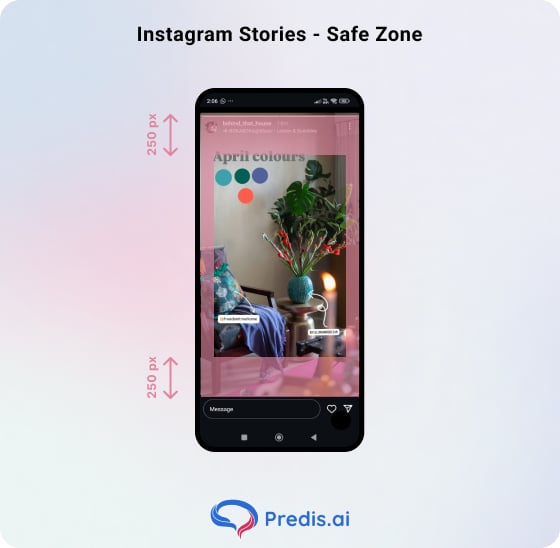
Keep the sticker in the middle third of the screen — away from the top 10% (covered by the account handle and story progress bar) and the bottom 20% (where the reply bar and navigation elements sit). A sticker that gets partially obscured by UI won’t get tapped.
3. Incentivise with a Stake
“We’re picking 3 responses to win a discount code” turns passive scrollers into active participants. The prize doesn’t need to be large — the perception of being selected is often more motivating than the reward itself.
4. Use a Face-to-Camera Video Background
A video of you holding the phone, looking at the camera, and visually inviting responses makes the request feel personal and direct. Brands using regular question-based engagement see 25% higher Story completion rates compared to standard content — and face-to-camera backgrounds consistently outperform static images for completion.
5. Time it strategically
If your Story views drop, pause posting for 24 hours and restart with a highly engaging Story like a question sticker — this “reset” approach can double your Story reach. The Questions sticker isn’t just an engagement tool; it’s a re-engagement signal to the algorithm.
6. Keep your questions short
The prompt field allows three lines of text, but the most-answered questions rarely use all three. One sharp, specific line outperforms a multi-sentence setup every time. If your question needs a paragraph of context before it makes sense, it’s too complex for a Story sticker.
7. Ask things relevant to your niche
Generic questions get generic answers. The more closely your prompt ties to the specific topic your audience followed you for, the higher the response quality and volume. A fitness creator asking “What’s your biggest obstacle with early morning workouts?” will outperform the same creator asking “What did you do this weekend?”
8. Engage with every answer you receive
Replying to responses — even with a quick reaction, a follow-up question, or a voice note — signals to the respondent that their answer was seen and valued. That small acknowledgement is what converts a one-time participant into a habitual engager.
How to Analyse Effectiveness
Not all responses are equal. Ten messages from potential buyers who described a genuine product need are worth more than 100 funny captions. Before you evaluate a Questions sticker campaign by volume, evaluate it by value.
What to track in Instagram Insights
After sharing a Questions Story, check the Insights for that frame specifically:
- Profile Visits
- Follows
- Reach triggered by that Story
A spike in Profile Visits after a Q&A Story means new people discovered you through it — either from shares or from followers forwarding it. Follows directly attributed to a Story indicate your prompt reached people who weren’t already following you.
Once that is done, here are some things that you can do with responses that you got:
- Turn answers into content. The most efficient creators use Question responses as a direct content pipeline. Responses reveal recurring pain points; common misconceptions become myth-busting posts; frequently requested products inform your roadmap and more.
- Save the best responses to Highlights. Stories disappear after 24 hours, but Highlights are permanent. Curating your best Q&A sessions into a dedicated Highlight folder — “You Asked,” “FAQs,” or a topic-specific name — gives new profile visitors immediate social proof and context about who you are and how you interact with your audience.
Stand Out on Instagram with AI Content 🌟
The Instagram Questions Sticker Is a Bridge, Not a Megaphone
Every tool on Instagram can be used to broadcast or to connect. The Question sticker is the rare feature that structurally forces you into connection mode — you ask, they answer, you respond, they feel seen. That loop, repeated consistently, is how communities are built.
A question sticker can turn into an entire AMA event, where you create a series of follow-up Stories with your responses — a popular approach even Mosseri himself uses. The best questions aren’t the cleverest or the most strategic. They’re the ones that make your audience feel like their answer actually matters — because it does. It shapes your content, your product, your direction.
FAQ
Only you — the account owner — can see the names of people who responded to your Question sticker. When you share a response back to your Story, the responder’s identity remains private. Their answer is displayed; their username is not.
Like all Stories, a Question sticker is live for 24 hours. However, you can save both the Story and the responses beyond that window. Save high-performing Q&A sessions to a Story Highlight to make them permanently visible on your profile.