


Explore this content with AI:
Here’s a number that makes sizing feel less like admin. In Meta’s own Reels ad guidance, 9:16 video ads with audio and key messages inside the safe zone had a 34.5% lower cost per result than image ads. Shape and sound, plus where the text sits. That’s the whole difference.
The problem is finding the right numbers. Meta ad sizes are spread across dozens of Ads Guide and Help Center pages, they change several times a year, and a surprising number of guides still quote sizes Meta stopped recommending.
Get it wrong and the damage is quiet: a CTA hidden under the caption, or black bars around a square video in Reels. Sometimes it’s a logo sitting right where Instagram puts its like button.
We checked every size and spec below against Meta’s pages.
What are the Meta ad sizes for 2026?
Meta now recommends three master sizes: 1440 x 1800 pixels (4:5) for Facebook and Instagram Feed, 1440 x 2560 pixels (9:16) for Stories and Reels, and 1440 x 1440 pixels (1:1) for carousels, Marketplace and search. The older 1080-wide versions of the same shapes still run as the recommended minimum.
Make product ads that look like your brand
Static, video and UGC ads from one product page, in your brand colors.
Meta Ad Sizes at a Glance: The 3 Files You Need
Meta lists more than 20 placements. You don’t need 20 files.
Three masters cover almost every Facebook and Instagram placement, as long as you export them at the 1440-pixel width Meta now recommends.
| Master file | Size | Aspect ratio | Covers |
|---|---|---|---|
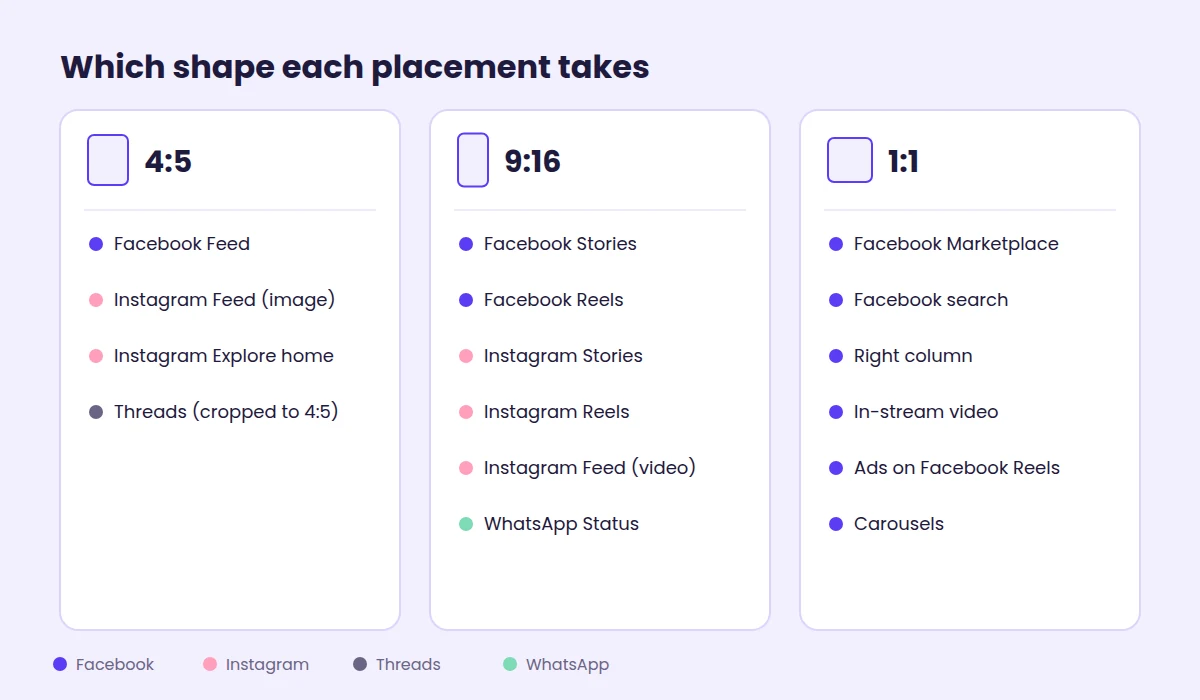
| Portrait | 1440 x 1800 | 4:5 | Facebook Feed, Instagram Feed images, Instagram Explore home |
| Vertical | 1440 x 2560 | 9:16 | Stories and Reels on both apps, Instagram Feed video, WhatsApp Status |
| Square | 1440 x 1440 | 1:1 | Carousels, Marketplace, search results, right column, in-stream |
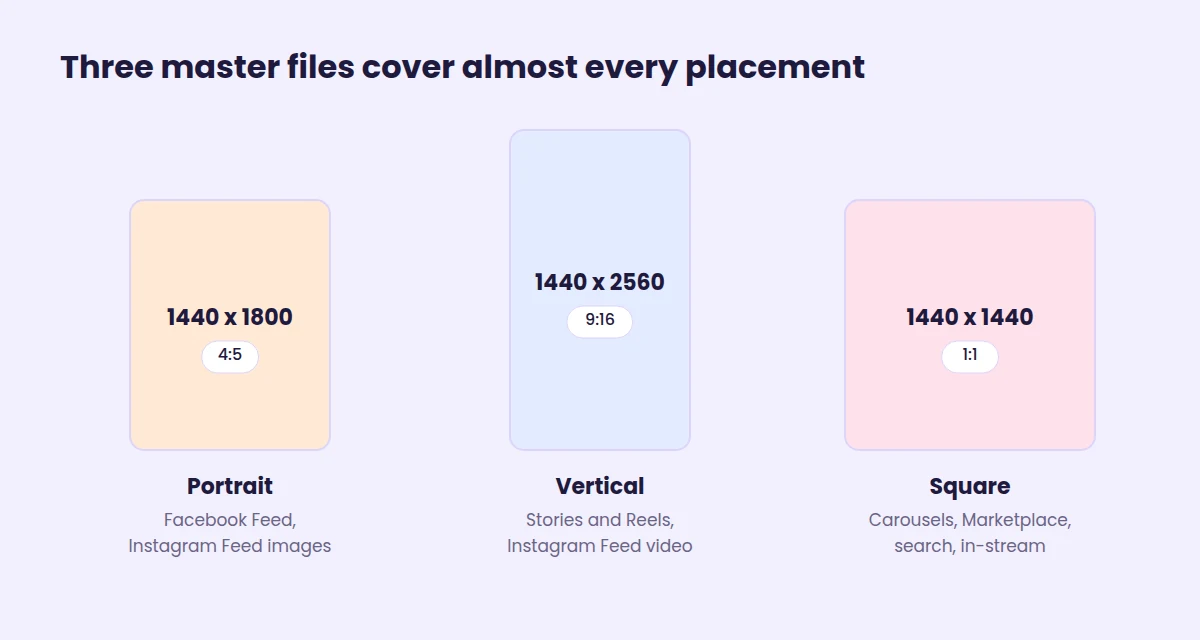
These Meta ad dimensions come straight from Meta’s Ads Guide. The older 1080 x 1350, 1080 x 1920 and 1080 x 1080 sizes are the same shapes at lower resolution. They still clear Meta’s minimums, so Meta won’t reject your existing creative. New exports should go out at 1440 wide.
These are ad sizes. Organic posts follow slightly different rules, covered in our social media image sizes guide.
One more rule before the tables. Upload each aspect ratio yourself. If you give Ads Manager a single file, it will crop, pad or stretch it to fit the other placements, and you lose control over what gets cut.
What Changed in Meta Ad Sizes and Placements in 2026
If your Meta ad sizes or Meta ad specs sheet is from last year, these are the updates that matter.
- 1440 is the new recommended width. The Ads Guide now lists 1440 x 1800, 1440 x 2560 and 1440 x 1440. The 1080 sizes are the recommended minimum.
- Instagram Explore feed is gone. Meta’s Marketing API v26.0 changelog (July 29, 2026) says the Instagram Explore Feed placement is no longer available. Delivery shifts to other placements, and requests that name Explore return an error. Instagram Explore home is a separate placement and still has specs.
- Messenger Stories ends on October 27, 2026. The same changelog drops the placement from v26.0 calls now and from every API version on October 27. If you use Advantage+ placements, there’s nothing to do.
- WhatsApp Status carousels. Ads in WhatsApp Status now support carousels of up to 10 cards.
- Threads is on by default. Threads is included when you use Advantage+ placements, and brands can now advertise from a Threads profile without a linked Instagram account, rolling out gradually since September.
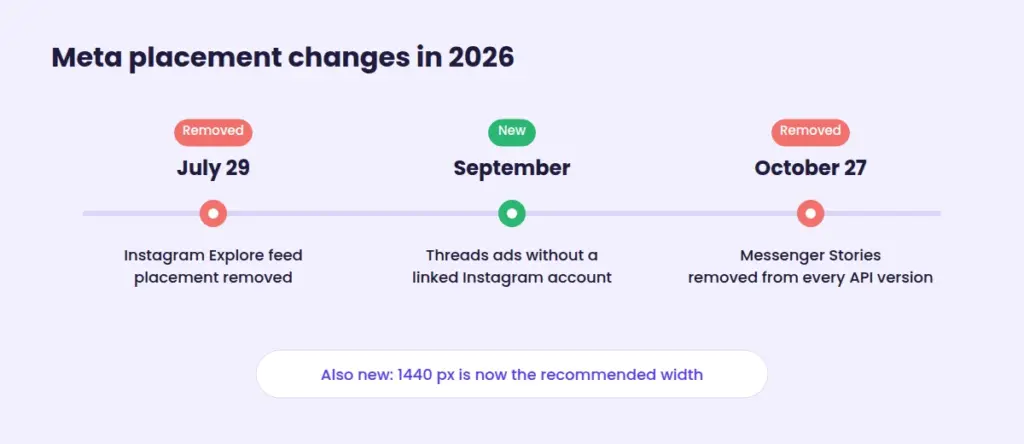
Threads crops anything taller than 4:5 down to 4:5, which is one more reason the portrait master earns its place.
Facebook Ad Sizes by Placement
Here are the Facebook ad sizes for every current placement. Text limits get their own table further down.
| Placement | Recommended ratio | Recommended size | Video length |
|---|---|---|---|
| Feed | 4:5 (1:1, 16:9, 1.91:1 accepted) | 1440 x 1800 | 1 second to 241 minutes |
| Stories | 9:16 | 1440 x 2560 | Keep under 2 minutes |
| Reels | 9:16 | 1440 x 2560 | No maximum listed |
| Ads on Facebook Reels (after a reel loops) | 1:1 | 1440 x 1440 | 4 to 15 seconds |
| Marketplace | 1:1 | At least 1080 x 1080 | 1 second to 241 minutes |
| Search results | 1:1 | At least 1080 x 1080 | 1 second to 241 minutes |
| Right column (desktop) | 1:1 | At least 1080 x 1080 | Images recommended |
| In-stream video | 16:9 or 1:1 | At least 1080 x 1080 | 5 to 15 seconds on desktop, up to 10 minutes on mobile |
For Feed images specifically, the Facebook Feed image spec sets the floor at 600 pixels wide and 750 pixels tall at 4:5, with a 30 MB maximum and a 3% aspect ratio tolerance.
A few details trip people up:
- Desktop changes your video. On desktop Feed, a 4:5 video displays at 1:1, so expect bars at the sides.
- Right column ads are tiny. The minimum is 254 x 133 pixels, and Meta recommends no text on the image at all.
- Facebook Reels has no auto-captions. Burn your captions into the video file.
Instagram Ad Sizes by Placement
Instagram ad sizes mostly mirror Facebook’s, with two twists: Feed video now prefers 9:16, and Reels has rules about what the video can contain.
| Placement | Recommended ratio | Recommended size | Video length |
|---|---|---|---|
| Feed (image) | 4:5 | 1440 x 1800 | Not applicable |
| Feed (video) | 9:16 | 1080 x 1920 or larger | 1 second to 60 minutes |
| Stories | 9:16 | 1440 x 2560 | 1 second to 60 minutes |
| Reels | 9:16 | 1440 x 2560 | 0 seconds to 15 minutes |
| Explore home | 4:5 images, 9:16 video | 1440 x 1800 or 1080 x 1920 | 1 second to 60 minutes |
| Threads (via Advantage+ placements) | Up to 9:16, cropped to 4:5 | 1440 x 1440 | Not listed |
Reels ads can’t use licensed music, face or camera effects, GIFs or product tags. Plan audio you own or have cleared. (Posting organic Reels too? Covers and thumbnails have their own sizes, listed in this guide to Instagram Reels dimensions.)
Stories also cut long ads short. Instagram plays Stories ads under 16 seconds in full and may split longer ones into cards. Facebook Stories does the same above 15 seconds. Put the hook and the offer in the first card.
Threads, WhatsApp Status and Audience Network Specs
These smaller placements switch on automatically with Advantage+ placements, so your files will land there whether you planned for it or not. Here are the Meta ads specs that differ.
Threads. Per Meta’s Threads ads guidance, you can run single images, single videos and image-only carousels. Meta recommends 1440 x 1440 for images, and anything taller than 4:5 is centre-cropped to 4:5. Primary text runs 80 to 160 characters with a 40-character headline, but URLs aren’t supported in the primary text. Video on Threads doesn’t show captions or CTA buttons, so the video itself has to carry the message.
WhatsApp Status. Full-screen and vertical, like Stories. Meta recommends 9:16, with a minimum image size of 500 x 320 pixels and video of up to 60 minutes. Carousels of up to 10 cards are now supported.
Audience Network. Ads that run in other apps and sites. Native, banner and interstitial placements take 9:16 at a minimum of 1080 x 1080 with video from 1 second to 2 minutes, and rewarded video runs 3 to 61 seconds. Audience Network doesn’t support captions.
If your 9:16 master already sits inside the Reels safe zone, it will hold up in all three.
Meta Carousel Ad Specs and Collection Ads
Meta carousel ad specs are simpler than they look, as long as you default to square.
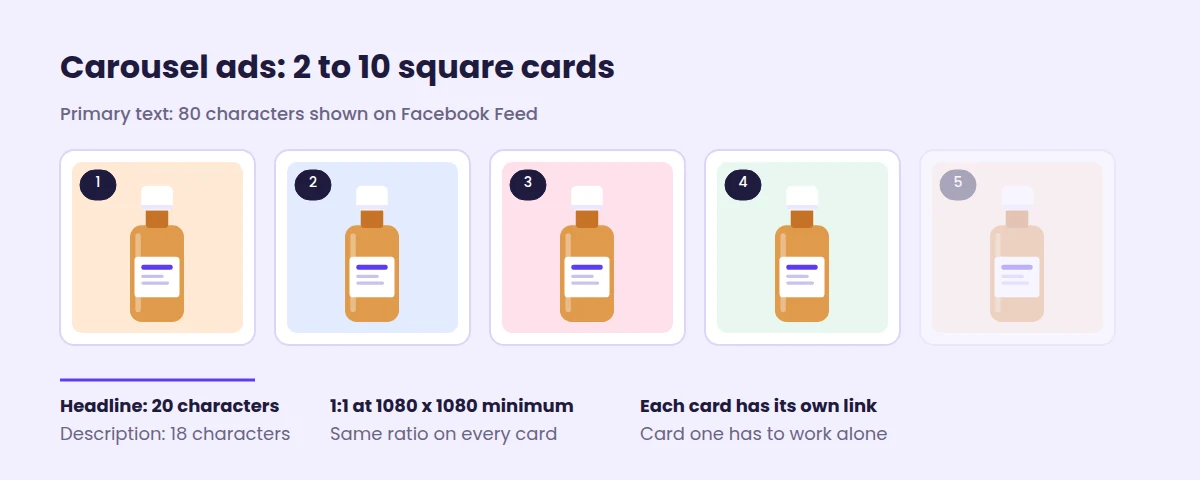
- Cards: 2 to 10, each with its own link.
- Shape: 1:1 at a minimum of 1080 x 1080 is the safe choice for Feed, Marketplace and search carousels. Stories and Reels carousels use 9:16 instead.
- The 4:5 catch: Meta’s Ads Guide lists 4:5 for image-only Instagram Feed carousels, but its best-practice page says 4:5 carousels are only for Advantage+ catalog ads. If Ads Manager doesn’t offer 4:5 cards, use 1:1.
- Consistency: keep every card the same ratio, and use square cards for any carousel that includes video.
- Facebook Feed text: 80 characters of primary text, a 20-character headline and an 18-character description per card.
Collection ads pair a cover image or video with a product grid and need an Instant Experience behind them. For Feed placements, the cover runs from 1.91:1 to 1:1 at a minimum of 1080 x 1080.
Many people never swipe past card one. Make it work on its own.
Meta Reels Safe Zone in Pixels (Stories Too)
This is where most sizing problems actually show up, and the Meta Reels safe zone is the strictest one the company publishes.
On 9:16 ads, Instagram and Facebook lay the profile name, caption, CTA button and engagement icons over your creative. For Reels and most Stories, the guidance is to keep text, logos and key visuals out of the top 14%, the bottom 35% and 6% on each side. Its safe zone help page adds one exception: if the ad carries a disclaimer, keep the bottom 40% clear.
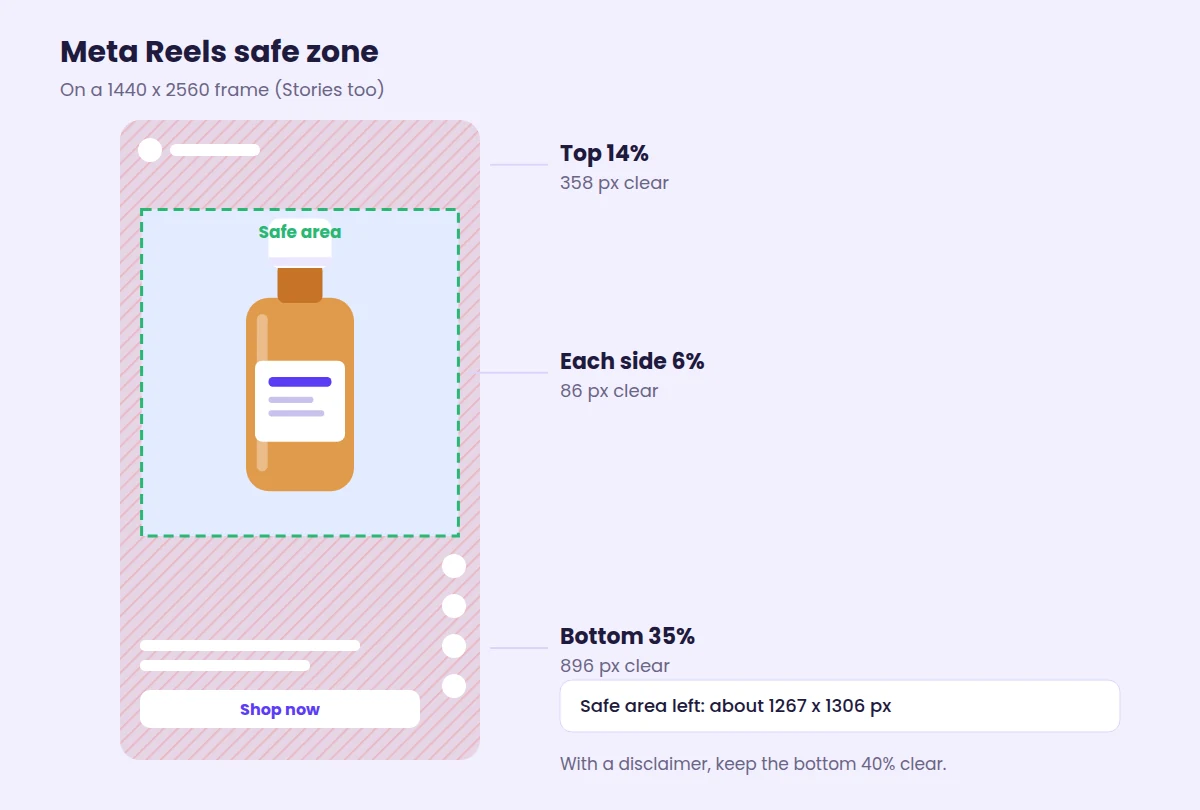
| Keep clear | On 1080 x 1920 | On 1440 x 2560 |
|---|---|---|
| Top 14% | 269 px | 358 px |
| Bottom 35% | 672 px | 896 px |
| Each side 6% | 65 px | 86 px |
| Safe area left in the middle | About 950 x 979 px | About 1267 x 1306 px |
Pixel values are our conversions of Meta’s percentages.
That safe area is roughly half the frame. Your footage should still fill the whole screen. Only the words and logos need to stay in the middle.
Does it pay off? When KiwiCo ran Reels-style creative built this way (9:16, audio on, bottom 35% kept clear) alongside its standard ads, it saw a 27% lower cost per purchase than with either set alone.
Before you publish, turn on the safe zone guardrail in the Ads Manager preview. It shades the covered areas so you can see what’s hidden.
Meta Ad Copy Specs: Text Limits by Placement
Meta’s character limits are recommendations for how much text shows before it’s cut off with “See more”. Longer copy still runs. It just gets hidden.
| Placement | Primary text | Headline | Description |
|---|---|---|---|
| Facebook Feed | 50 to 150 | 27 | Not shown |
| Facebook Stories | 125 | 40 | Not shown |
| Facebook Reels | 40 | 55 | Not shown |
| Facebook Marketplace and search | 125 | 40 | 30 |
| Facebook Feed carousel | 80 | 20 | 18 |
| Instagram Feed | 125 | 40 | Not shown |
| Instagram Stories | 125 | Not shown | Not shown |
| Instagram Reels | 44 | Not shown | Not shown |
| Threads | 80 to 160 | 40 | Not shown |
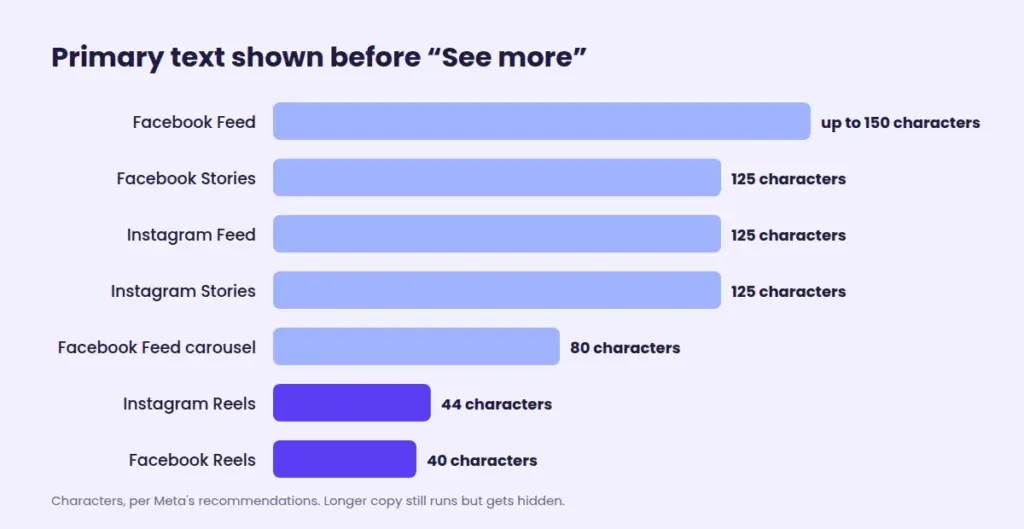
The pattern is obvious once it’s in one place. Reels shows a third of what Feed shows.
So write the hook into the first 40 characters, and let everything after it be optional reading.
Meta Video Ad Specs: File Types and Settings
The file side of Meta ad specs, from image formats to Meta video ad specs, is the same almost everywhere:
- Images: JPG or PNG, up to 30 MB.
- Video: MP4 or MOV (GIF works in most placements, but not Instagram Reels), up to 4 GB.
- Video encoding: H.264, square pixels, fixed frame rate, progressive scan and stereo AAC audio at 128 kbps or higher.
- Aspect ratio tolerance: 3% on most Facebook placements, 1% on Instagram placements and Facebook Stories, and 0% on Ads on Facebook Reels. A file that’s slightly off can get padded or rejected.
Honestly, sound matters more than most spec sheets admit. According to the same Meta Reels guidance, 75% of Reels are watched with sound on. Captions still help, but don’t treat audio as optional.
When Meta’s Own Ad Specs Disagree
Meta ad specs pages don’t always agree with each other. Even its aspect ratio help page contradicts the Ads Guide on one shape. Here’s which number to use when pages disagree.
| Spec | One Meta page says | Another says | Use this |
|---|---|---|---|
| Instagram Feed single image | 4:5 (Ads Guide) | 1:1 (aspect ratio best practices) | 4:5, since it fills more of the screen |
| Facebook Stories video length | Up to 3 minutes (Ads Guide) | Up to 2 minutes (video length help page) | Under 2 minutes |
| Stories bottom safe zone | 20%, about 340 px (Facebook Stories pages) | 35% (Reels and safe zone guidance) | 35%, which clears both |
| 4:5 carousel cards | Allowed for image-only Instagram Feed carousels | Advantage+ catalog ads only | 1:1 unless Ads Manager offers 4:5 |
| Right column shape | 1:1 (Ads Guide) | 1.91:1 recommended (aspect ratio table) | 1:1 at 1080 x 1080 or larger |
Notice the pattern? When two numbers conflict, design to the stricter one. A 9:16 ad built to the 35% bottom margin is safe in Stories. One built to 20% gets its CTA covered in Reels.
Biddyco’s 2026 spec review documents several of the same conflicts and recommends checking Meta’s guide before a big launch. Meta updates its pages quietly.
Make video ads in the ratio each placement needs
Start from a prompt, image or product link and pick the ratio before you export.
How to Build Every Meta Ad Size Without Redesigning
Knowing the Meta ad specs is half the job. Producing three versions of every ad is where small teams lose an afternoon. A better order:
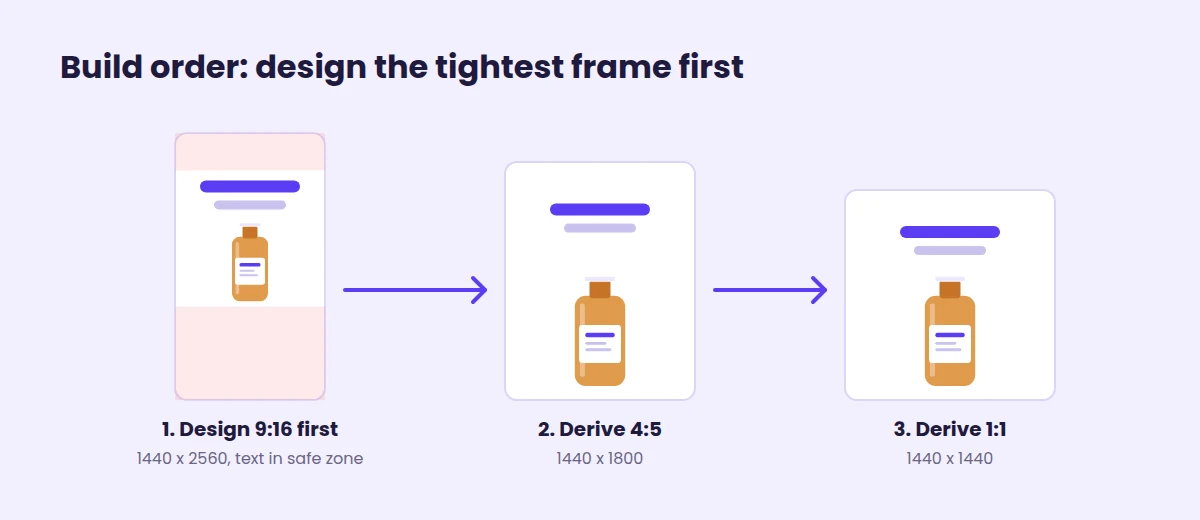
- Design the 9:16 master first, at 1440 x 2560, with every word inside the safe zone. It’s the most constrained frame.
- Derive the 4:5 and 1:1 versions from it. Because your text already sits in the middle, it usually survives the shorter frames with small nudges.
- Upload all three to the same ad and open the aspect ratio view in Ads Manager to check each placement.
- Opt out of placements you didn’t design for. Meta fills missing sizes with padding, media expansion and cropping, but cropping doesn’t stop delivery to a placement. Only opting out does.
If you’d rather start from a template that’s already the right size, Predis.ai has a Facebook ad maker and an Instagram ad maker for each platform’s formats. Running the same campaign on TikTok, LinkedIn or Pinterest? Our social media ad size guide covers those networks.
Start from a Facebook ad already sized for Meta
Pick a format, add your product and export it at the ratio each placement needs.
Your Pre-Upload Checklist
The right Meta ad sizes won’t make a weak ad good. They do stop a good ad from being quietly broken. Before you hit publish:
- Export a 4:5, a 9:16 and a 1:1 master at 1440 pixels wide.
- Keep text and logos out of the top 14%, bottom 35% and 6% sides of anything vertical.
- Put the hook in the first 40 characters of primary text.
- Keep Stories and in-stream videos at 15 seconds or less if you want them played in full.
- Remove Instagram Explore and Messenger Stories from any manual placement setups.
- Preview every placement with the safe zone guardrail on.
Meta changes these pages often, so treat any list of Meta ad sizes and specs, including this one, as something to recheck every quarter.
FAQs
The core Meta ad specs are 1440 x 1800 pixels (4:5) for Facebook and Instagram Feed, 1440 x 2560 pixels (9:16) for Stories and Reels, and at least 1080 x 1080 pixels (1:1) for carousels, Marketplace and search results. Images can be up to 30 MB and videos up to 4 GB.
Yes, for square placements like carousels, Marketplace and search, where 1080 x 1080 is the listed minimum. For Feed, a square image still runs, but Meta now recommends 4:5 at 1440 x 1800 because it takes up more of a phone screen. Use the square as a fallback, not your main Feed asset.
It depends on the placement. Facebook Feed allows up to 241 minutes, Instagram Feed and Stories up to 60 minutes, Instagram Reels up to 15 minutes, and Facebook Reels lists no maximum. In-stream ads on desktop run 5 to 15 seconds. The practical limit is shorter: Stories only play ads of about 15 seconds or less in full.
No. Meta dropped the 20% limit on image text years ago, and you can put as much text on an image as you like. On 9:16 ads, the safe zones do the limiting instead, since text near the top, bottom or sides gets covered by the interface.
Not Instagram Explore feed. Meta removed it in Marketing API v26.0 on July 29, 2026, and delivery moved to other placements. Messenger Stories is being removed from every API version on October 27, 2026. Instagram Explore home is a separate placement and is still listed in the Ads Guide.
You may also like: