


Explore this content with AI:
You wrote 70 words of ad copy on Sunday night. The offer is good and the hook is sharp. There’s no camera crew or editor, though, and the ad needs to go live Tuesday.
That gap is closing fast. In Wyzowl’s latest survey, 63% of video marketers said they’ve used AI tools to make or edit videos, up from 51% a year earlier. Script to video AI is a big part of that jump, because it takes the words you already have and builds the video around them.
Here’s the catch. Every tool reads a script the same basic way, so the script decides whether you get a finished ad or a slideshow with a voice on top.
So let’s fix the script first.
What script to video AI actually does
Strip away the product pages and the process is fairly simple. The tool reads your script line by line and splits it into scenes, which is basically an automatic storyboard. For each scene it picks or makes a visual, then it adds a voice reading your lines, captions that match the voice, and music underneath. You get a draft you can edit and export.
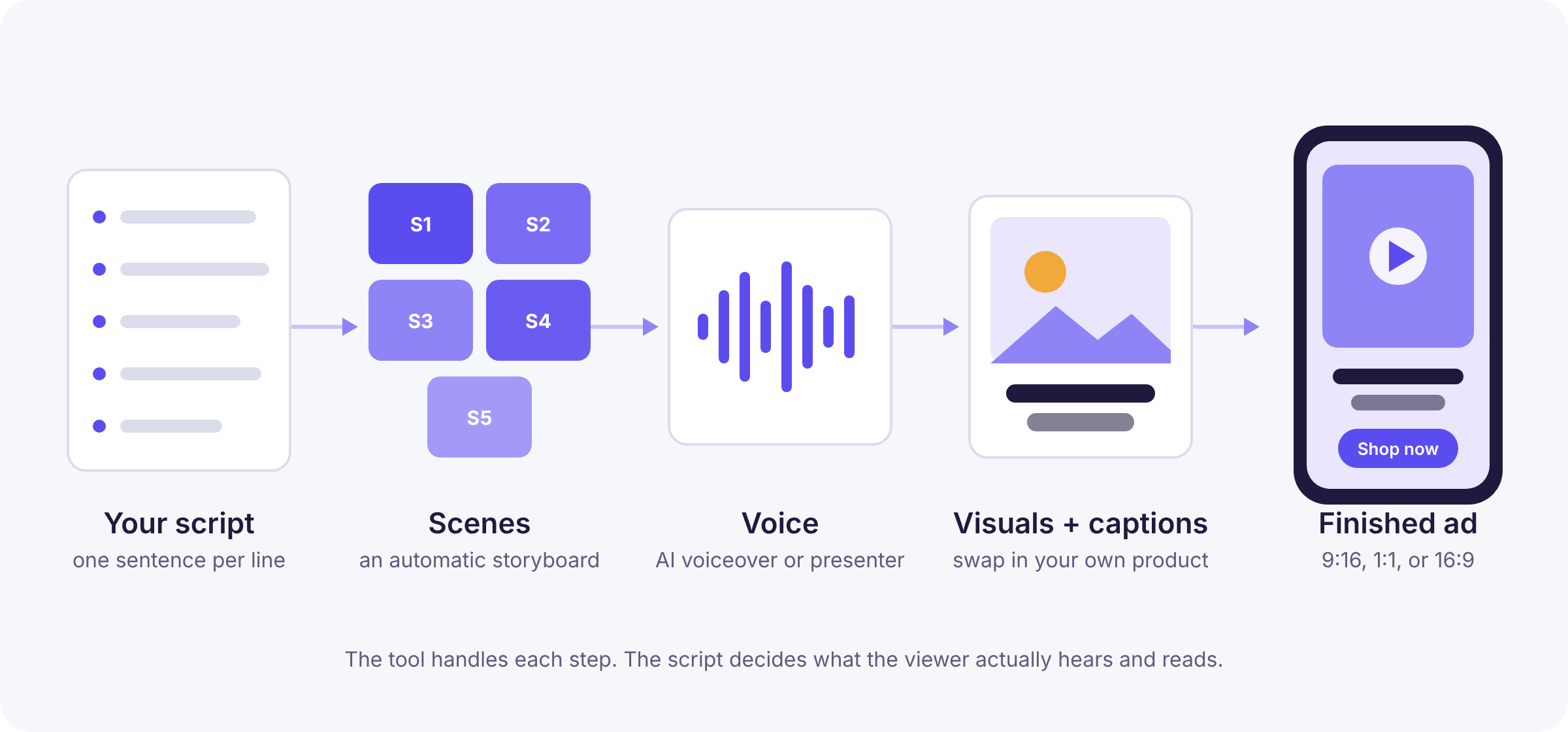
People often mix this up with text to video AI. They overlap, but they aren’t the same job. A text prompt describes one clip (“a woman pours coffee in a sunny kitchen”) and the model fills in the rest.
A script fixes the words, the order, and the pacing before anything is made. For ads, you want the second one, because you chose every word in an ad script on purpose.
What the tool won’t do is decide your offer. It doesn’t know your customer, and it can’t rescue a weak first line. Feed it a vague script and you’ll get a vague video, just faster.
Why the script matters more than the tool now
A few years ago the hard part of video ads was production. That’s not really true anymore.
The IAB’s 2025 video ad spend report found that 86% of US digital video buyers already use or plan to use generative AI to build video ad creative. Platforms are building it in too. On October 6, 2026, Meta made video generation from static assets generally available in Advantage+ creative.
Cost used to be the wall. Among marketers who still don’t use video, 24% say it’s too expensive. That wall keeps getting shorter.
So what does script to video AI leave for you to do? When every business has access to roughly the same generators, the words are the part your competitor can’t copy. The script is what separates AI video ads that sell from the ones that blend in.
How to write an ad script a video tool can read
An ad script isn’t a YouTube script with the intro cut off. It has four jobs, and it should do them in this order:
- Hook. One line that makes the right person stop.
- Offer. One thing you want them to know or get. Just one.
- Proof. A reason to believe you, like a customer result or a quick demo.
- Call to action. What to do next, said out loud and shown on screen.
This isn’t just a copywriting habit. In a 2021 study, Google and Kantar looked at 11,000 ads and found that ads following Google’s ABCD creative principles showed a 30% lift in short-term sales likelihood. Those principles line up closely with the four jobs above: get attention fast, show the brand early, keep to one message, and pair the CTA with a voiceover.
Now make it readable for a script to video AI tool. Write one sentence per scene, because many tools treat each line as its own shot. If a sentence has two ideas, split it. Then add what the viewer should see in square brackets after each line, so the tool isn’t guessing.
Write for sound-off, too. Read each line and ask whether it still works as on-screen text with the volume down. If it doesn’t, shorten it.
Struggling with the first line? These UGC hook styles for video ads are a good place to borrow a structure.
A fill-in ad script template
Here’s a 30-second video ad template you can copy. Swap the brackets for your details and keep one sentence per line.
SCENE 1 (Hook, 0–3s)
Line: [Name the problem or the surprising result in under 10 words.]
Visual: [Close-up of the problem, or the product doing the thing.]

SCENE 2 (Offer, 3–10s)
Line: [Your product] [does what] for [who], [in what time or way].
Visual: [Product in use, your logo visible.]

SCENE 3 (Proof, 10–20s)
Line: [One real result, review line, or quick demo step.]
Visual: [Customer review on screen, or before and after.]

SCENE 4 (Proof or detail, 20–25s)
Line: [The one detail that removes the last doubt: price, shipping, guarantee.]
Visual: [Detail shown as on-screen text.]

SCENE 5 (CTA, 25–30s)
Line: [Verb] + [what they get] + [where].
Visual: [End card: logo, offer, button text.]
Only use proof you can back up. A real review beats an invented number every time.
How long should your script be?
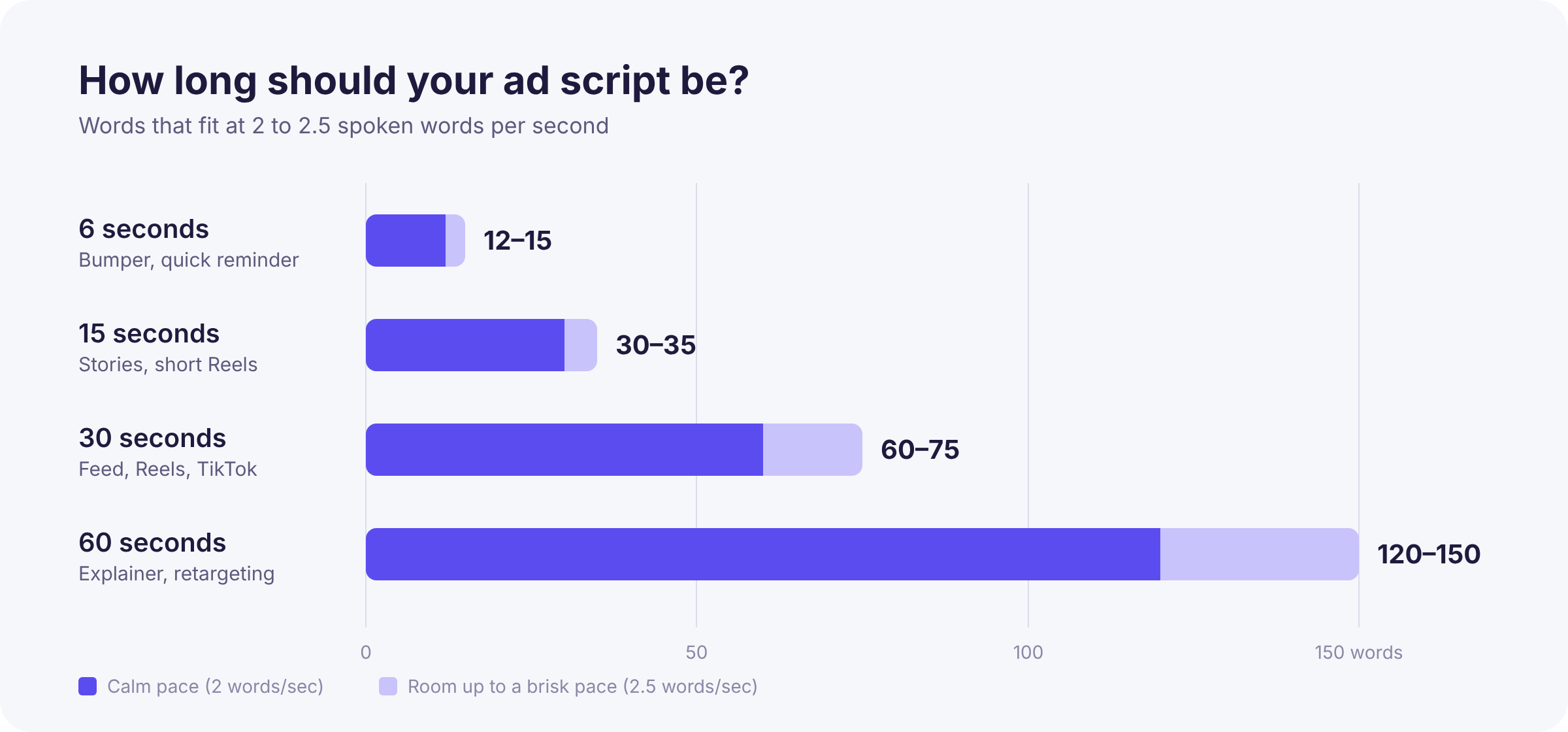
Shorter than you think. A 2019 meta-analysis of reading rates found people read aloud at about 183 words per minute on average. Ad voiceovers usually run slower than that, because you need room for pauses, on-screen text, and a CTA people can actually catch. Plan for about 2 to 2.5 words per second.
| Ad length | Typical placement | Script length |
|---|---|---|
| 6 seconds | Bumper, quick reminder | 12–15 words |
| 15 seconds | Stories, short Reels | 30–35 words |
| 30 seconds | Feed, Reels, TikTok | 60–75 words |
| 60 seconds | Explainer, retargeting | 120–150 words |
Will your ad script fit?
Paste your script with one sentence per line. Each line counts as one scene, the way many script-to-video tools read it. Text in [square brackets] and lines that start with “Visual:” or “Scene” are skipped.
Sample script for a made-up mug. Paste yours to replace it.
Estimates use 2 to 2.5 spoken words per second. Ready to turn it into a video? Paste it into Predis.ai.
Over the limit? Cut adjectives first, then the second proof point. Never cut the CTA.
Turn the script into a finished video, step by step
Script ready? Good, because with script to video AI you don’t need to know how to make a video ad the old way. The exact buttons differ by tool, but the order holds.
Step 1: Paste the script, one scene per line
Paste it exactly as you wrote it, with each sentence on its own line. Many AI script to video generator tools read line breaks as scene breaks, so the line structure you built becomes the storyboard. With Predis.ai, you can paste your own script into the text to video maker and pick a language and template before it builds the video.
Step 2: Choose the format before you generate
Pick the aspect ratio first, because reframing later can cut off text. Meta recommends 9:16 for Stories and Reels since most people hold their phones upright. Use 9:16 for Reels, Stories, and TikTok, and 1:1 or 4:5 for feeds.
Step 3: Pick the voice
You have two broad options. An AI voiceover video reads your lines over visuals, which suits product demos and offers. A presenter-led video puts a person on screen, the format most tools sell as AI UGC ads, and it suits testimonials and “here’s why I switched” scripts. If you’re going that route, this walkthrough on making AI UGC ads covers it end to end. Match the voice to the buyer, not to your own taste. A skincare brand selling to 22-year-olds and a bookkeeping firm selling to restaurant owners shouldn’t sound alike.
Step 4: Replace generic visuals with your own
This is the step most people skip, and it shows. Swap stock shots for your actual product, packaging, storefront, or screen recordings wherever you can. Add your logo and brand colors. The goal is a video that looks like your brand, not like the tool’s demo reel.
Step 5: Check the three things viewers notice
Before export, watch it once with the sound off and check three things. Can you read every caption? Does your brand or product show up in the first few seconds? Is the CTA on screen long enough to read? If any answer is no, fix it now. Stuck on the wording of that last line? Here’s how to pick CTAs that get clicks.
Step 6: Export and name the file well
Export in the format you picked and name the file with what makes it different, like mugs_hook-question_30s_9x16. That name matters in the next section.
Make 3 variants before you spend
One finished ad is a guess. Three versions of it is a test.
This is where script to video AI earns its keep, because a new version costs you a rewrite, not a reshoot. Ad buyers already work this way. When video buyers use generative AI to enhance their ads, the top use is tailoring them for different audiences, cited by 42%.
Keep it simple. Change one thing per version, and start with the hook, since it decides whether anyone sees the rest. Keep the offer, proof, and CTA the same so the result actually tells you something.
- Version A: Question hook (“Still reheating your coffee three times a morning?”)
- Version B: Result hook (“This mug keeps coffee hot for [X] hours.”)
- Version C: Proof-first hook (a real customer review line)
Run all three with the same budget and audience. After the numbers come in, you’ll have your winner, and the next round of variants starts from that one.
In Predis.ai, one script can become several ad variants, and fix-one-frame editing lets you change a single scene without regenerating the whole ad. The video ad maker is the place to start if you’d rather begin from a product description.
Mistakes that make AI video ads look like everyone else’s
Viewers notice. For the second year running, the IAB found that Gen Z and Millennial consumers feel less positive about AI-generated ads than ad executives assume, and more than half want to know when an ad uses AI video. You can’t hide the tool, but you can avoid the tells:
- A script written like a blog post. Long sentences become long scenes, and long scenes lose people.
- Three offers in 30 seconds. Pick one. Save the others for the next ad.
- The brand shows up at the end. By then, plenty of viewers have already scrolled.
- Stock footage only. If none of the frames show your real product, the ad could belong to anyone.
- No captions. Plenty of people scroll with the sound off, and a voice-only message gets lost on them.
- One version, then nothing. Without variants, you can’t learn what worked.
Your script is the part nobody can copy
Script to video AI tools will keep getting cheaper and faster. That’s good news, but it also means the generator stops being an advantage the moment everyone has it.
What stays yours is the script. The hook you wrote for your customer and the proof only you have don’t come with the software.
Write that well, and any decent video ad maker becomes a production team.
Predis.ai is an AI ad platform that helps businesses create ads that look like their brand, shaped by what works in their category. Paste your script, make your versions, and keep the ones that sell. The trial runs 3 days and needs a card.
FAQs
Many tools offer a free plan or a short trial, usually with limits like a watermark, a cap on video length, or a set number of exports. Free tiers are fine for testing whether your script works as a video. For ads you plan to put budget behind, check whether exports are watermark-free and whether you can upload your own product footage.
Write the script one sentence per line, paste it into a script to video AI tool, and choose your aspect ratio and voice before generating. Then replace generic visuals with your own product shots, check captions with the sound off, and export. Most tools let you edit individual scenes after the first draft.
Yes, as a first draft. AI chat tools are good at structure and quick at writing hook options. Edit before you generate, though. Add your real proof, cut anything you can’t back up, and make sure it sounds like your brand. A script nobody on your team would say out loud usually makes an ad nobody watches.
Rules vary by platform and by ad category, and they change, so check each platform’s current ad policy before launch. Beyond the rules, the IAB’s research found that more than half of younger consumers want brands to disclose AI video. Disclosure is easy to add. A generic look is much harder to fix after launch.
It depends on what you sell and how you sell it. Look for four things: it accepts your own script word for word, it lets you upload your own product visuals, it exports in 9:16, 1:1, and 16:9, and it makes variants without starting over. Test two or three script to video AI tools with the same script and compare the results.
You may also like: