Explore this content with AI:
TikTok has a worldwide footprint with almost 18% of all Internet users actively using it. With more and more people getting on it, businesses have both a huge opportunity and an expectation on their heads. The opportunity allows them to tap into a wide audience range, and there is an expectation that they need to create entertaining content for their audience. Having to make fresh content every single day can become quite hard, which is where reposting can help. But if you don’t know how to repost on TikTok, then this guide is just for you.
So, let us begin.
What is Reposting on TikTok?
Reposting on TikTok is where you can post other creator’s content on your own profile. And these type of content will be placed separately from your original content and it will also have a different analytics dashboard. This diashboard is designed in a way that both the original creator and you can be benefited from it. The content you repost will also be marked as Reposted in the bottom.
Now, reposting can be a tricky business. Don’t get me wrong, you can do that very easily with the TikTok platform. The tricky part is not violating copyrights and being ethical. To make sure you do not have any issues with this, we suggest you talk to the original creator before reposting it.
How To Repost A TikTok?
Reposting a TikTok doesn’t even take too long, with only a couple of steps. So to get it done, here is what you should do:
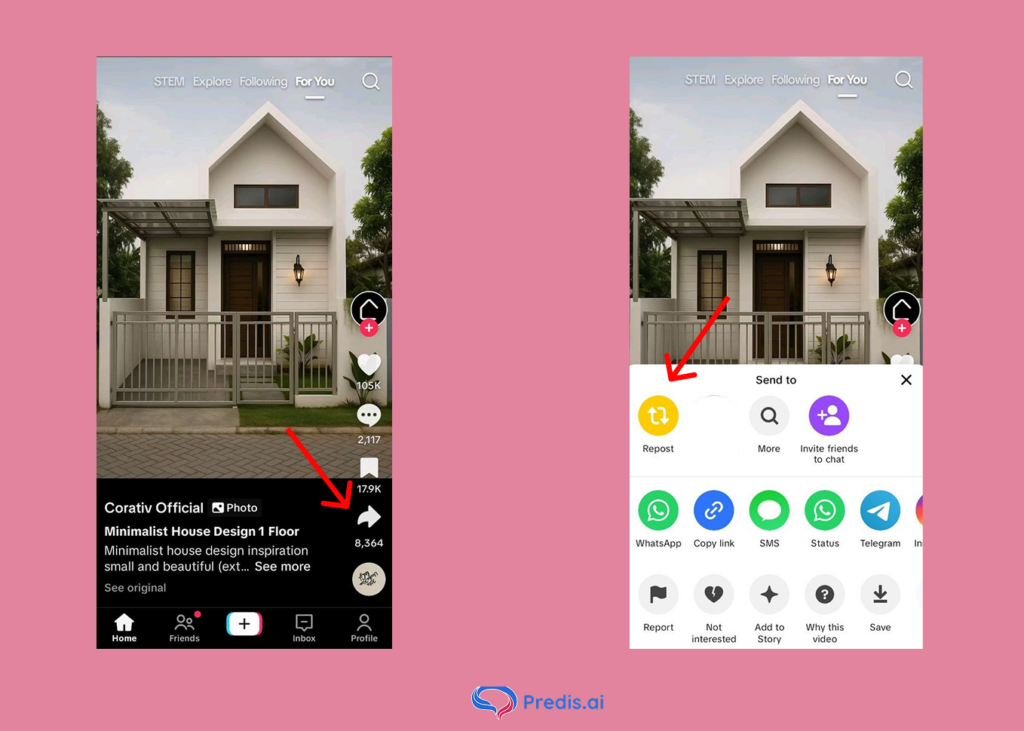
- Find a TikTok that you really like.
- Click on the Share button.
- Click “Repost”.
It is as simple as that.
How To Undo or Remove A TikTok Repost From Your Account?
Because of the too-easy repost process, some TikTokers have said that they reposted videos they had no intention of. If something similar happened to you and you want your reposted TikTok to be removed, this is how you need to do it:
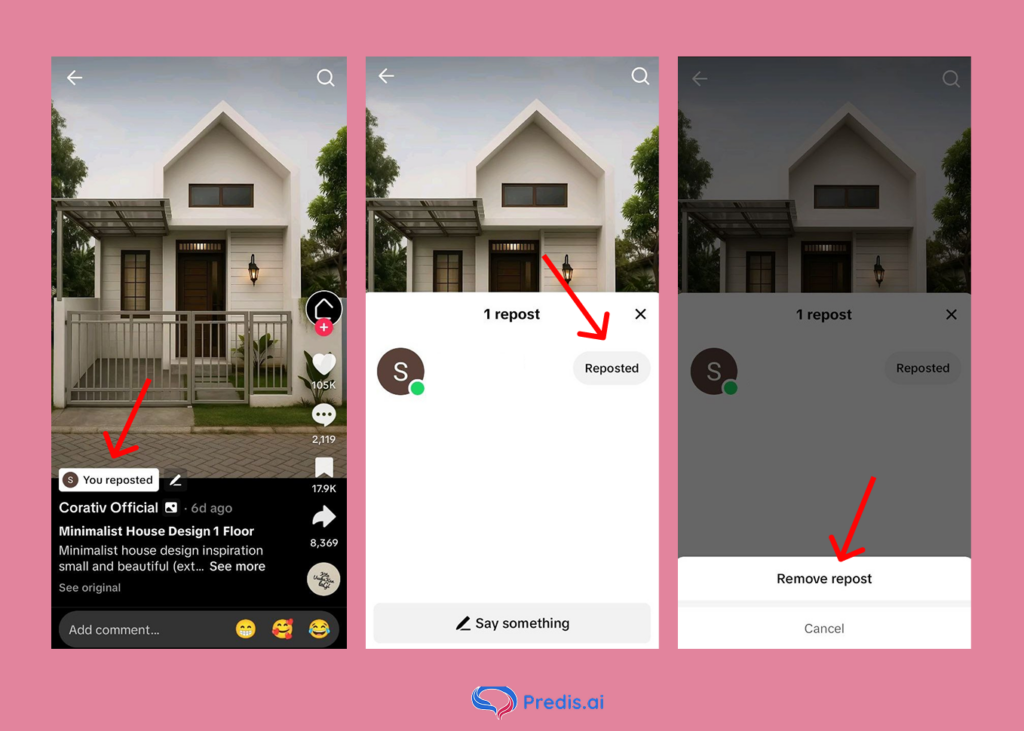
- Click on the “You Reposted” option on TikTok.
- Hit the “Reposted” button again.
- Click “Remove repost”.
And just like that, your repost will be removed from your account.
How to Enable or Disable Reposting on TikTok
TikTok lets you control whether other people can repost your videos.
How to Enable Reposting
- Go to your Profile.
- Tap the Menu icon in the top-right corner.
- Select Settings and privacy → Privacy.
- Scroll down to Repost.
- Toggle the switch ON.
How to Disable Reposting
If you want to keep your content exclusive:
- Follow the same steps above.
- Toggle the Repost option OFF.
This gives you full control over how your content is shared.
How to See Your Reposts on TikTok
Finding the videos you’ve reposted is simple once you know where TikTok hides them. The platform adds a special tab to your profile that collects every repost in one place, making it easy to review or manage what you’ve shared.
How to View Your Reposts
- Go to your profile.
- Look for the icon with two arrows pointing in opposite directions.
- Tap it to see all the videos you’ve reposted.
If the tab doesn’t appear, it simply means you haven’t reposted anything yet.
How to See Someone Else’s Reposts
- Visit their profile.
- Tap the same two-arrow icon beneath their bio.
You’ll be able to browse all the videos they’ve reposted there.
Who Can See Your Reposts?
Visibility matters, especially for brands and creators who care about privacy and audience control. TikTok allows you to decide who can view the reposts on your profile.
In most cases, followers who visit your account, along with anyone permitted by the original creator’s privacy settings, can see your reposted videos.
To change these preferences:
- Go to Profile → Menu
- Tap Privacy
- Select Who can see your reposts
From there, you can limit who views your reposted content.
Why Can’t I Repost on TikTok? (Common Fixes)
When the repost option suddenly disappears, it can be frustrating — especially if you’re trying to stay consistent with your content strategy. Fortunately, the issue is usually easy to fix.
Here are the most common reasons the repost button may not show up:
- Your app needs an update
- TikTok is still rolling the feature out in your region
- The creator disabled reposting for that video
- Your internet connection is unstable
- Cached data is causing glitches
Try updating the app, restarting it, clearing the cache, or checking another video to confirm whether reposting is available.
5 Best Practices When Reposting Others’ Content
Reposting others’ content can be a great way to tap into their audience and improve brand visibility, only when it is done right. To do it the perfect way, here are 5 best practices that you can adopt:
1. Don’t copy as such
Much as it feels easy to just repost someone’s content and call it a day, there is no clear understanding to your audience on why you did it. And if you are a business, then telling your audience how this will be a value-add to them is very essential.
So to make sure everyone understands the purpose of the video, put your twist on it. Add a comment explaining why this post made you repost and why the content resonates with your brand.
2. Give credit where it is due
Since you are reposting content that someone poured blood, sweat, and tears into, it is only fair for you to give them the credit for it. If they are a small creator, then this might help them grow and your brand to build a rock-solid rapport with them.
3. Maintain consistency
If you are a brand that is looking to repost content, then selecting the first one you like may not be a great idea. To ensure your brand image stays consistent, you need to have some criteria for choosing the right content, which can be:
- If the content is in alignment with your brand values and image.
- The content is of good quality and understandable.
- Think about whether the content you want to repost will be valuable to your target audience.
- Whether you have explicit consent from the original creator to repost it, and there are no copyright infringement issues.
4. Leverage Hashtags
Just because it is a reposted content does not mean you do not have to make any efforts to promote it. One such way of getting more eyeballs on your promoted content is by using relevant hashtags.
Watch the hashtags in your niche that are getting popular. When you find one that is relevant to both your business and the TikTok you are reposting, you can use it.
5. Leverage UGC
If you are a brand looking to get more social proof for your business, then encouraging users to make UGC content and reposting them can be a great strategy.
Having more people talk good about your product and business goes a long way in earning the trust of your customers. It is more like word-of-mouth but on a large scale, since UGC and Influencers have a good follower base on their own.
By encouraging UGC content, you have lots of benefits, with notable ones being:
- Production cost for content creation is greatly reduced.
- Tap into the UGC creator’s followers and other wider group of audience.
- Positive word-of-mouth that encourages users to buy from your business.
- New, innovative content created by someone with a fresh perspective.
6 Benefits of Reposting TikToks
Okay, now that you have reposted TikToks for your business and everything is well and good. But you are wondering how beneficial this practice is to you. Here are some major benefits that you can get from reposted content:
1. Get Content Ideas
When you keep on creating content for your business, there comes a time when you cannot think of a content idea to save your life. This is where a fresh perspective can become your alliance.
When a creator who has little to no experience with your brand, creates content regarding your brand (think UGC), then they are bound to have a fresh perspective on it. They will cover different aspects you might not have considered, giving rise to interesting content.
2. Collaboration Opportunities
The success you get from collaborating with the right creators can be massive. And TikTok reposting can open a gateway to building rapport with said creators.
By reposting someone’s content, giving them a shoutout, and being appreciative of their content you build a solid relationship with them. And when you repost their content on your profile, you can also get a sneak-peek into how their content performs for your brand.
If it seems like a successful repost attempt, then there could be an avenue of collaboration that you can look further into.
3. Get More Views
TikTok algorithm is always in the look out for new, fresh and exciting content. And when you repost a content that is already performing well, the algorithm is bound to push it to more people.
This, in turn, translates to more discoverability for your brand and higher engagement on your post.
4. Can Be A Breath Of Fresh Air
Novelty is a great selling point. When you introduce variety in your content, viewers are bound to be intrigued. And when collaborating with popular creators, you are bound to get your users excited to view your content.
This type of fresh content can be what it takes to improve your post’s engagement and bring in more viewership.
5. Maximizing Return on Ad Spend
When you use reposted TikToks as ad content, your ads have a chance of reaching more people. This includes your audience and the original creator’s audience.
There is an additional benefit to this, where you already know this post will perform well since it was successful as an organic post. So, there are lesser chances of your ad creative failing you.
6. Less Usage of Resources
Let’s face it. Making great content means you have to use up a lot of resources from manpower to production equipment. And if you are a small business with limited resources then this can eventually take a toll on your business.
By reposting content once in a while you take a little bif of strain off your team. Your consistency is also not compromised through this method.
Can You See Who Reposted Your Content?
While you may not be able to see who reposted your content without some vigilance and help from third-party apps, you can most certainly keep track of your reposted content. The process is similar to checking videos that you’ve reposted.
- Go to the profile section on your TikTok account.
- Click on Accounts.
- Next, click on Reposts. You’ll see the videos that others have reposted.
Stand Out on TikTok with AI Content 🌟
Final Thoughts
Reposting content is easy. Making repostable content is hard. With more and more people entering the social space and getting exposed to businesses, being consistent is non-negotiable for you to stay ahead of the competition.
But without using up a lot of resources, you can still make great content that never fails to engage your audience by using Predis AI.
Predis AI uses Artificial Intelligence to generate a whole post with captions and hashtags from just a simple prompt from you. Think ChatGPT but for social media posts!
But if you are a hands-on business owner who wants to have more control over your creatives, then our template library can be a great place for you to start. You can modify templates as per your requirements and still get posts done in half the time.
Check out Predis AI today to find out the cool features that we offer and how we can automate your social media workflow from end to end!