Explore this content with AI:
In 2026, Instagram Reels have transcended being just “short-form video.” They are the cultural heartbeat of the internet—a place where trends are born, recipes are shared, and global news is digested in 60-second bursts. Whether you are a digital nomad traveling through areas with spotty Wi-Fi, a content creator building a “swipe file” of inspiration, or a social media manager archiving your brand’s top-performing assets, the need to save these videos offline has never been greater.
While Instagram’s interface is designed to keep you scrolling inside the app, there are times when you need that MP4 file sitting directly in your camera roll. This comprehensive guide explores the most reliable, high-quality methods to download Instagram Reels in 2026, balancing convenience with the technical “know-how” to keep your library organized.
Can You Actually Download Instagram Reels?
The short answer is yes, but with caveats. Over the last year, Instagram has significantly updated its native features to compete with TikTok, which has allowed video downloads for years. However, the platform still prioritizes the protection of creator IP (Intellectual Property).
Native vs. Third-Party
Instagram now allows a “Native Download” for many public Reels. However, this often comes with a floating watermark—the Instagram logo and the creator’s handle—much like a TikTok download. If you require a “clean” video for a professional presentation or a high-resolution archive, you will likely need to look toward third-party tools.
Creator Permissions
It is important to note that Instagram gives creators the power to “Opt-Out.” In your privacy settings, you can toggle off the ability for others to download your Reels. If you encounter a video where the download button is missing, it isn’t a glitch; the creator has restricted that feature.
6 Simple Ways to Download Instagram Reels
Method 1: The Native Instagram “Save to Device” Feature
This is the path of least resistance. It requires no extra software and happens entirely within the app interface. Here is how you can download other creators’ reels (Provided that they have a public account).
How it works:
1. Open the Reel you want to save.
2. Tap the Share icon (the paper airplane).
3. Look for the Download button at the bottom of the share sheet.
- Best for: Casual users who just want to show a video to a friend later without worrying about data usage.
- The 2026 Update: Instagram now automatically includes the audio in most native downloads, a change from previous years where “Copyrighted Music” was often stripped from the file, leaving you with a silent video.
Method 2: Using Online Reel Downloaders (Browser-Based)
If you are working from a laptop or want a video without the distracting watermark, browser-based downloaders are the industry standard. Sites like SaveInsta, SnapInsta, or IGDownloader have become highly sophisticated and ad-light in 2026.
How it works:
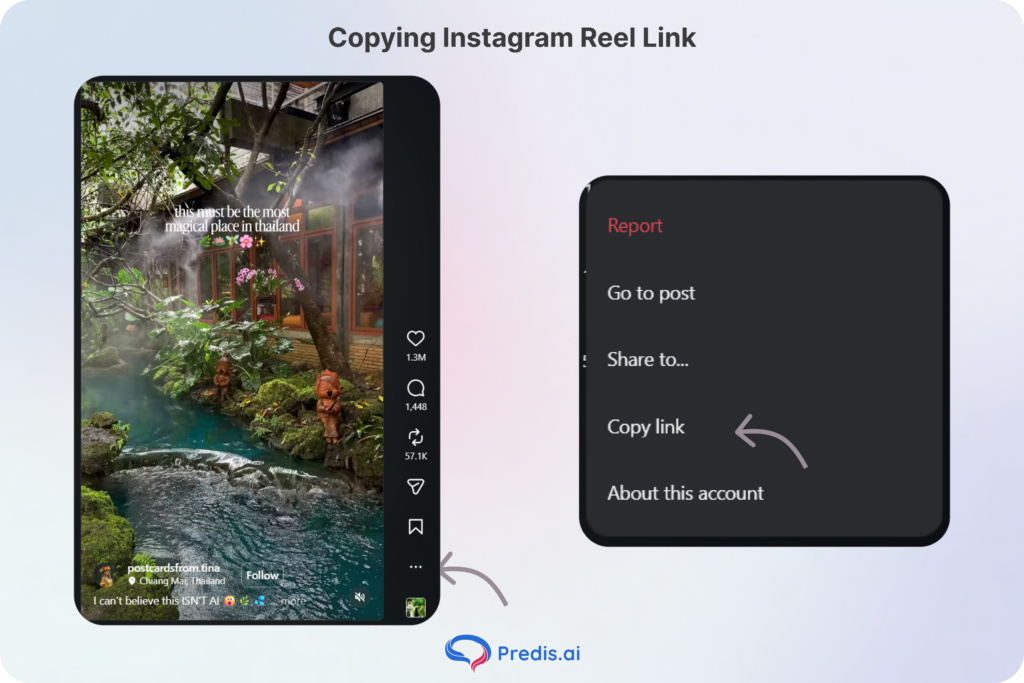
1. Copy the URL of the Reel (Tap Share > Copy Link).
2. Navigate to your chosen downloader site in Safari, Chrome, or Firefox.
3. Paste the link into the search bar and hit Download.
4. Select your preferred resolution (usually 720p or 1080p).
- Best for: AI ad creator free is best for marketing professionals and creators who need high-quality, watermark-free footage for mood boards or research.
Method 3: Screen Recording (The “Universal” Method)
When all else fails—perhaps the account is private, or the downloader site is down—screen recording is your fallback. Because it captures what is on your screen directly, it bypasses almost all technical restrictions.
How it works:
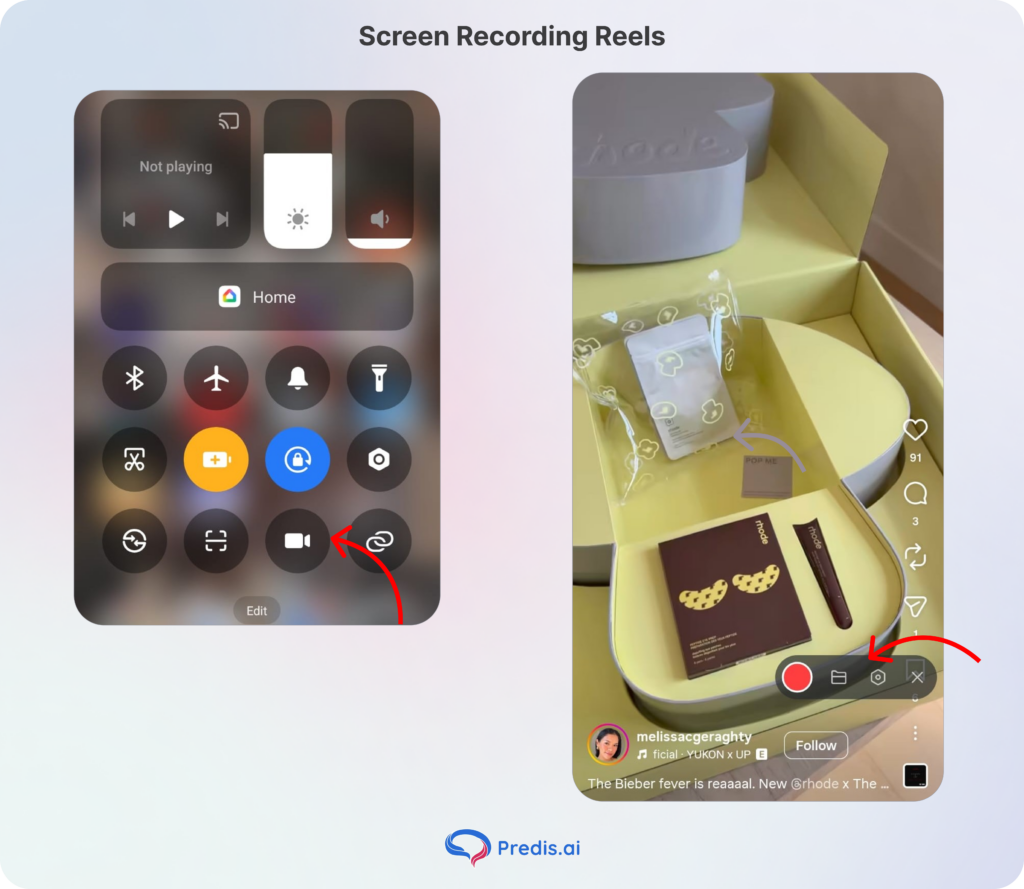
1. Swipe down (iOS) or up (Android) to access your Control Center.
2. Tap the Screen Record icon.
3. Play the Reel from start to finish.
4. End the recording and use your phone’s “Crop” tool to remove the Instagram UI (the likes, comments, and sidebars).
- Best for: Saving content from private accounts you follow or capturing “Instagram Stories” that haven’t been saved as Highlights.
Method 4: AI-Powered Telegram Bots and Desktop Apps
For power users who need to download Reels in bulk, Telegram bots have become a hidden gem. Bots like @InstaSaveBot allow you to simply “forward” a Reel to a chat, and the bot instantly returns a downloadable file.
- How it works: You send the link to the bot; the bot “scrapes” the video and sends it back as an attachment.
- Best for: High-volume downloading and users who want to bypass the browser experience entirely.
Method 5: Download Your Own Reel Before Posting (The Archive Method)
Many creators prefer Instagram’s robust editing suite—with its precise timing, filters, and text overlays—but want to use the finished video on other platforms like TikTok or YouTube Shorts without re-editing.
The Process:
1. Assemble your Post as usual, adding all your music, text, and effects.
2. On the final Share screen (where you write your caption), tap the Download icon (a downward-facing arrow) at the top of the interface.
3. The video will process and save directly to your camera roll as a complete file.
- The Music Catch: Due to 2026 copyright licensing, if you use a song from the Instagram Music Library, the video may save without audio. To bypass this, use “Original Audio” or save the Reel as a Draft, then use the full-screen preview to screen record the video with high-fidelity sound.
Method 6: The “Story Trick” (Download Without Third-Party Sites)
This is a classic “hacker” method that remains highly effective in 2026 for downloading Reels that don’t have a visible download button. It uses the Stories interface as a temporary bridge to your camera roll.
The Process:
1. Open the Reel and tap the Share (paper airplane) icon.
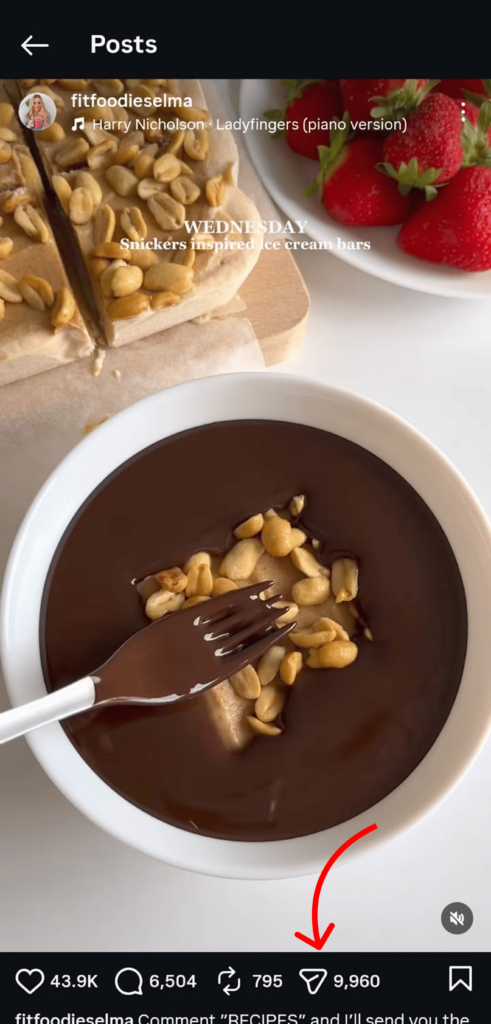
2. Select “Add to Story.”
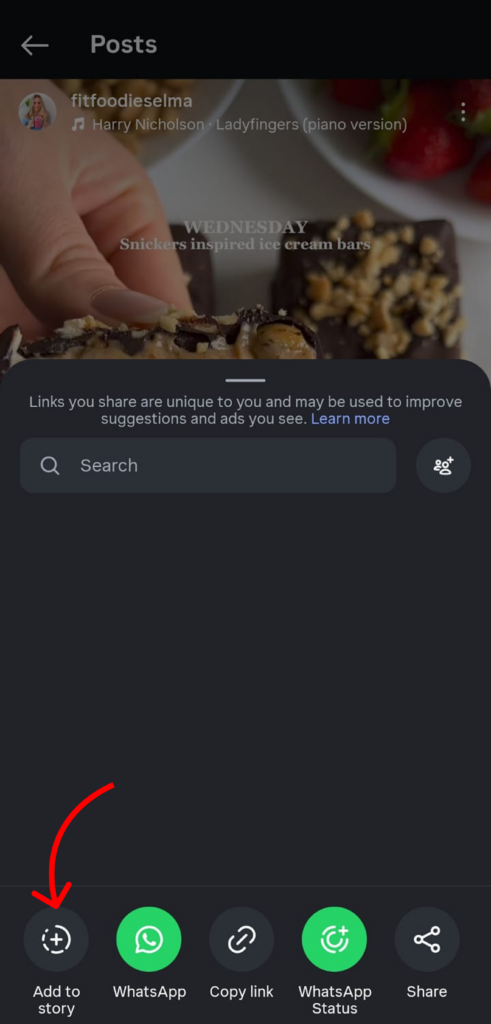
3. On the preview screen, use your fingers to pinch and zoom the video until it fills the entire frame (removing the default border).
4. Tap the three-dot menu (…) in the top right corner and select “Save.”
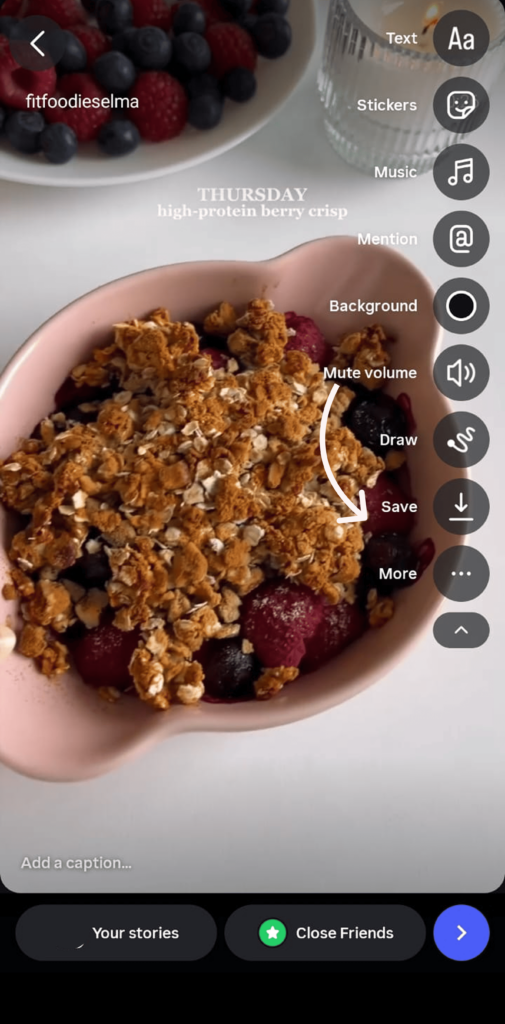
5. Exit the Story editor without actually posting the video.
- Why it works: This method essentially “tricks” the app into rendering the video for your device’s local storage. It’s the fastest way to get a clean-looking video without leaving the Instagram ecosystem or using external websites.
What to Do Instead of Downloading (Alternatives)
Rather than downloading other creators’ Reels, a better long-term strategy is to build your own library of original content. An AI reel maker makes it easy to generate fresh, on-brand Reels from scratch, so you always have original content to post, share, and save without worrying about creator permissions or watermarks:
- Instagram Collections: Tap the Bookmark icon. You can create themed folders (e.g., “Kitchen Inspo,” “Gym Workouts”) and access them instantly from your profile.
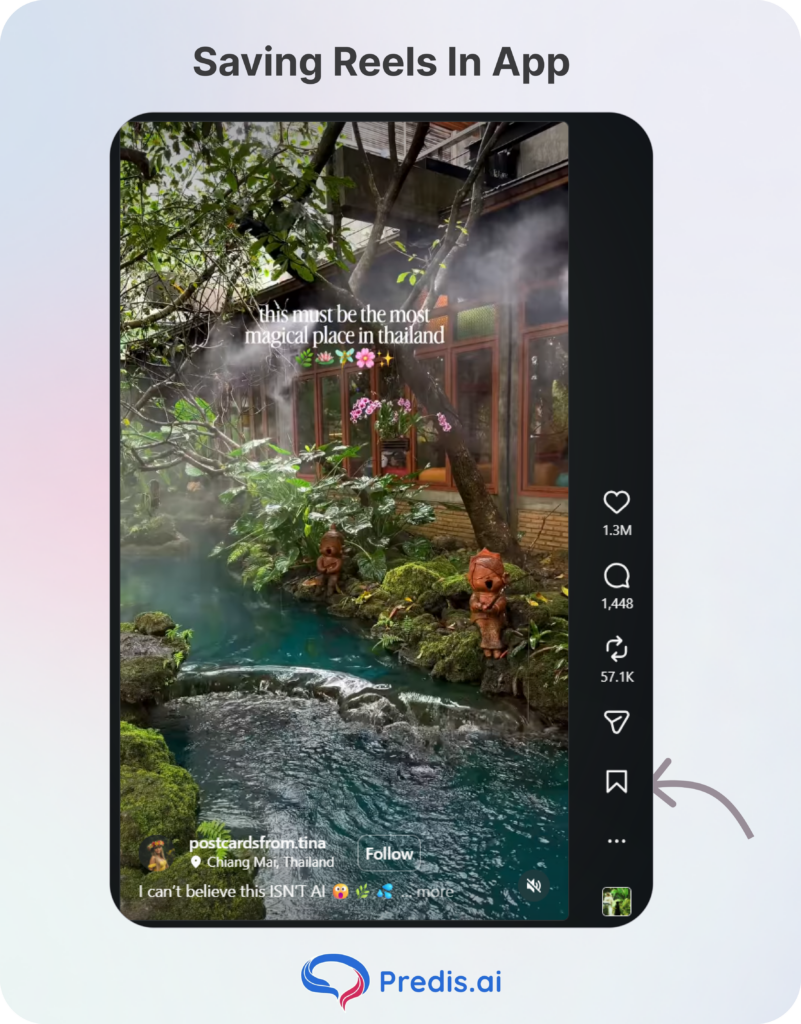
- The “Saved” Tab: All your bookmarked Reels live here. As long as you have an internet connection and the creator hasn’t deleted the post, the video is always available. You can easily categorise these Reels based on what you want it for. Like you can have a folder that says “Instagram Trends to try”.
- Sharing to Stories: If you want to keep a Reel “active” for 24 hours for your own followers to see, sharing to your Story is more effective than downloading and re-uploading, as it maintains the link to the original creator. Rather than repurposing downloaded content from others, you can build original videos from scratch using an AI reels maker in just a few minutes.
Comparison: Methods at a Glance
| Method | Ease of Use | Video Quality | Watermark? | Best For |
| Native Download | High | Standard (720p) | Yes | Quick, casual saves |
| Online Downloader | Medium | High (1080p) | No | Professional curation |
| Screen Record | High | Variable | Yes (UI) | Private or restricted accounts |
| Telegram/Apps | Medium | High | No | Bulk/Power users |
The Ethics of Downloading: A 2026 Perspective
With the ease of downloading comes the responsibility of copyright awareness. Downloading it to save it as Instagram Reel Idea Inspiration, then it is fine. But if you decide on sharing it, then the whole game changes.
1. Don’t Plagiarize: Downloading a Reel to watch later is fine. Downloading it to re-upload to your own page as “original content” is a violation of community guidelines and, in many regions, copyright law.
2. Give Credit: If you use a clip from a downloaded Reel in a video of your own (under “Fair Use”), always tag the original creator.
3. Respect Privacy: If a creator has disabled downloads, they have a reason. Respect their digital boundaries.
Common Mistakes Beginners Make
- Ignoring Resolution: Some online downloaders default to 360p to save server bandwidth. Always look for the “HD” toggle.
- Forgetting Audio: If you are in a region with strict music licensing, native downloads might still be muted. In this case, use screen recording, web downloaders, or add music to Reels after downloading.
- Storage Clutter: High-def Reels are roughly 15-30MB each. If you download 100 Reels, you’ve used nearly 3GB of space. In such cases, saving them in-house helps save storage space.
Conclusion
Downloading Instagram Reels is no longer a “hack”—it is a standard part of how we interact with digital media. Whether you choose the simplicity of the Native Download, the cleanliness of an Online Downloader, the reliability of Screen Recording, or the speed of an AI Bot, you now have the tools to build your own offline library. You can also use an AI reels generator to recreate similar reel-style content when you want fresh ideas without starting from scratch.
We expect Instagram to integrate even more “offline” features as they continue to battle for our attention. Until then, keep these four methods in your toolkit to ensure your favorite content is never more than a tap away.
Frequently Asked Questions (FAQs)
Only if you follow them, and even then, usually only via Screen Recording. Online downloaders cannot “see” into private profiles.
No. Instagram does not currently send notifications for downloads or screen recordings. They only see that the Reel was “Shared.”
This usually happens with native downloads if the music is heavily protected by a record label. Try an online downloader to bypass this.
For personal, offline viewing, it is generally considered acceptable. However, using that footage for commercial purposes or reposting without permission is a legal gray area that most platforms penalize.