Explore this content with AI:
Music is an important part of video stories. It creates an atmosphere, stirs up feelings, and keeps people interested. But if you use the wrong music on YouTube, a popular video can quickly become a nightmare for rights lawyers.
YouTube’s copyright checking tools are better than ever in 2026. One mistake can cause the sound to be muffled, money to be lost, or even channel strikes. That’s why it’s no longer a choice but a necessity to know how copyrighted music works on YouTube.
This guide will tell you what copyright infringement is, what happens if you do it wrong, and the best ways to use music on YouTube without putting your channel at risk.
What Is Copyright Infringement on YouTube?
If you use songs that you don’t own or have permission to use, you are breaking the law. Copyright law says that the people who made the music have the only right to decide how it is shared, copied, and sold.
In most places, copyright protection lasts for 70 years after the creator has died. This means that most well-known songs are still safe, even ones that are decades old.
YouTube follows copyright laws very closely because it needs to protect people who own the rights. YouTube can take action against you even if your goals were good if you use copyrighted music without permission.
What Happens If You Use Copyrighted Music on YouTube?
If YouTube finds copyrighted music in your video, different things may happen based on how the rights holder has their settings set up:
- Your video might be turned off or blocked.
- You can stop making money or send the money to the rights owner.
- Someone could file a copyright claim or strike against your station.
- If violations happen over and over, the channel may be shut down.
Even one strike can stop the growth of your channel. With three strikes, it’s gone for good.
Can You Use Copyrighted Music on YouTube Legally?
Yes – but only in very specific ways. There are two legitimate methods, which are as follows:
1. Get Permission From the Original Creator
This can be a hassle in so many ways. For one, if you want to use an audio that is owned by a record label company, then as a creator, you might not be able to afford their exorbitant prices.
Another major issue is that multiple people own a particular song, such as the music writer, songwriter, label company, publisher, and so on., In such cases, negotiating a fee with every single one of them is just not feasible.
But if you still want to go with this process, here is how you can proceed:
- Find the original owners of the particular music.
- Determine the type of rights you need. For example, some creators have rights to both the song and the studio recording of it. In such cases, getting 2 licences might be necessary.
- Contact the original creators and work out a deal with them.
- Get a written agreement from them confirming their permission.
2. Make Your Own Version (With Proper Rights)
This, too, is a tedious task, but compared to the above, it is pretty easy.
The idea is to hire a musician and create your own version of it. You can easily hire someone from Fiverr or Upwork and get the job done for a fraction of the cost of the above method.
But this way also comes with its own set of disadvantages, which is that the quality and the final output might not turn out as good as you expected them to be.
If you are going with this method, make sure the copyright is signed over to you at the end of the composition.
4 Alternate Ways To Find Music For Your Videos (Non-Copyrighted Of Course!)
Not satisfied with the two options, well, we do not blame you!
But thankfully for us, there are many other hassle-free alternative ways in which you can obtain music for your videos. Here are some of the ways:
1. Stock Music Libraries
Many music libraries allow users to find and choose an audio of their preference and use it as they please (Provided you have a subscription and you attribute the music creator!)
And these libraries provide no shortage of choices, catering to every mood and genre.
2.YouTube Audio Library
If you do not want the hassle of finding websites, getting subscriptions, and choosing and adding music to your video, then YouTube Audio Library can be a godsend for you. YouTube Audio Library only offers copyright-free music, and the platform is free and built into it. This makes it an amazing choice for anyone who is just starting out or wants a quick fix.
Be advised that the trending, popular songs might not be available here, but the options are still pretty good.
3. Use the Creative Commons Licensed Music
Some creators make their music available under the Creative Commons license. This means you can use this music and being stuck with a copyright claim. Although sometimes the creator might ask you to attribute the credits to them.
This is one of the types of copyrighted music on YouTube. The other two being: Licensed and Ad-supported music.
You must already be aware of what Licensed music is. But what are Ad-supported ones?
Creators and record labels allow ad-supported music to be used in videos, but they take all the revenue the video generates, leaving you with no earnings from it. So, it is generally not a great option!
4. Get AI to generate your own tracks
Nowadays, AI’s technological advancements are honestly spectacular. With its capabilities expanding every single day, there must be an AI that can compose your own songs for you, right?
And there is!
There are many AI music composers out in the world for you to choose from, with even Canva offering one! And the best part is, you do not need an ounce of songwriting skills!
How to Check If Music Is Copyrighted on YouTube?
After you spend time finding the right audio and adding it to your video, a doubt often creeps in—what if the music is copyrighted and creates problems later? Well, there is a way to be sure of this, and that is by using Creator Studio.
But before diving into understanding how exactly you could do that, you need to understand how YouTube detects infringement.
YouTube uses a robust content identification system called Content ID that lets music creators claim ownership of their tracks and protect their rights. However, if a creator has not registered a song with Content ID, YouTube will not automatically enforce copyright claims for that music.
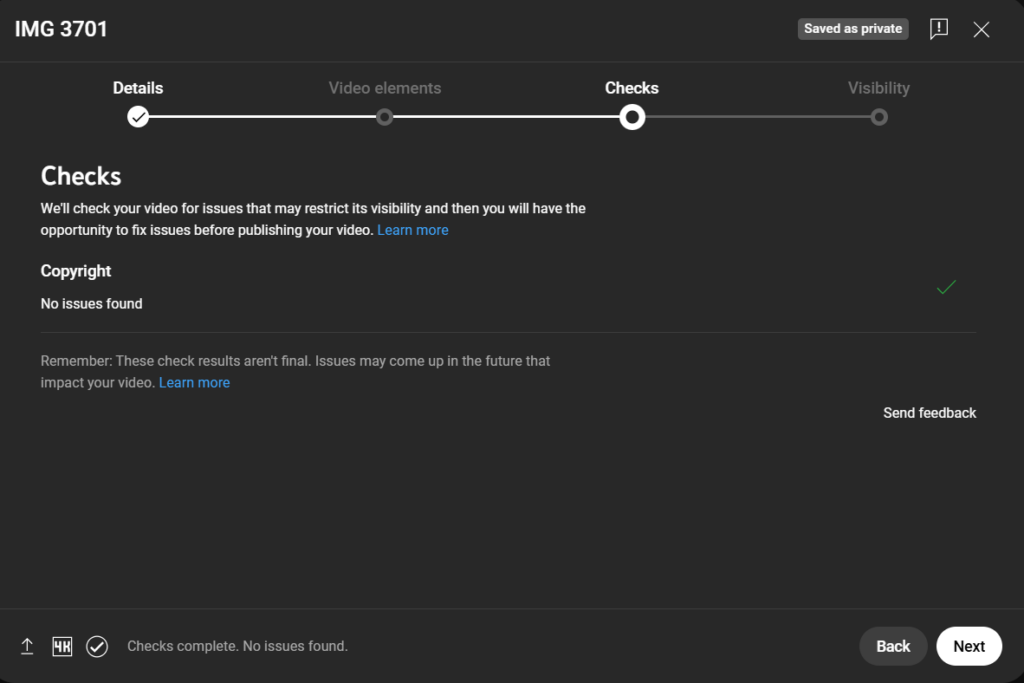
Now that is out of the way, let us figure out how you can find out if you have used copyrighted music on YouTube. To do that, follow these steps:
- Head over to Creator Studio and upload a video to your channel.

- The third step in the process is to do checks. In this scroll down to see the copyright section. If YouTube has found a copyright claim on your video, it will be displayed here.
How Do Some People Avoid Copyright Strikes?
Even after warning against the problems of getting a copyright strike, we know you are skeptical. Because the creator you always watch uses trending music all the time, and they seem to be doing fine. So, why wouldn’t you be?
Well, ignoring YouTube’s copyright policies can mean that with a single mistake, you could throw out months of hard work on your channel. And secondly, the reason your favorite creator seems to be getting away with it could be due to one of the following reasons:
1. The Music Isn’t Registered Yet
If a song isn’t in Content ID, YouTube may not flag it immediately. However, the music can be registered later, triggering retroactive claims.
2. The Claim Just Hasn’t Happened Yet
Content ID scans continuously. You can claim a video weeks or months after the upload.
3. Fair Use (Rare and Risky)
Fair use applies in limited cases like commentary, criticism, or education. Music usage alone rarely qualifies.
Relying on fair use is risky and often unsuccessful.
Final Thoughts
No matter what song or audio you are planning on using for your YouTube video, it is good practice to check whether you have used copyrighted music on YouTube or not. This way, you get to protect all your hard work of making that video. Because a copyright strike can be a blow to your video.
If you, too, are having a hard time creating amazing, high-quality, and engaging content for your YouTube channel, then check out Predis AI. With Predis AI, you can generate your videos with AI, upload your videos, and edit them, or leverage built-in templates to make a quick and easy post. You can also collaborate and schedule your posts from the same platform.
So, sign up today, get a free account and check out everything Predis AI has to offer!