Explore this content with AI:
You can’t afford to disregard video requirements if you’re running Facebook ads in 2026. The size, aspect ratio, and format of your videos have a direct impact on how they appear in other places. If the size is wrong, the cropping might not seem right, the pictures might be blurry, or the information might get pushed down the feed.
Facebook doesn’t use a “one-size-fits-all” approach anymore, like it did in the past. Ads show up in Feed, Stories, Marketplace, In-Stream, and Search these days, and each one handles video in its own way.
That’s why it’s important to know the standards for Facebook video ads in 2026. This guide has the most up-to-date information on video sizes, aspect ratios, file restrictions, text guidelines, and placement-specific advice to make sure your ads look good and get results.
Let’s get right to it.
Why Facebook Video Ad Specs Matter in 2026?
Facebook video advertising keep doing well. In fact, more than half of marketers feel that Facebook ads are good at getting people to buy things. But when videos are not structured correctly, performance degrades quickly.
When your video doesn’t meet the recommended specs:
- Important content gets cropped
- Text on top of other text becomes hard to read.
- Videos look fuzzy or of poor quality.
- People lose interest because the viewing experience is bad.
Following the right Facebook video ad requirements makes sure that your creative appears planned, loads quickly, and keeps people’s attention on all devices.
Facebook Video Ad Specs by Placement
Facebook supports multiple video ad placements. Below is a breakdown of Facebook video ad sizes and requirements for each major format. 54% of marketers say Facebook ads are excellent in generating sales. These highly efficient ads can be placed in 5 different formats, which are as follows:
1. Facebook Feed Video Ads
Facebook feed is the primary way of absorbing content for users. And Facebook feed ads are placed in this personalized feed.
Like any other in-feed posts you can interact with these ads by liking, commenting, and sharing them. You can also provide internal and external links in the description as well as CTA.
Facebook Feed video ad specs:
- Aspect Ratio: 16:9 to 9:16
- Maximum Length: 240 minutes
- File Type: MP4, MOV, GIF
- Maximum File Size: 4 GB
- Minimum Resolution: 1080 × 1080 pixels
- Captions: Optional but highly recommended
- Sound: Optional (videos autoplay muted)
These video ads are mute by default. So we advise you not to depend on users unmuting your video and add a caption to ensure you get your point across.
2. Facebook MarketPlace Video Ads
If you have ever sold anything on Facebook, then you would have brushed up against the Facebook Marketplace. This is where the world comes to shop and if you are selling anything, your ads should be on it too.
Facebook Marketplace video ad specs:
- Aspect Ratio: 16:9 to 9:16
- Maximum Length: 240 minutes
- File Type: MP4, MOV, GIF
- Maximum File Size: 4 GB
- Minimum Resolution: 1080 × 1080 pixels
- Captions: Not supported
- Sound: Optional but recommended
Keep visuals clean and descriptive since captions are unavailable in this placement.
3. Facebook Stories Video Ads
These are full-screen vertical ads that are placed between other stories. Each story can last up to 15 seconds and if the video extends more than the time limit, then it will split into multiple stories.
The viewers might lose patience in a few seconds and swipe to the next one. To avoid that you need to have scroll-stopping content on your ads.
Also, when creating these ads make sure to leave some space at the top and bottom to accommodate a CTA.
The Facebook video ad size you need to follow for these kinds of ads are as follows:
- Source Ratio: 1.91:1 to 9:16
- Video length: 1 – 120 seconds
- Captions and Sound: Caption optional. Sound Optional but recommended
- File Type: MP4, MOV or GIF
- Maximum File Size: 4 GB
- Resolution: 1080 x 1080 pixels at least
Use the space between the logo on the top and the CTA at the bottom wisely to convey the message of your ad clearly.
4. Facebook In-Stream Video Ads
These are videos that are placed in between Facebook Live streams and can only be 15 seconds or less. Anything more than this time duration will play only after the user clicks “Continue watching”.
These kinds of ads get a higher engagement rate because of the undivided attention of your audience. So, use this space wisely to further your campaign goals.
The kind of specs that you need to follow for these ads are as follows:
- Source Ratio: 16:9 to 9:16
- Video length: 5 – 120 seconds
- Captions and Sound: Caption optional. Sound Optional but recommended
- File Type: MP4, MOV or GIF
- Maximum File Size: 4 GB
- Resolution: 1080 x 1080 pixels at least
5. Facebook Search Results Video Ads
These are the kind of video ads that appear on your user’s search page when they type keywords related to your product. This is a great way to improve visibility and conversion since you are targeting people who are already on the lookout for your services.
The Facebook video ad size that you need to abide by for these ads are as follows:
- Source Ratio: 1:1
- Video length: 240 minutes maximum
- Captions and Sound: Captions are not supported. Sound Optional but recommended
- File Type: MP4, MOV or GIF
- Maximum File Size: 4 GB
- Resolution: 1080 x 1080 pixels at least
Facebook Video Ad Text Requirements
Beyond video dimensions, Facebook also limits how much text you can include in your ads.
Current text limits include:
- Primary Text: Up to 125 characters
- Headline: Up to 40 characters
- Description: Up to 30 characters
Keeping copy concise improves readability and prevents truncation across devices.
How to Create Facebook Video Ads Efficiently?
Making a video ad and navigating the extensive Facebook ad settings could feel like a task on its own. However, with Predis AI you can make one of those jobs easier, which is creating video ads that bring excellent results.
So, if you are a newbie or a small business owner who does not have a lot of time on their hands, then this part is for you! Check out how you can easily create video ads with Predis AI in 5 easy steps:
- Sign in to the Predis AI account if you are a new user.
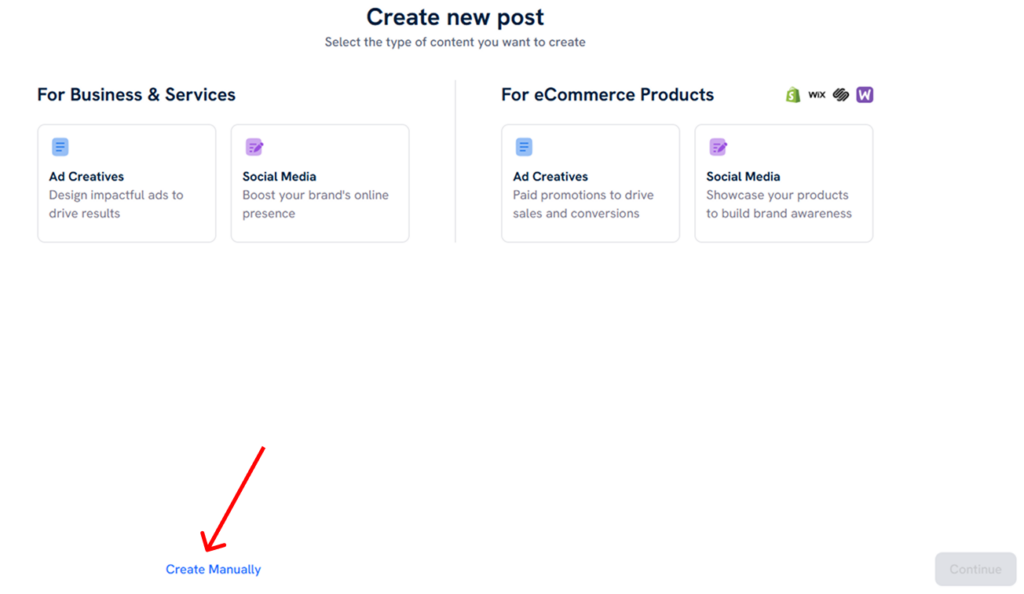
- Click on the “Create New” Option.
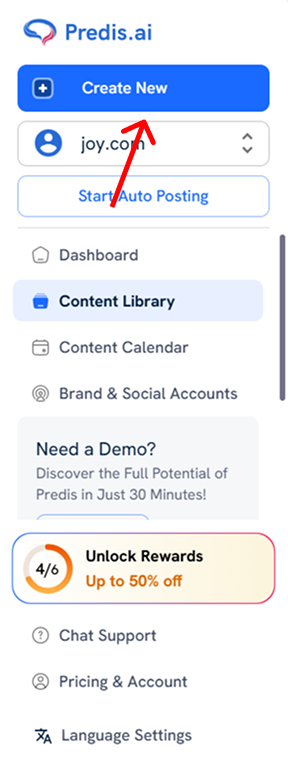
- Now you have 2 options: You can either manually upload your media or create your own ads. Or you can let AI do the job for you. Take a moment to see which one you would prefer.
Manually Creating the Ads:
- Select the “Create Manually” option in the bottom left.
- Upload the content of your choice from your device and hit “Proceed”
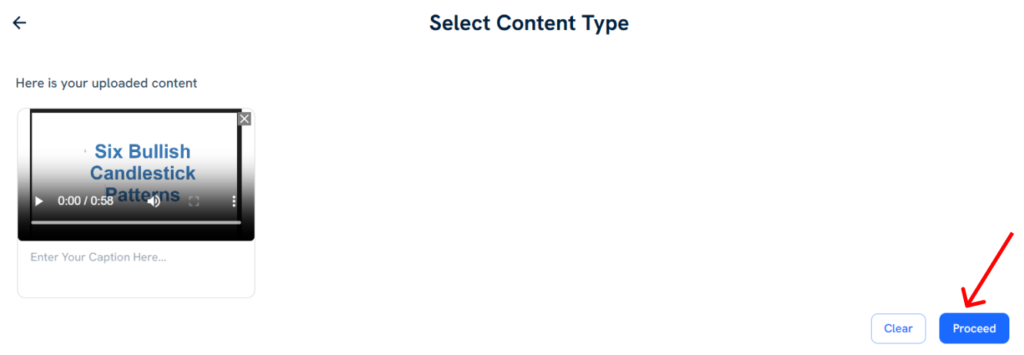
- The video will then be uploaded to your Content Library. Hover over it to get the Edit option. Click on it and utilize the in-app editor to make any change you want.
Let AI Generate the Ads:
- Select the ad creatives button > Video > and the orientation of your choice.
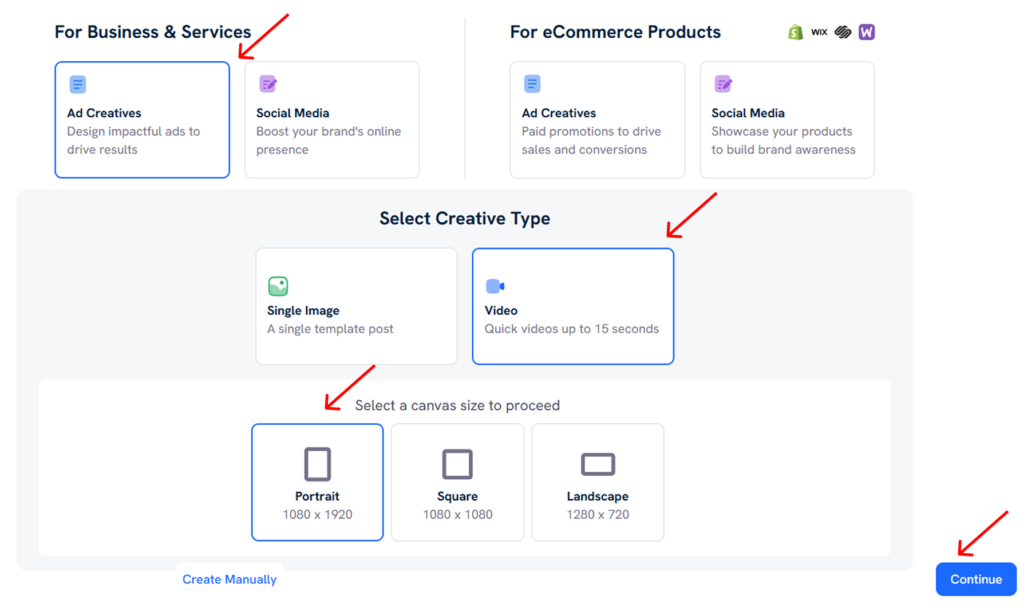
- Once done with the selection, hit “Continue”
- Provide details regarding the business and the purpose of your ad in detail
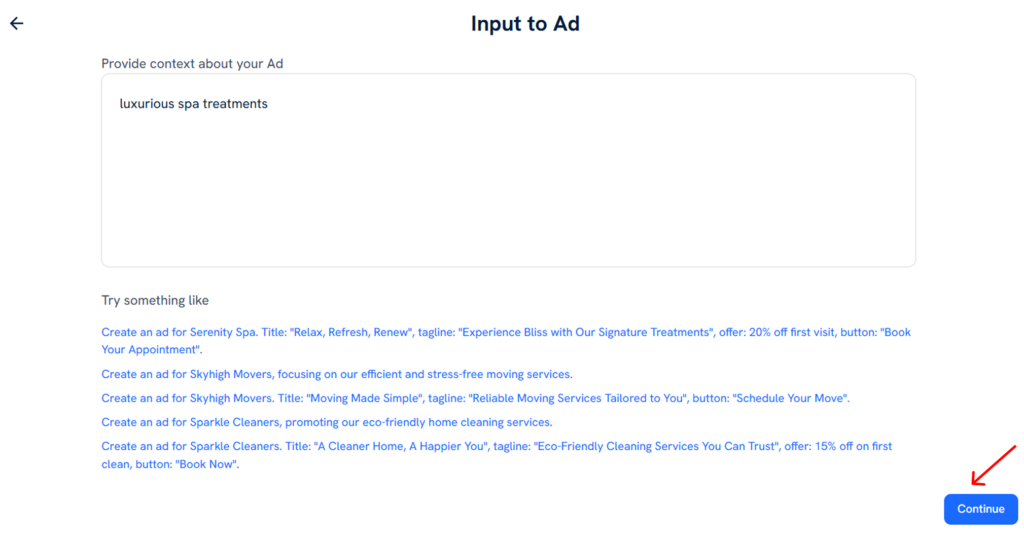
- Our intelligent AI will generate the headline, and transcription, and choose the media for your ads. You can review these changes and make any changes as per requirement. You even can decide how many variations you want.
- Once done, click on the “Generate” button in the bottom right.
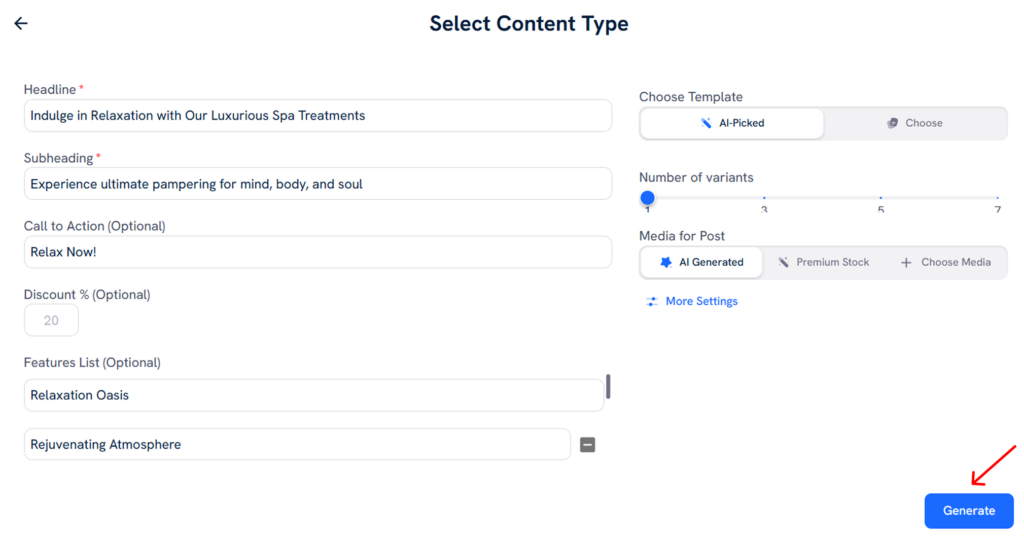
- The generated content will automatically appear in the Content Library. You can edit it to your heart’s content by hovering over the post and hitting the “Edit button”
Predis AI further allows you to schedule, and get approval from other teammates all within the platform. So, if you are looking for an end-to-end social media management tool then Predis AI is the one for you.
Conclusion
Having multiple video ad formats and their different specs can be hard to understand and utilize as a beginner. But, thankfully content creation does not have to be as big or confusing as a task as choosing an ad format.
Because, with Predis AI you can manage all your social media channels from one platform. From ideating for your posts to creating and scheduling them, Predis AI can make your life easier. So, go work on your business while we keep your social media up and running.
So, what are you waiting for? Sign up today to find out what Predis AI can do for you!
FAQ:
The maximum file size for Facebook ads is 4 GB.
The maximum length for various Facebook video ads is as follows:
1. Facebook feed – 240 minutes maximum
2. Facebook Marketplace – 240 minutes maximum
3. Facebook stories – 1 -120 seconds (15 seconds for each story)
4. Facebook Instream – 5 -120 seconds
5. Facebook search results – 240 minutes maximum
The file formats accepted by Facebook are MP4, MOV, and GIF.