

Explore this content with AI:
Did you know that video accounts for more than 80% of global internet traffic? From YouTube to TikTok to brand campaigns, video is the language of the internet. But here’s the challenge traditional editing takes hours of cutting, tweaking, and rendering. That’s where artificial intelligence steps in.
AI is changing the way creators edit by automating time-consuming tasks like scene detection, color correction, subtitles, and even turning plain text into full videos. It’s faster, smarter, and accessible to anyone, whether you’re a professional editor or someone making content on your phone.
In this guide, we’ll look at the Top 5 Best AI Software for Video Editing. You’ll see what makes each tool stand out, the features they offer, and how much they cost, so you can choose the right one for your needs. For a closer look at each, see our AI video tool reviews.
Features of the Best AI Software For Video Editing
When you’re deciding which tool to invest in, it’s important to know what separates average editors from the best AI software for video editing. These features not only save time but also unlock creative possibilities that traditional editing can’t match.
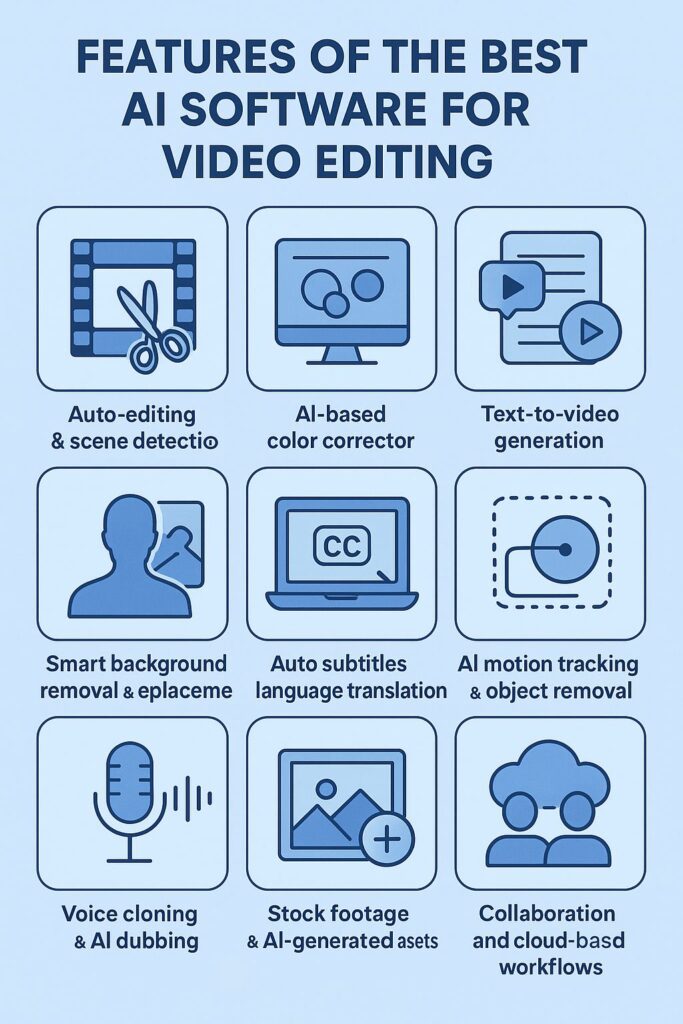
1. Auto-editing & Scene Detection
Manually trimming long clips can be exhausting, especially for vlogs, tutorials, or event videos. AI-powered scene detection identifies cuts, transitions, and highlights instantly, letting you focus on storytelling instead of sifting through hours of footage.
2. AI-based Color Correction & Grading
Getting the right look used to take years of editing experience. With AI, you can achieve professional-grade color correction and grading in seconds. These tools analyze lighting, tones, and contrast to give your videos a cinematic polish, something even beginners can pull off.
3. Text-to-Video Generation
One of the most groundbreaking features of modern AI tool editors is the ability to generate videos directly from text. Simply type a script or prompt, and the software can create video clips, add animations, or even use AI avatars. This makes it easier than ever to produce content without filming a single frame.
4. Smart Background Removal & Replacement
Forget expensive green screens. The best AI software for video editing can detect and separate subjects from their backgrounds with a single click. You can then replace the background with custom images, stock footage, or even AI-generated visuals perfect for social media, presentations, or creative storytelling.
5. Auto Subtitles & Language Translation
Captions aren’t just about accessibility, they boost engagement and SEO too. AI tools can automatically generate subtitles with high accuracy and even translate them into multiple languages. This allows creators to reach a global audience without extra editing costs.
6. AI Motion Tracking & Object Removal
Whether you need to blur a license plate, stabilize shaky footage, or remove an unwanted object from the frame, AI-powered motion tracking makes it possible. These features track movement frame by frame, saving editors countless hours of manual adjustments.
7. Voice Cloning & AI Dubbing
Hiring voice actors or recording narration can be expensive and time-consuming. With AI voice cloning, you can generate natural-sounding speech in your own voice or pick from multiple AI voices. Combined with AI dubbing, it also lets you create multilingual content effortlessly, highlighting the growing capabilities of AI software development in media production.
8. Stock Footage & AI-Generated Assets
The best AI software for video editing integrates ready-to-use stock libraries and even AI-generated elements like images, animations, and transitions. This makes it simple to enhance videos with professional assets without needing to shoot or design them yourself.
9. Collaboration and Cloud-based Workflows
Team projects often suffer from version conflicts and slow file transfers. Cloud-based AI editors solve this by allowing multiple users to edit and review projects in real time. This feature is especially valuable for agencies, remote teams, and YouTube creators working with editors worldwide.
10. Affordability & Ease of Use
Powerful features don’t mean much if the software development is too expensive or complicated. The best AI software for video editing strikes the right balance, offering professional-grade tools with an intuitive interface and pricing that fits both solo creators and production teams.

Comparing Top 5 Best AI Software For Video Editing
When it comes to choosing AI video editing software, the options can feel overwhelming. Each tool brings its own strengths some excel in professional-grade editing, while others focus on speed and simplicity. To help you decide, here’s a clear comparison of the top 5 AI video editing tools, breaking down their key features, usability, and best use cases.
| Software | Used For | Pricing | Best For |
|---|---|---|---|
| Adobe Premiere Pro | Professional multi-track video editing (films, ads, long-form content) | From $22.99/mo (annual plan, billed monthly) | Professional editors and filmmakers |
| Runway | Generative video and image creation from text and image prompts | Free plan; paid from $12/mo (billed annually) | Social media creators and marketers experimenting with AI video |
| Morphic | Prompt-based (agentic) editing on a multi-track timeline, with built-in video, image, and audio generation | Free plan; paid from $19/mo (billed annually) | Creators and teams who want generation and editing in one tool |
| ImagineArt | Generating and editing clips in one workspace through plain-language instructions, across multiple video and image models | Free plan; paid from $5/mo | Marketers and creators who need stills and motion from the same project |
| Async | Chat-based AI video editing, automated rough cuts, captions, and B-roll generation | Free plan; paid plans available | YouTubers and creators who want polished videos without hours of editing |
Top 5 Best AI Software For Video Editing
With so many tools available today, choosing the right editor can feel overwhelming. To make it easier, here’s a breakdown of the best AI software for video editing, covering what each one offers, its standout features, and how much it costs.
1. Adobe Premiere Pro
Adobe Premiere Pro is considered the gold standard in professional video editing. It combines traditional editing power with Adobe Sensei, the company’s AI technology, to make advanced workflows more efficient. Whether you’re working on YouTube content, short films, or high-end productions, Premiere Pro delivers precision and speed.

Key Features:
- Auto Reframe: Instantly resize videos for different platforms like Instagram, YouTube, or TikTok.
- Scene Edit Detection: Detects cuts in raw footage automatically, saving hours of manual work.
- Speech-to-Text: Generates captions with impressive accuracy.
- AI Color Matching: Quickly balances color and lighting across multiple clips.
Price: Subscription-based, starting at around $22.99/month.
2. Runway
Runway has quickly become a favorite among creators for its innovative AI-first approach. Unlike traditional editors, Runway focuses on generative video capabilities—meaning you can create or manipulate video with just text prompts. It’s ideal for social media creators, marketers, and anyone experimenting with new forms of storytelling.

Key Features:
- Green Screen Removal: Eliminate backgrounds instantly without a green screen setup.
- AI Motion Tracking: Apply effects that follow objects seamlessly across frames.
- Generative Video Tools: Create video clips from text prompts or still images.
- Image-to-Video Conversion: Turn static visuals into dynamic motion content.
Price: Offers a free plan, with paid options starting at $12/month
3. Morphic
Morphic is an AI-first creative platform with an agentic video editor called Compose. For teams exploring AI Video Editing, it combines a full multi-track timeline with natural-language editing so creators can ask for changes while keeping precise manual control over the final cut.

It also brings generative video and image creation into the same workspace, making it useful for creators and teams that want to generate assets, assemble scenes, and refine the final video without jumping between multiple tools.
Key Features
- Agentic Video Editing: Ask Copilot to trim, reorder, reframe, retime, or modify clips using natural-language instructions.
- Multi-Track Timeline: Edit video, audio, images, text, and other assets on a full timeline.
- Generative Media: Generate video clips, images, voiceovers, music, and sound effects directly inside the workflow.
- Automated Editing: Remove silences, create subtitles, adjust color, add transitions, and make repetitive edits automatically.
- Multiple Aspect Ratios: Reframe projects for widescreen, vertical, square, and other formats.
- Professional Export Options: Export videos up to 4K or continue editing projects in tools such as DaVinci Resolve or Final Cut Pro.
4. ImagineArt
ImagineArt combines generation and editing in a single workspace, so you can create a clip and finish it without moving between tools. Its AI video editor handles trimming, object removal, background changes, and upscaling through plain instructions rather than a timeline. It runs around forty models across both video and images, making it a strong choice for marketers and creators who need stills and motion from the same project.

Key Features:
- Multi-Model Generation: Choose between Runway, Veo, Kling, and Seedance for each shot rather than being locked to one engine.
- Image to Video: Animate a photo you already own with control over camera movement and motion.
- Instruction-Based Editing: Remove objects, replace backgrounds, and trim by describing the change instead of masking it manually.
- 4K Upscaling: Sharpen compressed or low-resolution footage and stills before export.
Price: Free plan with daily refreshing credits, with paid plans starting at $9/month.
5. Async
Async is an AI video editor that lets you edit videos through simple chat prompts instead of manually working through a timeline. You can upload your footage, tell the AI what you want to change, and let it handle tasks like removing awkward pauses, adding subtitles, cleaning up audio, and generating B-roll. It’s particularly useful for YouTubers, content creators, and marketers who want to create polished videos without spending hours on editing.
Key Features:
- Chat-Based Video Editing: Edit videos using natural language instructions, without needing advanced editing skills.
- AI Rough Cut: Automatically remove filler words, unnecessary pauses, and bad takes.
- AI B-roll Generation: Generate and add relevant visuals to improve storytelling.
- Auto Subtitles and Audio Enhancement: Generate captions and improve audio quality with AI-powered tools.
Price: Free plan available, with paid plans offering additional features and AI credits.
Wrapping Up
AI has completely reshaped the way we approach video editing. What used to take hours of manual effort, like trimming, color correction, or subtitle creation, can now be done in minutes with the right tools. The best AI software for video editing doesn’t just save time; it also makes professional-quality content accessible to anyone, regardless of skill level.
The right choice depends on your needs. If you’re a professional editor or filmmaker, Adobe Premiere Pro or DaVinci Resolve will give you the power and precision you need. If you’re a content creator who values speed and creativity, CapCut or Runway are excellent picks. And for businesses or educators who want polished presentation-style videos without filming, Synthesia is the go-to.
The good news is that most of these platforms offer free versions or trial plans. So before committing, explore them hands-on and see which one fits your workflow best. The future of video editing is here and it’s powered by AI.
Frequently Asked Questions
1. What is AI video editing software?
AI video editing software uses artificial intelligence to automate editing tasks like cutting, color correction, subtitle generation, and even creating videos from text prompts.
2. Is AI video editing better than manual editing?
AI speeds up repetitive tasks and makes editing accessible to beginners. However, manual editing still gives professionals more creative control.
3. Which AI video editor is best for beginners?
CapCut and Runway are beginner-friendly because of their simple interface and affordable plans.
4. Can AI completely edit a video for me?
Yes, to an extent. Tools like Runway and Synthesia can generate or auto-edit videos, but fine-tuning often requires human input.
5. What’s the most professional AI video editor?
Adobe Premiere Pro and DaVinci Resolve are considered industry-standard, offering advanced AI features for professional-grade editing.
6. Is there free AI video editing software?
Yes. CapCut and DaVinci Resolve offer powerful free versions with many AI tools included.
7. Can AI add subtitles automatically?
Yes. Most modern AI editors (Premiere Pro, CapCut, Runway) have auto-caption and multi-language translation features.
8. Which AI video editor is best for YouTube content creators?
CapCut is great for fast, trendy edits, while Premiere Pro and DaVinci Resolve are better for high-quality, cinematic videos.
9. Are AI video editors worth the price?
If you create videos regularly, yes. They save time, reduce editing complexity, and often cost less than hiring a professional editor.
10. Will AI replace human video editors?
AI won’t fully replace editors it enhances workflow by handling repetitive tasks, leaving more room for creativity and storytelling.