



Explore this content with AI:
People have made more than 45 million docs, decks and designs in Claude since Anthropic put those tools in every conversation. Ask that same chat for a 15-second Reel of your product, though, and you’ll usually get a script back.
So can Claude make videos? Yes, sometimes. Anthropic hasn’t shipped its own Claude video generation model. So two things decide what you get, and whether you get a file at all: the plan you pay for, and the kind of video you need. Motion graphics are one job. Footage of a real-looking product is another.
That split trips people up. Most answers you’ll find gloss over it, mostly because they were written to sell you one connector.
The short answer, plan by plan
Can Claude generate videos on your plan? Here’s what each tier can actually hand you, as of November 2026.
| Your plan | What you can get | A real video file? |
|---|---|---|
| Free | Scripts, shot lists, per-scene prompts, animations that play in the chat, and one custom connector | Only through that one connector |
| Pro, Max or Ultra | Everything on Free, more connectors, plus Claude Code, which can render video with Remotion | Yes, if you’re comfortable in a terminal |
| Team or Enterprise | Everything above, plus Claude Motion, which exports animated explainers as MP4 | Yes, inside the chat (beta) |
Two details matter here. Custom connectors work on every plan, but Free accounts get one. And Claude Motion is in beta on Team and Enterprise only: on by default for Team, off for Enterprise until an owner turns it on.
Solo seller on Pro or Max? The built-in animation feature you may have read about isn’t on your menu yet, so your routes are code or a connector.
Can Claude make videos on its own?
Not footage. Anthropic hasn’t built a video generation model into Claude, and its help center says plainly that Claude Motion doesn’t use one, so it can’t create realistic footage or people.
Where Claude shines is everything around the pixels. Give it a product page and it’ll write a 30-second script, then break it into scenes with a camera move for each shot. It will also write a text-to-video prompt per scene for you to paste into a generator. Captions, hooks and on-screen text, too.
Animation code is fair game too. Ask for an animated chart or a moving headline and you’ll watch it play right in the chat. Looks like video. Still not a video file, though, and Instagram won’t take it until something renders it.
So the honest version of “can Claude create videos” goes like this: Claude is a very good director with no camera. The four routes below are four ways of handing it one.
Four ways to get a real video file out of Claude
When people ask “can Claude make videos,” they usually mean one of these four routes. Each makes a different kind of video, so pick by what needs to appear on screen.
| Route | What you get | Real-looking products or people? | What you need |
|---|---|---|---|
| Claude Motion | Animated explainers, charts and walkthroughs as MP4 | No | Team or Enterprise plan (beta) |
| Claude Code + Remotion | A video built as code, rendered to a file | No | A paid plan, Node.js, some terminal comfort |
| A connector (MCP) to a video tool | Clips from that tool’s models, back in the chat | Yes, depending on the tool | An account with that tool |
| Claude writes, another app renders | Whatever the app makes | Depends on the app | A video app |
Claude Motion
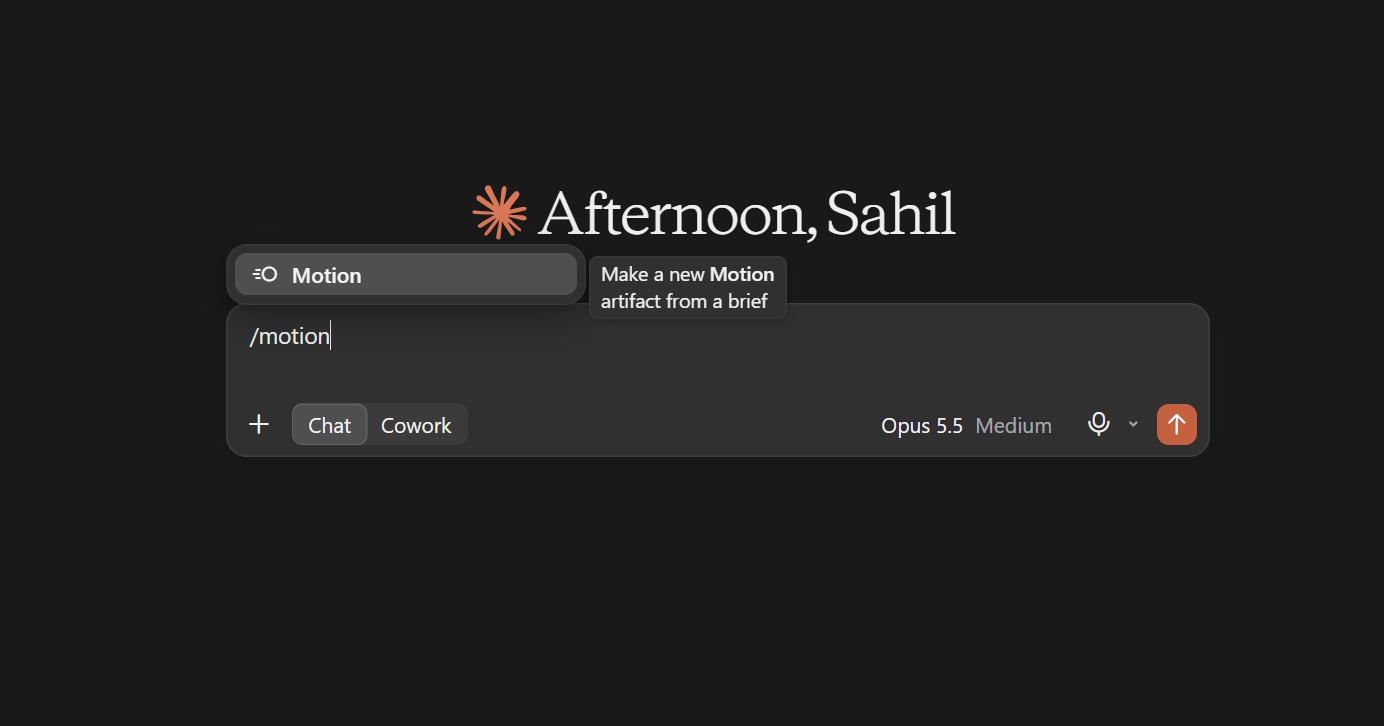
Anthropic launched Claude Motion in beta on October 8, 2026, in the same announcement as Claude Dashboards. You ask in any chat (“Turn this quarterly report into a 30-second explainer for our all-hands”), type /motion, or pick Output and then Motion in the message box.
Claude builds the animation as code that moves your text, charts, shapes and images, and it plays like a short video. Because it’s code, you can change one word, number or bit of timing and the rest stays put. “Change the Q3 number to 18%” is a real edit you can ask for. When it looks right, click Export and choose MP4.
Know two limits before you plan around it. Motion counts toward your plan’s usage, and longer or more complex animations eat more of it than a normal message does. And it makes motion graphics only. To take a cut further, Anthropic lists handoffs to Adobe, Descript, HeyGen, Higgsfield, invideo, Luma AI and Runway, with Canva and Captions coming soon.
Good for an animated chart, a feature walkthrough or an onboarding explainer. Claude motion graphics, in other words.
Claude Code with Remotion
Remotion is a framework that builds video out of React code, and its docs say it works with coding agents such as Claude Code.
Setup is short: create a blank project, install Remotion’s Agent Skills, start the preview server, then open Claude Code in a second terminal and describe your video. Claude writes the scenes and timing; Remotion renders the file.
The cost is friendlier than you’d expect. Remotion is free for individuals and teams of up to 3 people, with the same features as the paid license. Bigger companies need a company license.
Where this route earns its setup is repetition. One video? A normal editor is faster. Fifty versions of one template, each with a different product, price or city? That’s a Claude Code video job, and you can re-render any of them by changing one line.
A connector to a video tool
Footage of a real-looking product on a kitchen counter needs a trained video model. Claude reaches outside tools through connectors built on MCP (Model Context Protocol). You add the connector once and sign in. From then on, Claude can call that tool mid-conversation and drop the finished clip back in the chat.
This is the route people mean when they search for a Claude AI video generator. Every plan can add custom connectors, but Free gets one, so choose with care.
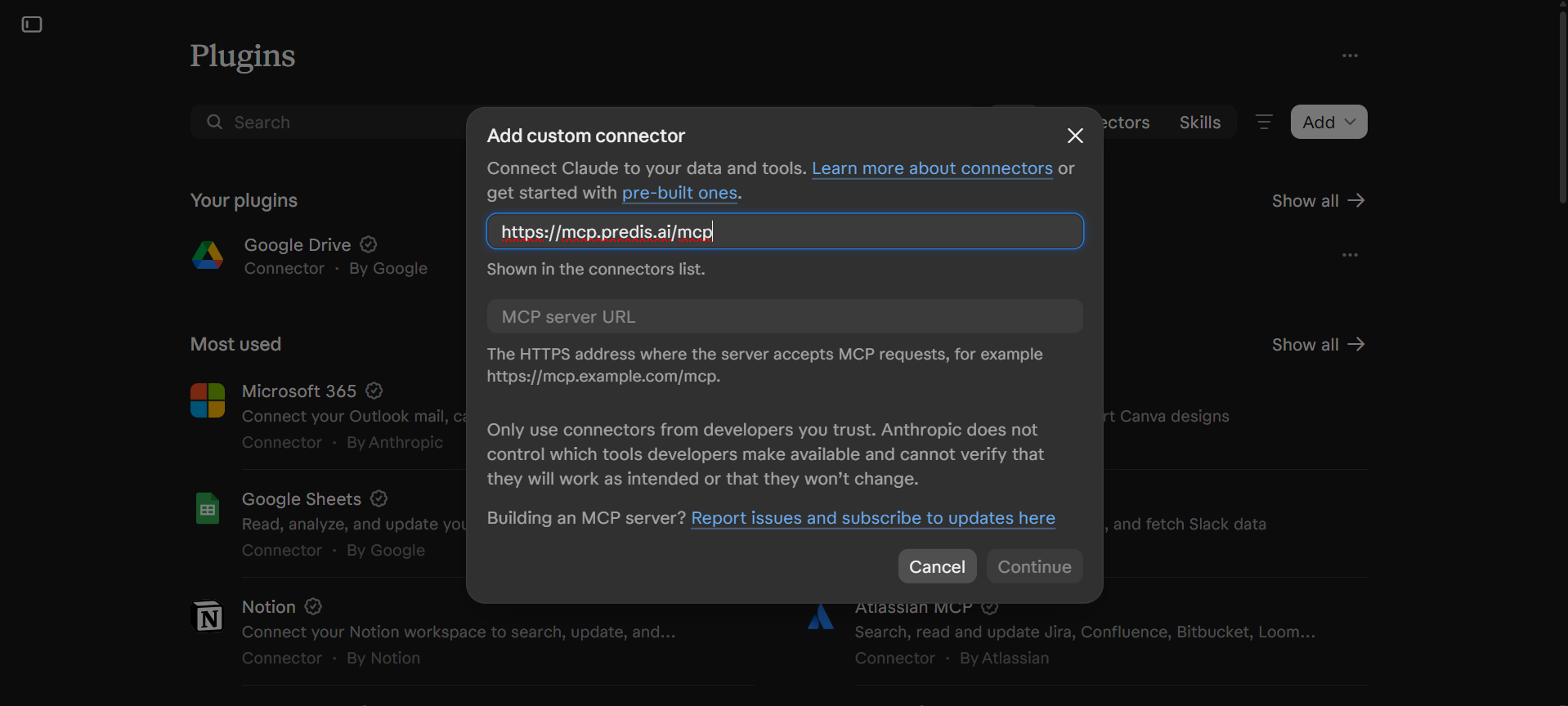
The options split three ways: general video generators, avatar tools, and tools built for ads. Predis.ai’s connector sits in that last group.
You paste one server URL into Claude’s connector settings, sign in, and ask for video ads, UGC ads, static ads or carousels in your brand’s style without leaving the chat.
It also works in ChatGPT and Claude Code, and if UGC is new to you, this walkthrough of UGC product ads made with AI covers the format.
Claude writes, another app renders
No setup at all. Ask Claude for a scene table with one prompt per shot, then paste those prompts into the video app you already pay for, or into an AI ad generator if the video is an ad.
Claude isn’t making the video here, but it’s often the fastest start, and the prompts are where most of the quality comes from anyway.
Which route fits your video?
Three taps settle it. The picker asks about your plan and what has to be on screen, then whether this is a one-off or a batch.
Question 1 of 3
Which Claude plan are you on?
Free
Question 2 of 3
What has to be on screen?
A real-looking product or personA bottle on a counter, someone talking to camera
Question 3 of 3
How many videos do you need?
One video
A connector to a video tool
Real-looking footage needs a trained video model, and Claude has none of its own. A connector lets Claude call one and return the clip in the chat.
- Pick a tool that matches the job: general video, avatars, or ads
- Add it as a custom connector and sign in
- Describe the shot, the size and the length in one message
Free plans get one custom connector, so choose carefully.
To try another answer, click any highlighted choice above.
Many versions of one templateSame layout, different product, price or city
A connector to a video tool
Real-looking footage needs a trained video model, and Claude has none of its own. A connector lets Claude call one and return the clip in the chat.
- Pick a tool that matches the job: general video, avatars, or ads
- Add it as a custom connector and sign in
- Ask for each version in the same chat so the product stays consistent
To try another answer, click any highlighted choice above.
A few ad versions to testDifferent hooks for the same product
A connector built for ads
Testing hooks means several versions that still look like one brand. A general video model can do it with careful prompting; a connector made for ads does it from your product link.
- Add the connector once in Claude's connector settings
- Ask for 3 versions of the same product ad with different hooks
- Run them, then keep the one that earned the budget
Free plans get one custom connector, so this would be your one.
To try another answer, click any highlighted choice above.
Charts, text and shapes that moveAn explainer, an animated chart, a walkthrough
Question 3 of 3
How many videos do you need?
One video
Claude writes, another app renders
On Free, Claude can draft and even preview an animation in the chat, but it won't hand you an MP4. Use it for the script and scenes, then build the video in an app you already use.
- Ask for a scene-by-scene script with on-screen text
- Paste it into your video app
- Or add one connector if the video ends up needing footage
To try another answer, click any highlighted choice above.
Many versions of one templateSame layout, different product, price or city
Claude Code with Remotion (needs a paid plan)
Many versions of one template is what code is good at, but Claude Code isn't on Free. Until you upgrade, Claude can write the template and scene copy for another app.
- Upgrade to a paid plan to get Claude Code
- Install Node.js and create a blank Remotion project
- Change one value and re-render for each version
Remotion is free for individuals and teams of up to 3 people.
To try another answer, click any highlighted choice above.
A few ad versions to testDifferent hooks for the same product
A connector built for ads
Testing hooks means several versions that still look like one brand. A general video model can do it with careful prompting; a connector made for ads does it from your product link.
- Add the connector once in Claude's connector settings
- Ask for 3 versions of the same product ad with different hooks
- Run them, then keep the one that earned the budget
Free plans get one custom connector, so this would be your one.
To try another answer, click any highlighted choice above.
Nothing yet, I need the plan firstScript, shot list, prompts
Claude writes, you pick a renderer later
Every plan can do this today. Ask for a scene table with one text-to-video prompt per shot, and keep the product description identical in every prompt.
- Use the scene-table prompt in this article
- Decide on footage or motion graphics once you see the scenes
- Come back to this picker with that answer
To try another answer, click any highlighted choice above.
Pro, Max or Ultra
Question 2 of 3
What has to be on screen?
A real-looking product or personA bottle on a counter, someone talking to camera
Question 3 of 3
How many videos do you need?
One video
A connector to a video tool
Real-looking footage needs a trained video model, and Claude has none of its own. A connector lets Claude call one and return the clip in the chat.
- Pick a tool that matches the job: general video, avatars, or ads
- Add it as a custom connector and sign in
- Describe the shot, the size and the length in one message
To try another answer, click any highlighted choice above.
Many versions of one templateSame layout, different product, price or city
A connector to a video tool
Real-looking footage needs a trained video model, and Claude has none of its own. A connector lets Claude call one and return the clip in the chat.
- Pick a tool that matches the job: general video, avatars, or ads
- Add it as a custom connector and sign in
- Ask for each version in the same chat so the product stays consistent
To try another answer, click any highlighted choice above.
A few ad versions to testDifferent hooks for the same product
A connector built for ads
Testing hooks means several versions that still look like one brand. A general video model can do it with careful prompting; a connector made for ads does it from your product link.
- Add the connector once in Claude's connector settings
- Ask for 3 versions of the same product ad with different hooks
- Run them, then keep the one that earned the budget
To try another answer, click any highlighted choice above.
Charts, text and shapes that moveAn explainer, an animated chart, a walkthrough
Question 3 of 3
How many videos do you need?
One video
Claude Code with Remotion
Claude Motion isn't on your plan yet, but Claude Code is. It can build the same kind of animated explainer as code and render an MP4.
- Create a blank Remotion project and add its Agent Skills
- Describe the animation to Claude Code
- Render to MP4 from the terminal
Prefer no terminal? Ask Claude for the script and scenes, then build it in a video app.
To try another answer, click any highlighted choice above.
Many versions of one templateSame layout, different product, price or city
Claude Code with Remotion
Remotion turns video into React code, so Claude writes the template once and you re-render it with a new product, price or city each time.
- Create a blank Remotion project and add its Agent Skills
- Open Claude Code in a second terminal and describe the video
- Render, then swap one value for the next version
Remotion is free for individuals and teams of up to 3 people.
To try another answer, click any highlighted choice above.
A few ad versions to testDifferent hooks for the same product
A connector built for ads
Testing hooks means several versions that still look like one brand. A general video model can do it with careful prompting; a connector made for ads does it from your product link.
- Add the connector once in Claude's connector settings
- Ask for 3 versions of the same product ad with different hooks
- Run them, then keep the one that earned the budget
To try another answer, click any highlighted choice above.
Nothing yet, I need the plan firstScript, shot list, prompts
Claude writes, you pick a renderer later
Every plan can do this today. Ask for a scene table with one text-to-video prompt per shot, and keep the product description identical in every prompt.
- Use the scene-table prompt in this article
- Decide on footage or motion graphics once you see the scenes
- Come back to this picker with that answer
To try another answer, click any highlighted choice above.
Team or Enterprise
Question 2 of 3
What has to be on screen?
A real-looking product or personA bottle on a counter, someone talking to camera
Question 3 of 3
How many videos do you need?
One video
A connector to a video tool
Real-looking footage needs a trained video model, and Claude has none of its own. A connector lets Claude call one and return the clip in the chat.
- Pick a tool that matches the job: general video, avatars, or ads
- Add it as a custom connector and sign in
- Describe the shot, the size and the length in one message
To try another answer, click any highlighted choice above.
Many versions of one templateSame layout, different product, price or city
A connector to a video tool
Real-looking footage needs a trained video model, and Claude has none of its own. A connector lets Claude call one and return the clip in the chat.
- Pick a tool that matches the job: general video, avatars, or ads
- Add it as a custom connector and sign in
- Ask for each version in the same chat so the product stays consistent
To try another answer, click any highlighted choice above.
A few ad versions to testDifferent hooks for the same product
A connector built for ads
Testing hooks means several versions that still look like one brand. A general video model can do it with careful prompting; a connector made for ads does it from your product link.
- Add the connector once in Claude's connector settings
- Ask for 3 versions of the same product ad with different hooks
- Run them, then keep the one that earned the budget
To try another answer, click any highlighted choice above.
Charts, text and shapes that moveAn explainer, an animated chart, a walkthrough
Question 3 of 3
How many videos do you need?
One video
Claude Motion
It's built into Claude on your plan (beta). Claude builds the animation as code, you tweak a word, number or timing, then export an MP4.
- Type /motion or ask for an animation in any chat
- Say who will watch, where it plays and how long it runs
- Click Export and choose MP4
On Enterprise, an owner may need to switch Motion on in Organization settings under Artifacts.
To try another answer, click any highlighted choice above.
Many versions of one templateSame layout, different product, price or city
Claude Code with Remotion
Remotion turns video into React code, so Claude writes the template once and you re-render it with a new product, price or city each time.
- Create a blank Remotion project and add its Agent Skills
- Open Claude Code in a second terminal and describe the video
- Render, then swap one value for the next version
Remotion is free for individuals and teams of up to 3 people.
To try another answer, click any highlighted choice above.
A few ad versions to testDifferent hooks for the same product
A connector built for ads
Testing hooks means several versions that still look like one brand. A general video model can do it with careful prompting; a connector made for ads does it from your product link.
- Add the connector once in Claude's connector settings
- Ask for 3 versions of the same product ad with different hooks
- Run them, then keep the one that earned the budget
To try another answer, click any highlighted choice above.
Nothing yet, I need the plan firstScript, shot list, prompts
Claude writes, you pick a renderer later
Every plan can do this today. Ask for a scene table with one text-to-video prompt per shot, and keep the product description identical in every prompt.
- Use the scene-table prompt in this article
- Decide on footage or motion graphics once you see the scenes
- Come back to this picker with that answer
To try another answer, click any highlighted choice above.
Not sureCheck your plan in Claude's settings later. We'll assume Free for now.
Question 2 of 3
What has to be on screen?
A real-looking product or personA bottle on a counter, someone talking to camera
Question 3 of 3
How many videos do you need?
One video
A connector to a video tool
Real-looking footage needs a trained video model, and Claude has none of its own. A connector lets Claude call one and return the clip in the chat.
- Pick a tool that matches the job: general video, avatars, or ads
- Add it as a custom connector and sign in
- Describe the shot, the size and the length in one message
Free plans get one custom connector, so choose carefully.
To try another answer, click any highlighted choice above.
Many versions of one templateSame layout, different product, price or city
A connector to a video tool
Real-looking footage needs a trained video model, and Claude has none of its own. A connector lets Claude call one and return the clip in the chat.
- Pick a tool that matches the job: general video, avatars, or ads
- Add it as a custom connector and sign in
- Ask for each version in the same chat so the product stays consistent
To try another answer, click any highlighted choice above.
A few ad versions to testDifferent hooks for the same product
A connector built for ads
Testing hooks means several versions that still look like one brand. A general video model can do it with careful prompting; a connector made for ads does it from your product link.
- Add the connector once in Claude's connector settings
- Ask for 3 versions of the same product ad with different hooks
- Run them, then keep the one that earned the budget
Free plans get one custom connector, so this would be your one.
To try another answer, click any highlighted choice above.
Charts, text and shapes that moveAn explainer, an animated chart, a walkthrough
Question 3 of 3
How many videos do you need?
One video
Claude writes, another app renders
On Free, Claude can draft and even preview an animation in the chat, but it won't hand you an MP4. Use it for the script and scenes, then build the video in an app you already use.
- Ask for a scene-by-scene script with on-screen text
- Paste it into your video app
- Or add one connector if the video ends up needing footage
To try another answer, click any highlighted choice above.
Many versions of one templateSame layout, different product, price or city
Claude Code with Remotion (needs a paid plan)
Many versions of one template is what code is good at, but Claude Code isn't on Free. Until you upgrade, Claude can write the template and scene copy for another app.
- Upgrade to a paid plan to get Claude Code
- Install Node.js and create a blank Remotion project
- Change one value and re-render for each version
Remotion is free for individuals and teams of up to 3 people.
To try another answer, click any highlighted choice above.
A few ad versions to testDifferent hooks for the same product
A connector built for ads
Testing hooks means several versions that still look like one brand. A general video model can do it with careful prompting; a connector made for ads does it from your product link.
- Add the connector once in Claude's connector settings
- Ask for 3 versions of the same product ad with different hooks
- Run them, then keep the one that earned the budget
Free plans get one custom connector, so this would be your one.
To try another answer, click any highlighted choice above.
Nothing yet, I need the plan firstScript, shot list, prompts
Claude writes, you pick a renderer later
Every plan can do this today. Ask for a scene table with one text-to-video prompt per shot, and keep the product description identical in every prompt.
- Use the scene-table prompt in this article
- Decide on footage or motion graphics once you see the scenes
- Come back to this picker with that answer
To try another answer, click any highlighted choice above.
Prefer rules? Footage of a product or a person means a connector, whatever your plan. A chart or explainer on Team or Enterprise means Motion.]
The same template many times over, if you’re happy in a terminal, means Claude Code with Remotion. For anything else, start with the scene-table prompt further down.
Can Claude watch or edit a video?
This is the question right next door, and the answer is mostly no. Claude’s chat accepts documents and images, such as PDF, DOCX, CSV, JPEG, PNG, GIF and WebP, and no video formats appear on that list. Can Claude watch videos, then? Not ones you upload as files in the chat.
There are workarounds. Paste a transcript and Claude can cut it into hooks, captions and chapter markers. Drop in a few screenshots and it’ll critique the framing or the on-screen text.
Can Claude edit videos? Indirectly. In Claude Code, it can write FFmpeg commands that trim, join, resize or burn in subtitles. What it can’t do is see the result. You review every output yourself.
What changes when the video is an ad
Most guides that ask “can Claude make videos” stop at “you got an MP4.” If you sell something, that’s where the work starts.
An ad has jobs an explainer doesn’t. It has to look like your brand, not like a template anyone could have picked. It needs 9:16 for Reels and TikTok, 1:1 for the feed and 16:9 for YouTube.
And you rarely know in advance which hook will land. You need three or four versions to test, then the numbers to tell you which one earned more budget. Browsing a few UGC video ad examples before you brief Claude makes those versions sharper.
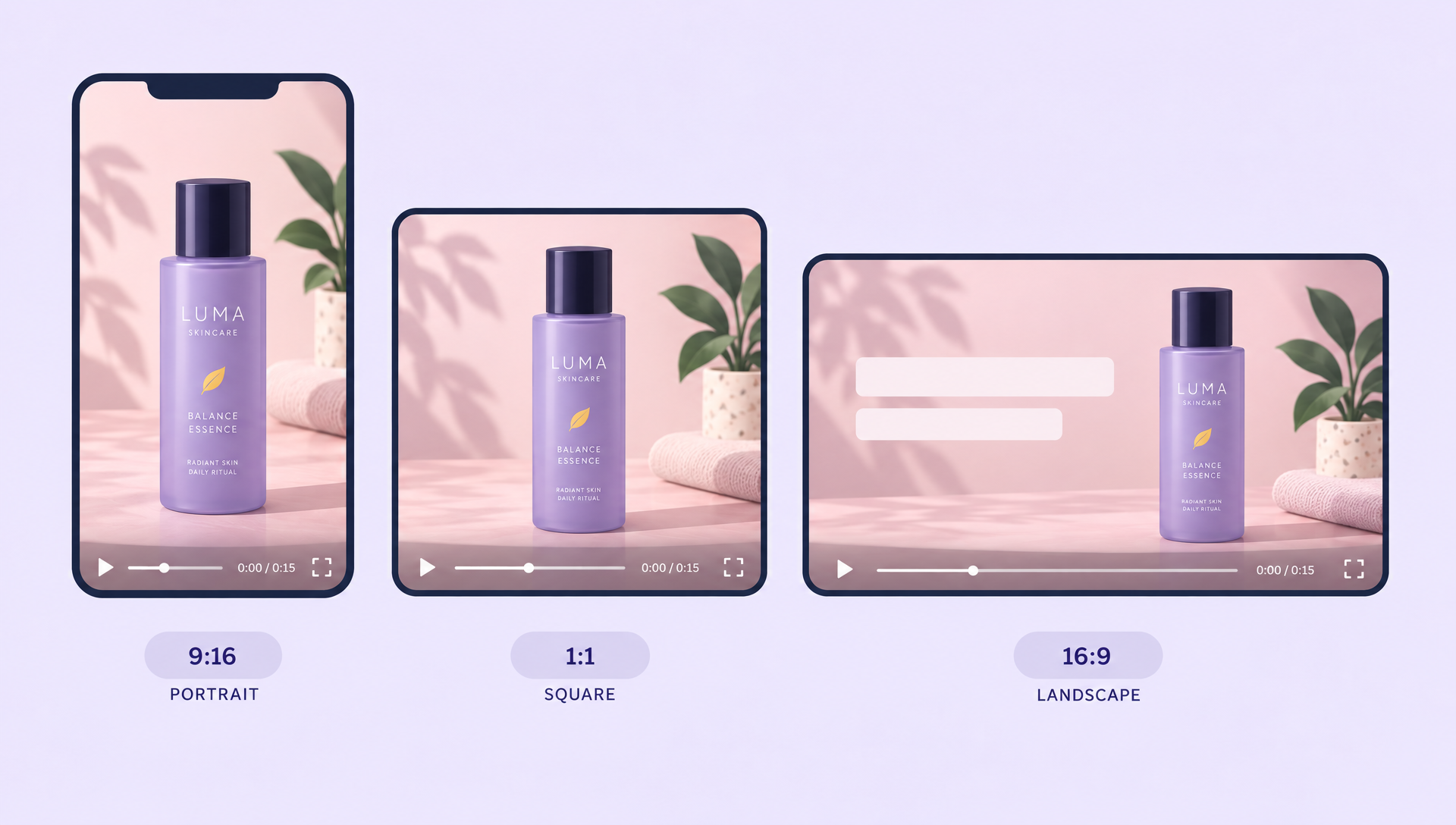
Now hold the routes up against that list. Motion makes clean explainers, but your actual product on a counter isn’t something it can show. Remotion handles templated variants well if someone on your team writes code.
A general video model gives you footage, though keeping the product identical from clip to clip takes careful prompting.
That gap is what Predis.ai’s video ad maker is built around. You start from a product link, or from a reference ad you admire, and get video ads that look like your brand. Don’t like one scene? Fix that frame and keep the rest.
Once the ads are live, insights show which one earned attention, so you can scale the ones that sell. Run it on Predis.ai directly or from the Claude chat through the connector.
A prompt to start with
Whichever route you pick, this prompt handles the planning half. Swap in your product.
Break a 20-second vertical video ad for [product] into 4 scenes of 5 seconds. For each scene, give me the visual, the camera move, the on-screen text, the voiceover line and a self-contained text-to-video prompt. Use this exact product description in every prompt: [one fixed sentence].That last line does the heavy lifting. When the product description changes from scene to scene, generated clips drift, and the bottle in scene 3 stops matching the bottle in scene 1.
Using Motion instead? Anthropic’s tip is to say who will watch, where it will play and roughly how long it should run, then attach the report, data or images you want in it.
Claude is the director, not the camera
Can Claude make videos? Close enough, now. It plans a shoot better than most of us and writes the code behind motion graphics. On Team and Enterprise it even exports the MP4 without leaving the chat. For footage of your actual product, though, it still needs a camera, and today that camera is a connector to a tool that has one.
Anthropic’s own framing fits: Claude makes the first version, and you decide what gets shared. That’s a sensible way to treat any video it helps you make.
If your next video is an ad, connect Predis.ai to Claude and ask for three versions of the same product ad. Then let the results tell you which one to keep.
FAQs
Claude Motion comes with Team and Enterprise plans, where it’s in beta; it isn’t on Free, Pro, Max or Ultra. There’s no separate charge, but each animation counts toward your plan’s usage limit, and longer or more complex ones use more. Enterprise owners have to switch it on in Organization settings under Artifacts.
Not by itself. Anthropic says Claude Motion creates no realistic footage and no AI-generated people, and Claude Code with Remotion builds animation, not footage. For a person on screen, connect Claude to an avatar or video tool that supports it, and use only faces and voices you have permission to use.
On its own, it can animate an image inside a Motion explainer or a Remotion project: pans, zooms and text over the top. Turning a product photo into realistic motion, like a bottle rotating under studio light, needs a connector to a tool with an image-to-video model.
Not the way it used to. OpenAI shut down the Sora web and app experience on April 26, 2026, and the Sora API on September 24, 2026. Today ChatGPT, like Claude, gets video through connected apps rather than a built-in model.
Not directly. Claude can’t play a YouTube link or take a video upload in chat. Paste the transcript, if the video has one, and Claude can summarize it, pull out key points or rework it into posts and scripts.
You may also like: