Explore this content with AI:
Every negative comment on your Instagram ad is doing two things at once: telling potential customers not to buy, and telling Meta’s algorithm your ad isn’t worth showing.
The reputation damage is real — but so is the financial one. Unmanaged comment sections push your relevance score down, your CPMs up, and your cost per acquisition higher. Brands that leave negative threads unchecked often see CPAs creep up before they notice anything is wrong.
This guide covers everything you need to fix that: why negative comments happen, how each type should be handled, which ones to respond to publicly, which to hide, and how to automate the parts that don’t need a human.
Why Negative Comments Matter
Negative comments aren’t just noise; they can shape how people see your brand and influence the success of your marketing efforts.
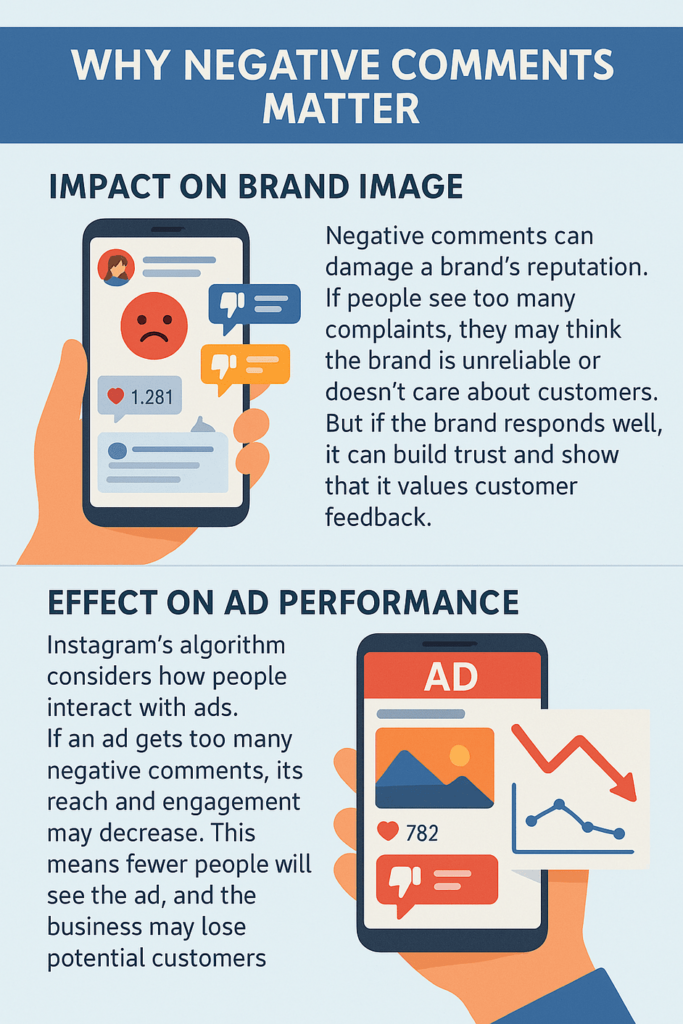
Negative comments can hurt your brand and limit your ad reach, but they also offer a chance to show accountability. By responding thoughtfully, brands can turn criticism into an opportunity to build trust and improve performance.
Types of Negative Comments
Not all negative comments are the same. Some can be useful, while others may be harmful or irrelevant. Understanding the different types of negative comments can help businesses decide how to respond.

1. Constructive Criticism
Some customers leave negative comments because they want to share honest feedback. This is called constructive criticism. These comments highlight real issues and give businesses a chance to improve their products, services, or marketing.
💡 Best way to handle it:
- Acknowledge the comment.
- Apologise if necessary.
- Show that you value feedback and will make improvements.
2. Customer Complaints
Harsh comments come from customers who are unhappy with their experience. They might be about late deliveries, faulty products, or poor customer service. If these complaints are ignored, they can damage a brand’s reputation.
💡 Best way to handle it:
- Respond quickly to avoid making the customer more frustrated.
- Offer a solution, such as asking for more details or providing a refund/replacement.
- If needed, move the conversation to direct messages.
3. Hate Speech or Offensive Remarks
Some comments are not genuine feedback but are instead hateful, rude, or offensive. These may target the brand, its employees, or other customers. Such comments can create a toxic environment and should be managed carefully.
💡 Best way to handle it:
- Use Instagram’s comment moderation tools to filter out offensive words.
- Report or block users who repeatedly post harmful comments.
- Avoid engaging in arguments.
4. Spam and Bot Comments
Spam comments are often irrelevant and may include links to other websites, promotional messages, or fake reviews. Bots (automated accounts) may also post repetitive or meaningless comments.
💡 Best way to handle it:
- Use Instagram’s spam filters to automatically remove such comments.
- Regularly monitor your ad comments and remove anything suspicious.
- Avoid clicking on links from unknown users.
How Negative Comments Affect Your Instagram Ads
Most advertisers think of comment moderation as a brand issue. It’s also a media buying issue.
Meta’s ad auction doesn’t just look at your bid. It factors in “Ad Quality” — a composite score influenced by how users engage with your ad. When a comment thread turns negative, especially when users report the ad or react with anger, the platform interprets it as a signal that the content is low quality or irrelevant. The result: your ad gets pushed into more expensive inventory.
The conversion math works against you, too. A first-time prospect seeing your ad will scroll the comments for social proof. If the top comment reads “Scam — never got my order,” your conversion rate drops regardless of how strong the creative is. You’re effectively paying for traffic that has already decided not to buy.
What a healthy account looks like:
- Negative sentiment rate below 5% of total comments
- Average first response time under 60 minutes during business hours
- Zero unresolved complaint threads older than 24 hours
Track these weekly, not monthly. By the time a monthly review catches a problem, the algorithm has already penalized the creative.
Impact on Brand Reputation
1. How Negative Comments Influence Potential Customers
When people see an ad on Instagram, they often check the comments before making a decision. If they find too many negative comments about poor service, low-quality products, or misleading ads, they may decide not to buy.
Example:
Imagine you see an ad for a skincare product. If the comments say, “This product caused a rash!” or “They never delivered my order,” you might hesitate to make a purchase.
💡 What brands can do:
- Respond professionally to negative comments.
- Offer solutions and show that you care about customer concerns.
- Encourage satisfied customers to leave positive feedback
2. The Importance of Brand Perception
Your brand’s image is built through customer experiences. If Instagram users see that a brand actively listens to concerns and resolves issues, they are more likely to trust it. On the other hand, if negative comments are ignored, it can make the brand look unprofessional.
Example:
Brand A receives a complaint and responds with, “We’re sorry! Please send us a DM so we can sort this out.”
Brand B ignores the complaint or deletes the comment.
Which brand do you think people will trust more? Most will prefer Brand A because it shows they care about their customers.
Effect on Ad Performance
1. Instagram’s Algorithm and Engagement Metrics
Instagram’s algorithm promotes content based on engagement. Engagement includes likes, shares, comments, and carousels for engagement—both positive and negative. How can you handle negative comments on Instagram ads? Basically, if an ad gets too many negative comments, it may signal to Instagram that users are unhappy with it. This could result in:
- Lower reach – Instagram may show the ad to fewer people.
- Higher ad costs – Ads with poor engagement may require a higher budget to get the same results.
💡 How to improve ad performance:
- Respond to negative comments to show engagement.
- Use Instagram’s moderation tools to filter out harmful or spammy comments.
- Encourage happy customers to leave positive feedback.
2. Can Negative Comments Lower Conversion Rates?
Yes, negative comments can directly impact sales and conversions. If potential buyers see too many complaints, they may lose confidence and decide not to make a purchase.
Example:
A clothing brand runs an ad for a new jacket. The comments section is full of people saying, “The material is cheap” and “Took months to arrive.” New customers may avoid buying because they believe the negative feedback.
💡 Solution:
- Address complaints quickly and professionally.
- Offer reassurance about product quality and customer service.
- Highlight positive reviews and testimonials to balance negative feedback.

Short Case Study: Examples Of Brands That Handle Negative Comments
1. KFC’s Response to Chicken Shortage
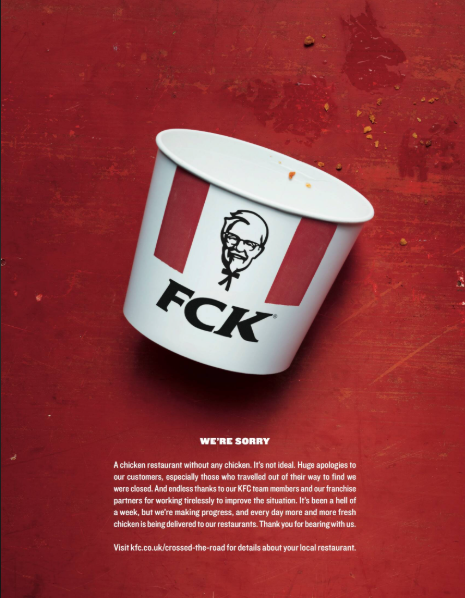
In 2018, KFC faced a significant crisis in the UK when a supply chain issue led to a chicken shortage, resulting in the temporary closure of numerous outlets. Customers expressed their frustration on social media.
KFC responded with humor and transparency by issuing an apology featuring an empty bucket with the letters rearranged to spell “FCK Campaign,” acknowledging the mishap. This candid approach was well-received and showcased the brand’s ability to handle criticism gracefully.
2. Domino’s Pizza’s Engagement with Customer Feedback
In 2009, Domino’s Pizza faced a public relations crisis when employees posted a video of unsanitary food handling. The incident quickly went viral, leading to widespread backlash.
Domino’s responded promptly by terminating the employees involved, issuing a public apology, and implementing stricter food safety measures. This proactive and transparent approach helped the company rebuild its reputation over time.
3. H&M’s Handling of Controversial Product Image
In 2018, H&M faced backlash for featuring a product image that was deemed racially insensitive. Customers voiced their concerns on social media, leading to widespread criticism.
H&M promptly removed the image, issued a public apology, and committed to reviewing its internal processes to prevent future incidents. This swift response demonstrated the brand’s commitment to addressing customer concerns and promoting inclusivity.
Strategies to Handle Negative Comments on Instagram Ads
Negative comments on Instagram Ads are unavoidable, but how a brand handles them can make a big difference. A professional and well-thought-out response can protect a brand’s reputation and even turn unhappy customers into loyal ones. Here are the best strategies to manage negative comments effectively.
Monitor and Respond Promptly
1. The Importance of Timely Responses
How can you handle negative comments on Instagram ads? You must know that ignoring negative comments can make things worse. Customers expect quick responses, and delays can lead to frustration. A prompt and polite reply shows that the brand cares and is willing to resolve issues.
2. Tools to Track and Manage Comments
Manually checking comments can be time-consuming, especially for businesses running multiple ads.:
- Monitor Instagram comments in real time.
- Set up alerts for negative keywords.
- Automate responses for common issues.
3. Categorize Comments Before You Act
The most common mistake brands make with negative comments is reacting instead of triaging. Not every negative comment deserves the same response — or any response at all. Before you type a reply, categorize what you’re dealing with.
The Four Comment Categories
| Category | What it looks like | Right action |
|---|---|---|
| Valid Complaint | “I ordered 3 weeks ago and have no tracking number.” | Respond publicly + move to DM |
| Troll / Hate Speech | “This brand is garbage, delete your account.” | Hide (don’t delete) |
| Spam / Bot | “DM me for cheap followers 📈” | Delete + block |
| False Claim | “Their products contain toxic chemicals.” | Respond publicly with facts, then monitor |
Why hide instead of delete for trolls?
Deleting a comment notifies the user. A troll who sees their comment removed will often return and comment more aggressively. Hiding makes the comment invisible to everyone except the commenter — they believe it’s still live, so there’s no escalation trigger.
Instagram’s algorithm also counts the engagement signal from the original comment without showing the negative content to other viewers.
False claims need a different approach.
Unlike trolls, false factual statements left unanswered can be read as tacit confirmation by other viewers. A brief, factual public correction (“Hi — we want to clarify that our products are [X certified / Y tested]. Full documentation is on our site.”) closes the loop without escalating.

Preventive Measures to Minimize Negative Comments
While negative comments on Instagram Ads are inevitable, businesses can take steps to reduce them. By setting clear expectations, using Instagram’s moderation AI tool, and encouraging positive engagement, brands can create a better experience for their audience.
Setting Clear Expectations in Ads
Many negative comments come from customers who feel misled by an ad. To know how you can handle negative comments on Instagram ads, you must avoid this; brands must ensure their ads are transparent and truthful.
1. Writing Accurate Ad Copy
- Avoid exaggerated claims (e.g., “Get results in 24 hours!” unless proven).
- Mention pricing, features, and any terms & conditions.
- Use honest customer reviews instead of fake testimonials.
Example: Instead of saying “The best weight loss product ever!”, use “Supports weight management with a healthy diet & exercise.”
2. Using High-Quality Visuals
- Use real product photos instead of overly edited or stock images.
- Show different angles of the product to set realistic expectations.
- Include videos demonstrating the product in action.
Enabling Instagram Comment Moderation Tools
Instagram provides built-in tools to help businesses control the type of comments that appear on their ads.
1. Filtering Specific Keywords
- Instagram allows brands to set up a keyword filter that automatically hides comments containing specific words.
- Common negative keywords to filter: “scam,” “fake,” “bad service,” “refund,” and offensive language.
💡 How to Set It Up:
Go to Settings > Privacy > Hidden Words and add unwanted words to Instagram’s filter list.
2. Restricting Certain Accounts
- If a user continuously leaves spam or abusive comments, businesses can restrict their account.
- This means their comments will only be visible to them and won’t affect brand reputation.
Encouraging Positive Engagement
A strong, positive community can naturally reduce negative comments and make customers feel more connected to a brand.
1. Creating Community-Driven Content
- Post behind-the-scenes content, user-generated content, or team introductions to make the brand feel more personal.
- Encourage discussions by asking questions or running polls.
💡 Example: Instead of just promoting a skincare product, a brand could post: “What’s your biggest skincare struggle? Tell us in the comments!”
2. Encouraging Satisfied Customers to Share Feedback
- Ask happy customers to leave comments about their positive experiences.
- Feature customer testimonials or shoutouts to make them feel valued.
- Respond to positive comments to show appreciation and encourage more engagement.
Example:
🗨️ Customer Comment: “I love this product! It helped my skin.”
✅ Brand Response: “That’s amazing to hear! Thank you for sharing your experience. 💙”
When to Delete or Hide Negative Comments?
Use this as a quick-reference guide for your team. The goal isn’t to remove negativity — it’s to protect conversion rates and your ad’s relevance score while maintaining brand credibility.
| Comment Type | Action | Why |
|---|---|---|
| Spam / Bot | Delete + Block | Zero value. Removal is permanent and prevents re-occurrence from the same account. |
| Hate speech / Slurs | Delete + Report | Violates Instagram’s community standards. Delete immediately; report to flag the account. |
| Valid customer complaint | Hide + DM + Public reply | Hide prevents the thread from growing while you resolve it. Reply publicly (briefly) so other viewers see that you responded. |
| Troll / provocation | Hide only | Don’t delete — it triggers re-engagement from the troll. Hide is invisible to everyone else. |
| False factual claim | Public correction + Monitor | Brief factual reply with documentation reference. Don’t argue. Monitor for follow-ups. |
| Constructive criticism | Respond publicly | These are your best comments to engage with. A good public response builds trust with the silent majority reading the thread. |
Instagram’s Moderation Policies
Instagram’s native moderation tools are free, underused, and genuinely effective when set up properly. Here’s how to configure them for an ad account.
Step 1: Enable the Hidden Words Filter
- Open the Instagram app and go to your Profile
- Tap the menu (☰) → Settings and Privacy
- Tap Hidden Words
- Toggle on Hide Comments and Hide Message Requests
- Tap Manage Custom Words and Phrases
- Add your keyword list (see below)
Starter keyword list for e-commerce/ads:
- Scam, fraud, fake, rip-off, scammer
- Refund, chargeback, stolen, never arrived
- Dropship, dropshipping, AliExpress
- Spam, bot, click this link
- [Your top 3 competitor brand names]
Review and update this list monthly. Scam tactics and complaint language evolve — your filter should too.
Step 2: Restrict Repeat Offenders
If a specific account repeatedly posts negative comments, use Instagram’s Restrict feature rather than Block. Restricting means the user’s future comments are only visible to them — you don’t have to manually review and hide each one. They don’t know they’ve been restricted.
To restrict: tap the comment → Restrict [Username]
Step 3: Set Up an Ad Comment Alert
For active ad campaigns, set up a daily review ritual: check the Hidden folder in your comments inbox. Instagram’s spam filter is aggressive and sometimes hides legitimate questions from potential buyers (“Do you ship to [country]?”, “What sizes are available?”). These are buying signals — checking the hidden folder every morning can recover missed sales.
Stand Out on Instagram with AI Content 🌟
Final thoughts
Negative comments are inevitable — how you handle them isn’t. The brands that protect their ROAS long-term are the ones that triage fast, respond with templates, and automate the noise away.
If you want to reduce negative comments at the source, start with better ad creatives. When your ads set accurate expectations and speak to the right audience, the volume of complaints drops before moderation even comes into play.
Start creating Instagram ads with Predis.ai →
Generate, test, and publish Instagram ad creatives with AI — no design skills needed.
Frequently Asked Questions
Not necessarily. If a comment is genuine feedback or a customer complaint, it’s best to respond professionally. However, if the comment is spam, hate speech, or a troll trying to provoke a reaction, it’s better to hide or report it instead of engaging.
If a comment spreads false information, politely correct it with facts. If it’s malicious or deceptive, consider hiding or reporting it. Engaging in arguments can harm your brand’s reputation.
No, Instagram does not allow comments to be turned off on ads. However, you can use Instagram’s comment moderation tools to filter out certain words or phrases to reduce negative engagement.