Explore this content with AI:
Running Instagram ads without audience exclusions means you’re paying to reach people who already bought from you, people who’ve seen your ad 15 times and still haven’t clicked, and entire demographics that will never convert. That wasted spend adds up fast — and it’s entirely avoidable.
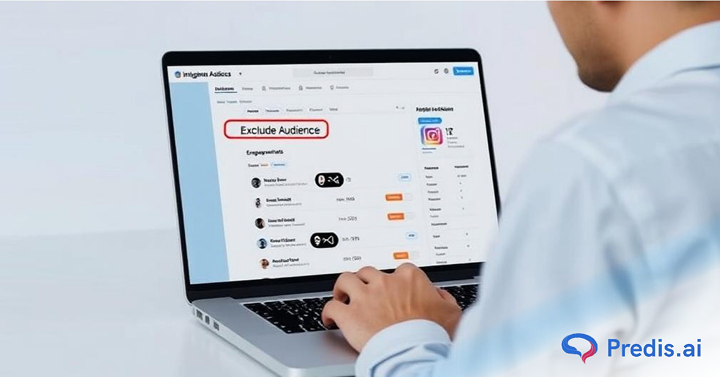
Audience exclusions in Meta Ads Manager let you tell Instagram exactly who not to show your ads to. Done right, they lower your CPC, improve your ROAS, and keep your campaigns focused on the people most likely to take action. This guide covers every exclusion method still available, how to set them up step by step, and the strategies that move the needle.
Why Does Excluding Audiences in Instagram Ads Matter?
The Hidden Cost of Poor Targeting
Running Instagram ads without audience exclusions is like casting a wide net, and you might catch some fish, but you’ll also pull in a lot of junk. It may seem like you’re reaching more people, but you’re also wasting money on impressions from:
- Individuals who have previously converted
- People who bounced off your website
- Audiences that are obsolete now
- Inflated expenses, poor involvement, and finally wasted budget follow from this.
Advantages of Smart Audience Exclusion
It’s about reaching the right ones, not about getting more people. Removing particular audiences and users can help to:
- Improve targeting accuracy
- Calculate your cost per click (CPC) and cost per acquisition (CPA).
- Increase your ROAS, that is, return on ad spend.
- Maximize participation among high-intent consumers.
What Changed: Meta’s Targeting Controls
Before diving into how to set up exclusions, it’s important to know what Meta has removed — because several guides still describe exclusion methods that no longer exist.
Detailed targeting exclusions were removed by Meta in mid-2025. Previously, advertisers could exclude people based on specific interests, behaviors, or demographic segments (for example, excluding people interested in a competitor brand). Meta phased this out as part of its broader shift toward AI-driven delivery and Advantage+ campaigns.
What this means for you: You can no longer exclude audiences based on interests or behaviors. The exclusion methods that still work in 2026 are:
- Custom audience exclusions (customer lists, Pixel-based audiences, engagement audiences) — these still work fully
- Account-level controls (location restrictions, minimum age, employee exclusions, brand protection) — these apply across your entire account
- Demographic filters (age range, gender) — still available at the ad set level, but Meta recommends broad targeting in most cases
If your current campaigns rely on interest-based exclusions, those are no longer active. Audit your ad sets and replace them with custom audience exclusions built from your own first-party data.
Types of Audiences You Can Exclude on Instagram Ads
Let’s look at the different types of audiences Meta lets you exclude during ad setup:
Custom Audiences
Remove those who have already come into touch with your brand. For instance: visitors to websites; app users; email subscribers; past consumers.
This prevents retargeting those who don’t require it and lets you concentrate on acquisition rather than redundancy.
Lookalike Audiences
These are those akin to your custom audiences. You can hone them further by removing any features, nations, or actions that aren’t working.
Re-engaging Users
You may wish to exclude someone who already interacted with a lead gen ad but failed to convert when they saw the same offer again.
Step-by-Step Guide to Exclude Audiences in Instagram Ads
Follow this easy walkthrough to start excluding the right people:
Step 1 – Go to Meta Ads Manager
Head over to Meta Ads Manager and choose the campaign you want to edit or create a new one.

Step 2 – Choose the Campaign Objective and Ad Set
Select your campaign goal—Conversions, Traffic, Lead Gen, etc.—then move to the ad set level.
Step 3 – Navigate to the ‘Audience’ Section
Here’s where the magic happens. Scroll to the Audience section within your ad set.
Step 4 – Use the “Exclude” Field
Right under “Custom Audiences,” you’ll find the Exclude option.
- Add a Custom Audience (like previous purchasers)
- Exclude Lookalikes from your least-performing list
Step 5 – Save Your Changes and Launch
Save your audience settings, continue to the ad creative, and launch your ad set with confidence!
Pro Tip: Save this audience setup as a preset to reuse across campaigns.
Before You Exclude: How to Build Your Custom Audiences
You need to create a custom audience before you can apply it as an exclusion. Here are the three most common types you’ll build for exclusion purposes.
1. Customer List Audience (Existing Buyers / Email Subscribers)
- Go to Meta Ads Manager
- Click on Audiences in the left column
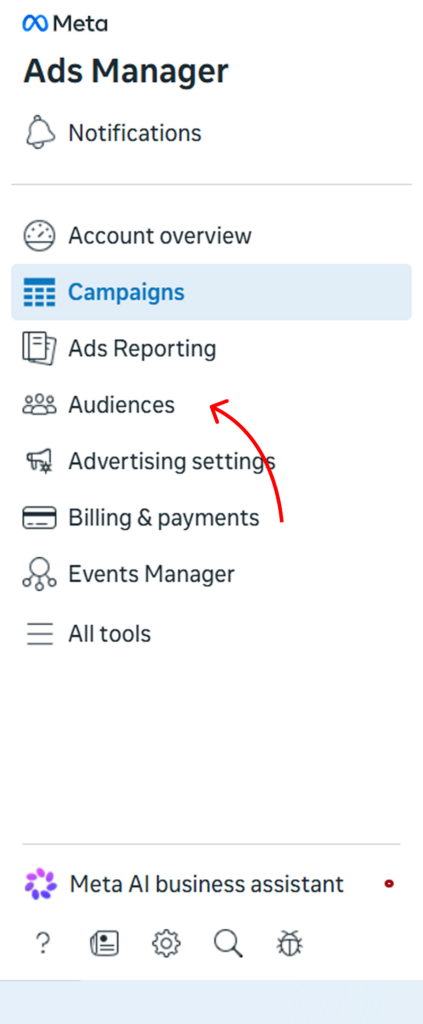
- Choose Create Audience
- Select Custom Audience
- Upload your Customer List
Upload a CSV file containing email addresses or phone numbers. Meta hashes the data on upload for privacy. Once matched, this audience can be used to exclude existing buyers from acquisition campaigns.
Best used to exclude from: TOF and MOF acquisition campaigns.
2. Website Visitor Audience (Pixel-Based)
Make sure Meta Pixel is installed on your website and firing on key pages (order confirmation, sign-up success). Go to Audiences → Custom Audience → Website. Select the event or URL that signals a conversion (e.g., “Purchase” event or your /thank-you page URL). Set a lookback window — 30 days for recent buyers, 90 days for broader exclusion.
Best used to exclude from: Acquisition campaigns targeting new customers.
3. Instagram Engagement Audience
Go to Audiences → Custom Audience → Instagram Account. Select the engagement type — people who visited your profile, saved your posts, or sent a message are the strongest signals. Set a 90-day lookback window.
Best used to exclude from: TOF cold prospecting (these people already know you, so treat them as warm).
Smart Ways You Can Exclude Audiences in Instagram Ads
Here’s how brands use exclusions to sharpen their Instagram Ad performance:
1. Exclude Recent Converters
Why show a 20% off ad to someone who just bought from you yesterday? Instead, exclude buyers from the last 30 days and upsell later.
2. Avoid Overlapping Audiences
If you’re running multiple ad sets, use the Facebook Audience Overlap Tool to avoid cannibalizing your results.
3. Segment Cold vs Warm Audiences
The most powerful way to use exclusions isn’t ad hoc — it’s systematic. Every stage of your funnel should have a defined inclusion audience and a matching exclusion list. Here’s the framework:
| Funnel Stage | Target Audience | Exclude |
|---|---|---|
| Top of Funnel (TOF) | Cold — lookalike audiences, broad targeting | Website visitors, past purchasers, page engagers, email subscribers |
| Middle of Funnel (MOF) | Warm — website visitors, video viewers, Instagram engagers | Past purchasers, TOF audiences (to avoid overlap) |
| Bottom of Funnel (BOF) | Hot — cart abandoners, product page visitors, high-intent signals | Past purchasers (unless your BOF campaign is specifically for re-engagement) |
| Post-Purchase | Existing customers | All non-purchasers — TOF, MOF, and BOF audiences |
Why this matters: Without these separations, your TOF awareness ads end up in front of people who already bought from you. Your retargeting ads reach people who’ve never heard of you. And your post-purchase upsell ads go to people who haven’t converted yet. Each group needs a different message — exclusions are how you enforce that.
4. Exclude Low-Performing Segments
Analyze past campaign reports. If a particular city, age group, or behavior yields high impressions but zero conversions—cut it out.
5. Exclude High-Frequency Viewers (Ad Fatigue Management)
If your campaign reporting shows high frequency (above 3–4 impressions per person) with declining CTR, create a custom audience of people who’ve seen your ads many times without converting and exclude them temporarily. Give them a 30-day break before re-entering the rotation. This is one of the most underused exclusion tactics, and it directly combats ad fatigue.
6. Exclude by Business Type
Not all exclusions apply to every business model. Here’s a quick reference:
| Business Type | Key Exclusion |
|---|---|
| Ecommerce | Exclude past 30-day purchasers from acquisition; re-include after 60 days for replenishment products |
| Lead generation | Exclude form completers and CRM leads from top-of-funnel campaigns immediately after they convert |
| App installs | Exclude users who completed the key in-app event (e.g., first purchase, profile completion) from install campaigns |
| SaaS / Free trial | Exclude existing trial lists and paying customers from cold acquisition ads |
Pro tip: Build your exclusion audiences first, before setting up your campaigns. Go to Audiences → Create Audience → Custom Audience, build each list (purchasers, website visitors, email subscribers), and save them. Then they’re ready to apply as exclusions across all your ad sets.
Common Mistakes to Avoid When You Exclude Audiences in Instagram Ads
- Excluding too many audience layers leaves your reach too narrow
- Forgetting to update exclusions after a new campaign or purchase cycle
- Not split-testing ad sets with and without exclusions
- Assuming exclusion always reduces results—it needs testing!
Track the Impact of Audience Exclusion
Use the steps below to measure how effective your audience exclusions are in Instagram Ads:
Use Meta Ads Manager Insights
- Monitor metrics like CTR, CPM, CPA, and ROAS.
- Compare performance before and after applying exclusions.
- Use breakdowns to analyze included vs. excluded segments.
Leverage Google Analytics
- Track assisted conversions from Instagram traffic.
- Analyze bounce rate, time on site, and session quality.
- Identify behavioral differences in traffic after exclusions.

Refine Based on Data
- Adjust exclusions if valuable users are being filtered out.
- Use learnings to fine-tune targeting for better ROI.
Conclusion
When you exclude Audiences in Instagram ads, you are using one of the most cost-effective optimisations available in Instagram advertising — and one of the most underused. Less than a quarter of advertisers apply exclusions to every campaign they run, which means your competitors are likely leaking budget on audiences that will never convert.
Done consistently, audience exclusions lower your CPA, improve your ROAS, and stop your best ad creatives from burning out on the wrong people.
Ready to make your Instagram ads work harder? Predis.ai’s Instagram Ad Maker helps you create high-performing ad creatives that are worth showing to the right audience — from a single prompt or product link, in minutes.