

Explore this content with AI:
The average B2B buyer takes 281 days to get from their first LinkedIn ad impression to closed revenue. That figure comes from Dreamdata’s 2026 LinkedIn Ads Benchmarks Report, and it should change how you plan LinkedIn ads for SaaS.
Most SaaS teams don’t plan for nine months. They launch two ads, give them six weeks, and judge the whole channel on cost per lead. The targeting is usually fine. The ads just get stale long before the buyer gets ready.
Targeting decides who sees you. Creative decides whether they still notice you in month seven.
Why LinkedIn Works for SaaS (and Why It Burns Budget)
LinkedIn is the one big ad platform where B2B spend reliably comes back with interest. Dreamdata measured a 121% return on ad spend on LinkedIn in 2025, against 67% for Google Search and 51% for Meta.
Why? You target by job instead of by guesswork. You can reach finance leads at 200-person logistics companies without hoping an interest category lines up.
That matters because buyers decide early. In 6sense’s 2025 study, 94% of buying groups had ranked their preferred vendors before talking to any of them, and the early favorite won 77% of the time. If your product isn’t on their mind before the shortlist forms, a demo ad in month eight arrives too late.
The catch? LinkedIn B2B ads cost more per click than most channels, so small mistakes compound. TripleDart puts typical CPCs at $8 to $15 for SaaS, and published cost-per-lead figures swing widely between agencies. Treat any benchmark as a rough range.
Your contract value decides what you can afford: a $300 lead is cheap for a $40,000 annual deal and ruinous for a $49/mo tool.
Start With the Objective, Then Pick the Format
Campaign Manager asks for an objective before it shows you any formats. That choice tells LinkedIn which people inside your audience to show the ad to first. Pick the wrong one and you pay to reach the wrong person.
LinkedIn sorts its objectives into three groups:
- Awareness: brand awareness. You pay for impressions, so it’s the cheapest way to reach a full account list.
- Consideration: website visits, engagement, and video views. Use these to spread content and fill your retargeting pools.
- Conversions: lead generation and website conversions. Save these for people who already know your name.
Do one thing before any website conversions campaign for SaaS LinkedIn ads: install the LinkedIn Insight Tag and check that it fires on your trial or demo thank-you page. Without it, LinkedIn can’t see who converted, and your website retargeting lists stay empty.
LinkedIn Ad Formats Mapped to the SaaS Funnel
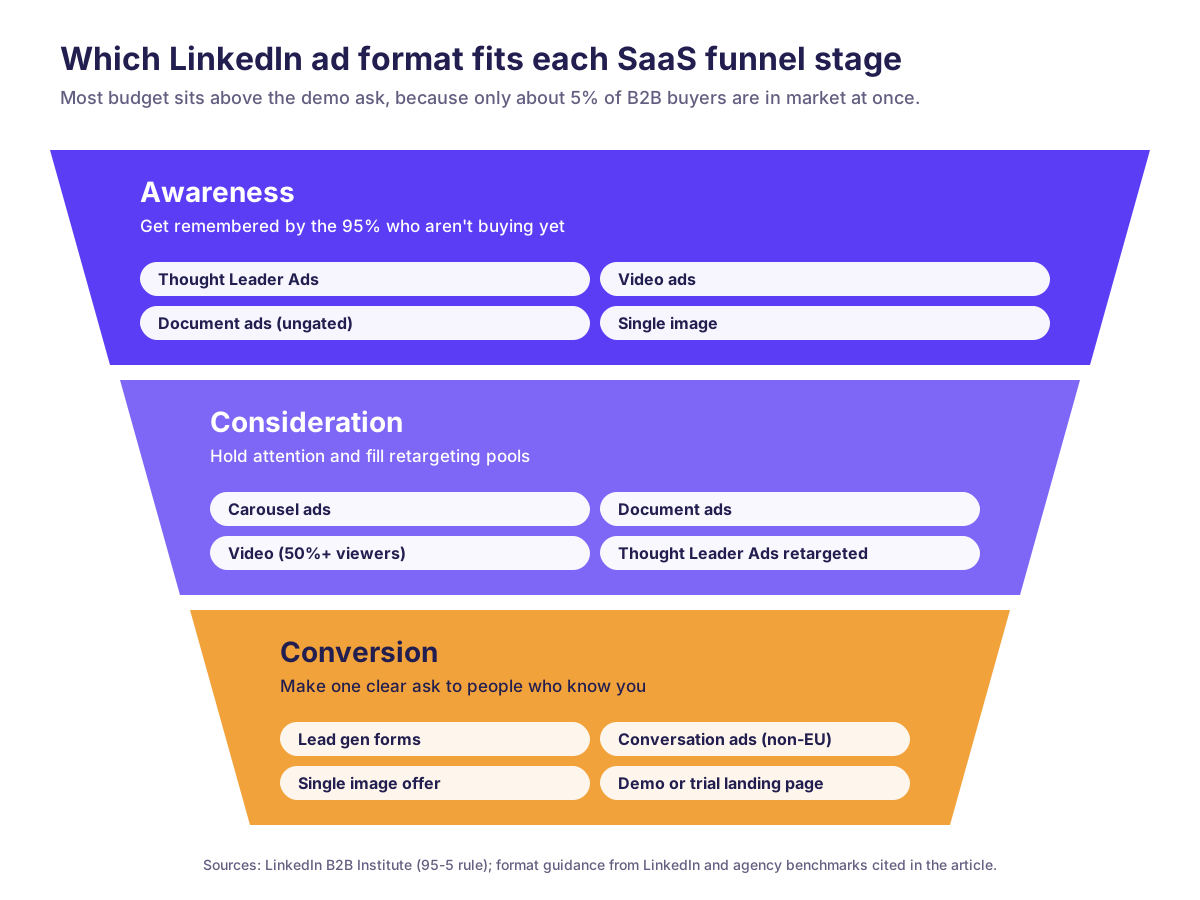
Here’s the uncomfortable math. Research from the Ehrenberg-Bass Institute for LinkedIn’s B2B Institute found that only about 5% of B2B buyers are in market at any given time. The other 95% will buy eventually, just not this quarter.
So most of your budget for LinkedIn ads for SaaS should reach people who won’t book a demo yet. Below are the LinkedIn ad formats, sorted by the job each does best.
| Format | Funnel stage | Best SaaS use | Watch out for |
|---|---|---|---|
| Thought Leader Ads | Awareness, retargeting | Founder or practitioner point-of-view posts | Needs a real person who posts regularly |
| Document ads | Awareness to consideration | Benchmark reports, playbooks, checklists | Gate them only for warm audiences |
| Single image ads | Every stage | Problem statements, proof points, offers | Wears out fastest on small audiences |
| Carousel ads | Consideration | Feature walkthroughs, step-by-step processes | Each card has to earn the next swipe |
| Video ads | Awareness, consideration | Short demos, customer clips, founder takes | The first 3 seconds carry the whole ad |
| Conversation ads | Conversion | Demo or trial offers to warm lists | Restricted for EU audiences |
| Lead gen forms | Conversion (attach to any format) | Content downloads, webinars, demo requests | Easy submits can lower lead quality |
Plan one LinkedIn campaign for your SaaS
Pick the stage, add your numbers, and get the objective, formats, a creative brief, and a refresh date you can hand to whoever makes the ads.
- Objective
- Formats
- Hook to adapt
- Visual
- Call to action
- Signal to watch
- Next step
Refresh timing sits inside the 2 to 4 week range Stackmatix recommends; heavier spend per member moves it earlier. Treat it as a starting point and refresh sooner if frequency rises while CTR falls. Format guidance follows LinkedIn’s 4 to 5 ads per campaign recommendation and Cognism’s 2026 study of 761 LinkedIn ad creatives.
Thought Leader Ads
LinkedIn thought leader ads promote a post from a person's profile instead of your company page. LinkedIn's own data shows they earn 2.3x the click-through rate of single image ads. Since March 2025, you can sponsor any member's post, employee or not, according to Social Media Today.
Snowflake's results show the ceiling. Its Thought Leader Ads reached a 5.6% CTR for Data Cloud Summit, and retargeted ones hit 21% for Dev Day, per LinkedIn's case study.
One caveat. Part of that CTR comes from people tapping "see more" to read the full post, which is why Cognism left these ads out of its CTR benchmarks. Judge them on engagement and on the retargeting pool they build.
Document and carousel ads
LinkedIn document ads let people read a PDF right in the feed. Run them ungated to cold audiences, then retarget readers with a gated version or a related asset. LinkedIn carousel ads suit step-by-step content, with one idea per card.
Video ads
LinkedIn video ads do two jobs well for SaaS: they show the product moving, and they build a retargeting pool of people who watched past the halfway mark. Put the problem in the first three seconds and add captions so the ad works with sound off. For exact sizes and character limits per format, keep this LinkedIn ad specs guide handy.
Conversation and message ads
LinkedIn conversation ads land in the inbox with button choices like "Book a demo" or "Send me the guide." They work on warm audiences who already know you. Sent cold, they read like spam. They're also restricted for EU audiences, so check your geo targeting before you build one.
Lead gen forms vs landing pages
LinkedIn lead gen forms pre-fill name, title, and company from the member's profile, so more people submit. TripleDart reports forms converting at about 13% against roughly 4% for landing pages, but landing-page leads produced 20% to 40% higher SQL rates in its accounts. Use forms for content and webinars, which is where LinkedIn ads for B2B lead generation shine. Use a landing page when the ask is a demo or trial and you want more intent behind each submit.
Targeting a SaaS Audience Without Wasting Impressions
You're not selling to one person. The same 6sense research found buying groups average more than 10 people. The person who'd use your product every day cares about very different things than the one who signs off on budget.
Good LinkedIn ad targeting reaches that group at companies that fit your ideal customer profile. Nobody else.
A worked audience build
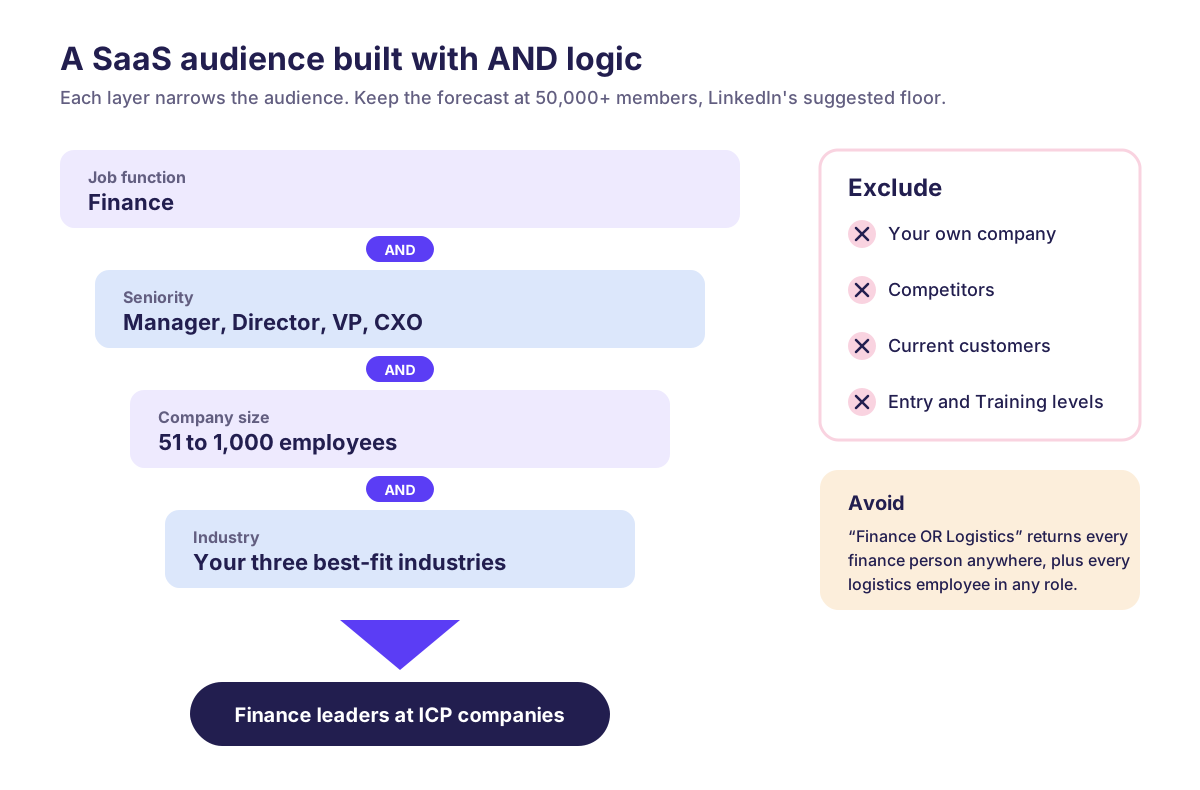
Say you sell expense software to finance teams at mid-market companies. A clean build in Campaign Manager looks like this:
- Job function: Finance
- AND Seniority: Manager, Director, VP, CXO
- AND Company size: 51 to 1,000 employees
- AND Industry: your three best-fit industries
- Exclude: your own company, competitors, current customers, and the Entry and Training seniority levels
Each facet narrows the audience, so keep an eye on the forecast panel as you build. LinkedIn's minimum is 300 members, but it suggests 50,000 or more to drive results. Go much smaller and frequency climbs fast, which wears your ads out in weeks.
One mistake shows up in almost every audit: putting function and industry in the same OR group. "Finance OR Logistics" gives you every finance person anywhere plus every logistics employee in any role.
Account lists and matched audiences
For account-based marketing, upload a company list of target accounts and layer function and seniority on top. Split the list into tiers so your top 50 accounts get their own campaign and their own budget.
LinkedIn matched audiences are where retargeting lives. The pools worth building for SaaS:
- Visitors to your pricing, integrations, or comparison pages (via the Insight Tag)
- People who watched 50% or more of a video ad
- People who opened or submitted a lead gen form
- People who engaged with a document ad or a Thought Leader Ad
LinkedIn retargeting is where conversion campaigns belong. Cold audiences get the idea, and warm ones get the offer.
Creative That Holds Up Over a 9-Month Buying Cycle
Most advice on LinkedIn ads for SaaS stops at "make valuable content." Fine. But what does that look like on a Monday when you need five ads by Friday?
Cognism's study of 761 LinkedIn ad creatives is the most useful dataset on this question. The median ad earned a 0.47% CTR, the top 10% started at 0.74%, and median dwell time was 4.21 seconds. Only about a quarter of the ads produced any conversions at all.
That last number matters most. Most creative doesn't convert. It earns attention so the targeting and the offer can convert later, which means each funnel stage needs creative with a different job.
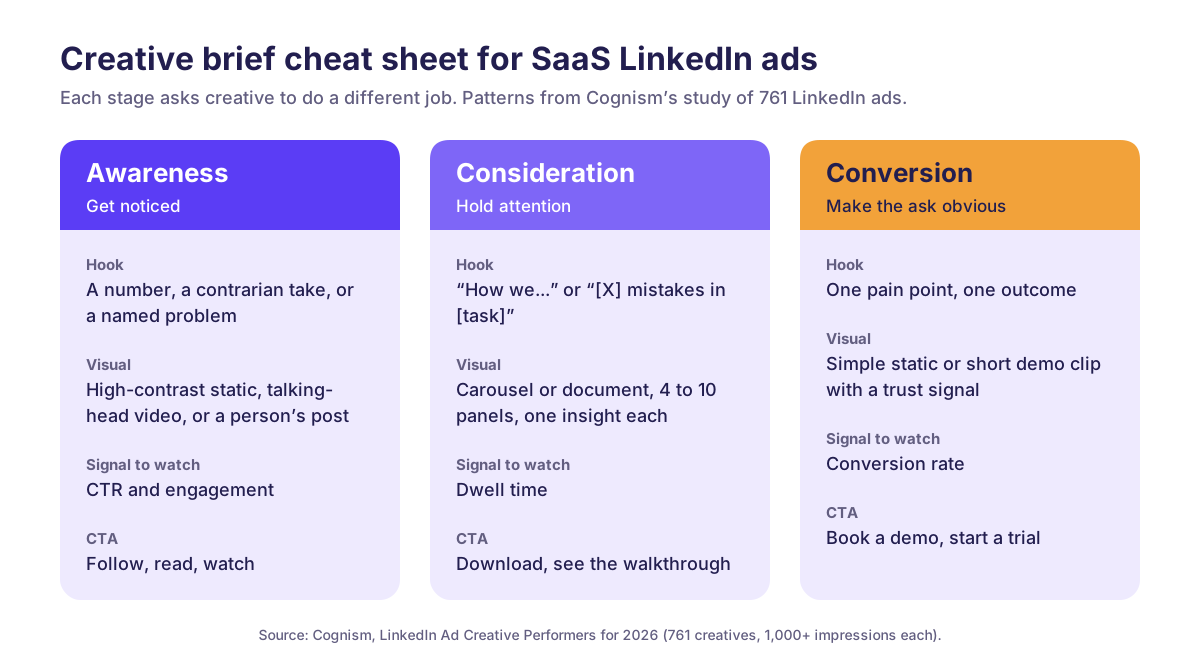
Creative briefs by stage
| Stage | Creative's job | Hook | Visual | CTA |
|---|---|---|---|---|
| Awareness | Get noticed | A number, a contrarian take, or a named problem | High-contrast static, talking-head video, or a Thought Leader Ad post | Follow, read, watch |
| Consideration | Hold attention | "How we..." or "[X] mistakes in [task]" | Carousel or document, one insight per panel | Download, see the walkthrough |
| Conversion | Make the ask obvious | One pain point, one outcome | Simple static or short demo clip with a trust signal | Book a demo, start a trial |
Cognism's data backs this split. The highest-CTR ads leaned on numbers, lists, and contrast. The ads people lingered on were talking-head videos and insight-dense carousels of 4 to 10 panels. The ones that converted were plain: one pain point, one CTA, and a trust signal. Our LinkedIn ad design guide goes deeper on layout and contrast.
Some hook formulas you can fill in for your own product:
- Awareness: "[Role] spends [hours] a month on [task]. Here's what that costs a [size] company."
- Consideration: "We studied [number] [category] teams. Here are the [number] habits the fastest ones share."
- Conversion: "See [product] handle [specific task] in a 15-minute demo."
For more patterns from real campaigns, browse these LinkedIn ad examples.
Thought Leader Ads deserve a permanent slot in the awareness row. In Cognism's dataset they had a median engagement rate of 1.72%, almost double the 0.90% for company-page ads. A founder explaining why they built the product tends to earn more reaction than a polished brand graphic.
Volume is the real bottleneck. Five variants per stage across three stages is 15 ads, and you'll replace most of them within a quarter. Carousels and document-style creative are the slowest to make by hand, which is where a LinkedIn carousel maker saves the most hours.
A Testing Rhythm for Small B2B Audiences
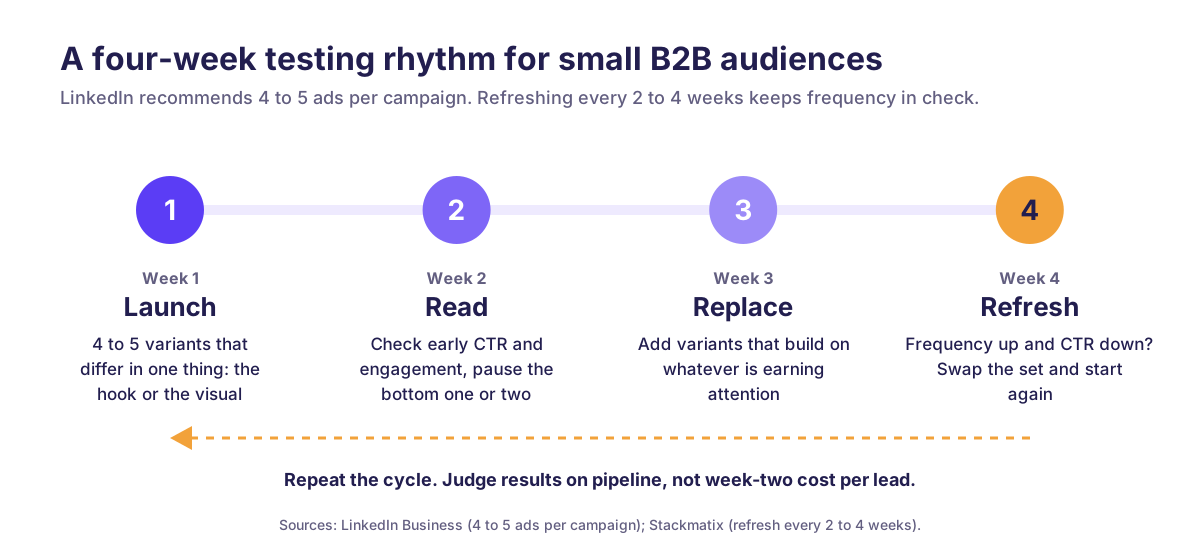
LinkedIn recommends running 4 to 5 ads per campaign. On a 60,000-person audience, that's also your defense against fatigue, because the more variants in rotation, the less often any one person sees the same ad.
A simple four-week rhythm:
- Week 1: Launch 4 to 5 variants that differ in one thing, either the hook or the visual.
- Week 2: Read early CTR and engagement. Pause the bottom one or two.
- Week 3: Add replacements that build on whatever is earning attention.
- Week 4: Compare frequency against CTR. If frequency is rising while CTR falls, refresh the set.
Stackmatix recommends refreshing creative every 2 to 4 weeks, which lines up with this cycle.
Your next variant shouldn't start from a blank page. Check which of your ads held attention longest, then look at what others in your category are running (here's how to run a quick competitive analysis). Predis.ai's competitor intelligence and insights put both in front of you before you spend on the next round, and what you do with them is your call.
And judge on pipeline. Dreamdata's report puts the gap between a first LinkedIn conversion and revenue at 214 days. A campaign that looks expensive in week two can still end the quarter as your cheapest source of pipeline.
Mistakes That Drain SaaS LinkedIn Budgets
A sound B2B LinkedIn ads strategy usually fails on the same few habits:
- Using OR between targeting facets that should be AND.
- Asking cold audiences for a demo before they know who you are.
- Running one ad for a whole quarter on a small audience.
- Sending paid clicks to the homepage instead of a page built for that ad.
- Pausing a campaign in week two because cost per lead looks high, before any lead could reach a sales conversation.
Where to Go From Here
LinkedIn ads for SaaS reward teams that treat creative like a supply line instead of a launch task. The targeting you set up in week one can stay mostly the same for months. The ads can't.
Start with three stages and four or five variants in each, then refresh every few weeks. Put a real person's voice in the awareness layer and keep the conversion layer plain. Read everything against pipeline.
If your founder or team already posts on LinkedIn, that's your Thought Leader Ads supply. Predis.ai for LinkedIn makes those posts and autoposts them on a schedule, so your organic feed keeps the paid one stocked.
FAQs
Agency guidance clusters between $3,000 and $10,000 a month. Stackmatix treats $3,000 to $5,000 as a floor, while TripleDart recommends $7,500 to $10,000. LinkedIn's own awareness playbook suggests $80 to $150 a day per target market for at least 4 weeks. Start at the low end with one audience, then scale whatever earns pipeline.
Your contract value matters more than any benchmark. Published agency ranges run from about $80 to $200 (Stackmatix) up to a $213 average (TripleDart). Work backward instead: if a closed deal is worth $30,000 and 1 in 20 leads closes, you can afford far more than $213 per lead and still come out ahead.
They do different jobs. Google catches people already searching for your category, while LinkedIn reaches the buying committee before they search. Dreamdata measured higher ROAS for LinkedIn than Google Search in 2025, but most SaaS teams run both: LinkedIn to create demand and Google to capture it.
Expect engagement data in the first 2 weeks and early leads within a month. Revenue takes far longer, since B2B deals sourced from LinkedIn often close most of a year after the first conversion. Give a SaaS LinkedIn program at least one full quarter before you decide whether it works.
You may also like: