


Explore this content with AI:
In January 2026, Runway showed 1,043 people a set of 5-second clips and asked one question: real or AI? Overall, they got it right 57.1% of the time, which is only a little better than a coin flip. But one category broke the pattern.
Clips with faces, hands, and people doing things were the easiest for viewers to get right.
That’s a problem if you sell things, because most ads are exactly that: a person holding a product and talking to the camera.
So if you’re figuring out how to make a realistic AI video for your next ad, start with the tells viewers use to catch one. There are five, and each one has a fix you can apply without an editor.
Why viewers still catch your AI video ad
AI video ads aren’t an experiment anymore. In IAB’s 2026 video report, 6 in 10 ad buyers said they use generative AI to build or improve video ads. AI-built ads now make up a third of all digital video ads. Small brands move fastest. A year earlier, smaller advertisers expected 45% of their video to be AI-built by 2026, compared with 36% for the biggest spenders.
Viewers noticed. NielsenIQ tested AI-generated ads on more than 2,000 people. Participants spotted most of them on instinct and rated them more annoying, boring, and confusing than regular ads. Even the ones judged high quality left a weaker memory trace.
The odd part? The best models can fool people in a clean 5-second test, yet the ads businesses actually run still get caught. Keep in mind that Runway’s test used single 5-second clips with no editing.
A 20-second ad with a presenter, a product, and three cuts gives viewers far more chances to notice something. The gap usually isn’t the realistic AI video generator you picked. It’s five specific things that slip through between the prompt and the post.
And people are looking for them. According to Ahrefs keyword data, more people search for how to tell if a video is AI generated than for how to make a realistic AI video.
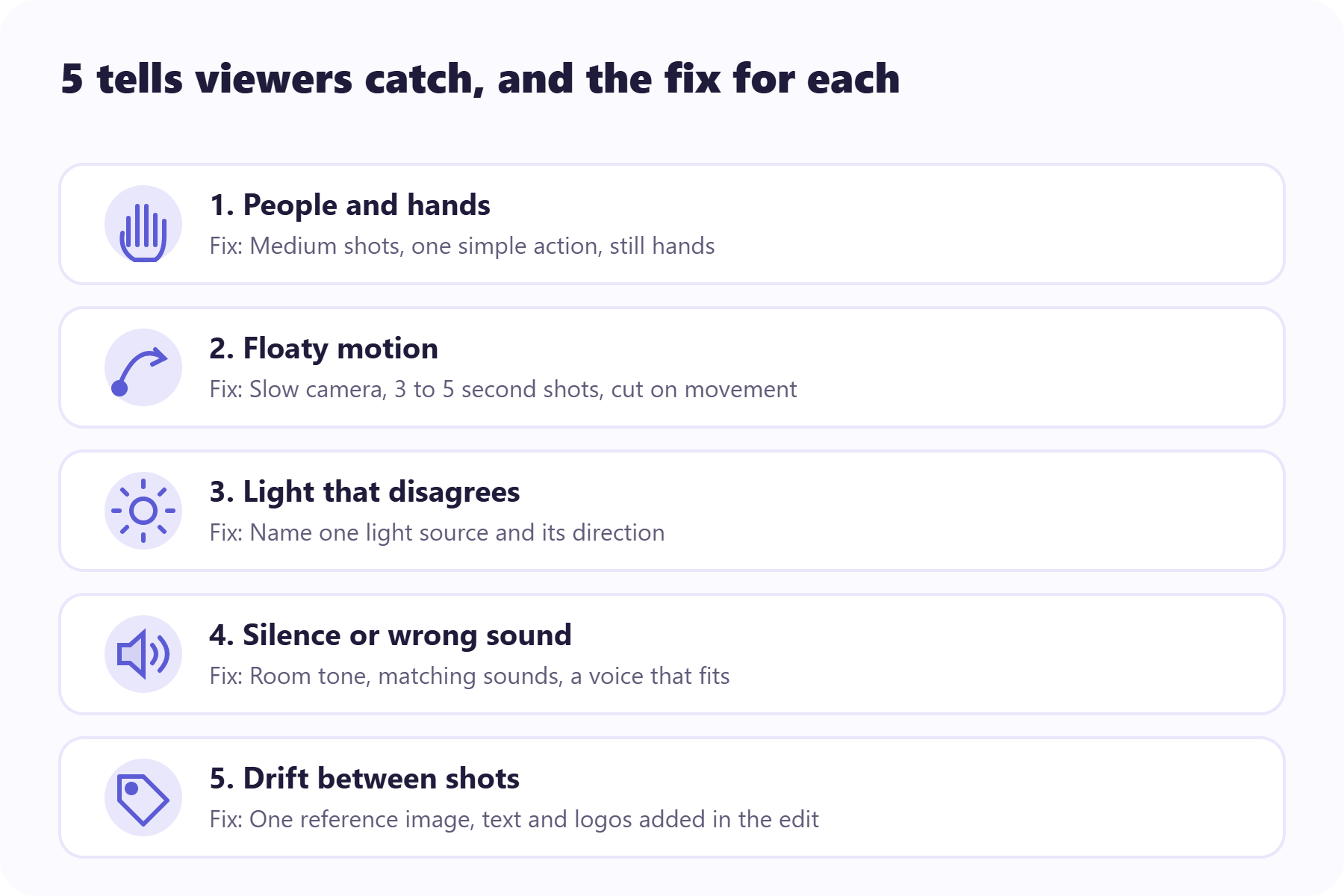
Reason 1: The people give it away
Runway’s study had a telling split. Viewers judged clips of people correctly 58% to 65% of the time, while AI-made animals and buildings fooled viewers more often than real footage did.
We’re wired to read other humans, so small errors land hard. A hand grips a mug with one knuckle too many. Teeth blur when someone talks, or a face shifts slightly as the head turns. That’s the uncanny valley, and AI UGC ads walk straight into it because they’re built on faces.
You don’t have to drop people from your ads. Just ask less of them:
- Frame at medium distance, because close-ups magnify every flaw in skin, teeth, and eyes.
- Give each shot one action, like a nod.
- Keep hands still, or out of frame, whenever they’d have to grip, twist, or type something.
- Cut before a big head turn.
- Let the product and the setting carry some shots, since those are the categories AI already handles well.
If your concept needs a person doing something fiddly, like applying a serum or opening a box, film that one shot on your phone and generate the rest around it.
Start from an ad that already works
Use a reference ad as your input instead of a blank prompt.
Reason 2: The motion has no weight
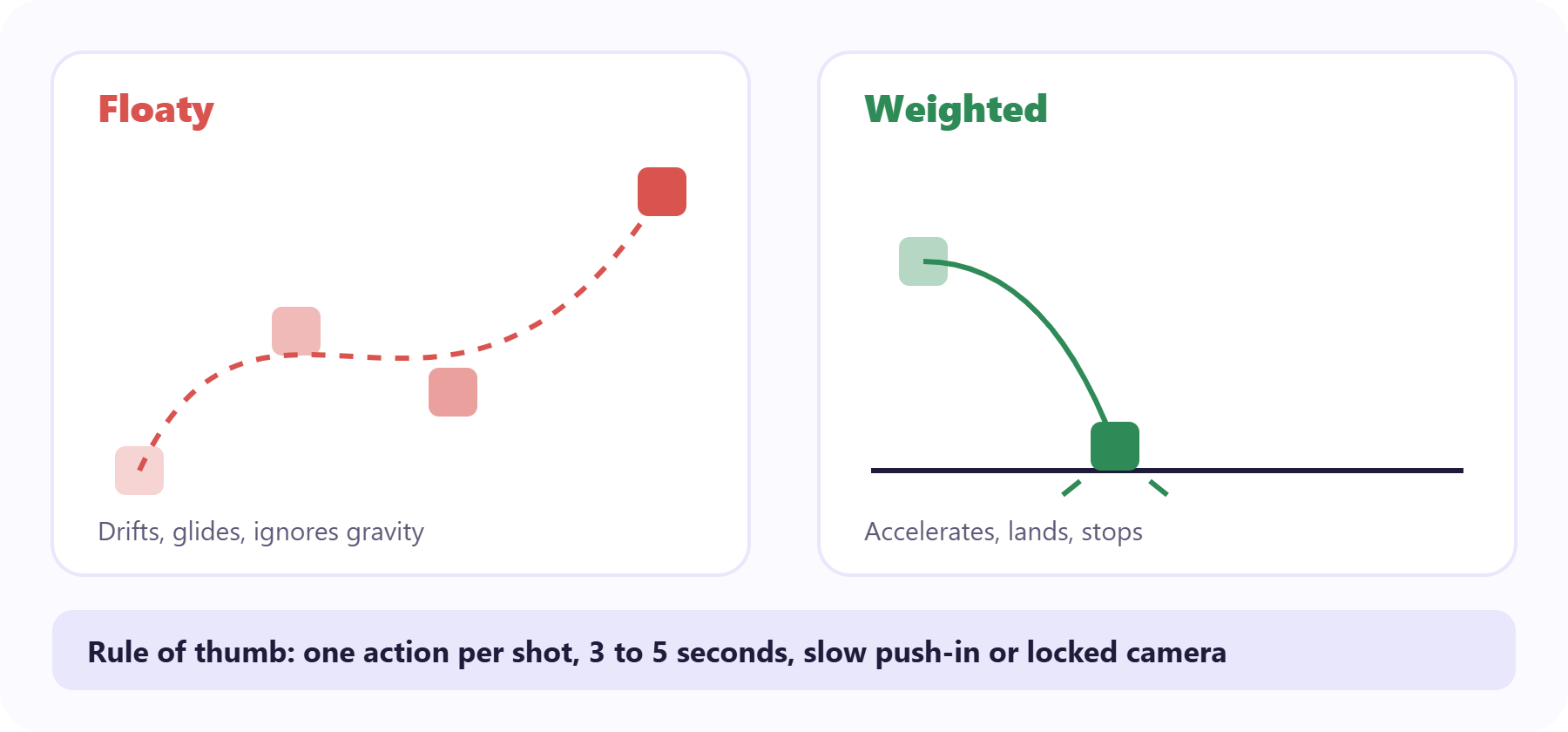
Watch for things that float. A cup rises a little too smoothly, a person glides instead of steps, or hair waves while nothing else in the scene moves. Viewers rarely name it, but they feel it.
Here’s what most guides skip. Researchers behind T2VPhysBench tested 10 text-to-video models against 12 basic laws of physics, and every model averaged below 0.60 in every category. Adding detailed physics hints to the prompt didn’t fix the problem, and some hints made it worse.
So you can’t prompt your way to gravity. You fix motion by choosing the kind of motion models already handle well.
Keep the camera slow. Camera words that tend to hold up include “slow push-in,” “static locked shot,” and “gentle pan left.” Words like “fast,” “sudden,” and “whip pan” are where clips fall apart.
A gentle push-in or a locked-off shot holds together far better than a fast pan or an orbit, because each frame changes less from the one before.
Give the subject one action per shot, and keep shots to 3 to 5 seconds. Short clips give errors less time to pile up, and cutting on movement hides the seam better than any transition. Planning the full ad? This guide to Instagram Reel length covers how long each format runs.
Need energy? Get it from the edit, with quick cuts between calm shots, rather than from fast motion inside a single shot.
Reason 3: The light doesn’t agree with itself
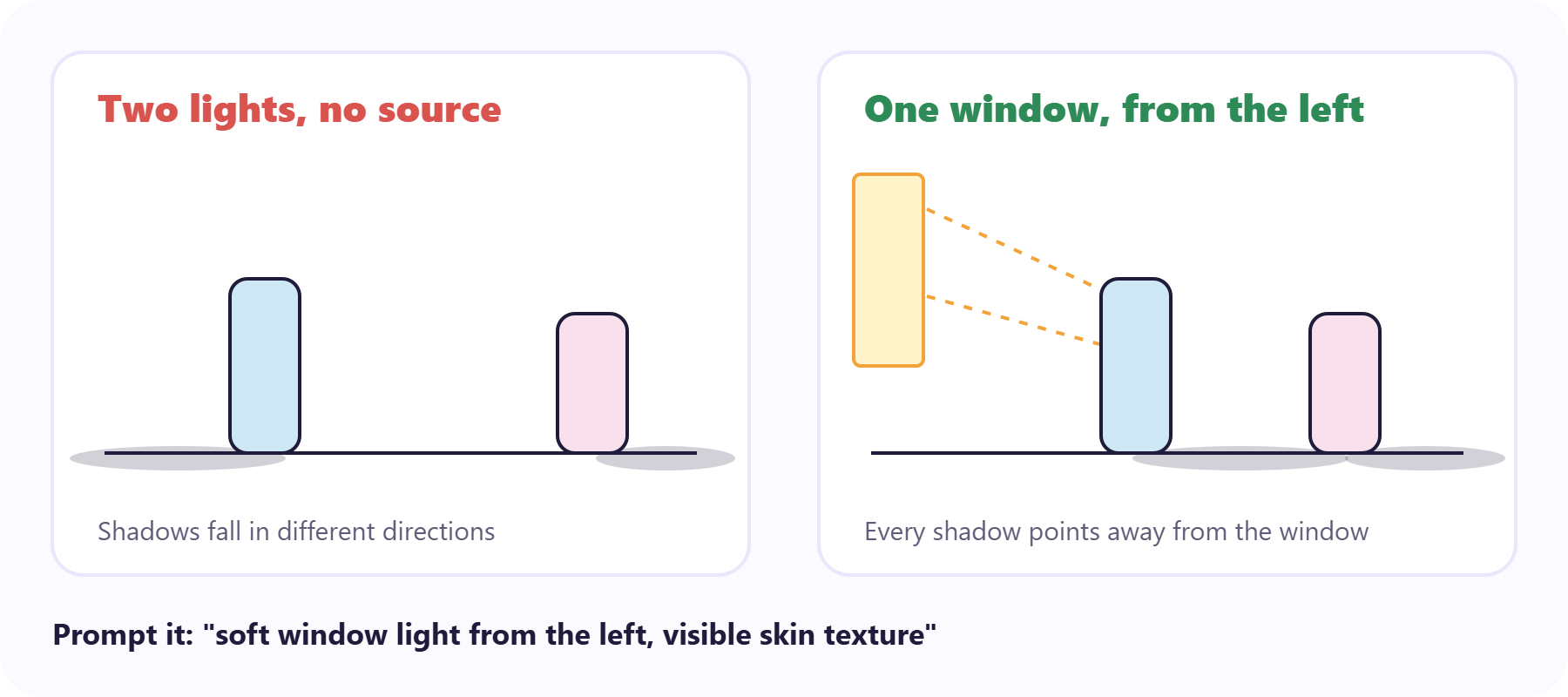
Real scenes have one main light source, and everything in them answers to it. AI scenes often don’t. A shadow falls left while the face is also lit from the left, a product glows with no lamp nearby, or skin looks like polished plastic.
These errors cost you more than looks. NielsenIQ found that low-quality visuals in AI ads made viewers work harder to process them, which pulls attention away from your message.
To make the light behave:
- Name one light source and its direction in your prompt. Write “soft window light from the left,” not “beautiful lighting.”
- Ask for real texture, like visible pores, fabric weave, or a scuffed tabletop. Perfect surfaces read as rendered.
- Add a light layer of film grain in your editor. It breaks up the too-clean look and helps clips from different generations match.
- Color grade every clip to the same warmth before you cut them together.
Reason 4: It’s silent, or the sound is wrong
A clip with no sound feels like a render, and a clean studio voice over a busy street feels like a dub. Either way, the picture looks worse than it really is.
That last part isn’t a hunch. In one perception study, viewers rated silent video lower on visual quality and engagement, even though the picture stayed the same. Another found that on small screens, better audio raised perceived video quality, while better video had no significant effect on perceived audio.
Sound is the cheapest realism fix you have:
- Add room tone, the quiet hum every real space has, because dead silence is a tell.
- Match sound to the action. A cup set down should clink, and footsteps should land when the feet do.
- Make the voice fit the room. A kitchen sounds a little echoey; a car sounds a little boxed in.
- Add captions so the ad still works for anyone watching with the sound off.
Listen to the voiceover on its own, too. A voice that never pauses for breath sounds synthetic even when every word is clear. Write short sentences into the script and leave small gaps between them, so the delivery has somewhere to breathe.
Reason 5: Details drift between shots
This is the one that sinks product ads. The logo’s letters wobble, the label turns to soup, the bottle grows taller between shot two and shot three, or the presenter’s shirt changes color. Each frame is predicted from the frames before it, so small changes stack up.
Start from a reference image instead of a text-only prompt. Image-to-video locks the product, the framing, and the light before any motion is added. Runway’s own guide says text-to-video usually takes 5 to 10 attempts to get close, and that most successful realistic clips start from an image.
Here’s how that plays out for a simple 3-shot product ad. Shot one is the product alone on a counter, animated from your best product photo with a slow push-in. Shot two is your presenter in a medium shot, lifting the same product into frame. Shot three is a close detail from that same photo. Because the product always starts from one image, it can’t quietly change shape between cuts. For more shot ideas, browse these product advertisement video examples.
Then follow two rules. Never ask the generator to render text or a logo; add those in your editor, on top of the video. And reuse the same reference image for every shot that shows the product.
When one frame still drifts, don’t regenerate the whole clip and roll the dice again. Fix that frame. Predis.ai lets you edit a single frame of a video ad and keep the rest, so the shots that worked stay put.
Fix the frame, not the whole video
Edit the one shot that drifted and keep the ones that worked.
How to make a realistic AI video pass the 10-second test
Runway gave its viewers 10 seconds per clip, which is about what a feed gives you. Give your own ad the same test before you put budget behind it. Watch it on your phone, once with sound and once without, and ask yourself five questions:
- Do faces and hands hold their shape the whole time?
- Does everything move like it has weight?
- Do all the shadows agree on where the light is?
- Does the sound match the room and the action?
- Do the product, logo, and clothes look the same in every shot?
A “no” on any question points you to the matching reason above. Then show the ad to one person who hasn’t seen it and don’t explain anything. If their first comment is about the product, you’re close. If it’s about a hand or a weird shadow, you know where to look.
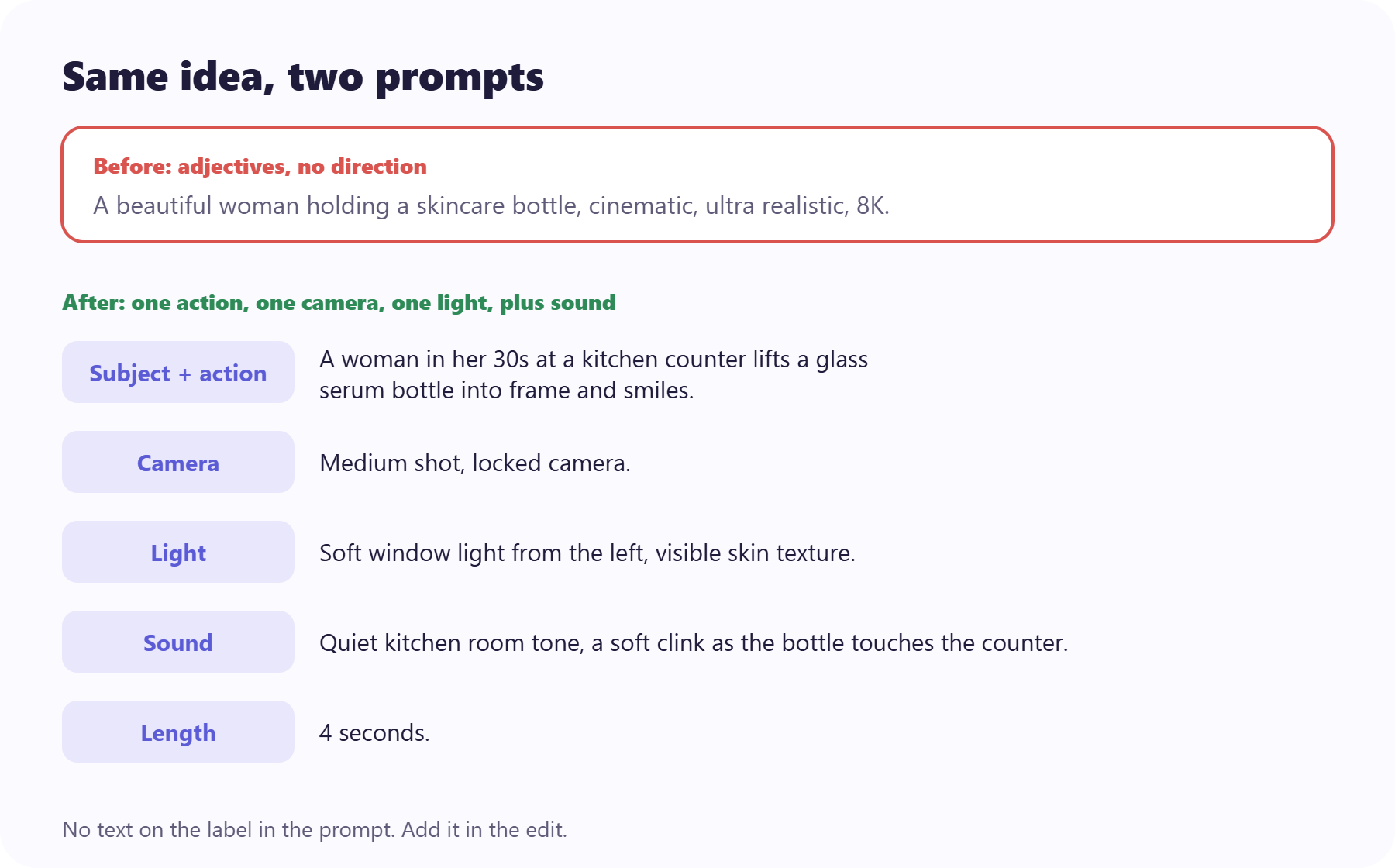
In a prompt, the difference looks like this. Most AI video prompt examples online read like the “before” version.
Before: A beautiful woman holding a skincare bottle, cinematic, ultra realistic, 8K.
After: A woman in her 30s at a kitchen counter lifts a glass serum bottle into frame and smiles. Medium shot, locked camera. Soft window light from the left, visible skin texture. Quiet kitchen room tone, a soft clink as the bottle touches the counter. 4 seconds.
The second prompt names one action, one camera, one light, and the sound. It never asks for text on the label, because that goes on in the edit.
Run the 10-second test
Play your ad on your phone and start the timer. Watch it once with sound and once without, then answer honestly.
Answer all five to see what to fix.
Realistic doesn't mean unlabeled
Making AI video look real isn't the same as passing it off as real, and platforms now check. YouTube labels photorealistic AI content automatically when creators don't disclose it. TikTok's policy asks creators to label realistic AI content, and it can apply a label on its own.
Meta says people may be required to add its "AI info" label when they share AI-generated content. In the EU, rules requiring labels on AI-generated material took effect in August 2026.
The fixes above aren't about fooling anyone. They remove the distractions, so viewers judge your product instead of your pixels. Turn the label on and let the ad do its job.
The fix is usually one frame away
Video models will keep getting better, and some of these tells will fade. Still, how to make a realistic AI video will come down to one habit: watch your ad the way a skeptical stranger would, find the one thing that gives it away, and fix that instead of starting over.
Then let the results decide. Run 2 or 3 realistic variants and see which one earns attention. Predis.ai's insights show how each variant performed after it ran, so your winner is something you found rather than something you guessed.
Make the variants, then find your winner
Make ads that look like your brand and see which one earned attention.
FAQs
In short clips, often yes. Runway's 2026 test found most viewers couldn't reliably tell its 5-second clips from real footage. Longer videos are harder, because every extra second and every extra shot gives a face, a hand, or a logo another chance to drift. For ads, aim for believable in every shot rather than perfect in one.
There's no single answer, and the leader changes every few months. Models differ in what they handle best, whether that's people, products, or wide scenes. Pick the one that keeps your product and presenter steady from a reference image, and judge it with the 10-second test above rather than its demo reel.
For anything that has to stay consistent, like your product, logo, or presenter, yes. A reference image sets the look and the light before motion is added, so the model only has to animate what's already there. Text-to-video is fine for loose background shots where nobody will check the details.
Hands have lots of small joints that overlap and hide each other as they move, so they're hard for a model to keep consistent from frame to frame. Runway's study found clips with faces, hands, and human actions among the easiest for viewers to judge correctly. The practical fix is to keep hands simple: resting, holding something still, or out of frame.
On the major platforms, usually yes if the video looks realistic. YouTube, TikTok, and Meta each have a disclosure setting, and YouTube now applies labels automatically. In the EU, labeling rules took effect in August 2026. Policies change often, so check each platform's current rules before you publish. This isn't legal advice.
You may also like: