Explore this content with AI:
You know the feeling. You’re mid-scroll, half-laughing at a Reel — a recipe that looked genuinely doable, a tutorial you actually needed, a meme that perfectly described your week — and then your thumb slips. The feed refreshes. The Reel is gone. You spend the next ten minutes frantically scrolling, searching, and ultimately accepting that it’s lost to the algorithm forever.
That experience is so universal that Instagram finally did something about it. As of late, the app rolled out a native Watch History feature — but it’s not the only way to recover a Reel you’ve seen. Between Watch History on Instagram Reels, your Likes log, and your Saved collections, you have three distinct tools for finding content you’ve already watched. This guide walks through all three, explains why you might not see the new feature yet, and gives you a set of habits to make sure you never lose a Reel again.
What Is Instagram Reels watch history?
Before diving into the how, it helps to understand what “Reels history” actually covers — because it isn’t one tidy folder.
Your Reels history on Instagram is really a combination of three separate logs:
- Watch History — a new, native feature that shows Reels you’ve recently viewed, regardless of whether you interacted with them
- Interactions (Likes/Comments) — a record of every Reel you’ve double-tapped or commented on, going back indefinitely
- Saves — Reels you’ve manually bookmarked, organized into collections you create
The critical distinction is the time window. The native Watch History feature covers roughly the last few days of your viewing activity. Your Likes and Saves, on the other hand, go back as far as your account exists. If you’re looking for a Reel from three months ago that you never liked or saved — that’s a much harder recovery job.
How to Check Your Instagram Reels Watch History: 3 Methods
Method 1: The Native Watch History Menu
Instagram’s Watch History feature is the most direct route to finding a recently viewed Reel. Here’s how to access it:
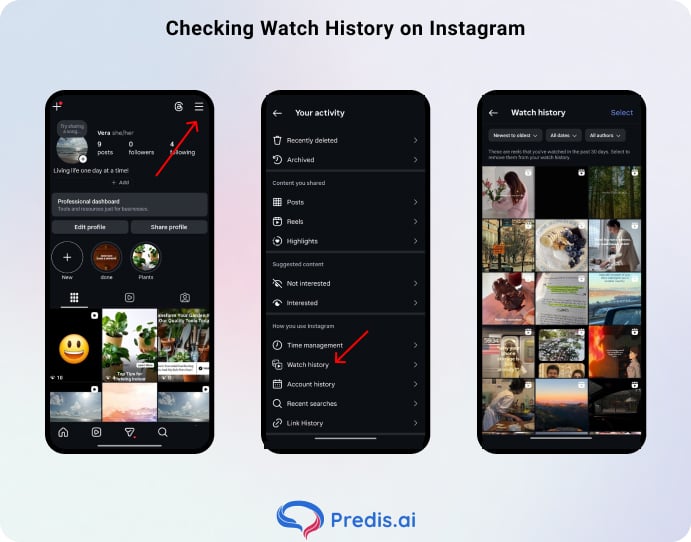
- Open Instagram and go to your Profile (bottom right icon)
- Tap the hamburger menu (three horizontal lines, top right)
- Tap Your Activity
- Scroll down and tap Watch History
Inside Watch History, you can sort Reels:
- from newest to oldest (or reverse)
- filter by a specific date range
- Narrow results down to a specific account.
That last filter is genuinely useful — if you remember it was a cooking creator or a particular brand’s account, you can isolate their content directly.
One important note: Watch History only covers the last 30 days. It’s a rolling window, not a permanent archive. And while you can remove individual Reels from your history by tapping Select and then Remove, there’s currently no option to bulk-clear everything in one tap.
Haven’t seen Watch History yet? That’s normal. Instagram rolls out features in phases, and some accounts — particularly those in certain regions or on older app versions — may not have it yet. The fix is almost always to update the app from the App Store or Play Store and wait a few days.
Method 2: The Interactions Loophole (Likes)
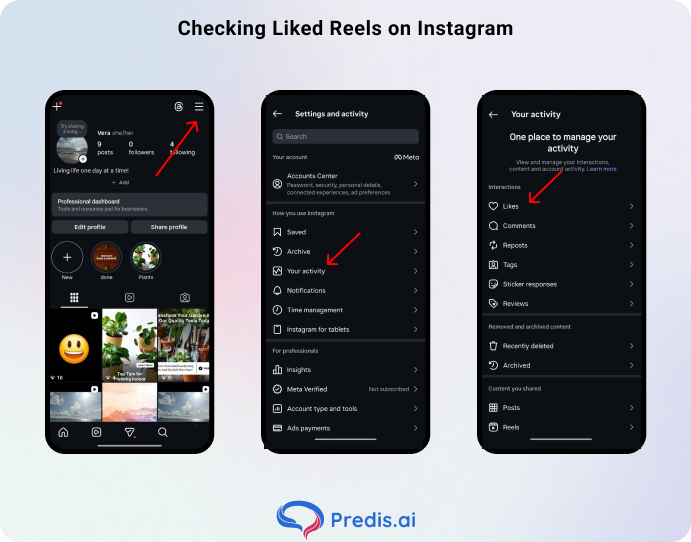
If Watch History isn’t available on your account yet, or you’re looking for something older than 30 days, your Likes history is the next best option. The catch: this only works if you actually double-tapped the Reel when you watched it. But if you did, it lives here indefinitely.
Steps:
- Go to your Profile
- Tap the hamburger menu > Your Activity
- Tap Interactions > Likes
- Filter by Reels to narrow the results
You can also sort by time period and filter by creator here — which makes this more powerful than it sounds.
The Likes log is essentially a permanent archive of every piece of content you’ve ever hearted. And since double-tapping is such an instinctive reflex while watching Reels, there’s a good chance the video you’re looking for is sitting here.
Pro tip: If you want an always-accessible “quick bookmark,” the double-tap is your fastest option. It takes zero extra steps, and the content never expires from your Likes log.
Method 3: Saved Collections
For Reels you deliberately bookmarked, the Saved folder is your most organized option. This is where content goes when you tap the bookmark icon at the bottom of a Reel — and with Collections, you can actually build a useful personal library.
To access your Saved Reels:
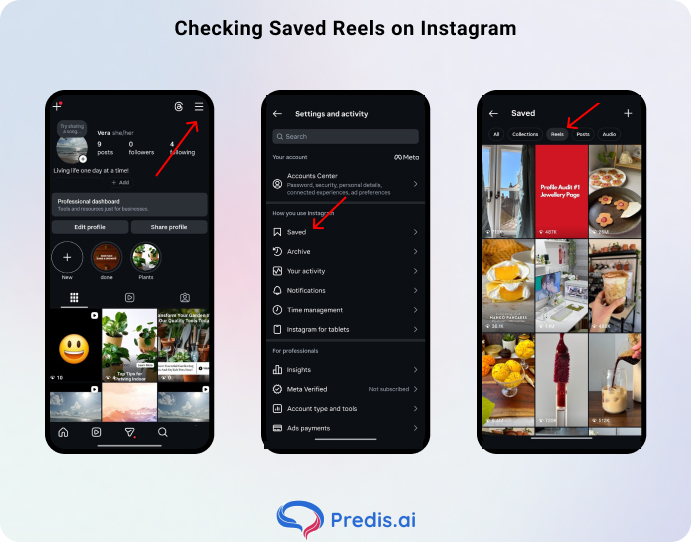
- Go to your Profile
- Tap the hamburger menu
- Tap Saved
- Tap the Reels icon at the top to filter by video content
To create a new Collection while saving a Reel, tap Save to Collection after bookmarking and either choose an existing one or create a new one on the spot. Collections like “Recipes to Try,” “Travel Ideas,” or “Work Inspo” turn what would otherwise be a messy pile of saved posts into something actually browsable.
Unlike Watch History, Saves never expire. A Reel you saved two years ago is still there. This makes it the most durable of the three methods — but it only helps if you were proactive enough to save in the first place.
| Method | Requires Prior Action? | Time Range | Best For |
|---|---|---|---|
| Watch History | No | Last 30 days | Recently watched, no interaction |
| Likes | Yes (double tap) | Indefinite | Quick passive bookmarking |
| Saved Collections | Yes (bookmark) | Indefinite | Organized long-term reference |
Why Can’t I See My Instagram Reels Watch History?
If you’ve followed the steps above and the Watch History option simply isn’t there, there are a few likely reasons.
1. Regional rollout
Instagram doesn’t flip features on globally at once. Watch History is still making its way across different markets, and some regions are getting it later than others. There’s no workaround here — it just hasn’t arrived for your account yet.
2. App version
Watch History is only available on newer versions of the Instagram app. Check your App Store or Play Store for pending updates. An outdated build is the most common reason features appear “missing.”
3. Failing to engage with the Reel
Watch History does log passive views — but only within the 30-day window. If you’re looking for something older that you never liked, saved, or commented on, it won’t appear anywhere in your activity. This is the most common reason a specific Reel feels “gone”: there was simply no interaction to anchor it to your account history.
4. The Reel was removed or set to private
If the creator deleted the Reel, made their account private, or had the content taken down by Instagram, it may still appear as an entry in your Watch History — but tapping it will lead nowhere.
You’ll either hit a dead end or see a “content unavailable” message. In this case, the video is genuinely gone, and no method will recover it. Your best bet is to search for the creator’s account directly and see if they’ve reuploaded a similar version.
Tips for Never Losing a Reel Again
The three methods above help you recover a lost Reel. These habits help you not lose it in the first place.
1. Build the double-tap reflex
Any Reel that makes you pause deserves a like. Even if you’re only mildly interested, a like costs nothing and creates a permanent, searchable record. Think of it as a zero-effort bookmark.
2. DM it to yourself
This sounds odd, but it’s one of the fastest save methods available. Tap the paper airplane (Share) icon on any Reel and send it to your own account in DMs. It lands in your message thread with yourself — no extra app, no screenshot, just a tappable link waiting whenever you need it.
3. Use audio as a search anchor
Most Reels use a trending song or audio clip. If you remember even a few words of the track, search for it in the Instagram search bar under the Audio tab. The app will surface all Reels using that sound — your video may be in there, and even if it isn’t, you might find a similar one from the same creator.
4. Keyword search with platform specificity
If you remember a phrase from the caption or a hashtag, Instagram’s Explore search bar can surface it. You can also try a Google search with site:instagram.com Plus your keywords — it indexes a lot of Instagram content and can surface specific Reels faster than Instagram’s own native search.
5. Save to a named Collection immediately
Saving a Reel to “All Posts” is better than nothing, but saving it to a specific Collection (“Recipes,” “Design Inspo,” “Client Ideas”) is infinitely more useful.
The next time you need it, you’re browsing a curated folder of 20 relevant videos — not scrolling through hundreds of mixed saves.
Build the habit of choosing a Collection every time you hit the bookmark. If the right one doesn’t exist yet, create it on the spot. It takes five extra seconds and saves you ten minutes later.
6. Go directly to the creator’s profile
If you remember roughly who posted the Reel — even just their niche or a partial username — go to their profile and browse their Reels tab.
Most creators post consistently in the same style, so the video you’re looking for is likely easy to spot once you’re on their page. This works especially well for accounts you follow regularly, since their content tends to cluster around recognizable themes and formats.
7. Download the Reel
For content you genuinely want to keep — a tutorial you’ll reference repeatedly, a format you want to adapt, an idea you’re saving for a pitch — the download option is the most permanent solution.
How to Clear Your Reels Watch History
Maybe you’ve been searching for something a bit embarrassing, or you just want to reset your algorithm suggestions. Clearing your Watch History is straightforward:
- Go to Profile > hamburger menu > Your Activity > Watch History
- Tap Select (top right)
- Choose the specific Reels you want to remove
- Tap Remove and confirm
As noted earlier, there’s currently no “clear all” button — removal is Reel by Reel. It’s tedious if your history is long, but it’s the option available for now.
What happens after you clear it?
Your “Suggested” and “For You” feeds may temporarily become less accurate. Instagram’s recommendation engine uses your watch behavior to calibrate what it shows you. Wiping that data is effectively asking the algorithm to start fresh — which can feel like a reset in feed quality for a few days before it re-learns your preferences.
Clearing Likes or Saves works independently: you can unlike a post from Your Activity > Interactions > Likes, and remove a saved Reel from the Saved folder, without touching Watch History.
Watch History Is Just the Start
The Watch History tab is the most direct route to recovering a lost Reel — but it’s a 30-day window with no permanent memory. Your Likes log and Saved collections are the actual long-term safety nets that most users already have access to, right now, regardless of whether Watch History has rolled out to their account.
The most resilient system is a combination of all three: let Watch History catch the things you almost forgot, use double-taps as passive bookmarks, and save intentionally when something genuinely matters. Set up a few Collections, and you’ve basically built your own personal Reels archive that Instagram itself can’t accidentally delete.
FAQ
No. Watch History is private by design — you can only view your own activity. Instagram doesn’t surface another user’s viewing behavior to anyone.
Typically no. Instagram logs the most recent view of a given Reel rather than stacking duplicates. If you watch the same video three times, you’ll see one entry, not three.
Watch History covers the last 30 days. Your Likes go back to whenever you started using Instagram, with no expiry. Saved posts are similarly permanent unless you manually remove them.