Explore this content with AI:
Most people pick Instagram business categories the same way they pick a username — quickly, without much thought, and then never revisit it. That’s a mistake. Your category isn’t just a label under your name. It’s one of the primary signals that tells Instagram’s AI which of its 2.14 billion monthly users should ever see your content at all.
This guide covers everything: what categories are, why they matter more now than ever, how to choose the right one, the full alphabetical list, and how to update, change, show, or hide yours — with zero fluff.
What Instagram Business Categories Actually Are
An Instagram business category is a short classification label that appears directly under your profile name on your public page. Think of it as your business’s genre tag — it tells both visitors and the algorithm what kind of account they’re looking at.
The category you choose does two distinct jobs:
- For users, it immediately answers “what is this account about?” before they read a single caption or tap a single post.
- For the algorithm, it’s a targeting signal. The discovery engine now accounts for roughly 40% of consumption on Instagram. Your category is one of the inputs that decides whether your Reels, posts, and Stories appear in the feeds of people who don’t follow you yet but have shown interest in your niche.
There’s also a distinction worth knowing: Business accounts and Creator accounts have access to slightly different category sets. Business accounts tend toward commercial labels like “E-commerce Website,” “Clothing Store,” or “business consultant“.
Creator accounts lean into personal brand labels like “Fitness Model,” “Video Creator,” or “Blogger.” If you find the category you want isn’t appearing, switching account types may unlock it.
Why Choosing the Right Category Matters More in 2026
The stakes around categorization have quietly risen. Here’s why this decision has real consequences now:
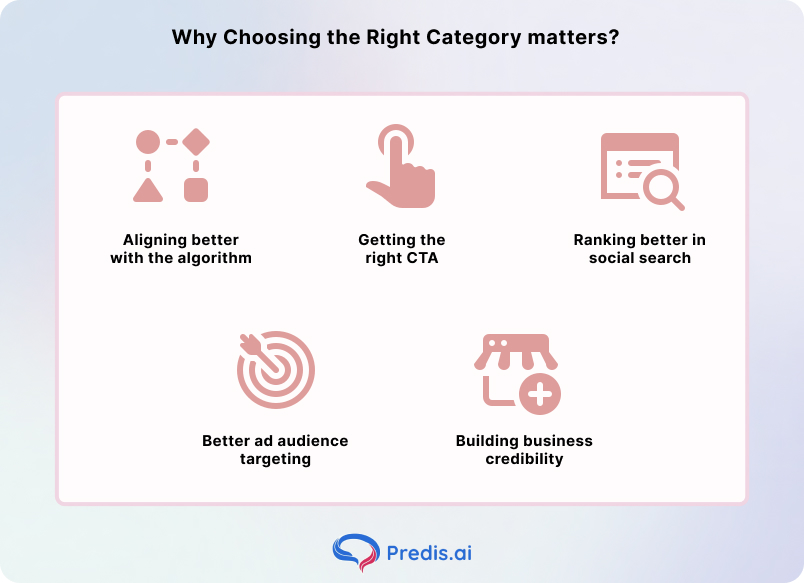
1. Algorithmic alignment
Instagram reports that 42% of Reel viewers are people who don’t yet follow the account. Those viewers didn’t stumble there randomly — the algorithm put the content in front of them because their interest signals matched a creator’s profile. Your category feeds directly into that matching logic.
2. Contact and action buttons
Certain categories unlock specific CTA buttons on your profile. Service businesses get access to “Book Now,” “Request a Quote,” and “Get Directions.” These aren’t cosmetic differences — they’re conversion touchpoints.
3. Instagram as a search engine
A growing segment of users now use Instagram’s search bar like a search engine, typing phrases like “Italian restaurant Chennai” or “Toronto wedding photographer.” Your category reinforces the keywords in your bio and posts, making your profile more likely to surface for those queries.
4. Sharper ad targeting
When you run paid campaigns through Meta, your business category is one of the data points that informs how Advantage+ and other AI-driven ad systems build your audience.
A correctly categorized account gives Meta’s ad engine a cleaner starting signal — meaning your budget gets spent reaching people who are already predisposed to care about what you sell, rather than a broad pool the system has to slowly learn to narrow down. The difference shows up in cost-per-click and return on ad spend over time.
5. Instant business credibility
A visible category label does something subtle but powerful: it signals that you’re an established entity, not just another personal account.
When a user lands on a profile and sees “Wedding Photographer” or “Nutritionist” under the name, it tells them this is a real professional with a defined offering — not someone figuring it out as they go. That first-impression credibility shortens the path from profile visit to follow, inquiry, or purchase.
How to Choose the Right Category for Your Business
Before you open the settings page, think through these questions:
What does your business actually sell or do?
Your primary revenue driver should determine your category — not your aspirational identity. A personal trainer who also sells e-books is primarily a “Personal Trainer,” not an “Author.”
What do your competitors use?
Search for accounts in your niche that are performing well. For partnership outreach, use an email finder to contact the right person. Look at their category labels. If 80% of thriving competitors in your space use “Interior Design Studio” rather than “Home Decor,” that’s a signal worth paying attention to — the algorithm has already learned to associate that label with that audience.
How specific can you go?
The more precise, the better. “Bakery” beats “Food & Beverage.” “Pediatric Dentist” beats “Dentist.” Specificity helps with local SEO, niche algorithmic routing, and immediate user comprehension.
Does it match your link in bio?
Your category, your bio copy, and your link in bio should all point in the same direction. If your link goes to a booking page for photography sessions, your category probably shouldn’t be “Artist.”
The Instagram Business Categories List (2026)
The following table covers the most commonly used and recently updated categories available across Business and Creator accounts. Use the search bar inside Instagram to find niche labels not listed here — Instagram’s full list is extensive and constantly updated.
A
- Academic Camp
- Accessories
- Accountant
- Actor
- Acupuncturist
- Advertising Agency
- Advertising/Marketing
- Aerospace Company
- African Restaurant
- Agricultural Cooperative
- Agriculture
- Airline Company
- Album
- Allergist
- Alternative & Holistic Health Service
- Amateur Sports Team
- Antique Store
- Apartment & Condo Building
- App Page
- Apparel Distributor
- Appliance Repair Service
- Aquarium
- Architectural Designer
- Argentinian Restaurant
- Aromatherapy Service
- Art
- Artist
- Arts & Entertainment
- Asian Fusion Restaurant
- Astrologist & Psychic
- Athlete
- Audiologist
- Auditorium
- Australian Restaurant
- Automotive Repair Shop
- Aviation School
- Awning Supplier
B
- Baby & Children’s Clothing Store
- Baby Goods/Kids Goods
- Bags & Luggage Store
- Bail Bondsmen
- Bakery
- Band
- Bank
- Bar
- Bar & Grill
- Barbecue Restaurant
- Barber Shop
- Bartending Service
- Beach Resort
- Beauty Salon
- Beauty, Cosmetic & Personal Care
- Beer Bar
- Biotechnology Company
- Blogger
- Board Game
- Boat / Sailing Instructor
- Bookstore
- Botanical Garden
- Brand Agency
- Buffet Restaurant
- Business Center
- Business Service
- Butcher Shop
C
- Cabin Rental
- Cafe
- Camera Store
- Canadian Restaurant
- Candy Store
- Canoe & Kayak Rental
- Car Dealership
- Casino
- Chicken Joint
- Child Care Service
- Chimney Sweeper
- Chinese Restaurant
- Chiropractor
- Chocolate Shop
- Christian Church
- City Infrastructure
- Cleaning Service
- Clothing (Brand)
- Coffee Shop
- Collectibles Store
- College & University
- Colombian Restaurant
- Comedian
- Comedy Club
- Community Organization
- Company
- Concert Tour
- Construction Company
- Consulting Agency
- Cosmetic Dentist
- Credit Union
D
- Dairy Farm
- Dance & Night Club
- Dance School
- Dating Service
- Day Care
- Dentist
- Dessert Shop
- Discount Store
- Doctor
- Driving School
- Dry Cleaner
E
- E-Commerce Website
- Education
- Engineering Service
- Entertainment Website
- Environmental Consultant
- Escape Game Room
- Event Planner
- Event Videographer
- Exotic Car Rental
F
- Fabric Store
- Family Doctor
- Family Medicine Practice
- Fashion Designer
- Fast Food Restaurant
- Finance Company
- Financial Consultant
- Florist
- Food & Beverage
- Footwear Store
G
- Gamer
- Garden Center
- Gas Station
- Gift Shop
- Graphic Designer
- Grocery Store
H
- Hair Salon
- Hardware Store
- Health & Wellness Website
- Health Food Restaurant
- Hotel & Lodging
I
- Ice Cream Shop
- Indian Restaurant
- Industrial Company
- Internet Marketing Service
- Investment Bank
J
- Japanese Restaurant
- Jewelry/Watches
K
- Karaoke
- Kitchen & Bath Contractor
- Korean Restaurant
L
- Landscape Company
- Language School
- Lawyer & Law Firm
- Library
- Local Business
M
- Magazine
- Makeup Artist
- Marketing Agency
- Media Company
- Medical Center
- Mediterranean Restaurant
N
- Nail Salon
- National Park
- Newspaper
- Nonprofit Organization
O
- Occupational Therapist
- Optometrist
- Organic Grocery Store
P
- Painter
- Personal Blog
- Pet Store
- Photographer
- Physical Therapist
- Pizza Place
- Public Figure
- Publishing Company
Q
- Quay
R
- Race Track
- Real Estate Company
- Recycling Center
- Restaurant
- Retail Bank
S
- School
- Shopping & Retail
- Sightseeing Tour Agency
- Software Company
- Spa
- Sports League
- Supermarket
T
- Talent Agency
- Tattoo & Piercing Shop
- Tech Company
- Thai Restaurant
- Theme Park
U
- University
- Urban Farm
V
- Vacation Home Rental
- Veterinarian
- Vintage Store
W
- Wedding Planning Service
- Winery/Vineyard
- Women’s Clothing Store
X, Y, Z
- Yoga Studio
- Zoo
Note: Instagram periodically adds and retires labels. If you don’t find your ideal category, use the keyword search in the “Category” settings field — it surfaces hundreds of niche labels beyond what the default suggested list shows.
How to Set or Update Your Instagram Business Category
The process takes about 90 seconds on mobile:
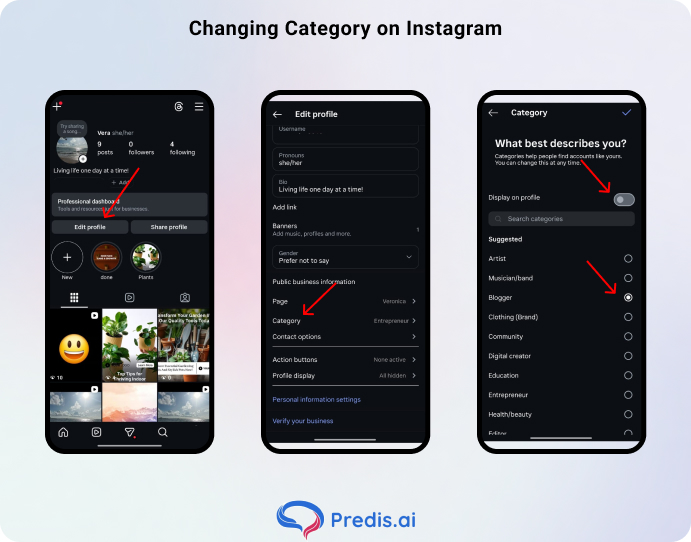
- Go to your profile and tap Edit Profile
- Scroll down to Profile Information
- Tap Category
- Use the search bar to type your category keyword (e.g., “fitness,” “bakery,” “consultant”)
- Select the label that best fits
- Toggle the Show category on profile on or off based on your preference
- Tap Done to save
One important sync note: If your Instagram is linked to a Facebook Page, Instagram will suggest you match categories across both platforms. Facebook still serves 3.07 billion monthly users, and keeping your categories consistent helps Meta’s ad systems (including Advantage+ campaigns) understand your business correctly across the family of apps.
How to Show or Hide Your Category
After setting a category, you’ll see a toggle labeled “Show category on profile.” This controls whether the label is publicly visible under your name.
When to show it: If you’re running a business account focused on lead generation or local discovery, keep it visible. A clear category label builds instant credibility and can improve profile-to-action conversion.
When to hide it: Some creators prefer a cleaner visual profile without the label. If you’re a personal brand that doesn’t fit neatly into one box, hiding the category keeps your profile uncluttered while still letting the algorithm use the signal behind the scenes. The algorithm reads your category regardless of whether it’s visible to users.
What Happens When You Change Your Category
Changing your category is safe and reversible — it doesn’t delete posts, reset followers, or affect your existing content. What it does affect:
1. Algorithmic re-indexing
Instagram’s system needs time to recalibrate its routing of your content after a category change. Expect a window of roughly 2–4 weeks before your reach patterns stabilize under the new label. During that period, engagement fluctuation is normal.
2. Ad campaigns
If you’re running Advantage+ or AI-optimized campaigns, a category change can shift the audience Meta uses for targeting. Monitor campaign performance in the weeks following a switch and adjust audience definitions if needed.
Frequency: There’s no hard limit on how often you can change your category, but switching repeatedly — more than once per quarter — can confuse both the algorithm and users who visit your profile regularly. Change it when your business genuinely pivots, not as an experiment.
Common Mistakes to Avoid
1. Choosing a category that’s too broad
“Shopping & Retail” covers an enormous space. “Jewelry Store” or “Vintage Clothing” gives the algorithm much more to work with and puts you in front of more relevant audiences.
2. Picking the aspirational label instead of the accurate one
If you’re a freelance graphic designer who occasionally speaks at events, you’re a “Graphic Designer,” not a “Public Speaker.” Accuracy beats aspiration for algorithmic purposes.
3. Setting it once and forgetting it
Businesses evolve. If you launched as a “Fitness Model” and have since built a fully fledged online coaching business, “Fitness Trainer” or “Coach” is now the more accurate signal. A mismatched category quietly erodes your reach over time.
4. Not using the search bar
Many users accept whatever appears in the “Suggested” list and miss the more specific label that actually fits. Always search before settling.
The Bottom Line
Your Instagram business categories are a small setting with outsized influence. It determines which users discover you, which action buttons appear on your profile, how well you rank in local and niche searches, and how the AI recommendation engine interprets your content.
The right category doesn’t just label your business — it positions it. Pick the most specific, accurate label you can find, make sure it matches your actual revenue focus, and revisit it whenever your business direction changes.
Audit your profile today. If your category hasn’t been reviewed since you first set up your account, there’s a good chance it’s costing you reach you don’t even know you’re missing.
FAQ
Yes — directly. Your category is one of the primary signals Instagram’s AI uses to determine which non-followers see your content through recommendations and Explore.
No. You must choose from Instagram’s pre-defined list, though that list is extensive. Use the search function in settings to find niche options beyond the default suggestions.
The Category field is only available on Business and Creator accounts. If you’re on a personal account, you’ll need to switch account types in Settings to access it.