Explore this content with AI:
In the fast-evolving landscape of social media, few features have shown the staying power of Instagram Stories. What began as a simple way to share fleeting moments has transformed into a sophisticated engine for brand storytelling, community engagement, and AI-driven creativity. As we move through 2026, the “24-hour” format is no longer just a fun add-on—it is the heartbeat of the Instagram platform.
Whether you are a seasoned creator or a complete beginner, mastering Stories is essential for staying relevant. This comprehensive guide will walk you through everything from the basics to the cutting-edge AI tools defining the current era.
Instagram Stories: A Quick Refresher for Beginners
If you’re just getting started, think of Instagram Stories as a secondary, more casual layer of your profile. While your main feed is a curated gallery, Stories are the “behind-the-scenes” footage.
What Stories are and how they work
Stories are vertical, full-screen photos or videos that disappear after 24 hours. They are designed to be ephemeral, encouraging users to post more frequently without worrying about “ruining” the aesthetic of their permanent profile grid.
How to create and post a Story
To start, simply swipe right from your home feed or tap the “+” icon on your profile picture. You have several capture modes:
- Photo/Video: Tap for a photo, hold for a video (up to 60 seconds per segment).
- Boomerang: Creates a looping, back-and-forth video burst.
- Text-only (Create Mode): Allows you to share thoughts on a colorful background without needing an image.
Saving Stories to Highlights
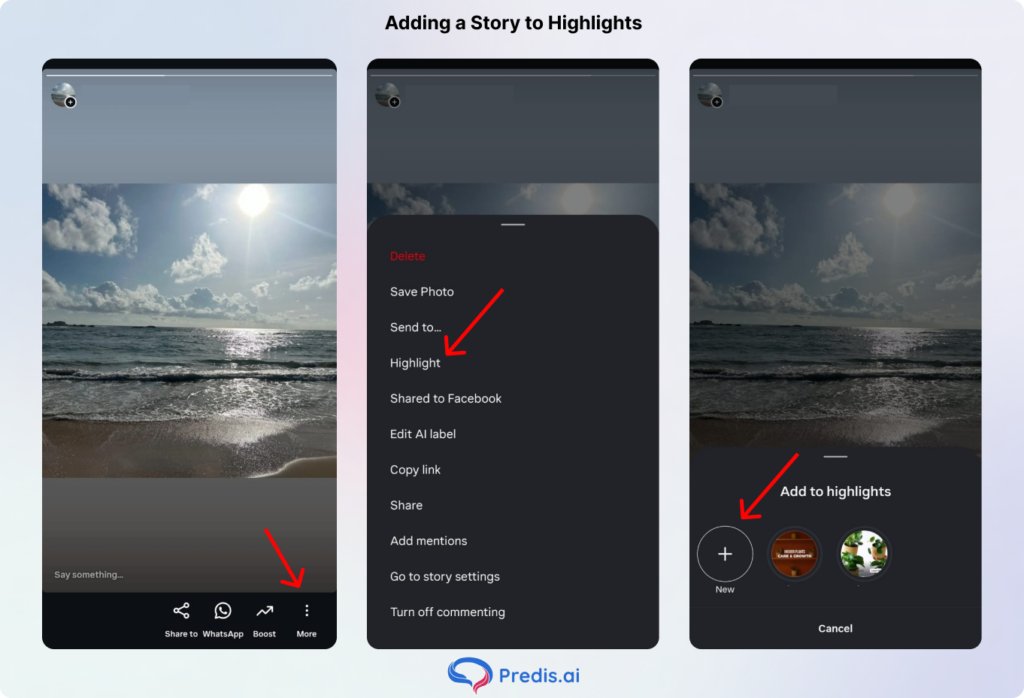
If you create something too good to lose, use the Highlights feature. By pinning a Story to a Highlight on your profile, it bypasses the 24-hour limit and stays visible to followers until you choose to remove it.
Why Instagram Stories Still Matter in 2026
You might wonder if the format is getting “old.” On the contrary, the numbers and the technology suggest that Stories are more dominant than ever.
- The 500 Million Club: Over 500 million people engage with Stories and make Stories every single day. For a business or creator, ignoring this is like ignoring half of your potential audience.
- The “Vibe” Shift: Instagram Feed posts are often seen as “ads” or “performative.” Stories feel raw and authentic. They hit differently because they feel like a direct FaceTime call with a friend rather than a polished commercial.
- The Algorithm Advantage: Every time you post a Story, your profile bubble moves to the front of the line at the top of your followers’ feeds. This constant “bump” keeps your brand top-of-mind without needing to fight the main feed algorithm constantly. And most importantly, this is prime real estate that gets you in front of users.
What’s New: Instagram Stories Features in 2026
The 2026 update brought a wave of AI-integrated tools that have changed how we produce content.
- AI-Powered Restyle Tool: You can now take a standard photo and use a text prompt (e.g., “Make this look like a 70s disco” or “Cyberpunk style”) to completely reimagine the visual aesthetic using generative AI.
- Public Comments: Previously, Story interactions were private DMs. Now, you can toggle “Public Comments” on, allowing followers to see a scrolling ticker of thoughts, which drastically boosts community feelings.
- Custom “Add Yours” Templates: You can now design your own interactive templates (like “My Morning Coffee Routine”) for others to follow, turning your creative ideas into viral challenges.
- AI Transitions: No more clunky cuts. Instagram’s native editor now uses AI to “morph” one clip into the next, creating seamless, professional-grade cinematography.
The Creative Toolkit: Every Story Feature You Should Be Using
To stop people from “tapping through” your content, you need to use the interactive tray.
- Polls, Quizzes & Questions: These are the “Big Three” of engagement. Use them to get instant feedback. Even a simple “This or That” poll can double your Story’s reach.
- Countdown Sticker: Use this to build “hype.” When a follower taps the countdown, they can set a reminder for when it hits zero—perfect for launches.
- Link Sticker: Gone are the days of the “Swipe Up” requirement. Everyone, regardless of follower count, can now drop a direct link to a website, shop, or blog.
- Music Sticker: Audio is 50% of the experience. Use the search tool to find trending tracks, which can actually help your Story appear in the “Audio” discovery tabs.
- Layout Feature: Don’t spam 10 separate photos. Use the Layout tool to create a clean grid of 2 to 6 images in a single frame.
Tips to Make Your Stories Actually Worth Watching
- The First Frame Rule: You have exactly one second to capture interest. Use a bold headline, a striking visual, or a “hook” question immediately.
- Visual Consistency: Use the same 2–3 fonts and a consistent color palette. This makes your Stories instantly recognizable as yours even before the viewer looks at the username.
- Strategic “Close Friends”: Use this list to share “VIP” content, behind-the-scenes secrets, or special discount codes. It creates a sense of exclusivity that builds deep brand loyalty.
- Don’t Overload: If your Story looks like a cluttered 90s website, people will skip it. Keep text concise and use negative space to let the visuals breathe.
How to Use Instagram Stories for Growth in 2026
Growth isn’t just about getting new followers; it’s about deepening the relationship with the ones you have. And here is how Instagram Stories can help you achieve that.
1. Community Building
The “Add Yours” sticker is a goldmine for growth. When someone uses your template, their followers see that you started the thread, leading new eyes back to your profile.
2. Search Engine Optimization (SEO)
In a major shift for 2026, public Instagram content is increasingly indexed by Google. By using Location Tags and Relevant Hashtags (even if you hide them behind a sticker), you increase the chances of your Stories appearing in local and interest-based searches.
Instagram Stories for Businesses and Marketers
For brands, Stories are the ultimate conversion tool.
- Natural Urgency: Use the 24-hour limit to your advantage. “Flash sale ends when this Story disappears” is a powerful psychological trigger.
- Comment to DM Automation: Use third-party tools to set up triggers. For example, “Comment ‘GUIDE’ and I’ll DM you the link.” This automates lead generation while you sleep. This way, you get to improve your engagement rate and also share your materials effectively with your audience.
- UGC (User Generated Content): Always reshare when a customer tags you. It provides “social proof” and makes your customers feel like part of the brand family. Besides, social proof increases your chances of conversion even more than professional ads do, because of how authentic it is!
Instagram Stories Analytics: What to Track and Why
To grow, you must look at the data. Because Data tells the whole story that hides behind your followers, what they like and what they don’t. By understanding them better, you can create stories that they will actually interact with. Swipe up on any live Story to see the graph icon.
- Reach vs. Views: Reach tells you how many unique people saw it. While views, on the other hand, let you know how many times a story has been viewed.
- Taps Back: This is a huge compliment. It means your content was so interesting or information-dense that the user wanted to see it again.
- Exits: If one specific type of content always has a high “Exit” rate, stop making it. It’s a signal that your audience is bored. It could also mean that your hook is not working.
- Reshares: In 2026, reshares are the “Gold Standard.” They indicate your Story provided so much value that a user wanted to claim it for their own audience.
Common Instagram Stories Mistakes to Avoid
Posting Instagram stories and forgetting about them is not the way to go. These are windows of engagement that should be cashed on. Here are some common mistakes that brands make, which miss these engagement opportunities.
- Ignoring the DMs: If someone replies to your Story, reply back! Engagement is a two-way street.
- Low-Quality Audio: People will forgive a grainy video, but they will mute/skip a video with “peaking” or muffled audio. No! It will be a huge turn-off and an immediate story exit, which is not what you want.
- Skipping the CTA: Every sequence should end with a “Call to Action.” Tell them to “Tap the link,” “Vote below,” or “Check the new post.” This way, you can further the conversation a little bit more.
Tools to Level Up Your Instagram Stories in 2026
- Predis.ai: An essential for the modern creator. It uses AI to generate on-brand visuals and captions from a simple text prompt, saving hours of design time.
- Canva: Still the king of templates. Use it for branded Highlights covers and complex multi-page layouts.

Many businesses also complement such tools with professional software development services to build more customized and scalable digital workflows.
Conclusion
While Stories are a great tool for daily engagement, Reels remain the most powerful format for reaching new audiences on Instagram. If you want to complement your Stories strategy with a strong Reels presence, an AI reel maker can help you produce scroll-stopping short videos efficiently and at scale.
The key is to stay consistent and have fun with your content. Since the app handles the technical work, you can focus on being yourself and checking your stats to see what people like. If you share regularly and save your best moments to your Highlights, your account will continue to grow and stay relevant with Predis AI.
Frequently Asked Questions
For most, 3 to 7 is the “sweet spot.” More than 10 often leads to a “drop-off” in views.
Yes, but only while the Story is live (and for 24 hours after it moves to the archive).
You can use Meta Business Suite or third-party apps like Predis AI to plan and auto-post your Stories at optimal times.
Yes, as of the 2026 update, you can enable public comments, though they still disappear after 24 hours along with the Story.