

Explore this content with AI:
Almost every small brand running video ads has tried AI by now. Most of them aren’t happy with it. In IAB’s 2026 video report, 96% of smaller buyers said they’re not satisfied with how they use generative AI for ad creative.
You know the feeling. You type a careful ai video prompt and wait two minutes. Back comes a gorgeous clip where your label melts halfway through, the camera spins for no reason, and the product is on screen for about one second. Pretty, and useless.
The fix isn’t a fancier model. It’s a prompt that knows what you sell and what the clip is for. Below are 50 of them, sorted by product category, written to paste into whatever video tool you already pay for.
Why most AI video prompt examples don’t sell anything
AI video ads stopped being an experiment a while ago. The same IAB report found that nearly two in three video ad buyers now use generative AI for video creative, and about a third of their ad assets already lean on it. Smaller brands are moving faster than big ones, too. In IAB’s 2025 edition, smaller brands expected 45% of their video to be built this way by 2026, compared with 36% for the largest.
So adoption isn’t the problem. The prompts are.
Look at most AI video prompt examples online and you’ll see them sorted by camera trick: orbit shots, dolly shots, crane shots. That’s handy if you’re a cinematographer. If you sell candles, you have to translate every single one into “okay, but what does that look like with my jar?” Plenty of people give up and type “cinematic product video, 4k” instead.
A product ad clip has one job. It shows your product doing one thing a buyer cares about, clearly enough that someone scrolling with the sound off gets it before they’ve moved on. Everything in the prompt should serve that job. Lens flares don’t, and neither do three camera moves crammed into five seconds.
The portable AI video prompt core (paste it into any model)
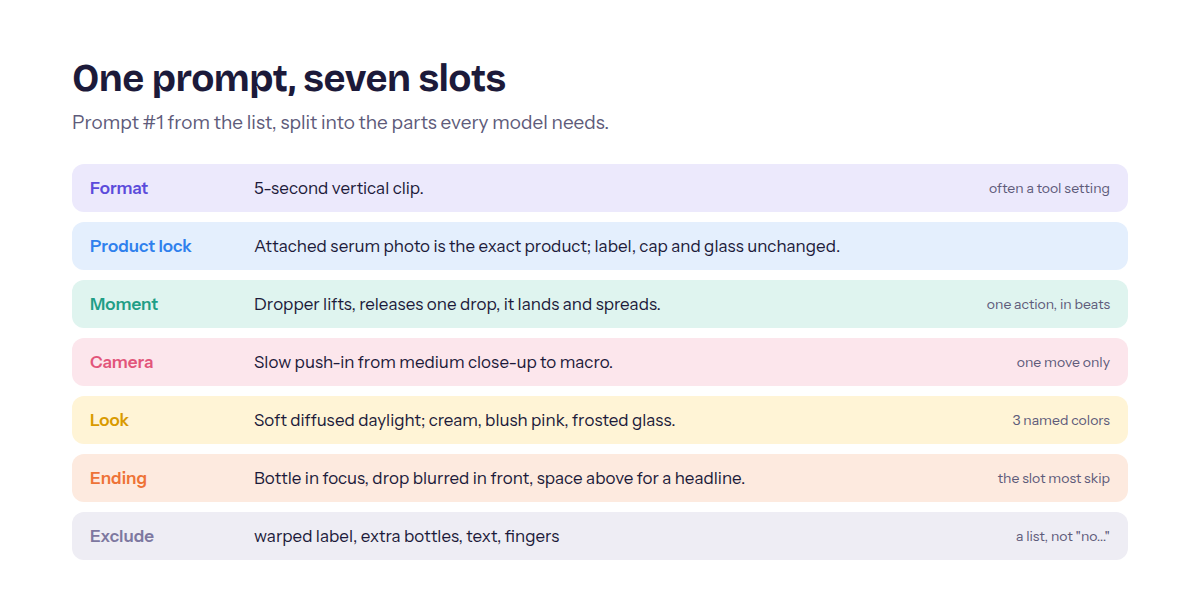
Every prompt in this list is built from the same six slots plus an exclude line. Learn the slots once and you can write your own, or repair any of the 50 when a model misbehaves.
Google’s Veo documentation lists subject, context, action and style as the core elements of a video prompt, with camera motion, composition and ambiance (color and light) as optional layers. OpenAI’s Sora guide adds the rule that rescues most product shots: one clear camera move and one clear subject action per shot, written in beats. The core below puts those ideas in the order an ad needs them.
Format: [length]-second [9:16 / 1:1 / 4:5 / 16:9] clip.
Product lock: [what the product is] + what must not change (label, color, shape, count).
Moment: one action in 2 or 3 beats (reach, lift, set down).
Camera: one move + framing (slow push-in, close-up).
Look: light source + 3 named colors.
Ending: where the camera stops and what the last frame shows.
Exclude: [4 or 5 things you keep seeing go wrong].
Two slots do most of the work. “Product lock” stops the model from redesigning your packaging. “Ending” gives the shot a destination, and a move with a destination reads as directed, while a move without one reads as drift. Oddly, it’s also the slot almost every prompt library skips.
Once a prompt works, running it is the easy part. Predis.ai’s AI video generator takes a prompt, an image or a product link, drafts the script, scenes and captions, and lets you fix one frame instead of regenerating the whole video.
Text-to-video vs image-to-video prompts
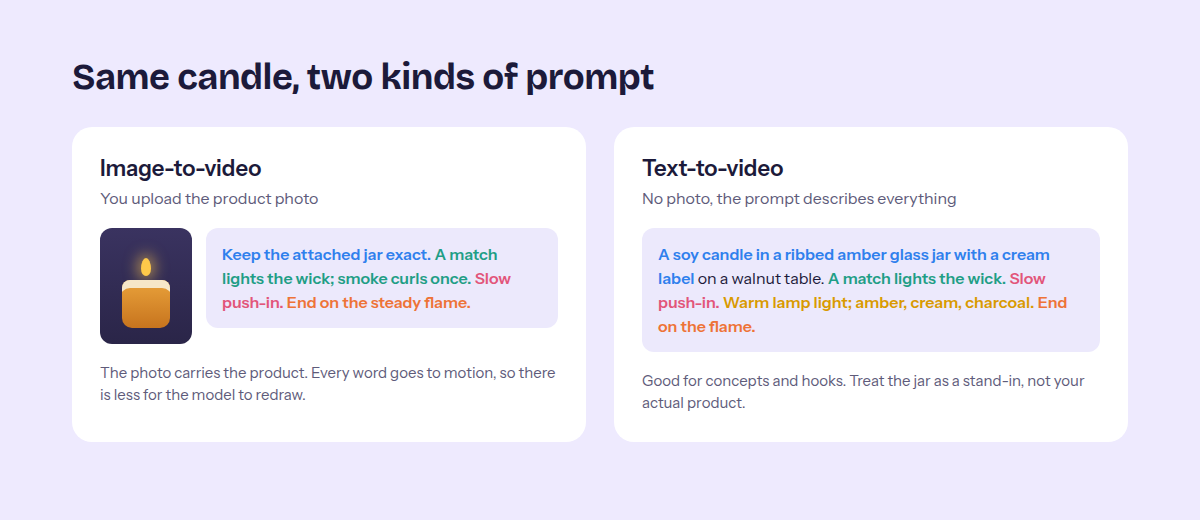
If you have a good product photo, start with image-to-video. The photo carries your product’s identity, so your image to video prompt should spend its words on motion. Don’t re-describe the bottle you just uploaded. The model can already see it. A second description just gives it one more chance to “correct” your label.
Text-to-video is for concepts: the ingredient shot, the hands-only demo, the problem-first hook. A text to video prompt has to describe the whole scene, product included, so treat the result as a stand-in rather than your actual SKU. Anything where the exact packaging matters should start from a photo. For the full photo-to-ad workflow, see this guide to making video ads from product images and scripts.
Each prompt below is tagged I2V (image-to-video) or T2V (text-to-video) so you know which to reach for.
Small adapters for different models
The same AI video prompt core works in Veo, Sora, Kling, Runway and most tools built on top of them. Still choosing one? This roundup of AI video ad tools compares the main options.
These adapters cover the differences:
| If your tool… | Do this |
|---|---|
| Has length and resolution settings | Set them there and delete the length from the Format line. OpenAI’s guide notes that duration and resolution are parameters, not prose, so “make it longer” does nothing. |
| Generates audio | Add sound as its own sentence after the Look line. Google recommends describing audio in separate sentences. |
| Has a negative prompt field | Move the Exclude list into it and drop the word “Exclude.” |
| Has no negative prompt field | Keep the Exclude line at the end of the prompt. |
| Accepts a reference image | Use the I2V prompts and cut any product description beyond the lock line. |
| Exports for Reels, TikTok or Shorts | Use 9:16, the format Google notes was popularized by short-form video apps. |
Make a UGC ad with Predis.ai
Make UGC-style video ads from one product link and let your numbers pick.
50 AI video prompt examples by product category
Each AI video prompt here is ready to paste. Swap the [bracketed] parts for your product, keep the rest, and generate. Tags tell you the workflow, the aspect ratio and a starting length. The lengths are short on purpose, and the assembly section explains why.
Prefer clicking to scrolling? The filterable library below lets you pick a category and copy any prompt in one tap.
Find your prompt, or build one
Pick what you sell, copy a prompt, and swap the highlighted brackets for your product. Or fill in the seven slots and copy your own.
Your prompt
Prompts from 50 AI Video Prompts for Product Ads You Can Copy Into Any Model Today by Predis.ai.
How to turn 4 clips into one 15-second ad
Here’s the counterintuitive part. Longer clips feel like better value, but OpenAI’s guide says models follow instructions more reliably in shorter clips, and it suggests stitching two 4-second clips instead of generating one 8-second clip. That’s why every prompt above stays between 2 and 8 seconds.
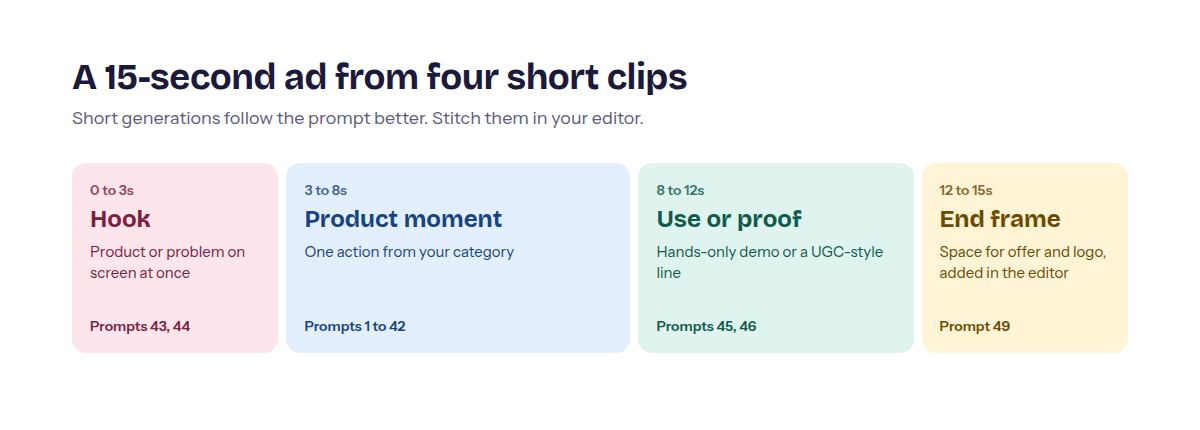
So don’t ask one AI video prompt for a whole ad. Build it from parts, roughly like this:
| Seconds | Beat | Pull from |
|---|---|---|
| 0 to 3 | Hook | #43, #44 or a category prompt with fast motion |
| 3 to 8 | Product moment | Any category prompt |
| 8 to 12 | Use or proof | Hands-only demo (#46) or the UGC-style clip (#45) |
| 12 to 15 | End frame | #49 |
Continuity is the tricky bit when each clip comes from a separate generation, and two habits fix most of it. Copy the exact same Look line into every clip, because OpenAI’s guide notes that naming 3 to 5 colors keeps the palette steady across shots. And keep the light coming from the same side every time.
Then add captions, price and your logo in the editor, not in the prompt. Generated text is often misspelled, and you’ll want to change the offer next week anyway. Set the aspect ratio once for the whole ad, too, since a 16:9 clip dropped into a 9:16 edit loses half the frame.
Negative prompts that save a product shot
A negative prompt is the part of an AI video prompt that lists what you don’t want to see. Google’s Veo guide is specific about the wording: list the unwanted things (“wall, frame”) instead of writing “no walls” or “don’t show walls.” Here’s what to add when a shot keeps failing:
| What keeps going wrong | Add to Exclude |
|---|---|
| Label warps or changes | warped label, changed logo, misspelled text |
| Extra bottles appear | extra products, duplicate items |
| Camera won’t settle | camera shake, sudden zoom, rotation |
| Random words on screen | text, captions, subtitles, watermark |
| Hands look wrong | distorted hands, extra fingers (or keep hands out of frame) |
| Product changes color mid-clip | color shift, flicker |
| Results look too good | dramatic before-and-after, filtered skin |
| Set looks messy | clutter, busy background, extra props |
Keep the list to 4 or 5 items. A list of 15 mostly tells the model what to think about.
How to test AI video prompts without wasting budget
Before you judge any prompt, run it at least three times. OpenAI’s guide is blunt about this: the same prompt gives a different result on each run, and the second or third take is sometimes the better one.
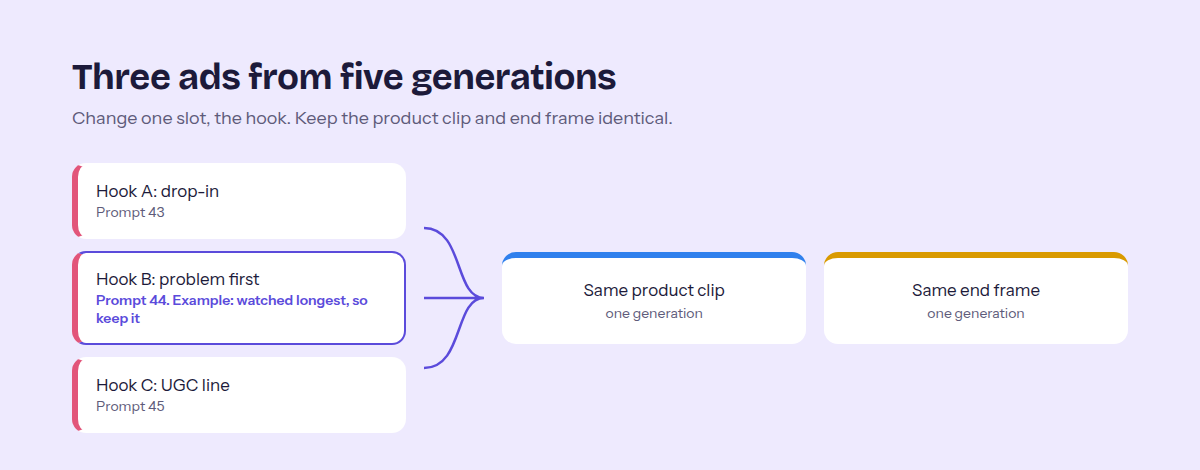
When a take works, test it against variants and change one slot at a time. Swap the Moment and keep everything else. Swap the hook clip and keep the body. Change four things at once and you’ll have no idea why one version did better.
Bigger advertisers already work this way. In IAB’s 2025 report, advertisers using generative AI said they use it to make versions for different audiences (42%) and to change visual style (38%).
A simple first test looks like this: 3 hooks, 1 product clip and 1 end frame. That’s 3 ads from 5 generations. Run them at the same small daily budget and keep the one people watch longest.
Making those variants by hand gets tedious fast. Predis.ai’s eCommerce ad maker makes UGC-style video and static variants from one product link, and its insights show which one earned attention, so you can scale the ones that sell.
Make a UGC ad with Predis.ai
Make UGC-style video ads from one product link and let your numbers pick.
Mistakes that make AI product ads look fake
Describing a product you already uploaded. In image-to-video, the photo is the product. Every extra adjective about the bottle is a chance for the model to redraw it.
Stacking camera moves. One move per shot. If you want an orbit and a push-in, that’s two clips.
Letting the model write your text. Prices, offers and product names belong in the editor, where you can spell them right and change them later.
Showing results you can’t prove. A generated demo still makes a claim. If your clip shows skin clearing overnight or a bag holding more than it really does, that’s on you. Under the FTC Act, advertisers need proof for their claims before the ad runs, and what a video shows can count as a claim.
Passing off AI presenters as customers. UGC-style is a format, not testimony. Don’t caption a generated presenter as a real reviewer, add star ratings, or give them a fake name.
Start with one category and three variants
You don’t need all 50. Pick the category closest to what you sell, copy two prompts, and build one hook, product and end-frame ad from them this week. Then make two more versions with different hooks.
The model you use will change. The slots won’t. An AI video prompt that locks the product, gives it one moment, and knows where the camera stops will carry over to whatever tool comes next.
And if writing prompts isn’t how you want to spend your afternoons, start from your product link in Predis.ai and fix the frames you don’t like.
Make a UGC ad with Predis.ai
Make UGC-style video ads from one product link and let your numbers pick.
FAQs
An AI video prompt is the written instruction you give a video model. For product ads, a good one names the product and what must not change. It also sets one action, one camera move, the light and colors, where the shot ends, and a short list of things to exclude. Think of it as a shot brief for a camera crew that has never seen your product.
Long enough to fill the six slots and no longer. Prompts in this list run 42 to 83 words, and most land near 60. OpenAI notes that very detailed prompts restrict the model and aren’t always followed reliably, so if a shot keeps failing, cut it back to one action and one camera move before adding detail.
Yes, the structure carries over. The details change: some tools have a separate negative prompt field, some generate audio, and length and aspect ratio are usually settings rather than words. Run the same prompt in two tools side by side and you’ll learn each one’s habits quickly.
Motion, mostly. The image already defines the product, setting and style, so describe what moves, how the camera moves and how the shot ends. Add one line saying what must stay unchanged (label, color, shape) and a short exclude list. Skip re-describing the product, because that invites the model to redesign it.
Start with three that differ in one thing, usually the hook. Three is enough to see a difference without spreading a small budget too thin. Once one version clearly holds attention longer, keep its hook and test the next slot, such as the product moment or the end frame.
You may also like: