Erkunden Sie diese Inhalte mit KI:
YouTube im Jahr 2026 sieht völlig anders aus als noch vor drei Jahren. Künstliche Intelligenz (KI) hat sich von einer Spielerei in wenigen Tools zur Basis jeder seriösen Bearbeitungsplattform entwickelt. Textbasierte Bearbeitung – bei der Wörter aus einem Transkript automatisch im entsprechenden Video gekürzt werden – ist heute Standard. Automatische Untertitel, KI-generierte B-Roll-Inhalte, Stimmenklonierung und Branding-Kits mit nur einem Klick haben die Produktionszeiten von Stunden auf Minuten verkürzt.
Der beste Video-Editor ist nicht unbedingt der leistungsstärkste. Er ist derjenige, der Ihnen keine Steine in den Weg legt und Ihnen das Veröffentlichen ermöglicht. Dieser Leitfaden stellt die zehn besten YouTube-Video-Editoren vor, die aktuell verfügbar sind, erklärt die wichtigsten KI-Funktionen und zeigt Ihnen, wie Sie mithilfe von KI in weniger als einer Stunde von der Idee zum veröffentlichten Video gelangen.
Die 10 besten YouTube-Videoeditoren im Ranking
1. Predis.ai

Für YouTube Shorts-Ersteller, Social-Media-orientierte Marken und alle, die von der Idee zum veröffentlichten Video gelangen möchten, ohne eine Timeline zu berühren, Predis.ai ist der schnellste verfügbare Weg.
KI-gestützte Videobearbeitungstools ermöglichen es Kreativen, einen zuverlässigen Redaktionsplan zu erstellen, ohne ihren Zeitaufwand proportional zu erhöhen – und Predis.ai Es wurde speziell nach diesem Prinzip entwickelt. Geben Sie ein Thema, eine Blog-URL oder eine Drehbuchgliederung ein, und das Tool generiert ein komplettes Storyboard, wählt markengerechtes B-Roll-Material aus, fügt KI-Voiceover hinzu und erstellt automatisch animierte Untertitel.
Hauptmerkmale
- Text-zu-Video-Generierung
- KI-Voiceover
- Automatische Untertitelung
- Markenkit-Anwendung
- Planung von Spitzenaktivitäten
Vorteile:
- Ein vollständiger Entwurf als Video in wenigen Minuten
- Das leistungsstärkste verfügbare Tool für YouTube Shorts und Werbeinhalte
- Intelligente Terminplanung beseitigt das Rätselraten bei der Veröffentlichung von Terminen.
- Markenkonsistenz in allen Ausgaben dank Markenkit-Anwendung mit nur einem Klick
Nachteile:
- Weniger detaillierte Steuerung für längere Formate
- Komplexe Erzählbearbeitung – nicht das richtige Werkzeug für eine 30-minütige Dokumentation oder einen filmischen Reise-Vlog.
Bestens geeignet für:
Social-Media-Manager, Kurzfilmproduzenten und Marken, die einen konsistenten, markenkonformen Video-Output benötigen, ohne über ein eigenes Produktionsteam zu verfügen.
Pricing:
Abonnement – kostenpflichtige Tarife schalten höheres Volumen, erweiterte Planungsfunktionen und die Funktion „Fenster mit Spitzenaktivität“ frei.
Erstellen Sie schnell atemberaubende Shorts!
Skalieren Sie die Erstellung Ihrer YouTube-Shorts mit KI
VERSUCHE ES JETZT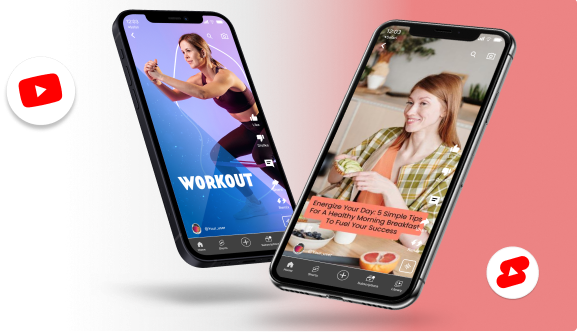
2. Adobe Premiere Pro
Adobe Premiere Pro bleibt der professionelle Maßstab.
Die Version 2026 bietet kontinuierlich sinnvolle KI-Funktionen: plattformbasiertes automatisches Reframing, audiobasierte Bearbeitung und eine umfassende After Effects-Pipeline für Kreative, die Motion Design in Broadcast-Qualität erstellen möchten.
Während einige KI-Tools langsamer auf den Markt kommen als der Rest der KI-Welt, bleiben das Plugin-Ökosystem und die professionelle Steuerung unübertroffen.
Hauptmerkmale
- Textbasierte Bearbeitung
- After Effects-Integration
- KI-Remix für Audio
Vorteile:
- Unübertroffenes Plugin- und Farbkorrektur-Ökosystem
- Detaillierte Kontrolle über jedes Element
- Branchenstandard für kollaborative Arbeitsabläufe und Kundenbetreuung
Nachteile:
Die eigenständige App kostet 34.49 $/Monat – mit Creative Cloud sinkt der Preis auf 22.99 $/Monat; steile Lernkurve für absolute Anfänger.
Bestens geeignet für:
YouTuber, die längere Inhalte produzieren, maximale Kontrolle benötigen und in einem Team oder Kundenumfeld arbeiten.
3. DaVinci Resolve

DaVinci Resolve ist einer der besten Video-Editoren, und seine Neural Engine KI-Funktionen haben ihn zu einer echten All-in-One-Plattform für ambitionierte Kreative gemacht.
Das free Die Version bietet KI-Funktionen der Profiklasse, darunter Magic Masking und Sprachisolierung. Ja, Tools wie die free Die Version von DaVinci Resolve bietet KI-Funktionen der Profiklasse wie Magic Masking und Sprachisolierung.
Während einige fortgeschrittene Funktionen hinter einer Bezahlschranke verborgen sind, free Für qualitativ hochwertige YouTube- und Social-Media-Produktionen sind oft schon Standardversionen ausreichend.
Hauptmerkmale
- Branchenführende Farbkorrektur
- KI-Maskierung durch neuronale Engine
- Fairlight-Audio-Suite
- Fusion-Visualeffekte
Vorteile:
- Das mächtigste free Stufe eines jeden professionellen Redakteurs
- Überragende Leistung auf High-End-Hardware
- Der knotenbasierte Farbworkflow ist unübertroffen.
Nachteile:
- Benötigt eine leistungsfähige GPU für einen reibungslosen Ablauf.
- Der knotenbasierte Workflow erfordert von Kreativen, die neu im Bereich der professionellen Bildbearbeitung sind, eine steile Lernkurve.
Bestens geeignet für:
Reise-, Dokumentar- und Film-Vlogger, die Wert auf visuelle Qualität legen und bereit sind, Zeit in die Weiterbildung zu investieren.
4. CapCut Desktop
Die Desktop-Version baut auf den Stärken der mobilen App auf und bietet eine leistungsfähigere Zeitleiste, eine riesige Bibliothek mit angesagten Übergängen sowie eine KI-gestützte Hintergrundentfernung, die auch bei fehlerhaftem Videomaterial zuverlässig funktioniert.
Hauptmerkmale
- Trendige Übergangsbibliothek
- Automatische Untertitel
- KI-Hintergrundentfernung
Vorteile:
- Extrem schnelles Rendering
- Integrierte Assets, optimiert für soziale Trends
- Der einfachste vollwertige Editor für Anfänger
Nachteile:
- Fehlt fortschrittliches Farbrouting
- Eingeschränkte Dateiverwaltung für komplexe Projekte mit mehreren Quellen
- Bei einigen Exporten können Wasserzeichen hinzugefügt werden free Tier
Bestens geeignet für:
Anfänger und fortgeschrittene Content-Ersteller, die trendorientierte Inhalte ohne lange technische Einarbeitungszeit erstellen möchten.
5. Asynchron
Async vereint Aufnahme, Bearbeitung, KI-Tools und die Wiederverwendung von Inhalten in einem Workflow und ist damit besonders nützlich für Kreative, die nicht zwischen fünf verschiedenen Apps hin- und herwechseln möchten, nur um ein Video fertigzustellen. Die KI-gestützte Video-Editor Die Lernkurve bleibt überschaubar, gleichzeitig erhalten die Nutzer aber genügend Kontrolle, um professionelle Inhalte für YouTube und TikTok zu erstellen. Reels, Podcasts und Kundenprojekte.

Hauptmerkmale
- KI-gestützter Videoeditor
- Automatische Untertitel- und Stilleentfernung
- KI-Clips zur Umwandlung langer Videos in Kurzformatinhalte
Vorteile:
- Anfängerfreundlicher Bearbeitungs-Workflow mit schnellen KI-gestützten Werkzeugen
- Integrierte Aufnahme-, Bearbeitungs-, Untertitel- und Wiederverwendungsfunktionen auf einer einzigen Plattform
- Ideal, um Podcasts, Interviews und Webinare in Social-Media-taugliche Videos umzuwandeln.
Nachteile:
- Fortgeschrittene Motion-Graphics-Tools sind im Vergleich zu herkömmlichen professionellen Editoren eingeschränkter.
- Große, mehrschichtige Projekte wirken möglicherweise weniger flexibel als High-End-Desktop-Software.
- Manche KI-Tools funktionieren am besten mit klarem Audio und strukturierten Inhalten mit sprechenden Köpfen.
Bestens geeignet für:
Kreative, Marketer, Podcaster und kleine Teams, die einen KI-gestützten All-in-One-Videoeditor suchen, der die Bearbeitung und Wiederverwendung von Inhalten vereinfacht und keine lange Einarbeitungszeit erfordert, werden hier fündig.
6. Filme 13
Filmora 13 besetzt eine Marktlücke: Es richtet sich an Kreative, die den Einsteiger-Tools entwachsen sind, aber noch nicht auf Premiere oder Resolve umsteigen möchten. Mit seinem erschwinglichen Preis, dem hervorragenden Funktionsumfang und der intuitiven Benutzeroberfläche ist es perfekt für die Erstellung von YouTube-Inhalten aller Art – Gaming-Videos, Tutorials, Reviews und mehr.
Hauptmerkmale
- Intelligenter Ausschnitt
- KI-Bild-zu-Video
- Bewegungsverfolgung
- Effektvorlagen
Vorteile:
- Kostengünstig
- Schließt tatsächlich die Lücke zwischen Arbeitsabläufen von Anfängern und Profis.
- Umfangreiche Vorlagenbibliothek
Nachteile:
- Gelegentlich kann es bei älteren Windows-Rechnern unter anspruchsvolleren Projekten zu Leistungseinbußen kommen.
- Free Die Testphase fügt Exporten ein deutlich sichtbares Wasserzeichen hinzu.
Bestens geeignet für:
Für fortgeschrittene Kreative mit begrenztem Budget, die professionell aussehende Ergebnisse ohne die steile Lernkurve von Premiere oder Resolve erzielen möchten.
7. Beschreibung

Descript hat sich zu einem der meistdiskutierten Videoeditoren entwickelt – und das aus gutem Grund. Die Kerninnovation ist simpel, aber revolutionär: Anstatt Wellenformen zu bearbeiten, bearbeitet man Text.
Löscht man Wörter in einem Transkript, werden sie sofort aus dem Audio- oder Videomaterial entfernt. Für alle Content-Ersteller, deren Inhalte hauptsächlich aus Interviews, Tutorials oder Podcasts bestehen, ändert das alles.
Neben der textbasierten Bearbeitung bietet Descript KI-gestützte Audioverbesserung (Studio Sound), Stimmklonierung, automatische Entfernung von Füllwörtern, Fernaufnahme für bis zu 10 Gäste, Echtzeit-Zusammenarbeit im Google Docs-Stil, Übersetzung und Synchronisation in mehr als 30 Sprachen sowie einen agentenbasierten KI-Co-Editor namens Underlord, der mehrstufige Bearbeitungsaufgaben anhand von Anweisungen in natürlicher Sprache ausführen kann.
Hauptmerkmale
- Transkriptbasierte Bearbeitung (Underlord AI)
- Studio Sound Audiooptimierung
- Overdub-Stimmklonierung
- Automatische Untertitel in über 20 Sprachen
- Social-Media-Clip-Generierung
Vorteile:
- Automatische Untertitel
- Exportiert direkt nach Premiere, Final Cut und DaVinci zur finalen Bearbeitung.
Nachteile:
- Nicht ideal für filmische Bearbeitung oder komplexe Motion Graphics.
- Bei größeren Projekten kann sich die Leistung verlangsamen.
- Keine Offline-Bearbeitung
Pricing:
- Free Plan verfügbar
- Creator-Abo ab 24 $/Monat
Bestens geeignet für:
YouTuber, Podcaster, Pädagogen und Kursentwickler, die hauptsächlich gesprochene Inhalte produzieren und schnell bearbeiten möchten, ohne sich mit einem Zeitplan herumschlagen zu müssen.
8. Schuss

Shotcut bietet eine robuste Reihe von Funktionen, die mit vielen kostenpflichtigen Videobearbeitungsprogrammen konkurrieren können: breite Formatunterstützung über FFmpeg (kein Import von Dateien erforderlich), native Timeline-Bearbeitung ohne obligatorische Konvertierung, Mehrspurbearbeitung, Chroma Key (Greenscreen), Audiofilter und 4K-Export bis zu 8K über FFmpeg.
Es enthält Exportvoreinstellungen, die für YouTube, Vimeo und Mobilgeräte optimiert sind – ein kleines, aber wichtiges Detail, das Kreative vor fehlerhaften Exportkonfigurationen bewahrt. Im Jahr 2025 fügte Shotcut eine Spracherkennungsfunktion zur automatischen Untertitelgenerierung hinzu und schloss damit eine seiner größten Lücken.
Hauptmerkmale
- Bearbeitung von Mehrspur-Timelines
- Native FFmpeg-Formatunterstützung
- Chroma-Key
- Audiofilter
- Sprach-zu-Text-Untertitel
- 4K/8K-Export, YouTube-Exportvoreinstellungen
Vorteile:
- 100% free und Open Source ohne Wasserzeichen
- Plattformübergreifend (Windows, macOS, Linux)
- Die breite Formatunterstützung bedeutet, dass keine Vorkonvertierung erforderlich ist.
- Eine aktive Open-Source-Community verbessert das Tool kontinuierlich.
Nachteile:
- Datierte Schnittstelle
- Fehlende KI-Funktionen
- Das Fehlen einer Bildschirmaufzeichnungsfunktion erschwert die Empfehlung als primäres Werkzeug für Kreative, die an moderne, KI-basierte Arbeitsabläufe gewöhnt sind.
- Keine integrierten Vorlagen
- Bei komplexen Projekten oder leistungsschwächeren Rechnern kann es zu Verzögerungen kommen.
Pricing:
- Vollständig freeFür immer – ohne Stufen, ohne Testphasen
Bestens geeignet für:
Preisbewusste Kreative, Linux-Nutzer, Studenten und fortgeschrittene Videoeditoren, die einen leistungsfähigen Desktop-Editor ohne jegliche Verpflichtungen suchen, ohne jemals eine Abonnementgebühr zahlen zu müssen.
9.CyberLink PowerDirector

PowerDirector 365 ist die beste Videobearbeitungssoftware für YouTube-Einsteiger. Sie bietet alle Funktionen, die Sie zum Bearbeiten von YouTube-Videos benötigen, wie Titelvorlagen, Übergänge, animierte Overlays, Anpassung der Videogeschwindigkeit, einen Videostabilisator, Spezialeffekte und vieles mehr.
Hauptmerkmale
- 360-Grad-Video-Unterstützung
- KI-Bewegungsverfolgung
- KI-Hintergrundentfernung
- Riesige Aktienbibliothek
Vorteile:
- Extrem schnelles Rendering auf Windows-PCs
- Große integrierte Lagerbibliothek
- Bietet sowohl ein Abonnement als auch eine einmalige, unbefristete Lizenz an.
Nachteile:
- Das Interface-Design wirkt im Vergleich zu modernen, KI-gestützten Tools veraltet.
- Die Version zum einmaligen Kauf bietet oft keinen Zugriff auf die neuesten KI-Funktionen.
Bestens geeignet für:
Windows-basierte Kreative, die große Mengen an 4K-Inhalten produzieren, Wert auf Rendergeschwindigkeit legen und einen einsteigerfreundlichen Einstiegspunkt suchen.
10. InShot / VN Editor

Sowohl InShot als auch VN Video Editor bedienen dieselbe Zielgruppe: schnelle, saubere und vertikale Videobearbeitungen auf dem Smartphone. Für Kurzvideos, kurze Social-Media-Clips oder Rohschnitte, die später am Desktop fertiggestellt werden, halten beide Programme, was sie versprechen – ganz ohne unnötige Komplexität.
Hauptmerkmale
- Übersichtliche Benutzeroberfläche für die vertikale Bearbeitung
- Grundlegende Übergänge und Filter
- Textüberlagerungen
- Audio-Bearbeitung
Vorteile:
- Sofort lernen
- Ideal für schnelle, grobe Zuschnitte unterwegs
- Der VN Editor eignet sich besonders gut für textreiche Kurzfilme.
Nachteile:
- Begrenzter Funktionsumfang für Videos mit einer Länge von über 10 Minuten
- Kein Hauptredakteur für komplexe Projekte
Bestens geeignet für:
Kreative, die neben einem leistungsfähigeren Desktop-Workflow eine schnelle mobile Option für Shorts und Social-Media-Clips benötigen.

So bearbeiten Sie ein YouTube-Video mit Predis.ai: Schritt für Schritt
Der gesamte Workflow für die Erstellung der Assets, die Sprachaufnahme und die Montage findet innerhalb von Predis.ai Das bedeutet, dass Sie Ihre Zeit in kreative Entscheidungen investieren, anstatt in die Fehlersuche in der Software. Hier ist der vollständige Prozess:
Schritt 1: Die Aufgabenstellung. Geben Sie Ihr Videothema, eine Blog-URL oder eine Drehbuchgliederung in den Text-zu-Video-Generator ein. Die KI erstellt innerhalb von Sekunden ein komplettes Storyboard – Szenenstruktur, Gesprächspunkte, Vorschläge für die visuelle Gestaltung und einen Aufhänger. Sie bearbeiten einen ersten Entwurf, anstatt bei null anzufangen.
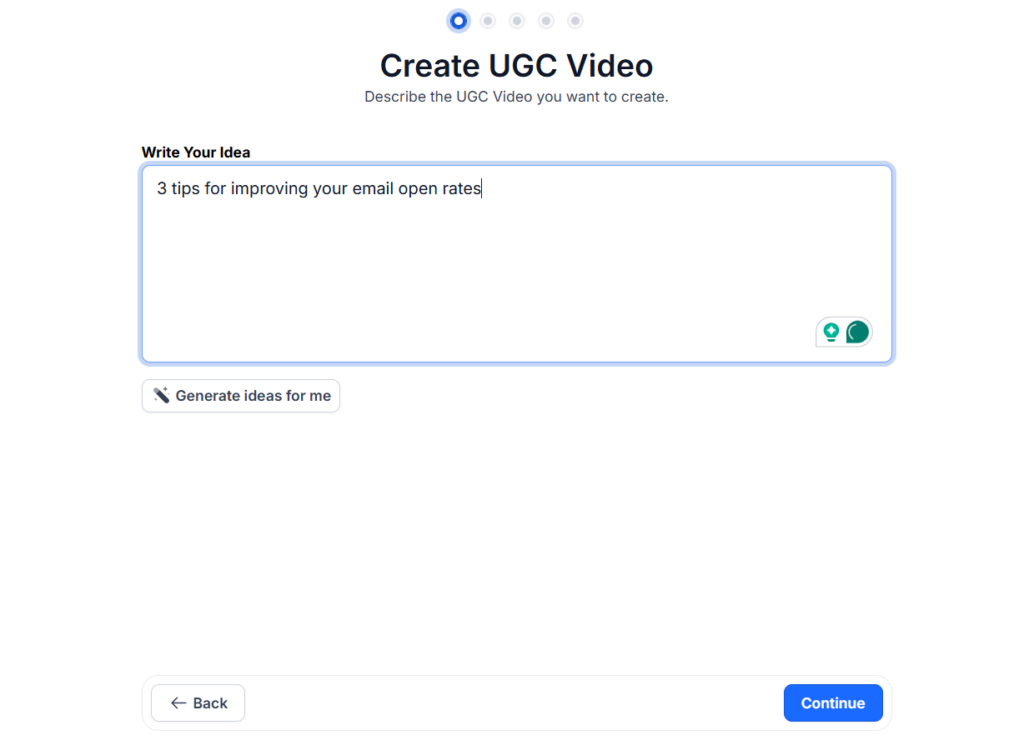
Schritt 2: Auswahl der KI-Assets. Predis.ai Es wählt automatisch passendes B-Roll-Material zu Ihrem Thema aus, schlägt Hintergrundmusik passend zum Tonfall Ihres Inhalts vor und setzt KI-Sprachausgabe ein, falls Sie keine eigene Aufnahme erstellen. Die gesamte visuelle Ebene wird automatisch zusammengestellt, ohne dass Sie einen einzigen Clip bearbeiten müssen.
Schritt 3: Skript verfeinern. Nutzen Sie den KI-Chat, um den Tonfall anzupassen. „Mehr Energie“, „Kürze die Einleitung“ oder „Füge einen stärkeren Aufhänger am Anfang hinzu“ sind allesamt sinnvolle Vorschläge. Die KI bearbeitet das Skript und strukturiert das Video entsprechend um.
Schritt 4: Individuelles Branding. Wenden Sie Ihr Branding-Kit – Farben, Schriftarten, Logoplatzierung – mit einem Klick an. Alle Szenen werden gleichzeitig aktualisiert. Kein manueller Austausch von Elementen in 15 Clips erforderlich.
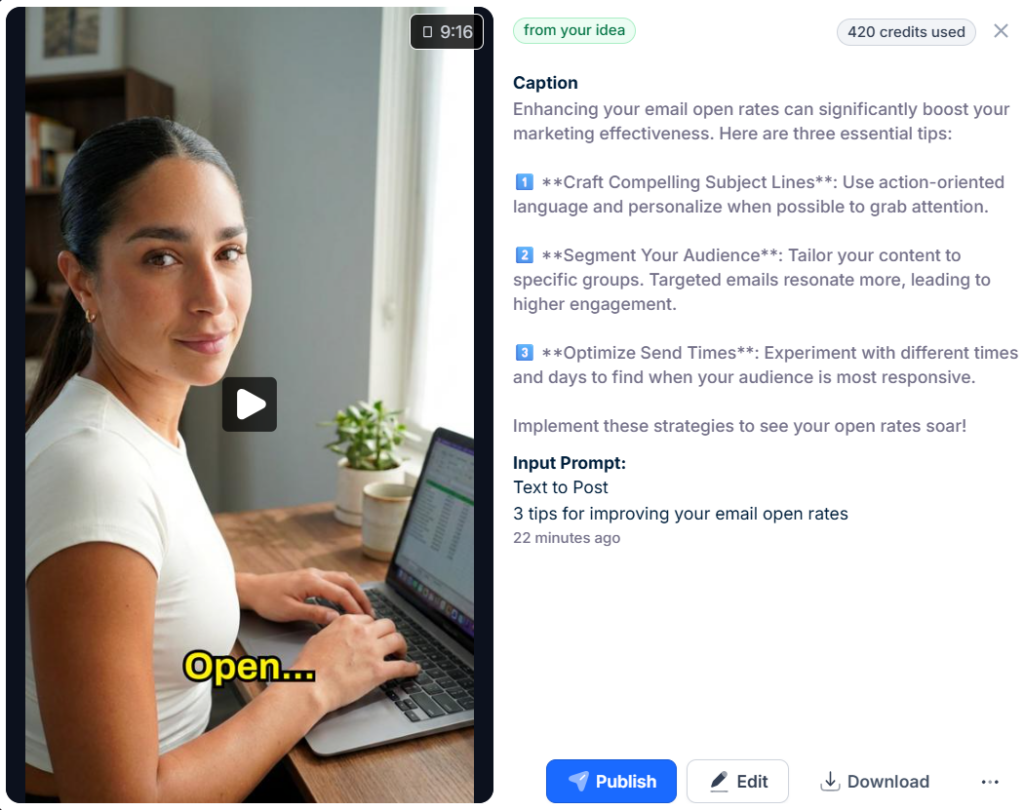
Schritt 5: Feinschliff und Terminplanung. Nutzen Sie den Drag-and-Drop-Editor, um bestimmte Clips auszutauschen, Ihre eigene Sprachaufnahme hinzuzufügen oder das Timing feinabzustimmen. Dann Zeitplans Verwendung der Funktion „Fenster mit Spitzenaktivität“ — Predis.ai Analysiert das Verhalten Ihrer Zielgruppe und ermittelt automatisch den optimalen Veröffentlichungszeitpunkt. So sieht ein fertiges Video aus:
Bewährte Methoden für die YouTube-Bearbeitung
1. Das 3-Sekunden-Unterbrechungsmuster
Studien zur Zuschauerbindung zeigen übereinstimmend, dass Zuschauer alle drei Sekunden einen neuen visuellen oder auditiven Reiz benötigen, um aufmerksam zu bleiben. Das bedeutet nicht, dass jeder Schnitt einen Übergang erfordert – vielmehr geht es darum, die Einstellungen zu variieren, einen Text einzublenden, zu B-Roll-Material zu wechseln oder einen Soundeffekt einzusetzen, um dem Gehirn neue Verarbeitungsmöglichkeiten zu bieten.
2. Für lautloses Betrachten optimieren
Da 92 % der Zuschauer ohne Ton fernsehen, verliert jedes Video ohne Untertitel fast die Hälfte seines potenziellen Publikums, noch bevor ein einziges Wort zu hören ist. Untertitel sind unverzichtbar – und automatische Untertitelung ist mittlerweile Standard bei allen Tools dieser Liste.
3. Das Sounddesign macht 50 % des Videos aus.
Ambient-Soundeffekte, dezente Übergangsgeräusche und gut abgemischte Dialoge erzeugen die professionelle Wirkung, die gute von großartigen Videos unterscheidet. Die meisten Kreativen verwenden 90 % ihrer Bearbeitungszeit auf Bild und Ton. Das Verhältnis sollte eher bei 60/40 liegen.
4. Farbe als Markenbildung
Eine einheitliche LUT (Farbvoreinstellung), die auf alle Ihre Videos angewendet wird, erzeugt eine wiedererkennbare visuelle Signatur, die Ihre Follower mit Ihrem Kanal verbinden, noch bevor sie den Titel lesen. KI-Tools für intelligentes Farb-Mapping können die Farbkorrektur nun automatisch von einer Aufnahme zur nächsten anpassen – so wird visuelle Konsistenz auch in großem Umfang möglich.
Tipps zur Auswahl des richtigen Videoeditors
1. Schätzen Sie zunächst Ihre Nische ein.
Vlogs brauchen Tempo und einen reibungslosen Ablauf mit sprechendem Kopf.
Dokumentarfilme und Kinofilme erfordern Farbgenauigkeit und präzise Zeitsteuerung.
Kreative, die sich auf Kurzfilme konzentrieren, benötigen KI-gestützte Generierung und schnellen mobilen Export.
Definiere dein primäres Inhaltsformat, bevor du Tools evaluierst – der beste Editor für einen Reise-Vlogger ist nicht der beste Editor für einen anonymen Bildungskanal.
2. Führen Sie eine Hardwareprüfung durch.
Die Videobearbeitung ist nicht nur besser geworden – sie ist auch komplexer geworden. Viel komplexer. Es geht nicht mehr nur darum, Clips zu schneiden und Musik hinzuzufügen.
Sie führen Echtzeit-Transkription, Hintergrundentfernung, Objektverfolgung, Farbkorrektur, Motion Graphics durch, manchmal alles gleichzeitig.
DaVinci Resolve auf einem einfachen Laptop zu nutzen, ist eine Qual. Predis.ai Auf demselben Rechner läuft es reibungslos. Passen Sie das Werkzeug an Ihre vorhandene Hardware an.
3. Machen Sie Ihre Wahl zukunftssicher
Setzen Sie auf Tools, die aktiv neue KI-Funktionen integrieren. Ein Editor, der 2024 noch hervorragend war, aber bei der KI-Entwicklung stagniert, wird mit jedem Monat weiter zurückfallen.
Jedes Tool in dieser Liste verfügt über eine Roadmap mit erweiterten KI-Funktionen – die Frage ist, welche sich am schnellsten in die für Ihren Workflow relevante Richtung entwickeln.
Verbessern Sie den YouTube-ROI ⚡️
Sparen Sie Zeit und erstellen Sie im großen Maßstab mit KI
VERSUCHE ES JETZTDer beste Videoeditor ist der, den man auch tatsächlich benutzt.
Der wichtigste Faktor für das Wachstum eines YouTube-Kanals ist nicht die Videoqualität, das Thumbnail-Design oder die Veröffentlichungsfrequenz – sondern die Kontinuität. Und Kontinuität ist nur dann möglich, wenn sich der Bearbeitungsprozess nicht wie ein zweiter Job anfühlt.
Beginnen mit Predis.ai wenn Sie ein Shorts-first channeWenn Sie große Mengen an Inhalten ohne Team produzieren müssen, ist Descript die richtige Wahl. Nutzen Sie Descript, wenn Ihre Inhalte hauptsächlich dialogbasiert sind und Sie schneller bearbeiten müssen, als es eine herkömmliche Timeline zulässt. Steigen Sie auf Premiere Pro oder DaVinci Resolve um, wenn Ihre erzählerischen Ambitionen die Möglichkeiten einfacherer Tools übersteigen.
Nutzen Sie KI, um die Arbeit – Bildmaterialerstellung, Untertitelung, Terminplanung – zu erledigen, damit Ihre kreative Energie in die Ideen, die Bildgestaltung und die Geschichte fließen kann. Das ist der Schlüssel zum Erfolg.
FAQ
Predis.ai ist das derzeit leistungsstärkste KI-Tool für YouTube Shorts und kurze Werbevideos – der Text-zu-Video-Workflow ist speziell für Inhalte von 60 bis 90 Sekunden Länge konzipiert.
Ja, aber rechnen Sie mit einer Eingewöhnungszeit von 2–4 Wochen. Die grundlegenden Bearbeitungskonzepte lassen sich zwar zwischen den Programmen übertragen, Tastenkombinationen, Projektdateiformate und Arbeitsabläufe sind jedoch programmspezifisch. Planen Sie den Übergang sorgfältig ein – wechseln Sie nicht mitten in einer Serie.
Tausende von Kanälen mit Hunderttausenden von Abonnenten werden vollständig bearbeitet free Software allein reicht nicht aus. Das Tool allein lässt Ihren Kanal nicht wachsen – Ihre Ideen, Ihre Beständigkeit und Ihr Verständnis für Ihre Zielgruppe schon.