Esplora questo contenuto con l'intelligenza artificiale:
Potresti star cercando un annuncio che hai visto in precedenza e che non riesci a rintracciare. Potresti voler vedere quali annunci sta pubblicando un concorrente o un marchio . Oppure potresti voler capire quali tipi di annunci esistono su Instagram e come vengono identificati nel feed.
Questa guida copre tutti e tre, compreso il processo passo passo per trovare la cronologia degli annunci all'interno dell'app, come utilizzare l' free La Libreria Meta Ad consente di visualizzare gli annunci attivi di qualsiasi marchio e offre una scorciatoia per visualizzare gli annunci di un concorrente direttamente dal suo profilo Instagram.
Comprendere gli annunci di Instagram
Prima di passare a come trovare annunci su Instagram, capiamo innanzitutto cosa sono gli annunci di Instagram. A differenza dei post organici pubblicati dagli account che segui, gli annunci Instagram sono contenuti di marketing sponsorizzati destinati a raggiungere popolazioni target specifiche.
Questi annunci possono assumere diverse forme, tra cui singole immagini, video, post di caroselli e storie. Consentono alle aziende di promuovere i propri prodotti, servizi e messaggi del marchio presso un pubblico specifico in base ai dati demografici, agli hobby e ai comportamenti.

Le inserzioni di Instagram sembrano post normali, ma hanno sempre l'etichetta "Sponsorizzato" per evidenziare che si tratta di pubblicità. Inoltre spesso includono più elementi di un post standard, inclusi collegamenti, pulsanti CTA e tag di prodotto.
Sapevi che puoi raggiungere oltre 1.628 miliardi di utenti Instagram tramite la pubblicità? Per raggiungere questo pubblico, hai bisogno degli strumenti giusti per coinvolgere il tuo target e garantire più conversioni. Un generatore di annunci basato sull'intelligenza artificiale può aiutarti a creare rapidamente contenuti creativi professionali e di alta qualità che si distinguano in un feed affollato.
Oltre al capo Predis.ai and crea un annuncio su Instagram con lo strumento di creazione di inserzioni Instagram che si allinea al tuo obiettivo pubblicitario.
Come trovare annunci su Instagram?
Ti è mai capitato di trovare un annuncio interessante e proprio mentre stavi per cliccarci sopra, il tuo feed si è aggiornato? Oppure potresti voler vedere gli annunci con cui hai interagito in passato. Non preoccuparti, non sei solo! Basta seguire i metodi seguenti.
Trova annunci sull'app Instagram
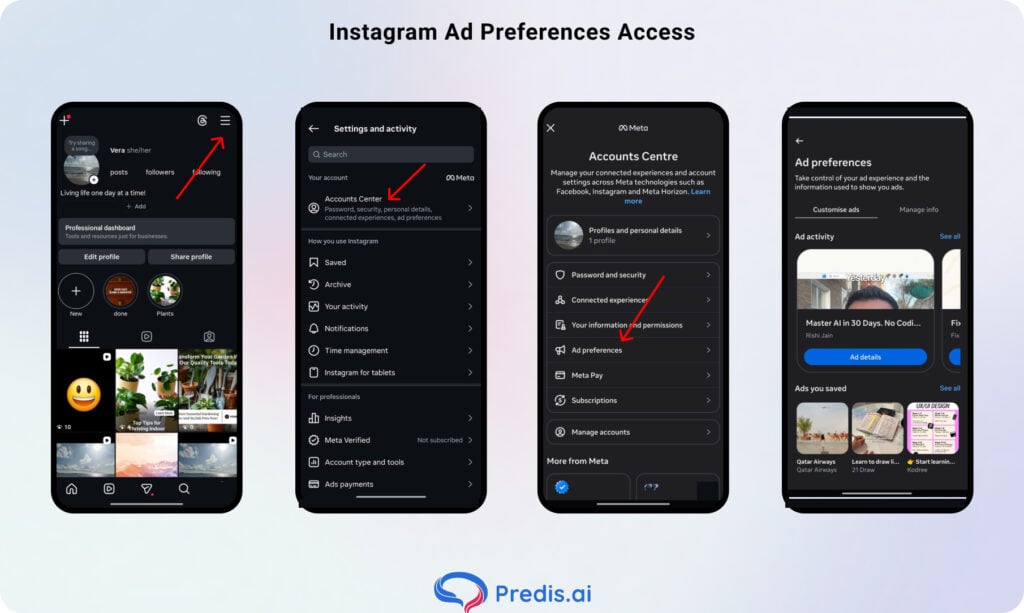
Passaggio 1: Apri Instagram e vai al tuo profilo
Tocca l'icona del tuo profilo nell'angolo in basso a destra dell'app.
Passaggio 2: apri il menu
Tocca le tre linee orizzontali (☰) nell'angolo in alto a destra della pagina del tuo profilo.
Passaggio 3: vai su Impostazioni e Privacy
Dal menu, tocca Impostazioni e privacy.
Passaggio 4: Apri il Centro account
Tocca "Centro account" nella parte superiore della pagina delle impostazioni. Questo è il centro di gestione centralizzato di Meta per le preferenze relative ai tuoi account Facebook e Instagram.
Passaggio 5: Seleziona le preferenze relative agli annunci
All'interno del Centro account, tocca Preferenze annunci . Vedrai quattro opzioni:
- Attività pubblicitaria — Un elenco cronologico degli annunci con cui hai interagito di recente (toccati, apprezzati, salvati o cliccati). Tocca una qualsiasi voce per rivedere l'annuncio o la pagina dell'inserzionista. Nota: questo elenco mostra solo gli annunci con cui hai interagito, non tutti gli annunci che hai visualizzato. Inoltre, non è permanente: gli annunci di diversi mesi fa potrebbero non essere più presenti.
- Annunci salvati — Una raccolta di annunci che hai aggiunto ai segnalibri. Puoi organizzarli in raccolte per consultarli più facilmente.
- Inserzionisti da cui hai visto annunci — Un elenco di marchi i cui annunci sono apparsi di recente nel tuo feed o nelle tue Storie.
- Argomenti degli annunci — Le categorie di interesse che Instagram utilizza per decidere quali annunci mostrarti. Puoi aggiungere o rimuovere argomenti qui per personalizzare i contenuti visualizzati.
Trova annunci su Instagram desktop
Instagram ha invitato la comodità alla festa di intrattenimento dei suoi utenti offrendo loro il freedom per usare Instagram su un desktop. Ora puoi trovare annunci su Instagram sul tuo desktop seguendo i passaggi indicati di seguito.
Passaggio 1: accedi o registrati su Instagram
Accedi al tuo account Instagram dal desktop. Se non ne hai uno, registrati.
Passaggio 2: trova l'opzione "Impostazioni".
Una volta effettuato l'accesso, trascina il cursore in fondo alla pagina e clicca sull'opzione "Altro". È contrassegnata da tre linee orizzontali parallele. Non appena clicchi, apparirà un menu a tendina. Seleziona l'opzione "Impostazioni".
Passaggio 3: visita il Centro account
Nel pannello di sinistra della pagina, noterai l'opzione "Scopri di più nel Centro account". Cliccaci sopra e si aprirà una nuova pagina.
Passaggio 4: visita le Preferenze annunci
Anche in questo caso, sul lato sinistro della homepage, troverai l'opzione "Preferenze annunci"; cliccaci sopra. La nuova pagina mostrerà opzioni come Argomento annuncio , Impostazioni annunci e Attività annunci recenti.
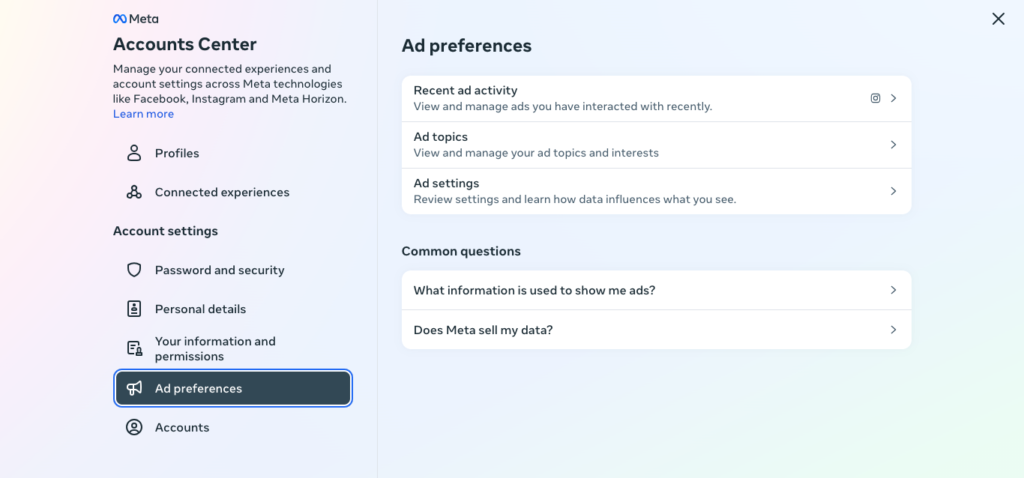
Quando scegli l'opzione "Attività pubblicitaria recente", visualizzi e gestisci gli annunci con cui hai interagito ultimamente
Passaggio 5: Congratulazioni, ce l'hai fatta!
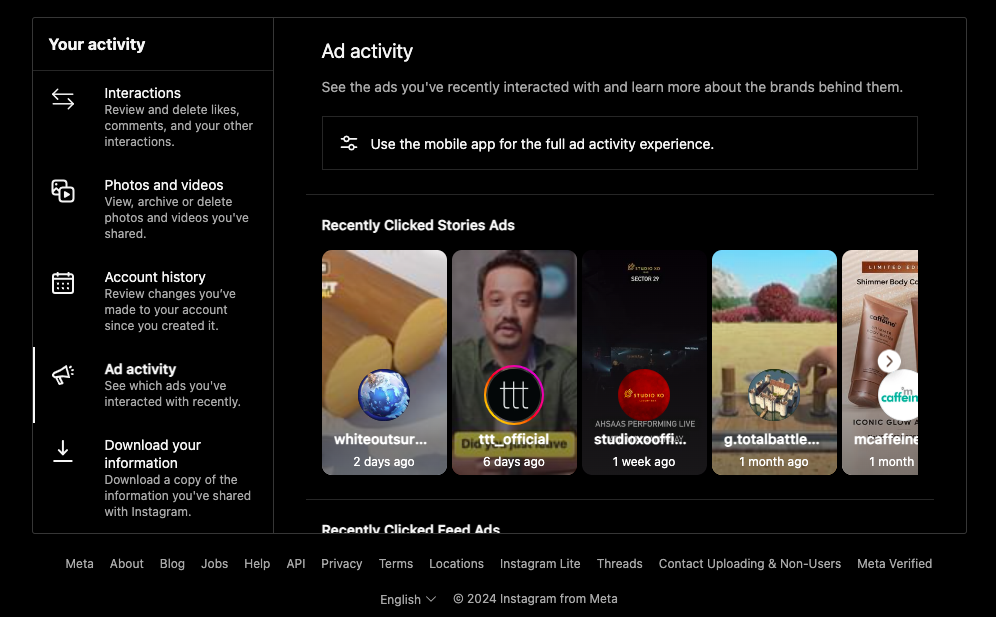
Si aprirà una nuova finestra che mostrerà gli annunci con cui hai interagito di recente. Puoi trovare l'annuncio che stavi cercando e agire subito!
Cosa fare se non trovi l'annuncio nel registro delle attività?
Il registro "Attività pubblicitarie" mostra solo gli annunci con cui hai interagito attivamente, non tutti gli annunci visualizzati nel tuo feed. Se hai scorciato un annuncio, lo hai guardato brevemente e poi sei passato ad altro, probabilmente non comparirà in questo registro.
Tre opzioni di riserva:
1. Verifica in tempo reale "Perché visualizzo questa pubblicità?"
Quando un annuncio compare nel tuo feed, tocca il menu con i tre puntini (⋯) nell'angolo in alto a destra del post. Seleziona " Perché vedo questo annuncio?". Instagram spiegherà quali criteri di targeting sono stati utilizzati per mostrarti l'annuncio e di solito è presente un link alla pagina completa dell'inserzionista. Questo strumento ti permette anche di esaminare in tempo reale qualsiasi annuncio che attira la tua attenzione prima di scorrerlo oltre.
2. Cerca per nome del marchio nella Libreria degli annunci meta.
Se ricordi il prodotto, il nome del marchio o una qualsiasi parola chiave del testo dell'annuncio, vai a facebook.com/ads/library in qualsiasi browser e cercalo. La Meta Ad Library è una freeSi tratta di un database pubblico di tutte le inserzioni attive su Facebook e Instagram. Digitando il nome del brand o una parola chiave, visualizzerai tutte le inserzioni attualmente in corso, inclusa quella che hai visto.
3. Controlla le notifiche e i post salvati su Instagram
Se hai toccato "Salva" sull'annuncio in qualsiasi momento, questo apparirà in Profilo → Salvati. Se hai iniziato a seguire il brand dopo aver visto l'annuncio, controlla Profilo → ☰ → Seguiti e cerca eventuali nuovi account che non riconosci.
Come trovare gli annunci Instagram attivi di qualsiasi marchio (Free)
La libreria Meta Ad è la più potente free Strumento disponibile per la ricerca di inserzioni su Instagram. Si tratta di un database pubblico e consultabile di tutte le inserzioni attive su Facebook, Instagram, Messenger e Audience Network. Non è richiesto alcun accesso.
Perché è importante per la tua pubblicità: se un annuncio di un concorrente è attivo da 3-6 mesi senza interruzioni, è un chiaro segnale che sta funzionando. I brand non continuano a pagare per annunci che non generano conversioni. Studiare gli annunci di lunga durata rivela quali messaggi, formati e offerte riscuotono successo nel tuo mercato, prima ancora di investire un solo centesimo per testarli.
Passaggio 1: Vai alla Libreria degli annunci meta
Apri un qualsiasi browser e vai su facebook.com/ads/library
Passaggio 2: Imposta il tuo Paese e la categoria
Seleziona il paese che desideri analizzare dal menu a tendina (utilizza "Tutti" per una visualizzazione globale). Imposta la categoria degli annunci su " Tutti gli annunci" per visualizzare gli annunci commerciali.
Passaggio 3: cerca il marchio o la parola chiave
Digita il nome del brand nella barra di ricerca. Meta ti mostrerà le pagine Facebook corrispondenti: seleziona quella corretta. Puoi anche cercare per parola chiave (ad esempio, "proteine in polvere" o "email marketing") per vedere tutti i brand che pubblicano annunci su quell'argomento. Questo è utile quando sei nuovo in una nicchia e non conosci ancora i principali attori del settore.
Passaggio 4: Filtra per visualizzare annunci specifici di Instagram
Una volta visualizzati i risultati, utilizza il pannello Filtri per restringere la ricerca:
| Filtra | Cosa selezionare | Perché |
|---|---|---|
| Piattaforma | Mostra solo gli annunci pubblicati su Instagram | |
| Tipo di supporto | Video / Immagine | Strategie di formato isolate |
| Stato attivo | Active | Scopri cosa è in onda adesso |
| Intervallo di date | Ordina dal più vecchio al più recente | Di lunga durata = ad alte prestazioni |
Il filtro meno utilizzato: Ordina per data di inizio più vecchia per primaSe un annuncio è iniziato 6 mesi fa ed è ancora attivo, è quasi certamente redditizio. Gli inserzionisti non continuano a pagare per annunci che non funzionano. La data di inizio di un annuncio è la più vicina free proxy per i dati sulle prestazioni.
Passaggio 5: Analizza i risultati
Quando esamini gli annunci di un concorrente, cerca di capire:
Strategia creativa e formato — Stanno utilizzando contenuti di marca ben curati o contenuti generati dagli utenti di bassa qualità? ReelsVideo verticali o immagini statiche? Il formato comunica il pubblico di riferimento e il posizionamento del marchio.
Copywriting e messaggistica : qual è il problema principale affrontato dalla prima riga? Quale promessa fa il titolo? Le loro call to action (CTA) rivelano per quale fase del funnel è progettato ogni annuncio: "Scopri di più" = parte superiore del funnel; "Acquista ora" = parte inferiore del funnel.
Offerte e promozioni - Free spedizione, codici sconto, free prove. Se un concorrente applica costantemente forti sconti, sta competendo sul prezzo. Se non applica mai sconti, sta puntando sul marchio e sul valore: due strategie molto diverse.
Segnali di test A/B : scorri gli annunci attivi e cerca duplicati con lievi variazioni: stessa immagine, titoli diversi; stesso video, frase di apertura diversa. Ogni variazione è un test. Puoi vedere cosa stanno ottimizzando senza dover eseguire i test tu stesso.
Da quanto tempo è attivo ogni annuncio? — La libreria mostra la data di inizio di ogni annuncio. Gli annunci attivi da più di 3 mesi sono quelli più efficaci. Fai uno screenshot e annota l'offerta, il titolo e il formato creativo.
Aumenta le vendite sui social media con l'intelligenza artificiale⚡️
PROVA SUBITO
Comprendere il costo degli annunci Instagram
A seconda dello scopo della campagna, gli annunci Instagram possono includere fino a 18 alternative di pulsanti di invito all'azione, collegarsi al tuo sito Web e offrire ai consumatori la possibilità di scaricare programmi o effettuare acquisti online.
Il costo delle inserzioni su Instagram è determinato dal budget complessivo, dal periodo di tempo e dagli obiettivi che scegli per la tua inserzione o campagna. Puoi impostare un budget giornaliero o permanente per le tue pubblicità su Instagram, in modo da poter decidere quanto spendere.
Gli inserzionisti possono impostare le loro offerte massime per ciascuna asta o consentire a Instagram di ottimizzarle automaticamente. Pertanto, se sei nuovo alla pubblicità su Instagram, inizia con un'offerta massima bassa per acquisire esperienza.
Una volta acquisita una migliore comprensione del panorama competitivo per il settore e i dati demografici selezionati, puoi valutare se è necessario aumentare l'offerta massima.
Suggerimenti e trucchi per gli annunci Instagram
Instagram si è affermato come un potente strumento che permette alle aziende di interagire con i propri clienti target in modo visivamente accattivante. A volte, ci si imbatte in una pubblicità che cattura l'attenzione e ispira a crearne una propria.
Puoi utilizzare i seguenti suggerimenti e trucchi per crearne uno tuo:
Schermo più piccolo, impatto maggiore
Dato che Instagram è accessibile principalmente tramite dispositivi mobili, assicurati che la tua pubblicità sia adatta alla visualizzazione mobile. Mantieni immagini e testo semplici e utilizza gli strumenti di anteprima delle inserzioni di Instagram per assicurarti che le tue inserzioni appaiano eccellenti sugli schermi più piccoli.
Mescolalo con gli influencer!
La collaborazione con influencer può aiutarti ad espandere la tua portata e credibilità su Instagram. Per commercializzare legittimamente i tuoi prodotti o servizi, collabora con influencer il cui pubblico è simile al tuo target demografico.
Lascia che il tuo annuncio trovi la sua passione
Prima di iniziare a creare annunci, definisci gli obiettivi della tua campagna. Chiarire i tuoi obiettivi, siano essi aumentare la notorietà del marchio, indirizzare il traffico del sito web o generare lead, ti aiuterà a inquadrare il tuo approccio pubblicitario e le misure di successo.
Diventa amico del tuo pubblico
Comprendere il tuo target demografico è essenziale per sviluppare un marketing pertinente e convincente. Utilizza le funzionalità di targeting avanzate di Instagram, come dati demografici, interessi, comportamenti e pubblico personalizzato, per raggiungere le persone giuste con il messaggio giusto.
Perfeziona il tuo annuncio
Monitora regolarmente i dati sulle prestazioni delle tue inserzioni e utilizza gli strumenti di analisi di Instagram per saperne di più sul coinvolgimento del pubblico, sui dati demografici e sui tassi di conversione. Utilizza queste informazioni per perfezionare il targeting e le idee creative per gli annunci futuri.
Avvolgendo!
Trovare annunci su Instagram significa sapere quale strumento utilizzare per quale esigenza:
- La tua cronologia degli annunci → App Instagram → Impostazioni e privacy → Centro account → Preferenze annunci → Attività pubblicitarie
- Ampia ricerca sui concorrenti o sul settore → facebook.com/ads/library → cerca per marchio o parola chiave → filtra per Instagram
La libreria di meta annunci è la più sottoutilizzata free Uno strumento fondamentale nel marketing digitale. Le campagne pubblicitarie di lunga durata di un concorrente offrono una panoramica di ciò che funziona nel tuo mercato, senza spendere un centesimo in test.
Una volta capito cosa risuona con il tuo pubblico, il passo successivo è creare qualcosa di tuo. Predis.aiIl generatore di creatività pubblicitarie di 's ti consente di generare creatività pubblicitarie per Instagram: immagine singola, carosello e Reels-video pronto — da una descrizione del prodotto o da un URL. Utilizza le ricerche sugli annunci della concorrenza per trarre ispirazione, quindi lascia che l'IA si occupi della produzione creativa.
Crea annunci su Instagram con Predis.ai →
Contenuto relativo,
Annunci Instagram: le 8 migliori alternative nel 2024
FAQ:
Sì, tramite la Libreria Meta Ad su facebook.com/ads/library. È un freeDatabase pubblico di tutte le inserzioni attive su Facebook e Instagram. È possibile effettuare ricerche per nome del marchio o parola chiave senza bisogno di accedere.
Il registro delle "Attività pubblicitarie" di Instagram all'interno dell'app non conserva gli annunci a tempo indeterminato. Gli annunci con cui hai interagito diversi mesi fa potrebbero non essere più visualizzati. Per ricerche a lungo termine, la Libreria Meta Ad conserva i dati degli annunci fino a 7 anni dopo la cessazione della pubblicazione, risultando quindi uno strumento più adatto per le ricerche storiche.
Sì. La libreria Meta Ad è completamente free e mostra tutti gli annunci attivi di qualsiasi account aziendale. È possibile filtrare per piattaforma (solo Instagram), tipo di media e intervallo di date. Non è richiesto alcun account o accesso.